# Policy: Global Privilege Elevation Justification Policy for Specific Application(s)
This example shows a **Privilege Elevation Policy** that targets a specifically defined **Application Collection** and requires the user to provide a **justification** before any application within that collection can run with elevated privileges, creating a targeted accountability and audit control point across all in-scope endpoints. After this **Global Privilege Elevation Justification Policy** is in place, additional policies can be layered to allow trusted administrators to elevate applications within the same collection without prompting, or to escalate the control to an Approval or MFA requirement for higher-sensitivity scenarios.
***
#### What This Policy Does
When a user on any **in-scope endpoint** attempts to run an application from the targeted Application Collection with elevated privileges:
1. The request is evaluated by the **Privilege Elevation** policy engine.
2. Because the policy targets a defined Application Collection, it matches only elevation attempts for the applications within that collection on those endpoints.
3. The policy requires the user to provide a **Justification** before the elevation is permitted to proceed — the elevation is not blocked, but it is gated behind a mandatory explanation that is recorded in the audit log.
#### Why It Behaves This Way
This policy is intentionally written as a "targeted match" policy that adds accountability friction at the point of privilege elevation rather than blocking it:
* **Enforced**: The policy is active and will apply controls (not just log).
* **Justification control on success**: When the policy matches, the user is prompted to enter a written justification before the elevation can proceed. This justification is captured in the audit log alongside the user identity, timestamp, and endpoint.
* **All users**: A wildcard user filter makes it apply to any user account on in-scope machines — no user is exempt from the justification requirement by default.
* **Specific Application Collection**: A defined Application Collection targets only the applications explicitly grouped within it, so unrelated elevation attempts on the same endpoint are unaffected by this policy.
* **No acknowledgement required**: `NotificationRequiresAcknowledge` is set to `false`, meaning the user is not required to separately dismiss a notification beyond completing the justification prompt — minimizing friction while still capturing the required context.
* **Built-in checks**: Standard checks (user, machine, file, date/time/day, certificate) are present. Because no date/time/day/certificate constraints are applied, the policy is always active for the targeted Application Collection on the targeted endpoints.
#### Revise To Apply To Multiple Endpoints
Right now, machine targeting includes a single endpoint identifier. To apply this same justification requirement across multiple endpoints, update the machine targeting so it includes more than one endpoint identifier, or assign the policy to a Machine Collection that spans the desired endpoints. For example:
* **Before**: `MachineCheck` lists one endpoint ID.
* **After**: `MachineCheck` contains multiple endpoint IDs, or the policy is scoped to a Machine Collection covering all relevant endpoints.
No other changes are required to broaden endpoint coverage.
#### What The User Experiences
* When a user attempts to run an application from the targeted Application Collection with elevated privileges on an in-scope endpoint, they will be presented with a **justification prompt** — a required text entry explaining their reason for the elevation.
* After the justification is submitted, the elevation proceeds. This policy is "prompt and record," not "block" — the friction is intentional, but work is not stopped for users with a legitimate need.
* Because `NotificationRequiresAcknowledge` is set to `false`, there is no additional dismiss step beyond the justification entry itself, keeping the interruption minimal.
* The notification message should clearly identify which category of tools is being controlled and why a justification is required, so users understand the context rather than experiencing an unexplained prompt.
***
#### Important Notes And Common Adjustments
* **Ensure the notification message is accurate**: Update the message to clearly state that a justification is required for this elevation and briefly explain why (e.g., "Running this application with administrator privileges requires a brief business justification. Your response will be logged for audit purposes.").
* **Keep your Application Collection current**: As new applications are deployed or retired, update the Application Collection itself rather than modifying the policy. Because the policy targets the collection — not individual App IDs — any application added to the collection is automatically covered by the justification requirement without a policy change.
* **Enable acknowledgement if stronger confirmation is desired**: If it is important that users explicitly confirm they have read the policy notice in addition to providing a justification, set `NotificationRequiresAcknowledge` to `true`. This adds a dismiss step but ensures the notification content is seen.
* **Expand or refine the Application Collection** as needed:
* Add additional applications to the collection to extend coverage to other tools that warrant the same justification friction at elevation.
* Use certificate constraints within the collection to scope the control to specific signed builds, ensuring only verified executables trigger the policy.
* **Narrow the user scope** for low-friction exceptions: Create a separate higher-priority **Allow** policy scoped to IT administrators or security team members who regularly elevate applications in this collection and for whom the justification prompt would create excessive friction.
* **Escalate the control if patterns emerge**:
* If audit logs surface unexplained or suspicious justification submissions, escalate to **APPROVAL** to require a human approver before any elevation is granted.
* Add **MFA** as an additional control if applications in the collection access highly sensitive systems or credentials and a stronger step-up authentication is warranted.
* **Add time/day/date restrictions** if elevated use of these applications should only be permitted during defined windows (e.g., business hours or change management windows).
* **Keep Risk Level meaningful**: Align the Risk Level value with the sensitivity of the operations the applications in the collection can perform when elevated. If they interact with credential stores or privileged infrastructure, a higher value ensures these events surface prominently in security dashboards and reports.
***
### How to Build a Global Privilege Elevation Justification Policy for an Application Collection
{% stepper %}
{% step %}
#### Create Policy
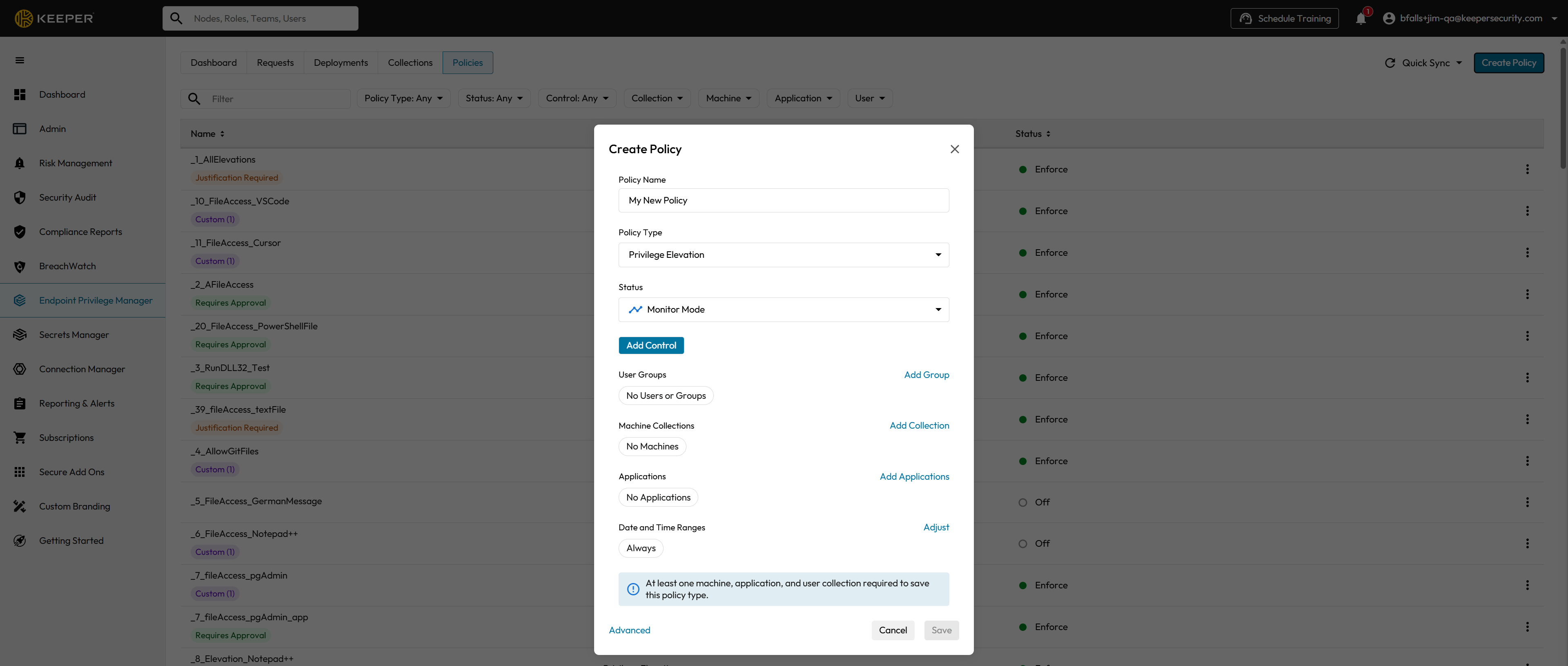
From the **Policies** tab of the Admin Console's Endpoint Privilege Manager page, click the **Create Policy** button.
This will open the Create Policy Form in a modal window.
{% endstep %}
{% step %}
#### Policy Name
Enter a descriptive name for your new **Global Privilege Elevation Justification Policy**. Including the name of the targeted Application Collection in the policy name (e.g., `_Elevate_Justify_AdminTools`) is recommended to make the policy easily identifiable in the policy list.
{% endstep %}
{% step %}
#### Policy Type
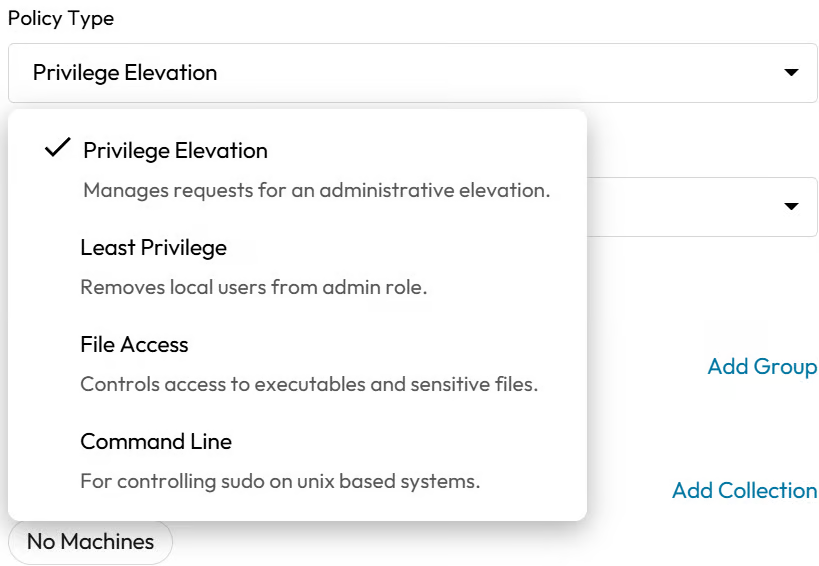
Select **Privilege Elevation** from the **Policy Type** select list. This policy type intercepts elevation attempts specifically — it will only trigger when an application from the targeted collection is being run with administrator or elevated privileges, not on standard launches.
{% endstep %}
{% step %}
#### Status
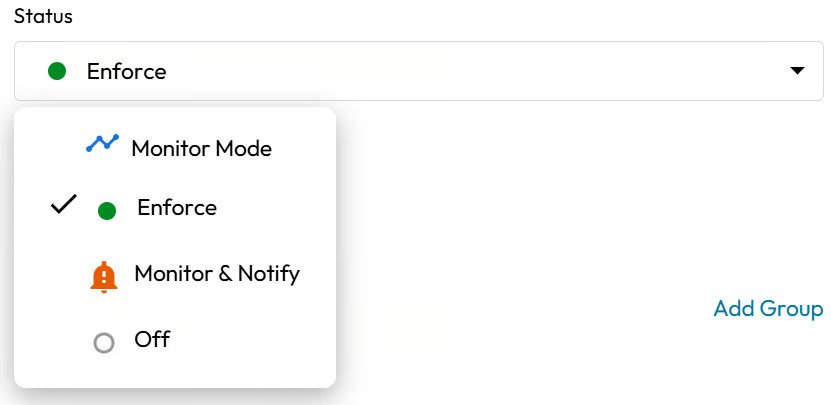
Select the status that you would like your new **Global Privilege Elevation Justification Policy** to be in upon submission of the completed **Create Policy** form. It is recommended to begin in **Monitor** mode to confirm the correct Application Collection is targeted and to assess elevation frequency before switching to **Enforce**.
{% endstep %}
{% step %}
#### Controls
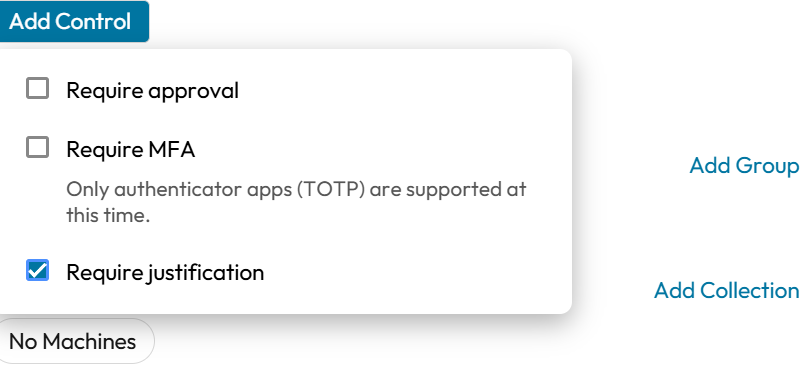
Select **Require justification** from the **Add Control** sub-form. This will prompt the user to provide a written business justification each time they attempt to run an application from the targeted collection with elevated privileges. The justification is recorded in the audit log alongside the user identity, endpoint, and timestamp.
{% endstep %}
{% step %}
#### User Groups
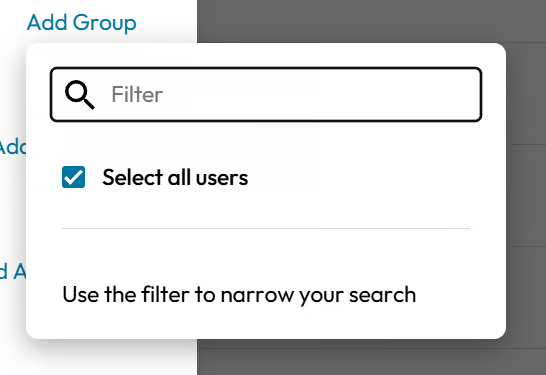
Click the **Add Group** link in the Create Policy form. This will open the **Add Group** sub-form.
Check the **Select all users** checkbox in the **Add Group** sub-form then click off of the sub-form to close it. **All Users and Groups** will now appear under **User Groups** as applied to your **Global Privilege Elevation Justification Policy.**
If specific users — such as IT administrators or security team members — should be exempt from the justification prompt, create a separate higher-priority **Allow** policy scoped to those users rather than excluding them here.
{% endstep %}
{% step %}
#### Machine Collections
Click the **Add Collection** link in the Create Policy form. This will open the **Add Collection** sub-form.
Check the **Select all machines** checkbox in the **Add Collection** sub-form then click off of the sub-form to close it. **All Machines** will now appear under **machine Collections** as applied to your **Global Privilege Elevation Justification Policy.**
{% endstep %}
{% step %}
#### Applications
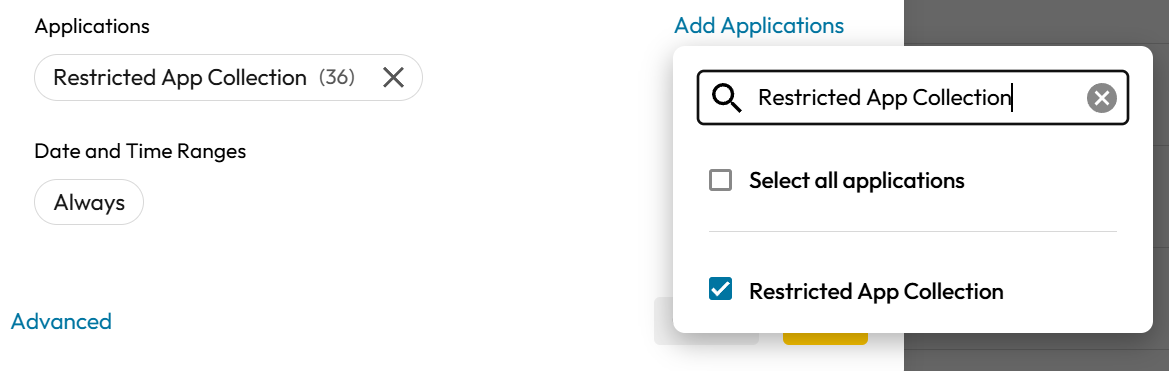
Click the **Add Applications** link in the Create Policy form. This will open the **Add Applications** sub-form.
Search for and select the **specific applications** you want to be elevated and justified. Do **not** use the **Select all applications** checkbox — this policy is intentionally scoped to a defined list of blocked applications, not all applications. Check the checkbox(s) of each application you want to be elevated and justified.
The **Applications** that you selected will now appear under **Applications** as applied to your **Global Privilege Elevation Justification Policy.**
{% endstep %}
{% step %}
#### Date & Time
For an Global Privilege Elevation Justification Policy, it is recommended that the **Date and Time Ranges** be set to **Always**, ensuring the justification requirement is continuously enforced. If your organization only permits elevated use of these applications during defined windows (e.g., business hours or change management windows), configure Date and Time restrictions accordingly.
{% endstep %}
{% step %}
#### Save Your New Global Privilege Elevation Justification Policy
Once the form has been sufficiently filled in per the previous steps, the **Save** button will be changed from an inactive to an active state. Click on the **Save** button. The **Create Policy** modal form will be closed and your **Global Privilege Elevation Justification Policy** will be saved.
{% endstep %}
{% endstepper %}
***
### Use-Case Definitions
This pattern — a **targeted Justification control on a defined Application Collection at the point of privilege elevation** — fills a deliberate role in endpoint privilege management: it does not restrict who can use applications in the collection or block their operation, but it eliminates anonymous elevated use. Every privileged execution of any application in the collection is now attributed, explained, and on the record. Here is a full breakdown of the use-cases and the reasoning behind it.
#### The Core Concept: "Attributed Elevation for a Defined Set of Administrative Tools"
Application Collections group related executables that share a common risk profile, function, or ownership. When a Justification policy is applied at the collection level rather than to individual applications, organizations gain a scalable, low-maintenance accountability control: adding a new application to the collection automatically brings it under the justification requirement, and the policy itself never needs to change. The risk being addressed is not that these tools exist or are used — it is that elevated use is difficult to distinguish from misuse without context. A Justification policy at the elevation layer resolves this by making every privileged execution attributed and explained.
#### Primary Use-Cases
**1. Scalable Audit Trail Across a Category of Administrative Tools**
Rather than authoring individual justification policies for every administrative utility, an Application Collection-scoped policy provides a single, maintainable control that covers an entire category of tools — such as all IT management utilities, all deployment agents, or all database administration applications. As the toolset evolves, only the collection needs updating; the policy remains stable.
**2. Insider Threat Deterrence for High-Value Tool Categories**
Tool categories that interact with credential stores, privileged infrastructure, or sensitive data are high-value targets for insider misuse. Requiring a written justification before any elevation within the collection proceeds makes anonymous abuse significantly harder — the user must commit a stated reason to the record, which deters opportunistic misuse and provides evidence for investigative purposes if misuse is later discovered.
**3. Compliance with Least-Privilege and Accountability Requirements**
Many compliance frameworks (SOC 2, ISO 27001, NIST 800-53, CIS Controls) require that privileged access to sensitive tools be both controlled and documented. A **Global Privilege Elevation Justification Policy** directly satisfies the accountability and logging requirements of these frameworks across an entire category of tools simultaneously — demonstrating that every privileged use is attributed and documented — without requiring a full approval workflow that would slow legitimate operations.
**4. Baseline Accountability Before Implementing Stricter Controls**
If an organization is considering moving to an **Approval** or **MFA** requirement for a category of tools but is uncertain about the operational impact, a Justification policy serves as the right first step. It generates real-world data on elevation frequency, user populations, and stated use patterns across the collection — all of which directly inform the decision about whether and how to escalate the control — without disrupting workflows during the assessment period.
**5. Graduated Control for Different User Populations**
Not all users who have access to applications in a collection carry the same risk profile. A Justification policy applied to all users establishes a universal accountability baseline, while higher-priority Allow policies scoped to trusted IT staff or security engineers ensure those users can work without friction. This creates a tiered posture: trusted users are unimpeded, everyone else is accountable — across the entire collection simultaneously.
**6. Change Management and Operational Governance at Scale**
In environments with formal change management processes, a collection-scoped Justification policy ensures that elevated use of any application in the collection is linked to declared change activity. When the notification message instructs users to reference a change ticket or maintenance window, the justification text becomes a lightweight operational governance control that spans the entire tool category — without requiring individual policy authoring or integration with a full ITSM workflow.
***
#### Why Privilege Elevation Policy (Not File Access) for these Use-Cases?
This is an important distinction. A **File Access policy** intercepts the *execution* of a file at any privilege level — including standard user launches. A **Privilege Elevation policy** intercepts only attempts to run something *with elevated privileges*. For administrative tools that are expected to be used normally at standard privilege levels but require elevation for specific operations, this is exactly the right layer: it is the elevation moment — not every launch — that carries the security and audit significance. Using a Privilege Elevation policy ensures the justification prompt appears precisely when it matters, without creating friction for standard-privilege interactions with the same tools.
**The Layered Policy Strategy That Follows**
Implement sophisticated policy combinations using layered policies — applying multiple policies to the same resources for defense-in-depth. Once the Application Collection Justification baseline is in place, a controlled exception and escalation model can be layered around it:
| Priority | Policy | Scope |
| --------------- | ---------------------------------------------------------------------------- | ------------------------------------------------------ |
| High | **Allow** — Trusted IT admins / security team with established elevated need | Specific users/groups, targeted Application Collection |
| High | **MFA + Justify** — Elevated access to highly sensitive systems or vaults | Specific machine collections or environments |
| Medium | **Approval** — Users who require occasional elevation with oversight | Specific users/groups, targeted Application Collection |
| Low (catch-all) | **Justify** — All other users | All users, targeted Application Collection |
Users matched by a higher-priority Allow policy pass through silently. Users matched by the MFA or Approval tiers face a stronger control. All remaining users encounter the justification requirement at the elevation point.
***
#### Key Operational Consideration
Because this policy uses a **Justification** control with `NotificationRequiresAcknowledge` set to `false`, the user experience is deliberately streamlined: the justification prompt appears, the user enters their reason, and the elevation proceeds — with no additional dismiss step. The quality of the audit record this produces depends directly on the clarity of the notification message — a well-written message that explains what is being logged and why will produce meaningful, searchable justification text rather than perfunctory entries. A key operational advantage of the collection-based approach is that the policy requires no updates as the application landscape changes; maintaining the Application Collection is the only ongoing task. It is strongly recommended to deploy this policy in **Monitor** mode first to confirm the correct Application Collection is targeted and to measure elevation frequency before switching to **Enforce**, particularly in environments where the collection contains tools used frequently across a broad user population.