# Tunnels

<figure><img src="/files/EH8OpknQvndPqgJMgzQk" alt=""><figcaption></figcaption></figure>

## Overview&#x20;

**KeeperPAM Tunnels** provide secure, ephemeral connections for accessing infrastructure without requiring a direct network path to the target system. They enable just-in-time access by establishing encrypted tunnels for RDP, SSH, LDAPS, databases, and other protocols. Users can authenticate through the KeeperPAM platform, which brokers the connection and ensures strict policy enforcement. Once a tunnel is activated, users can make use of any native application to communicate with the target infrastructure.

<figure><img src="/files/AWwSK5tbPWeL7l8Zxqph" alt=""><figcaption></figcaption></figure>

{% hint style="info" %}
Keeper Tunnels require the native [Keeper Desktop](https://www.keepersecurity.com/download.html?t=d) App or [Commander CLI](/en/keeperpam/commander-cli/overview.md)
{% endhint %}

### How do Keeper Tunnels work?&#x20;

When starting a tunnel, a local port is opened up on the local device running Keeper Desktop client. Native applications can then communicate to the target from this local port. For more details on the security model, see the [Connection and Tunnel Security](/en/keeperpam/privileged-access-manager/getting-started/architecture/connection-and-tunnel-security.md) page.

### Why Use Keeper Tunnels?&#x20;

A common challenge faced by IT Admins, DevOps and development teams is providing remote employees or contractors with access to internal company resources without exposing those resources to external networks. Additionally, remote employees may want to use their desired native applications to access these resources.&#x20;

Keeper Tunnels solves the above solutions by:

* Providing secure, encrypted connection from client to target resource
* Allowing users to securely connect to target resource with the native application of choice&#x20;
* Simplifying Configuration  - streamline setup and management of secure connection from PAM Record types
* Access controls and compliance - centralized management of access controls, ensuring that all connections meet organizational security policies and compliance requirements

### Tunnel Enforcement Policies

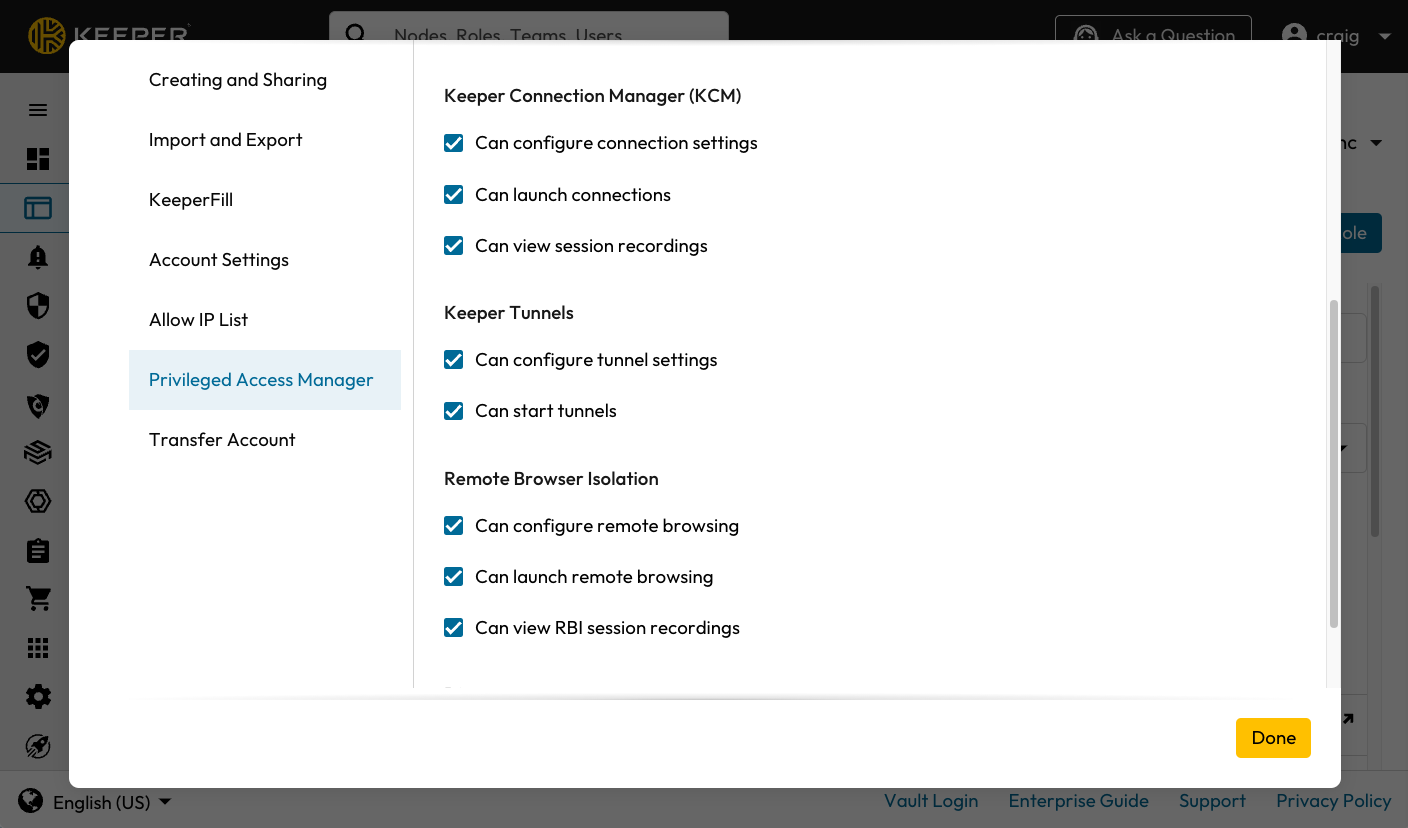
On the Admin Console, the following Enforcement Policies affect user's permissions to use Keeper Tunnels and need to be enabled.

Enforcement policies for KeeperPAM are managed in the Keeper Admin Console under **Admin** > **Roles** > **Enforcement Policies** > **Privileged Access Manager**.

<figure><img src="https://762006384-files.gitbook.io/~/files/v0/b/gitbook-x-prod.appspot.com/o/spaces%2F-MJXOXEifAmpyvNVL1to%2Fuploads%2F7qh2srRpGVVCcvTTt2Fr%2FScreenshot%202025-01-21%20at%2011.59.32%E2%80%AFAM.png?alt=media&#x26;token=20a4c885-1eb9-4a8d-89fe-3aa9b6948e92" alt=""><figcaption><p>Enforcement Policies for Tunnels</p></figcaption></figure>

<table><thead><tr><th width="196">Enforcement Policy</th><th width="274">Commander Enforcement Policy</th><th>Definition</th></tr></thead><tbody><tr><td>Can configure tunnel settings</td><td><pre data-overflow="wrap"><code>ALLOW_CONFIGURE_PAM_TUNNELING_SETTINGS
</code></pre></td><td>Allow users to configure Tunnel settings on PAM Machine, PAM Directory, PAM Database and PAM Configuration Records Types</td></tr><tr><td>Can start tunnels</td><td><pre data-overflow="wrap"><code>ALLOW_LAUNCH_PAM_TUNNELS
</code></pre></td><td>Allow users to start tunnels on PAM Machine, PAM Directory and PAM Database Record Types</td></tr></tbody></table>

Tunnels can also be enabled on the [Keeper Commander CLI](/en/keeperpam/commander-cli/command-reference/secrets-manager-commands.md#overview) using the `enterprise-role` command:

```
enterprise-role "My Role" --enforcement "ALLOW_CONFIGURE_PAM_TUNNELING_SETTINGS":true
enterprise-role "My Role" --enforcement "ALLOW_LAUNCH_PAM_TUNNELS":true
```

#### Enforcement Policy Use Cases

If a user should only have access to start tunnels and not configuring tunnels, then only "Can start tunnels" policy should be enabled for the user.

In addition to starting tunnels, If a user should also have access to configure tunnels, then "Can configure tunnel settings" and "Can Start tunnels" should be enabled for the user.

### Installing the Keeper Gateway

The [Keeper Gateway](/en/keeperpam/privileged-access-manager/getting-started/gateways.md) is a hosted agentless service that is installed on the customer's network to enabled zero-trust access to target infrastructure. Typically this service is installed on a Linux or Docker environment in each of the networks that requires access.

### PAM Configuration

The [**PAM Configuration**](/en/keeperpam/privileged-access-manager/getting-started/pam-configuration.md) contains essential information of your target infrastructure, settings and [Keeper Gateway](/en/keeperpam/privileged-access-manager/getting-started/gateways.md). Setting up a PAM Configuration for your infrastructure is **required**.

### PAM Machine, PAM Database, or PAM Directory

**Keeper Tunnel** is a secure, encrypted TCP/IP connection established between your vault client to the target endpoint. The target endpoint needs to be defined on one of the following PAM Record types:

<table><thead><tr><th width="215">PAM Record Type</th><th>Target Endpoint type</th></tr></thead><tbody><tr><td><a href="/pages/XTyf98IFn0oRnCoEILhY">PAM Machine</a></td><td>Windows/MacOS/Linux Machines, EC2 Instances, Azure VMs</td></tr><tr><td><a href="/pages/HRI2VkFUX0Hb1eZSFQ4n">PAM Database</a></td><td>MySQL, PostgreSQL, SQL Server, MongoDB, MariaDB, Oracle</td></tr><tr><td><a href="https://github.com/Keeper-Security/gitbook-secrets-manager/blob/master/privileged-access-manager/getting-started/pam-resources/pam-directory/README.md">PAM Directory</a></td><td>Active Directory, OpenLDAP</td></tr></tbody></table>

Depending on your target endpoint, visit the corresponding PAM Record Type page for more information on setup.

## PAM Settings - Tunnel Settings

After creating a PAM Record Type (PAM Machine, PAM Database, or PAM Directory) with your target endpoint, navigate to the Tunnel Section on the PAM Settings screen by:

1. Editing the PAM Record
2. Clicking on "Edit" in the PAM Settings section
3. Navigate to the "Tunnel" tab in the modal

<figure><img src="/files/EQetw4eqmNTDahGaej5Z" alt=""><figcaption><p>Tunnel Settings in a KeeperPAM Record</p></figcaption></figure>

The above image shows a PAM Database record where:

* Tunnel is enabled
* Tunnel will be open on localhost to the remote server port 1433
* Subsequent tunnels will use the same local port

After navigating to the Tunnel Section on the PAM Settings screen. The following table lists all the configurable fields for Tunnels:

<table><thead><tr><th width="295">Field</th><th>Definition</th></tr></thead><tbody><tr><td>PAM Configuration</td><td><p><strong>Required</strong></p><p>This is the <a href="/pages/r3KpQ6RkUwiqQMMpRR7r">PAM Configuration</a> that contains the details of your target infrastructure and provides access to the target configured on the PAM Record</p></td></tr><tr><td>Enable Tunnel</td><td><strong>Required</strong><br>When checked, enable tunnels for this record</td></tr><tr><td>Generate Local Port</td><td>When checked, Keeper will decide which local port to use based on available open ports.</td></tr><tr><td>Reuse Last Port</td><td>When checked, the last used tunnel port will be reused. This ensures that the port number doesn't change every time.</td></tr><tr><td>Remote Tunnel Port</td><td><p><strong>Required</strong></p><p>The port which is used to connect from the Keeper Gateway to the target infrastructure. If not specified, the gateway will use the "rotation port" specified in the Keeper record view.<br><br>If the specified port is in use, Tunnels will fail to start.</p></td></tr></tbody></table>

Once tunnels have been configured on the PAM Record, your PAM Record will have the "Start Tunnel" button:

<figure><img src="/files/ZQ7MBOXU07VRcSbJ81Ba" alt=""><figcaption></figcaption></figure>

## Starting a Tunnel

Once tunnels have been configured on the PAM Record, click on "Start Tunnel" button to start a tunnel. The local port number is selected in this case as 51255. Subsequent tunnels for this resource will use the same local port and tunnel.

<figure><img src="/files/gcN537azIQuA91M6QB9U" alt=""><figcaption></figcaption></figure>

## Using the Tunnel

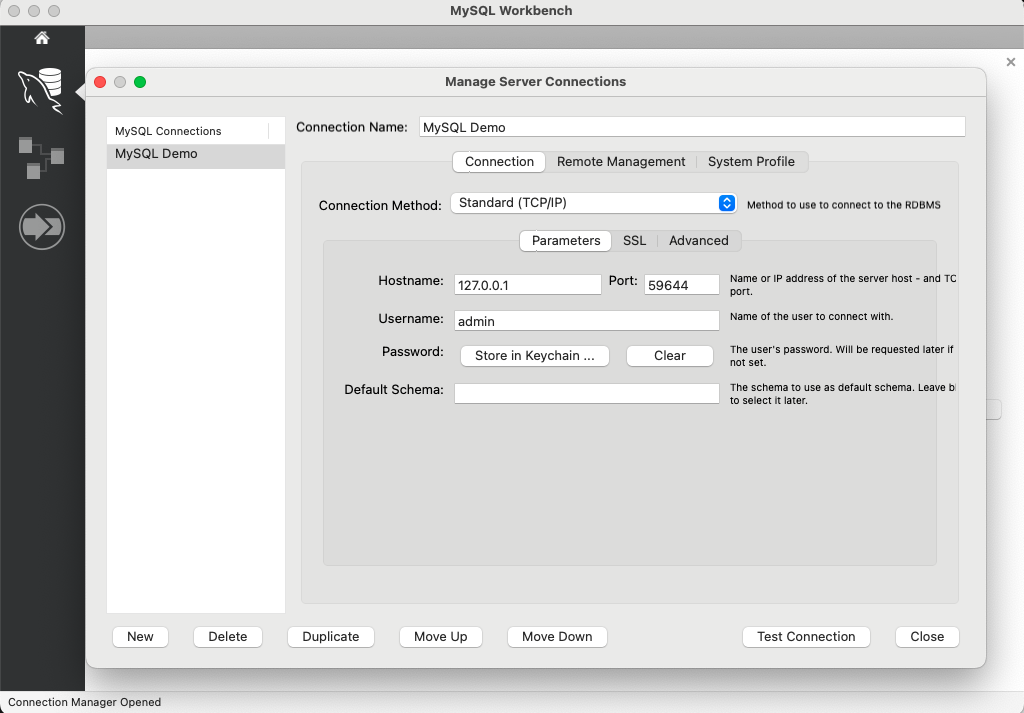
In the above screenshots, the target endpoint, a cloud database was defined and configured on a PAM Database record. After configuring the tunnel settings, a tunnel has been started on local hostname `127.0.0.1` and local port `51255`.

The database can then be accessed by using a native application of choice. For example, you can use DBeaver, MySQL Workbench Microsoft SQL Server Management Studio or even the [KeeperDB](/en/keeperpam/privileged-access-manager/keeperdb.md) multi-protocol native database application.

<figure><img src="https://762006384-files.gitbook.io/~/files/v0/b/gitbook-x-prod.appspot.com/o/spaces%2F-MJXOXEifAmpyvNVL1to%2Fuploads%2FG45mktqPR9PKR9mkjvqi%2FScreenshot%202025-01-15%20at%202.32.27%E2%80%AFPM.png?alt=media&#x26;token=9bfdd81b-d39d-404d-a2a3-16826cfa7323" alt=""><figcaption><p>MySQL Workbench with a Local Tunnel</p></figcaption></figure>

Likewise, using the CLI on the local device can initiate a connection to the database using this command:

```sh
mysql --host=127.0.0.1 --port=59644 --user=admin --password
```

## Commander CLI

[Keeper Commander](/en/keeperpam/commander-cli/overview.md) provides Tunneling capabilities in addition to using the Keeper Desktop UI.

Related commands:

* [`pam tunnel`](/en/keeperpam/commander-cli/command-reference/keeperpam-commands.md)

#### Example:

```
My Vault> pam tunnel start s0W1v6R4SUTJYMlu4jTZw
Establishing tunnel between Commander and Gateway. Please wait...

+------------------------------------------------------------------+
| Endpoint pbxV4snkAP9KGCUhSb6aQ==: Listening on: 127.0.0.1:49152 |
+------------------------------------------------------------------+
View all open tunnels   : pam tunnel list
Tail logs on open tunnel: pam tunnel tail pbxV4snkAP9KGCUhSb6aQ==
Stop a tunnel           : pam tunnel stop pbxV4snkAP9KGCUhSb6aQ==
```

### Passwordless Database Management with KeeperDB Proxy

For database tunnels (MySQL, PostgreSQL, SQL Server, Oracle, etc.), enable **KeeperDB Proxy** to provide passwordless access. Users simply connect to databases using their preferred native tools - without ever seeing or entering passwords.

* Credentials are injected by the Keeper Gateway, never exposed to the user
* No copying/pasting passwords into database clients
* Session management with idle timeout and duration limits
* Choice of static or short-lived credentials available

See [KeeperDB Proxy](/en/keeperpam/privileged-access-manager/keeperdb-proxy.md) for configuration details.

## Tunnels versus Connections

A tunnel provides a path from the user's local device to the target infrastructure using end-to-end encryption. For database connections, we recommend activating [KeeperDB Proxy](/en/keeperpam/privileged-access-manager/keeperdb-proxy.md) to transparently inject credentials from the gateway and provide a fully passwordless database session.&#x20;

If tunnels are provided to users along with the necessary credentials, we recommend automatic rotation of the credential to ensure that the credentials are ephemeral and invalidated on a scheduled basis. For more information about rotation, see the [Password Rotation](/en/keeperpam/secrets-manager/password-rotation.md) section.

KeeperPAM provides several methods of accessing remote infrastructure having full session recording and monitoring, without the need to share credentials:

* Keeper [Connections](/en/keeperpam/privileged-access-manager/connections.md) can establish interactive recorded sessions across many protocols
* Commander CLI [pam launch](/en/keeperpam/commander-cli/command-reference/keeperpam-commands/pam-launch-jit.md#pam-launch-just-in-time-jit-access) can establish terminal-based SSH and database sessions&#x20;
* [Remote Browser Isolation](/en/keeperpam/privileged-access-manager/remote-browser-isolation.md) with Autofill can control access to web-based applications
* [KeeperDB](/en/keeperpam/privileged-access-manager/keeperdb.md) creates fully interactive database sessions in a fully-featured UI
* [KeeperDB Proxy](/en/keeperpam/privileged-access-manager/keeperdb-proxy.md) provides native database sessions with query logging


---

# Agent Instructions: Querying This Documentation

If you need additional information that is not directly available in this page, you can query the documentation dynamically by asking a question.

Perform an HTTP GET request on the current page URL with the `ask` query parameter:

```
GET https://docs.keeper.io/en/keeperpam/privileged-access-manager/tunnels.md?ask=<question>
```

The question should be specific, self-contained, and written in natural language.
The response will contain a direct answer to the question and relevant excerpts and sources from the documentation.

Use this mechanism when the answer is not explicitly present in the current page, you need clarification or additional context, or you want to retrieve related documentation sections.