# Import/Export Keeper JSON
Keeper supports importing a structured JSON file. You may use this, for example, if you have backed up a Keeper file from a different vault or if you are building a file from another data source. This is an advanced feature, typically used by Keeper Enterprise administrators or more technical customers. If that's not you, head over to [CSV import](/en/user-guides/import-records-1/import-a-.csv-file.md).
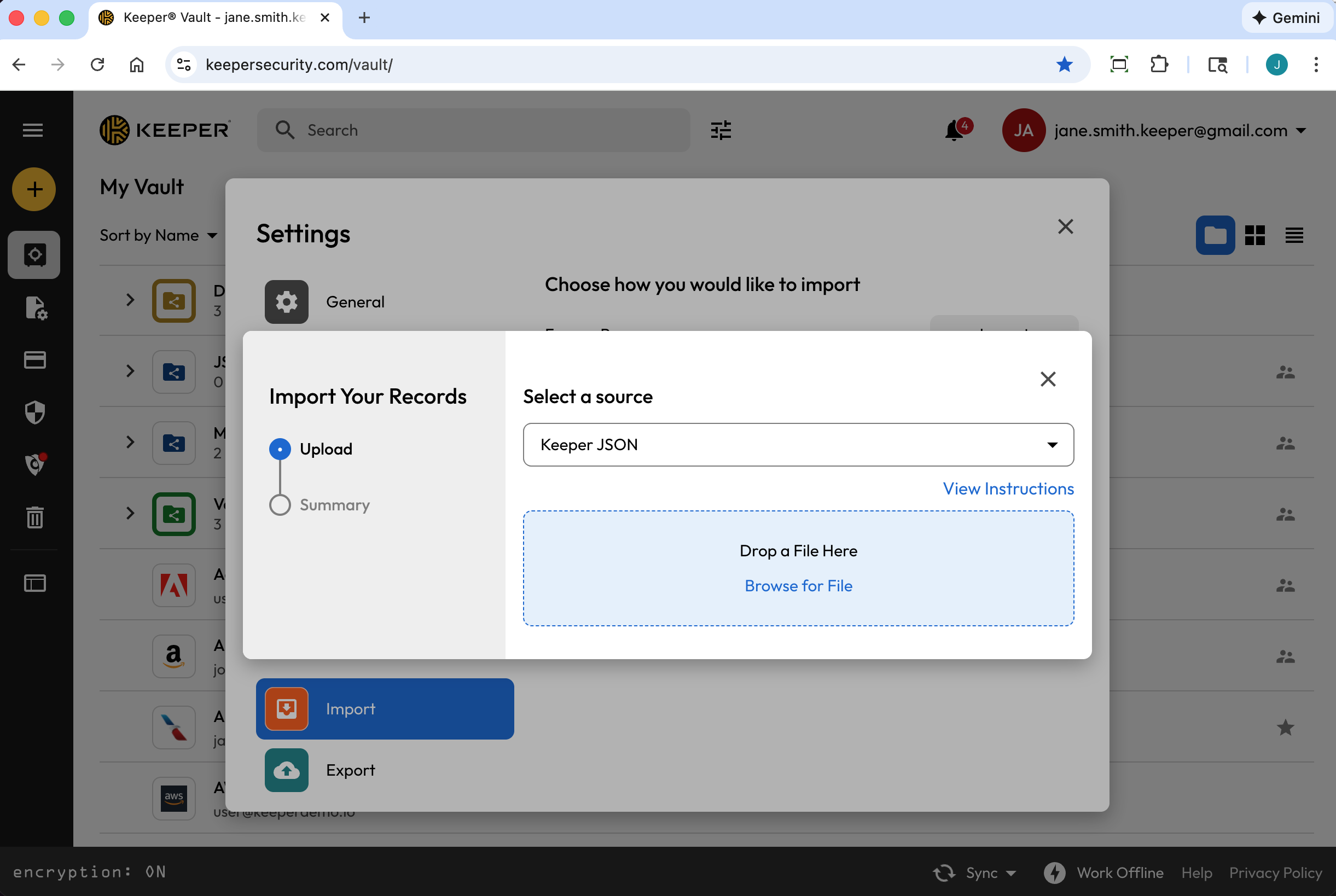
To begin, from the **Account Dropdown Menu**, click **Settings** **> Import > Import** (next to "Use Another Source"). From the dropdown menu, select **Keeper JSON**.
The JSON file can be created in several ways:
* Exporting .JSON file from the Keeper Vault
* Exporting .JSON from Keeper Commander SDK
* Creating your own custom file
Once your JSON file is properly formatted, drag-and-drop the file onto Keeper's "Drop a File Here" window or browse for the file on your computer.
{% hint style="info" %}
JSON files must be UTF-8 encoded to ensure that all symbols and characters are imported properly.
{% endhint %}
### Creating .JSON file from a Keeper Vault (Export)
To create a .JSON file from your existing Keeper Vault, from the **Account Dropdown Menu**, click **Settings > Export**.
Select **JSON** and click **Export**. If prompted, enter your Master Password and click **Export Now**.

### Creating a JSON file from Keeper Commander
Keeper Commander is a developer / Admin tool that has many capabilities for managing your vault and Enterprise account.
Visit the Keeper Commander SDK repository here:\
The command to export a vault in JSON format is demonstrated below:
```
$ keeper shell
_ __
| |/ /___ ___ _ __ ___ _ _
| ' export --format json my_export_file.json
Processing... please wait.
318 records exported
```
### Creating a Custom .JSON file for Import Into Keeper
When creating a custom JSON import file, Keeper supports an array of "records", "folders" and "shared\_folders". Several examples are included below that you can import into your vault for testing purposes.
Example JSON file: Records, Folders and Shared Folders
This file demonstrates several JSON import features including:
* Array of records
* Each record can have custom fields, notes and be added to folders
* Folders can be created as regular (private) or shared folders
* Records can also contain TOTP seeds (advanced feature, see Facebook entry in example below)
```
{
"records": [
{
"title": "Dev Server 1",
"login": "root",
"password": "123123123",
"login_url": "https://myserver.com",
"notes": "These are some notes.",
"custom_fields": {
"Security Group": "Private"
},
"folders": [
{
"folder": "Private Folder 1"
}
]
},
{
"title": "Prod Server 1",
"login": "root",
"password": "kj949234723jhfs4jf7h",
"login_url": "https://myprodserver.com",
"notes": "These are some notes.",
"custom_fields": {
"Security Group": "Public",
"IP Address": "12.45.67.8"
},
"folders": [
{
"folder": "Private Folder 2"
},
{
"shared_folder": "My Shared Folder 1",
"can_edit": true,
"can_share": true
}
]
},
{
"title":"Google",
"login": "testing",
"password": "1234567890",
"login_url": "https://google.com",
"notes": "These are some notes.",
"custom_fields": {
"Favorite Food":"Cheetos"
},
"folders": [
{
"folder": "My Websites\\Online"
}
]
},
{
"title":"Facebook",
"$type": "login",
"login": "me@gmail.com",
"password": "123123123123",
"login_url": "https://facebook.com",
"notes": "This is our corporate shared record.",
"custom_fields": {
"Facebook Application ID":"ABC12345",
"$oneTimeCode":"otpauth://totp/Amazon:me@company.com?secret=JBSWY3DPEHPK3PXP&issuer=Amazon&algorithm=SHA1&digits=6&period=30"
},
"folders": [
{
"folder": "Social Media"
},
{
"shared_folder": "Shared Social",
"can_edit": false,
"can_share": false
}
]
}
]
}
```
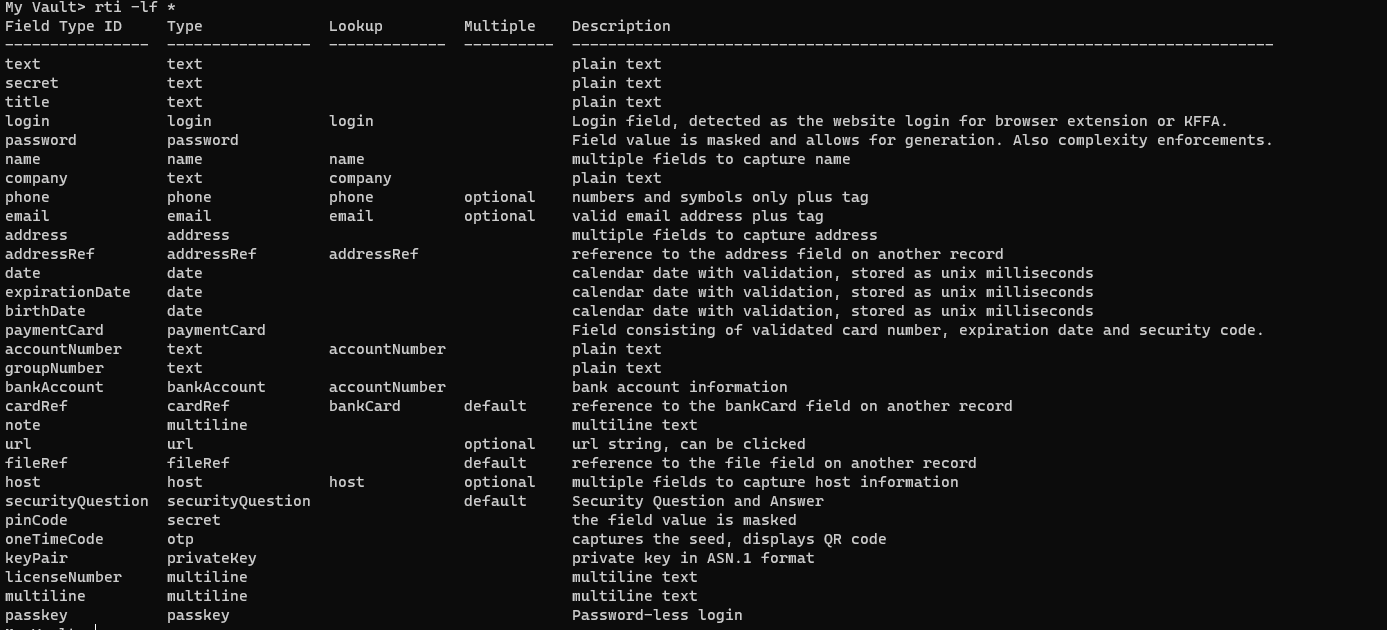
Here is a list of all possible field types (including custom fields):
All Field Types
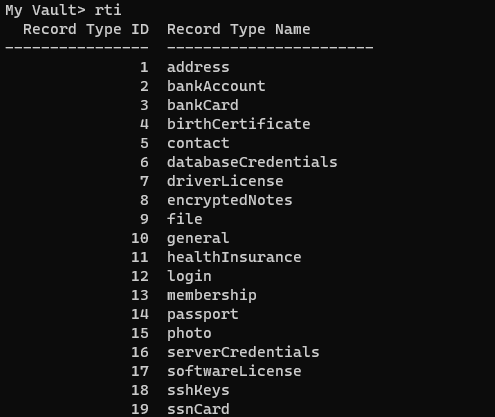
Here are some record types (you may have more if you created custom record types, or less if you are restricting some record types):
Record Types
**Example JSON file: Shared Folders and Permissions - No Records**
The below JSON file demonstrates the ability to create a shared folder structure (without records) that has permissions configured.
Note: Example references to "UID", "Team UID", etc are placeholders that are specific to your vault.
```
{
"shared_folders": [
{
"path": "My Shared Folder 1",
"manage_users": true,
"manage_records": true,
"can_edit": true,
"can_share": true,
"permissions": [
{
"uid": "kVM96KGEoGxhskZoSTd_jw",
"manage_users": true,
"manage_records": true
},
{
"name": "myusername@company.com",
"manage_users": true,
"manage_records": true
}
]
},
{
"path": "Customer1\\My Shared Folder 2",
"manage_users": false,
"manage_records": false,
"can_edit": false,
"can_share": false,
"permissions": [
{
"uid": "",
"manage_users": false,
"manage_records": false
},
{
"name": "",
"manage_users": true,
"manage_records": true
}
]
},
{
"path": "Customer2\\My Shared Folder 3",
"manage_users": true,
"manage_records": true,
"can_edit": true,
"can_share": true,
"permissions": [
{
"uid": "",
"manage_users": true,
"manage_records": true
},
{
"name": "myusername@company.com",
"manage_users": true,
"manage_records": true
}
]
}
]
}
```
**Example JSON File: Both Private Records/Folders and Shared Records/Folders**
The below example JSON file combines several features - Shared Folders, Private Folders, Records and TOTP seeds.
Note: Example references to "UID", "Team UID", etc are placeholders that are specific to your vault.
```
{
"shared_folders": [
{
"path": "My Customer 1",
"manage_users": true,
"manage_records": true,
"can_edit": true,
"can_share": true,
"permissions": [
{
"uid": "kVM96KGEoGxhskZoSTd_jw",
"manage_users": true,
"manage_records": true
},
{
"name": "user@mycompany.com",
"manage_users": true,
"manage_records": true
}
]
},
{
"path": "Testing\\My Customer 2",
"manage_users": true,
"manage_records": true,
"can_edit": true,
"can_share": true,
"permissions": [
{
"uid": "ih1CggiQ-3ENXcn4G0sl-g",
"manage_users": true,
"manage_records": true
},
{
"name": "user@mycompany.com",
"manage_users": true,
"manage_records": true
}
]
}
],
"records": [
{
"title": "Bank Account 1",
"login": "customer1234",
"password": "4813fJDHF4239fdk",
"login_url": "https://chase.com",
"notes": "These are some notes.",
"custom_fields": {
"Account Number": "123-456-789"
},
"folders": [
{
"folder": "Optional Private Folder 1"
}
]
},
{
"title": "Bank Account 2",
"login": "mybankusername",
"password": "w4k4k193f$^&@#*%2",
"login_url": "https://amex.com",
"notes": "Some great information here.",
"custom_fields": {
"Security Group": "Public",
"IP Address": "12.45.67.8",
"$oneTimeCode":"otpauth://totp/Amazon:me@company.com?secret=JBSWY3DPEHPK3PXP&issuer=Amazon&algorithm=SHA1&digits=6&period=30"
},
"folders": [
{
"folder": "Optional Private Folder 1"
},
{
"shared_folder": "My Customer 1",
"can_edit": true,
"can_share": true
}
]
}
]
}
```
---
# Agent Instructions: Querying This Documentation
If you need additional information that is not directly available in this page, you can query the documentation dynamically by asking a question.
Perform an HTTP GET request on the current page URL with the `ask` query parameter:
```
GET https://docs.keeper.io/en/user-guides/import-records-1/import-json.md?ask=
```
The question should be specific, self-contained, and written in natural language.
The response will contain a direct answer to the question and relevant excerpts and sources from the documentation.
Use this mechanism when the answer is not explicitly present in the current page, you need clarification or additional context, or you want to retrieve related documentation sections.