> For the complete documentation index, see [llms.txt](https://docs.keeper.io/llms.txt). Markdown versions of documentation pages are available by appending `.md` to page URLs; this page is available as [Markdown](https://docs.keeper.io/enterprise-guide/event-reporting/microsoft-sentinel/microsoft-sentinel-with-azure-marketplace.md).
# Microsoft Sentinel with Azure Marketplace
Quick setup instructions for integrating Keeper SIEM events with Microsoft Sentinel through the Azure Marketplace.
### Overview
This guide walks you through the step-by-step installation and configuration process for the Keeper Security SIEM integration with Microsoft Sentinel. Keeper Security is available in the Content Hub section of Microsoft Sentinel as an out-of-the-box integration in the Commercial and Government regions.
### 1. Create the Azure Marketplace Integration
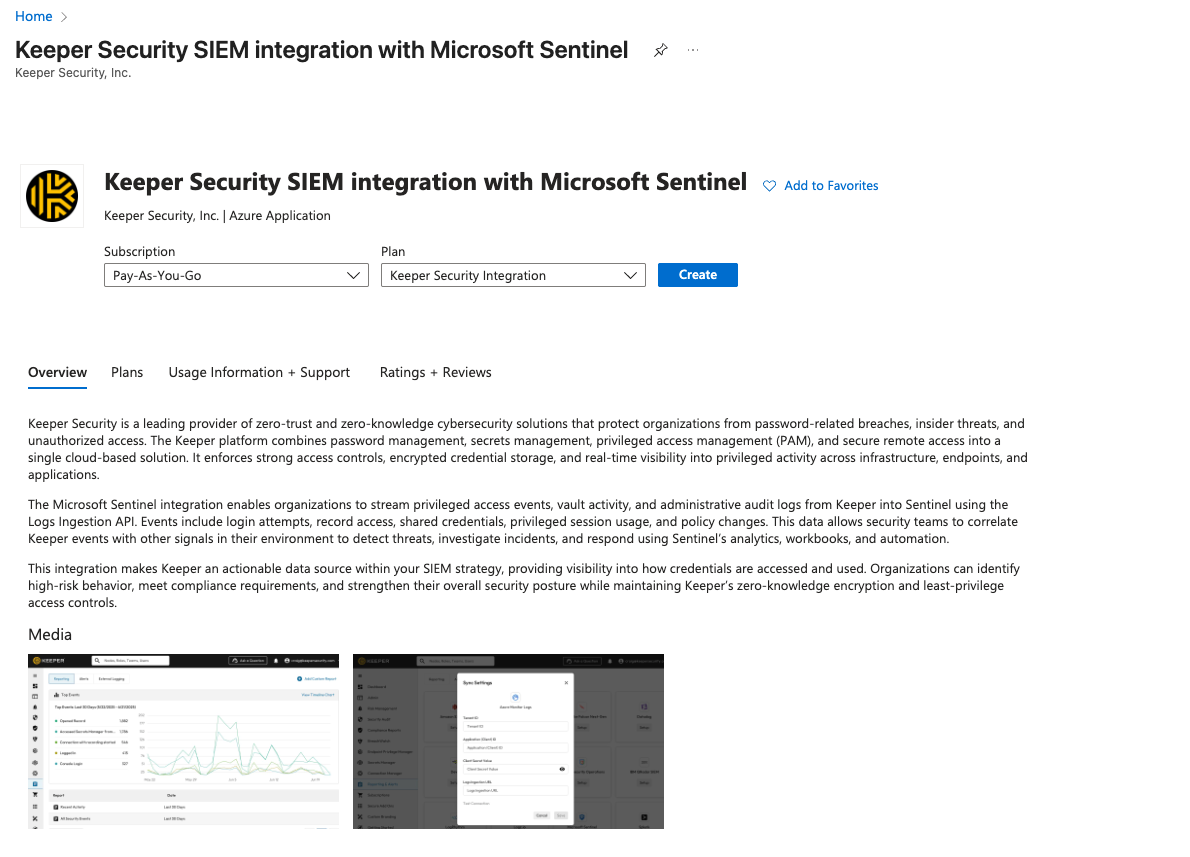
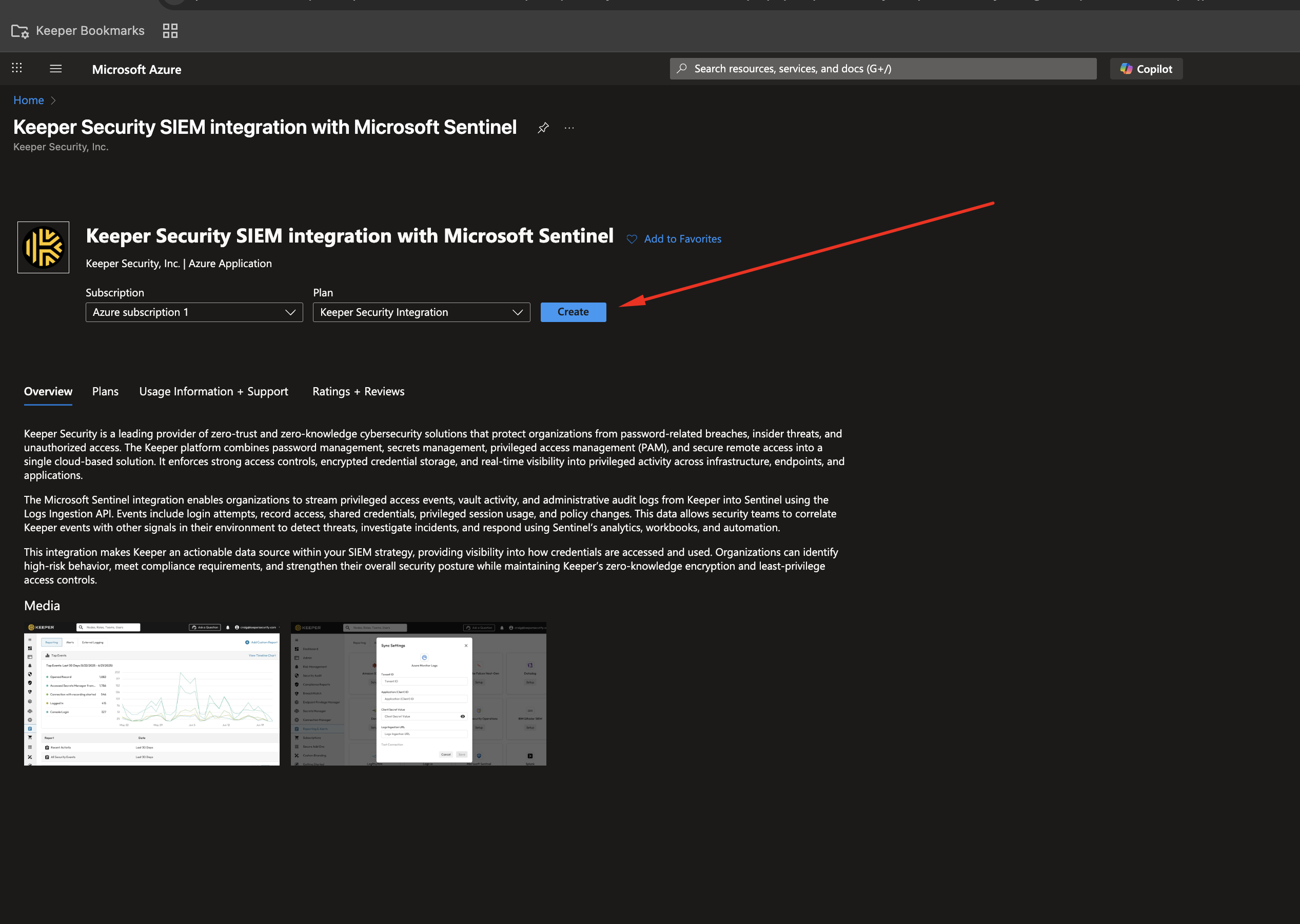
Navigate to the Azure **Marketplace** and find our integration for **Keeper Security SIEM integration with Microsoft Sentinel**.
Select Subscription and Plan:
* Choose your Azure Subscription.
* Select the plan: Keeper Security Integration.
* Click the Create button.
***
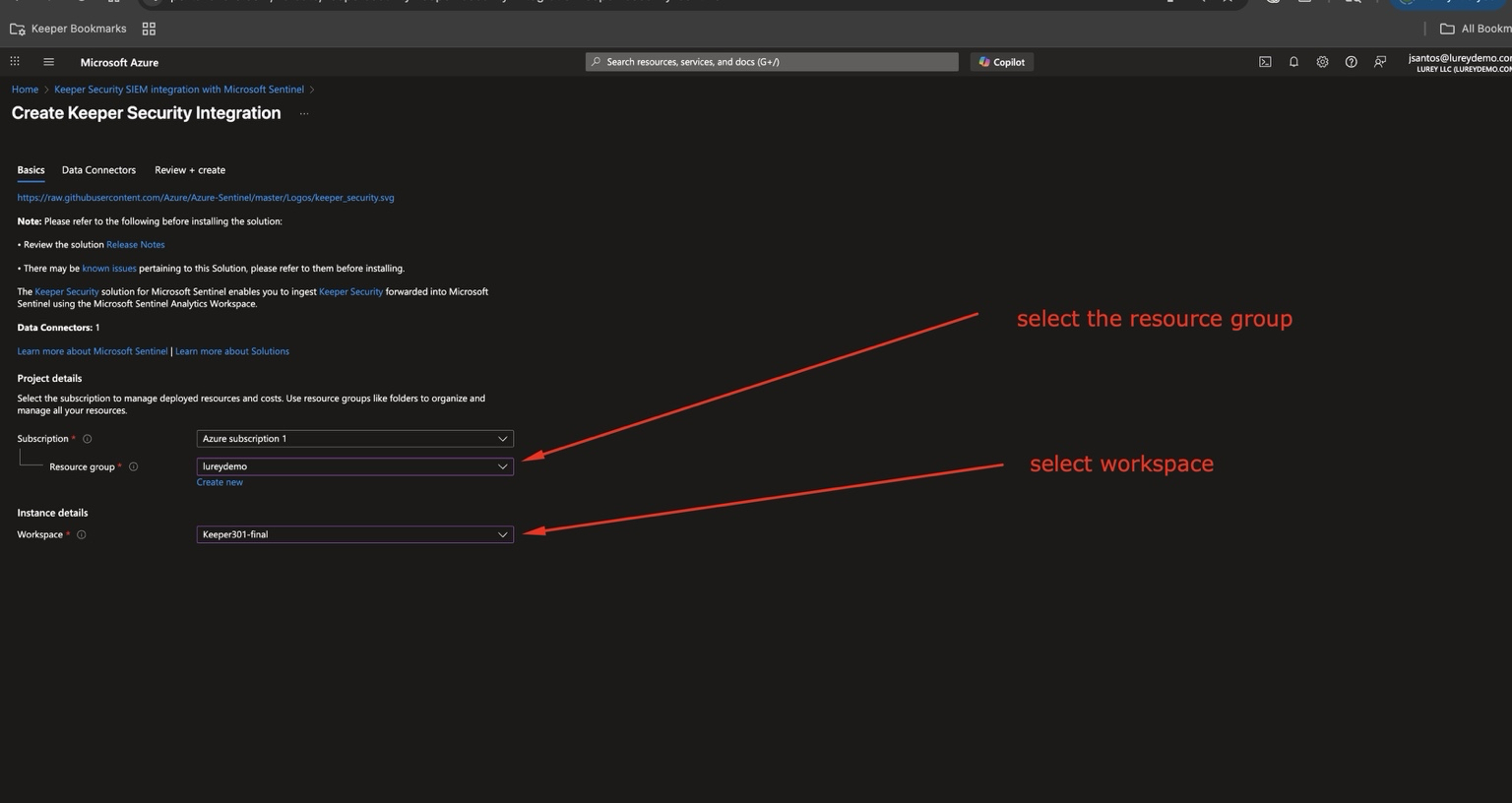
### 2. Configure Basic Project Details
* Select the Resource Group where the solution should be deployed.
* Choose the Log Analytics Workspace where the logs will be ingested.
* Ensure the subscription is correctly selected.
***
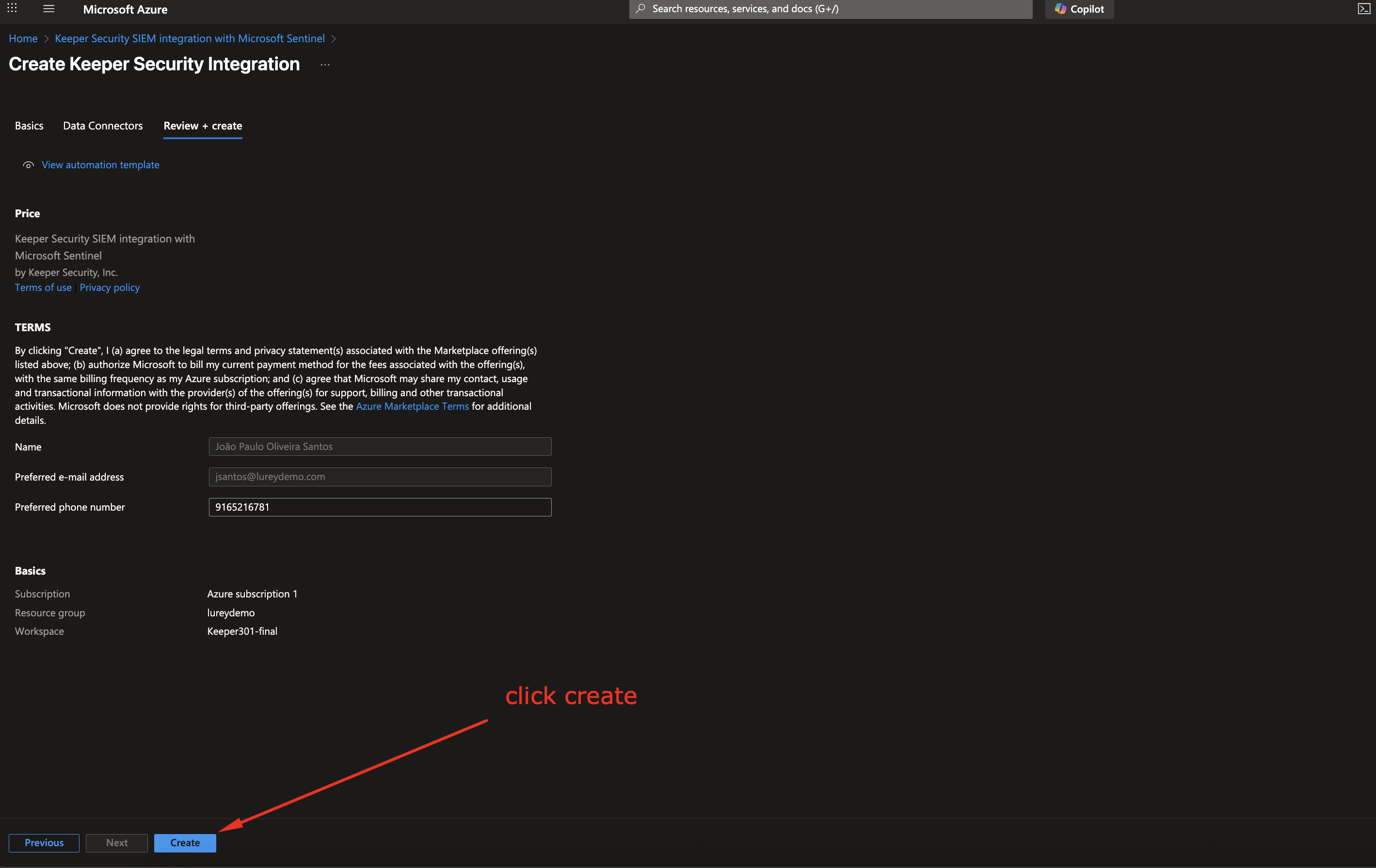
### 3. Review and Create
* Review your selections including:
* Name
* Subscription
* Resource group
* Workspace
* Click Create to proceed with deployment.
***
### 4. Open the Keeper Data Connector
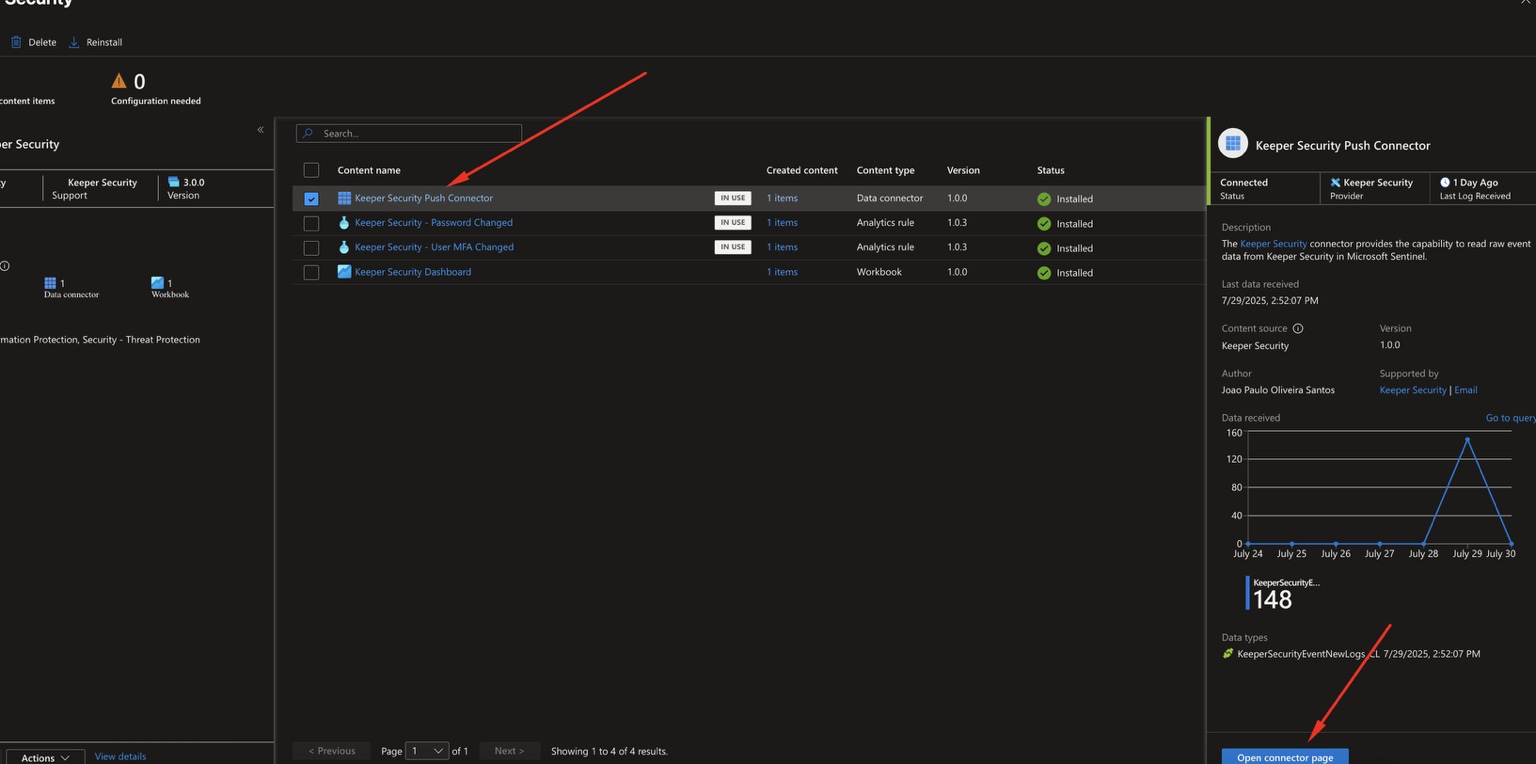
Navigate to **Microsoft Sentinel** in Azure and open your workspace.
In the Sentinel Workspace, navigate to **Configuration → Data Connectors**
Click on **Keeper Security Push Connector** to configure Entra integration.
***
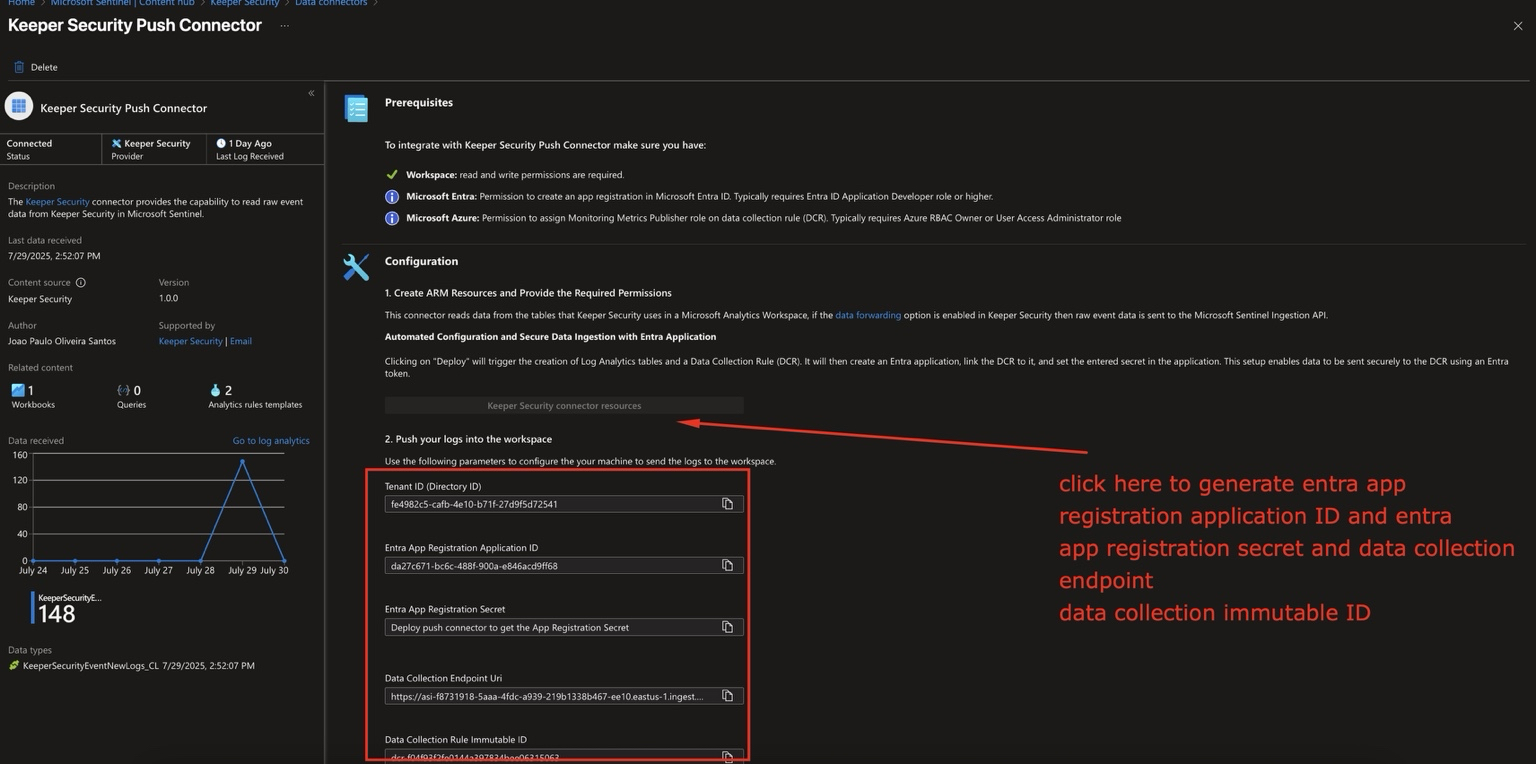
### 5. Generate Entra Configuration
* Click the button: **Keeper Security connector resources**.
* This automatically generates:
* Tenant ID (Directory ID)
* Application (Client) ID
* Client Secret
* Data Collection Endpoint URL
* Data Collection Immutable ID (DCR ID)
{% hint style="warning" %}
Copy these values to a secure location. The Client Secret should be treated as sensitive credential material.
{% endhint %}
***
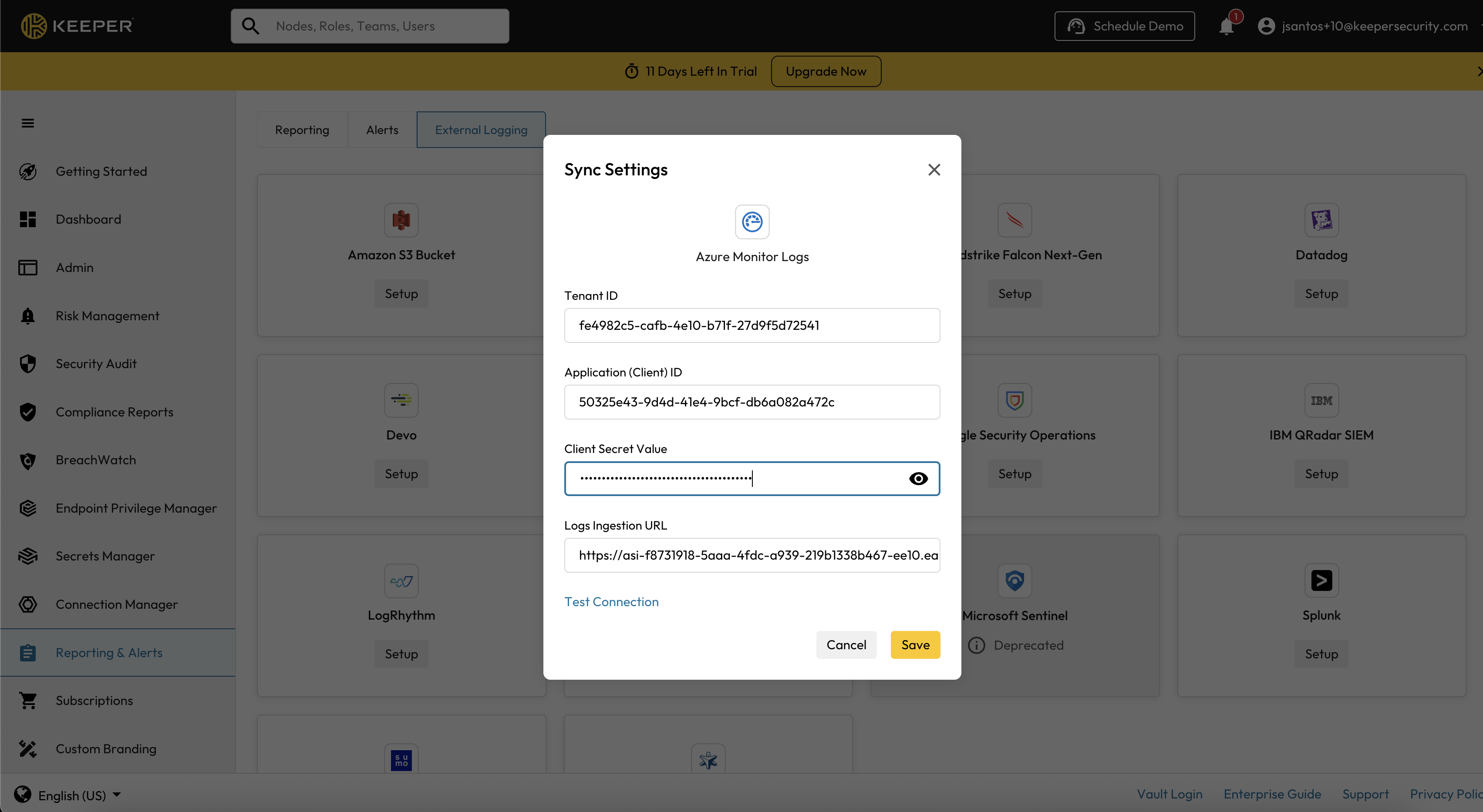
### 6. Configure Keeper Admin Console
Navigate to the **Keeper Admin Console** → **Reporting & Alerts** → **Azure Monitor Logs** and input the details from [Step 7](#id-7.-generate-entra-configuration):
* **Azure Tenant ID**
* **Application (Client) ID**
* **Client Secret Value**
* **Endpoint URL (assembled as shown below)**
#### Logs Ingestion URL Format Example:
{% code overflow="wrap" %}
```
/dataCollectionRules//streams/Custom-KeeperSecurityEventNewLogs?api-version=2023-01-01
```
{% endcode %}
* DCR\_ID: Use the Immutable ID from the Data Collector Rule.
* Custom-KeeperSecurityEventNewLogs: This is the table created by Azure.
***
### 7. Optional: Enable Analytics Rule - Master Password Changed
You can optionally enable an Analytics Rule in Microsoft Sentinel to automatically detect when a Keeper user changes their Master Password.
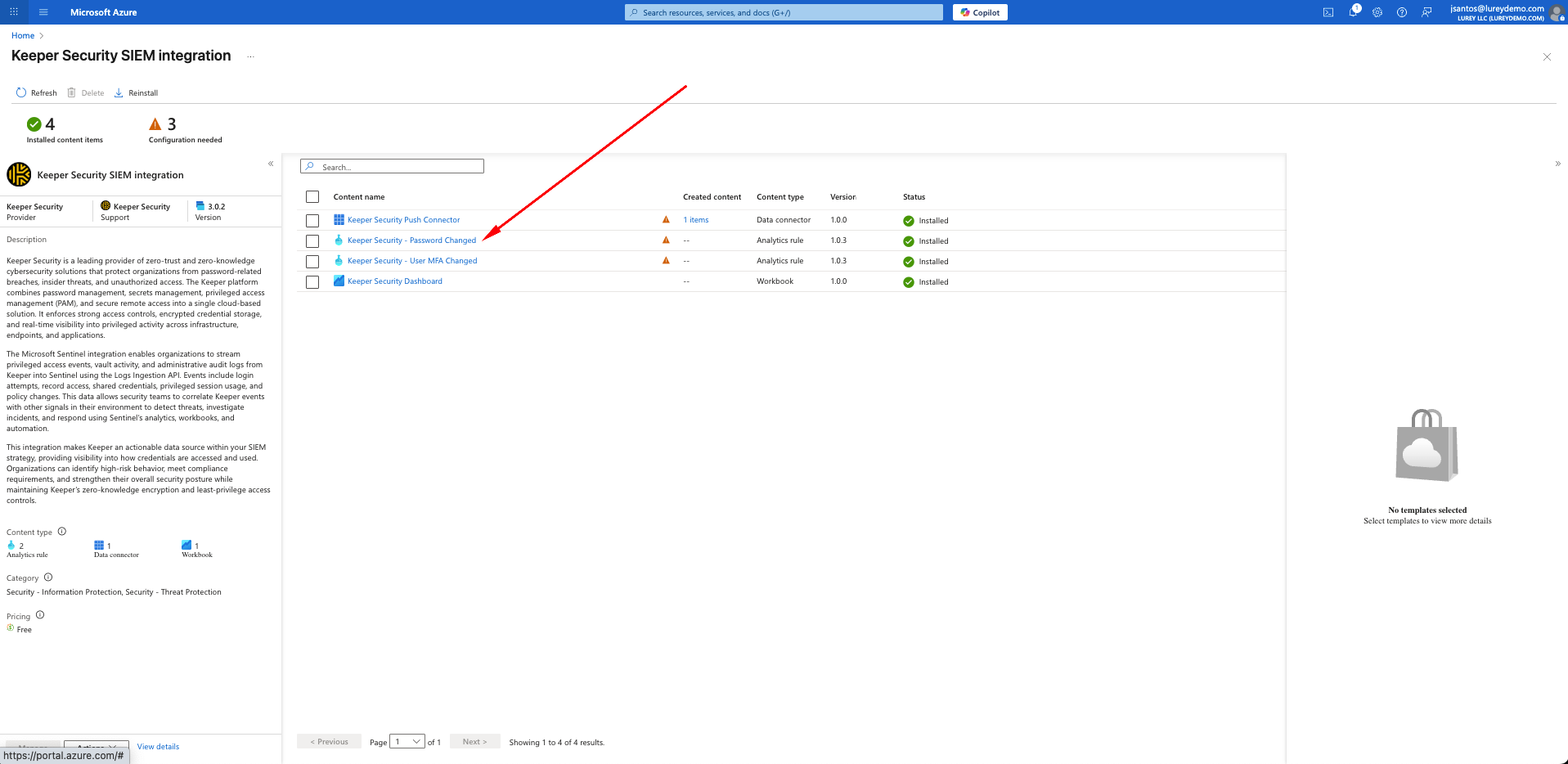
#### Step 1. Access Installed Content
* In Microsoft Sentinel, go to Content Hub → Keeper Security SIEM Integration.
* Under *Installed content items*, locate Keeper Security – Password Changed (Analytics Rule).
* Click on it to start configuration.
***
#### Step 2. Open the Rule Template
* Select the rule template Keeper Security – Password Changed.
* On the right panel, click Create rule.
* This will launch the Analytics Rule Wizard.
***
#### Step 3. Configure General Settings
* Name: *Keeper Security – Password Changed* (default).
* Description: Creates an informational incident when a Keeper Security Password Changed event is detected.
* Severity: Informational.
* MITRE ATT\&CK: Select Persistence (T1556).
* Status: Keep Enabled.
* Click Next: Set rule logic.
***
#### Step 4. Define Rule Logic
* Use the following query:
```kusto
KeeperSecurityEventNewLogs_CL
| where AuditEvent == "change_master_password"
```
⚠️ Note: Ensure that the table KeeperSecurityEventNewLogs\_CL exists (it is created automatically when Keeper logs start flowing into Sentinel). If logs are not yet ingested, the query may return an error during validation.
* Under *Event grouping*, select Trigger an alert for each event.
* Click Next: Incident settings.
***
#### Step 5. Configure Incident Settings
* Enable: Create incidents from alerts triggered by this rule.
* Alert grouping: Disabled (recommended for password events to capture each one individually).
* Click Next: Automated response.
***
#### Step 6. Optional – Add Automated Response
* You may attach a Logic App playbook if you want automated response actions (e.g., notify security team via Teams or email).
* Otherwise, leave automation rules empty.
* Click Next: Review + create.
***
#### Step 7. Review and Create
* Confirm all details:
* Rule Name
* Query
* Severity
* Entity mapping: Username → Account, RemoteAddress → IP
* Click Create to finalize.
***
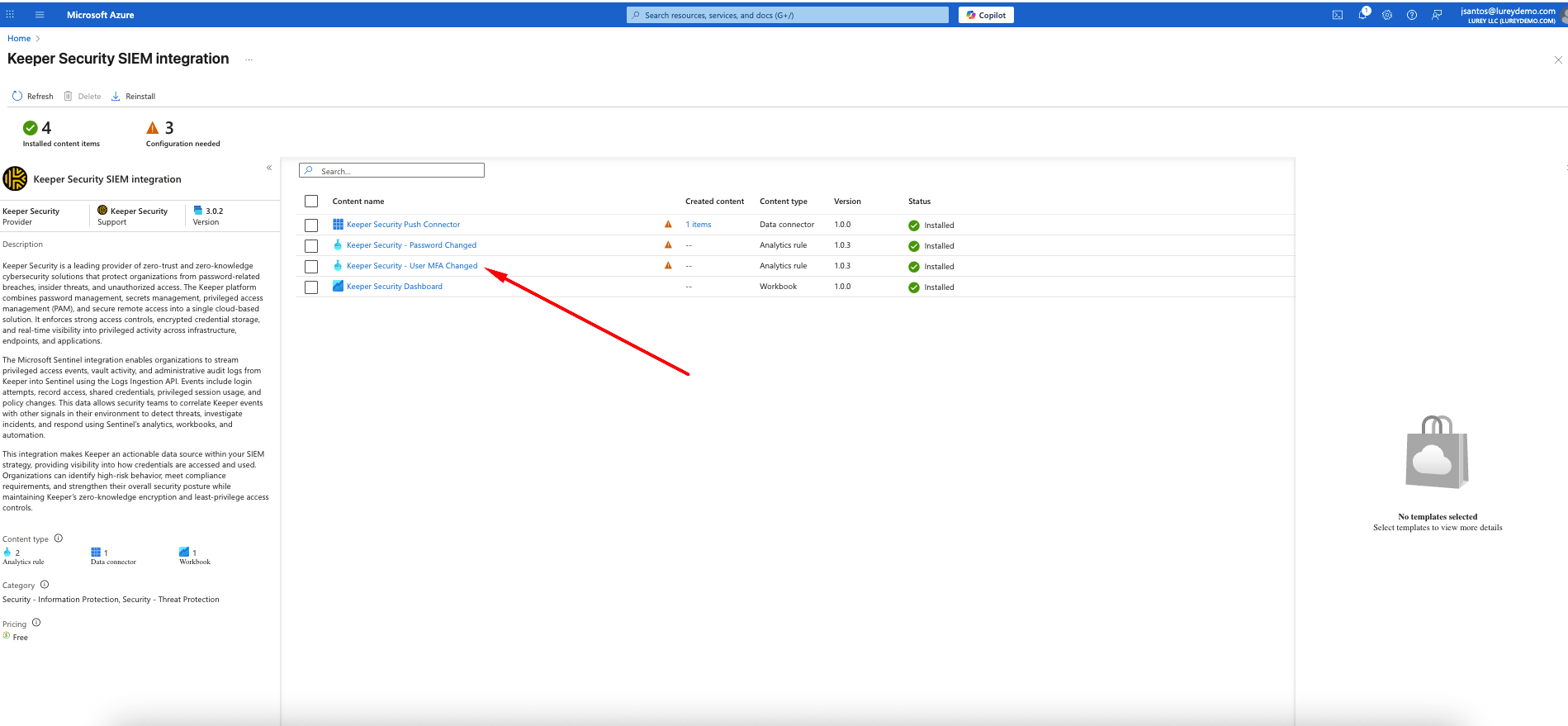
### 8. Optional: Enable Analytics Rule – User MFA Changed
You can optionally enable an Analytics Rule in Microsoft Sentinel to automatically detect when a Keeper user changes their multi-factor authentication (MFA) settings. This provides visibility whenever users enable or disable two-factor authentication.
***
#### Step 1. Access Installed Content
* In Microsoft Sentinel, go to Content Hub → Keeper Security SIEM Integration.
* Under *Installed content items*, select Keeper Security – User MFA Changed.
* Click on it to view the details.
***
#### Step 2. Open the Rule Template
* Select Keeper Security – User MFA Changed.
* On the right panel, click Create rule.
* This will launch the Analytics Rule Wizard.
***
#### Step 3. Configure General Settings
* Name: *Keeper Security – User MFA Changed* (default).
* Description: Creates an informational incident when MFA settings change in Keeper Security.
* Severity: Informational.
* MITRE ATT\&CK: Select Persistence (T1556).
* Status: Keep Enabled.
* Click Next: Set rule logic.
***
#### Step 4. Define Rule Logic
Use the following query:
```kusto
KeeperSecurityEventNewLogs_CL
| where AuditEvent in ("set_two_factor_off", "set_two_factor_on")
```
* Under *Event grouping*, select Trigger an alert for each event.
* Click Next: Incident settings.
***
#### Step 5. Configure Incident Settings
* Enable: Create incidents from alerts triggered by this rule.
* Alert grouping: Disabled (each MFA change will create a separate incident).
* Click Next: Automated response.
***
#### Step 6. Optional – Add Automated Response
* You may attach a Logic App playbook if you want automated response actions (e.g., notify the SOC team in Teams, Slack, or email).
* Otherwise, leave automation rules empty.
* Click Next: Review + create.
***
#### Step 7. Review and Create
* Confirm all details:
* Rule Name
* Query
* Severity
* Entity mappings (Username → Account, RemoteAddress → IP)
* Click Create to finalize.
***
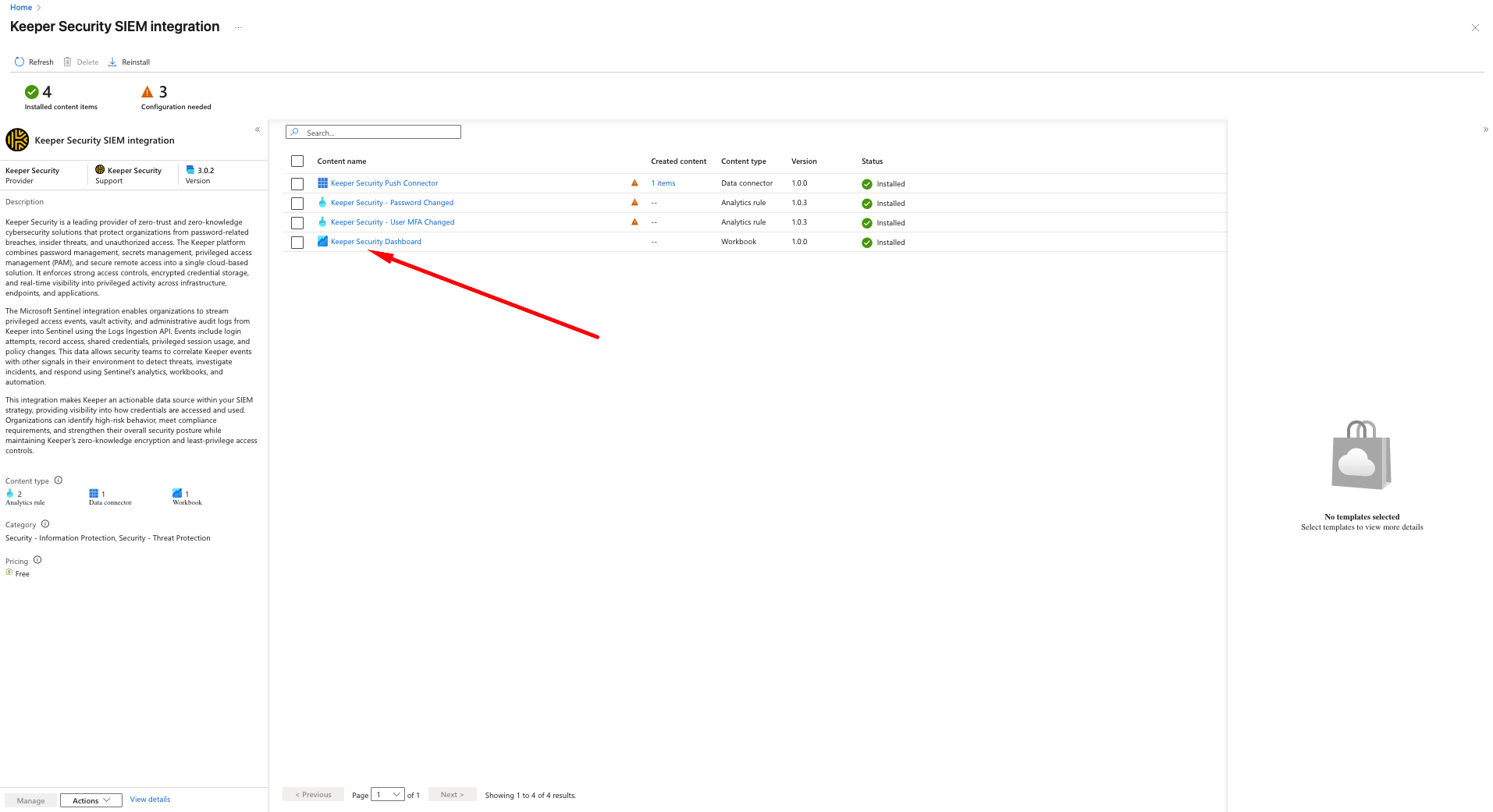
### 9. Optional: Enable Workbook – Keeper Security Dashboard
You can optionally enable the Keeper Security Dashboard workbook in Microsoft Sentinel to visualize Keeper event data. The dashboard provides insights into password changes, MFA events, privileged activity, and overall Keeper usage trends.
***
#### Step 1. Access Installed Content
* In Microsoft Sentinel, navigate to Content Hub → Keeper Security SIEM Integration.
* Under *Installed content items*, select Keeper Security Dashboard.
***
#### Step 2. Save the Workbook Template
* From the Workbook view, select Keeper Security Dashboard.
* In the right-hand panel, click Save.
* The template will now be added to your personal workbooks list.
***
#### Step 3. Open the Saved Workbook
* Once saved, go to Workbooks.
* Select Keeper Security Dashboard from the list.
* Click View saved workbook to open it.
***
#### Step 4. Visualize Keeper Events
The Keeper Security Dashboard includes prebuilt charts and insights, such as:
* Password Changes (audit trail of users changing their master password).
* MFA Events (tracking when MFA is turned on/off).
* User Activity (logins, session usage, record access).
* Security Alerts (policy changes, privileged actions, anomaly patterns).
***
### ✅ Success
Once configured properly, you should see logs appearing in Microsoft Sentinel under the table:
```
KeeperSecurityEventNewLogs_CL
```
You have now successfully integrated Keeper with Microsoft Sentinel using the Azure Monitor Logs ingestion method.
---
# Agent Instructions
This documentation is published with GitBook. GitBook is the documentation platform designed so that both humans and AI agents can read, navigate, and reason over technical content effectively. Learn more at gitbook.com.
## Querying This Documentation
If you need additional information that is not directly available in this page, you can query the documentation by asking a question.
Perform an HTTP GET request on the following URL with the `ask` and `goal` query parameters:
```
GET https://docs.keeper.io/enterprise-guide/event-reporting/microsoft-sentinel/microsoft-sentinel-with-azure-marketplace.md?ask=&goal=
```
`ask` is the immediate question: it should be specific, self-contained, and written in natural language.
`goal` is what the user is ultimately trying to achieve, the reason they need the answer. Sharing it helps GitBook give you a better, more relevant answer. A goal is most helpful when it describes the outcome the user wants rather than restating the question. For example, with `ask=how do I create an API token`, a goal like `automate deployments from our CI pipeline` lets GitBook tailor the answer to that use case.
The response will contain a direct answer to the question and relevant excerpts and sources from the documentation.
Use this mechanism when the answer is not explicitly present in the current page, you need clarification or additional context, or you want to retrieve related documentation sections.