> For the complete documentation index, see [llms.txt](https://docs.keeper.io/llms.txt). Markdown versions of documentation pages are available by appending `.md` to page URLs; this page is available as [Markdown](https://docs.keeper.io/enterprise-guide/jp/breachwatch.md).

# BreachWatch (ダークウェブモニタリング)

![Keeper BreachWatch](https://3468650114-files.gitbook.io/~/files/v0/b/gitbook-x-prod.appspot.com/o/spaces%2FeJwa6ByNJ2qindnPknCW%2Fuploads%2F2wXIEq62LxWTrNPRW4SY%2Fspaces_-LO5CAzpxoaEquZJBpYz_uploads_git-blob-35af79585a5ccd9478e712418ca8271959392c4b_breachwatch-header.jpeg?alt=media\&token=682341dc-59b2-4bc5-a51d-cd44f36490b0)

## 概要 <a href="#overview" id="overview"></a>

ダークウェブの侵害データを継続的に監視することで、組織はユーザーのパスワードの脆弱性を把握できます。レコード内のパスワードが公表済みの侵害で悪用され、クレデンシャルスタッフィング攻撃やアカウント乗っ取りにつながるおそれがある場合、ユーザーと管理者に通知されます。

ダークウェブモニタリングについて詳しくは、以下の動画をご覧ください。

{% embed url="<https://vimeo.com/930882546?share=copy>" %}
ダークウェブモニタリング
{% endembed %}

## エンドユーザー体験 <a href="#end-user-experience" id="end-user-experience"></a>

BreachWatchでは、ユーザーのクライアントデバイス上で通知が表示され、漏洩したパスワードについて **\[解決]** からパスワードの変更または無視を選ぶよう促します。パスワードアラートを無視した場合、そのレコードは今後のスキャンでスキップされ、パスワードがリセットされるまで再検出されません。また、ユーザーが何も対応せず (保留状態のまま) 危険なパスワードを変更しないことも可能で、その場合は引き続き「リスクあり」の状態となります。

<figure><img src="https://3468650114-files.gitbook.io/~/files/v0/b/gitbook-x-prod.appspot.com/o/spaces%2FeJwa6ByNJ2qindnPknCW%2Fuploads%2FFu9P9nhnbLuO9ICekd0i%2FJP_BWVault.png?alt=media&#x26;token=225cc32d-4608-4bf6-ae1b-79e71d769bd4" alt=""><figcaption></figcaption></figure>

<figure><img src="https://3468650114-files.gitbook.io/~/files/v0/b/gitbook-x-prod.appspot.com/o/spaces%2FeJwa6ByNJ2qindnPknCW%2Fuploads%2FfDrZHSV9xptGyg0S5hjf%2FJP_VaultHighriskpass.png?alt=media&#x26;token=42b1907d-4553-45a4-96c2-2e149f0735ae" alt=""><figcaption></figcaption></figure>

## 管理コンソール <a href="#admin-console-experience" id="admin-console-experience"></a>

管理コンソールでは、ダッシュボードの概要とサマリーテーブルから、ユーザーがBreachWatchの通知にどのように対応したかを確認できます。

<figure><img src="https://3468650114-files.gitbook.io/~/files/v0/b/gitbook-x-prod.appspot.com/o/spaces%2FeJwa6ByNJ2qindnPknCW%2Fuploads%2FeSdSLlbiKovqBexRpGmm%2FJP_AdminDashboard.png?alt=media&#x26;token=04167b64-efdc-470e-8aa3-5bc63bca7d67" alt=""><figcaption></figcaption></figure>

ユーザーが「危険」または「無視」のパスワードを保持している場合、Keeper管理者はそのユーザーに対応を促すことができます。なお、パスワードを含まないレコードはカウントに含まれません。レポートには、「所有しているレコード」と「共有されているレコード」の両方が含まれます。

<figure><img src="https://3468650114-files.gitbook.io/~/files/v0/b/gitbook-x-prod.appspot.com/o/spaces%2FeJwa6ByNJ2qindnPknCW%2Fuploads%2Fh3ipDjMuYPgWY39zDIZX%2Fimage.png?alt=media&#x26;token=e3fab8b4-bafb-4dd1-b267-bdf3f765b29c" alt=""><figcaption><p>BreachWatchレポート</p></figcaption></figure>

## レポートとアラート <a href="#reporting-and-alerts" id="reporting-and-alerts"></a>

レポート・アラートモジュールがエンタープライズライセンスで有効になると、BreachWatch固有のイベントがデバイスやクライアントから送信され、様々なフィルタを使用してアクティビティをレポートしたり、アラートを生成したりできます。

### BreachWatchイベントレポート機能の有効化 <a href="#activate-breachwatch-event-reporting" id="activate-breachwatch-event-reporting"></a>

{% hint style="info" icon="lightbulb-exclamation-on" %}
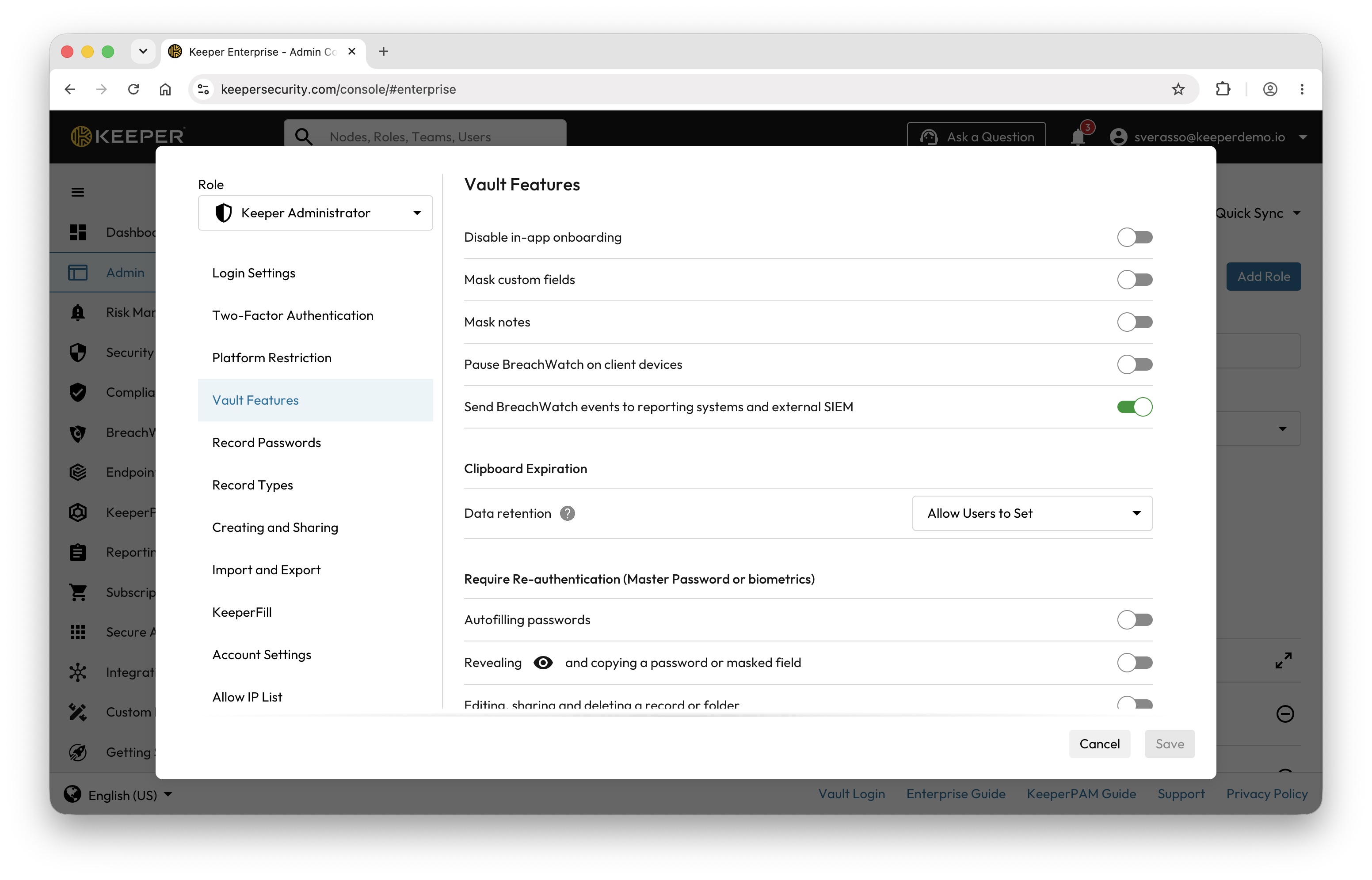
BreachWatchデータのイベントレベルのレポートをレポート・アラートモジュールで有効にするには、特定のロールの **\[強制適用ポリシー]** > **\[ボルト機能]** 画面で、イベント用の強制適用ポリシーを有効にする必要があります。
{% endhint %}

デフォルトでは、Keeperはユーザーのデバイスから接続されているSIEMやレポート・アラートモジュールにBreachWatchイベントデータを送信しません。Keeper管理者がこの機能を有効にすると、イベントデータはレポートエンジンやSplunkなどの接続済みSIEMシステムに送信され始めます。

{% hint style="info" icon="pencil-line" %}
この操作は過去に遡って適用できません。この機能が有効化された場合のみ、イベントがレポート・アラート機能に送信されます。
{% endhint %}

<figure><img src="https://3468650114-files.gitbook.io/~/files/v0/b/gitbook-x-prod.appspot.com/o/spaces%2FeJwa6ByNJ2qindnPknCW%2Fuploads%2FES5aWlUEyH53emf569Pl%2FBreachWatch%20(Dark%20web)-5.png?alt=media&#x26;token=d90361ba-cf09-4167-b094-1c285480cdf8" alt=""><figcaption><p>BreachWatch強制適用ポリシーの有効化</p></figcaption></figure>

### BreachWatchレポート <a href="#breachwatch-reports" id="breachwatch-reports"></a>

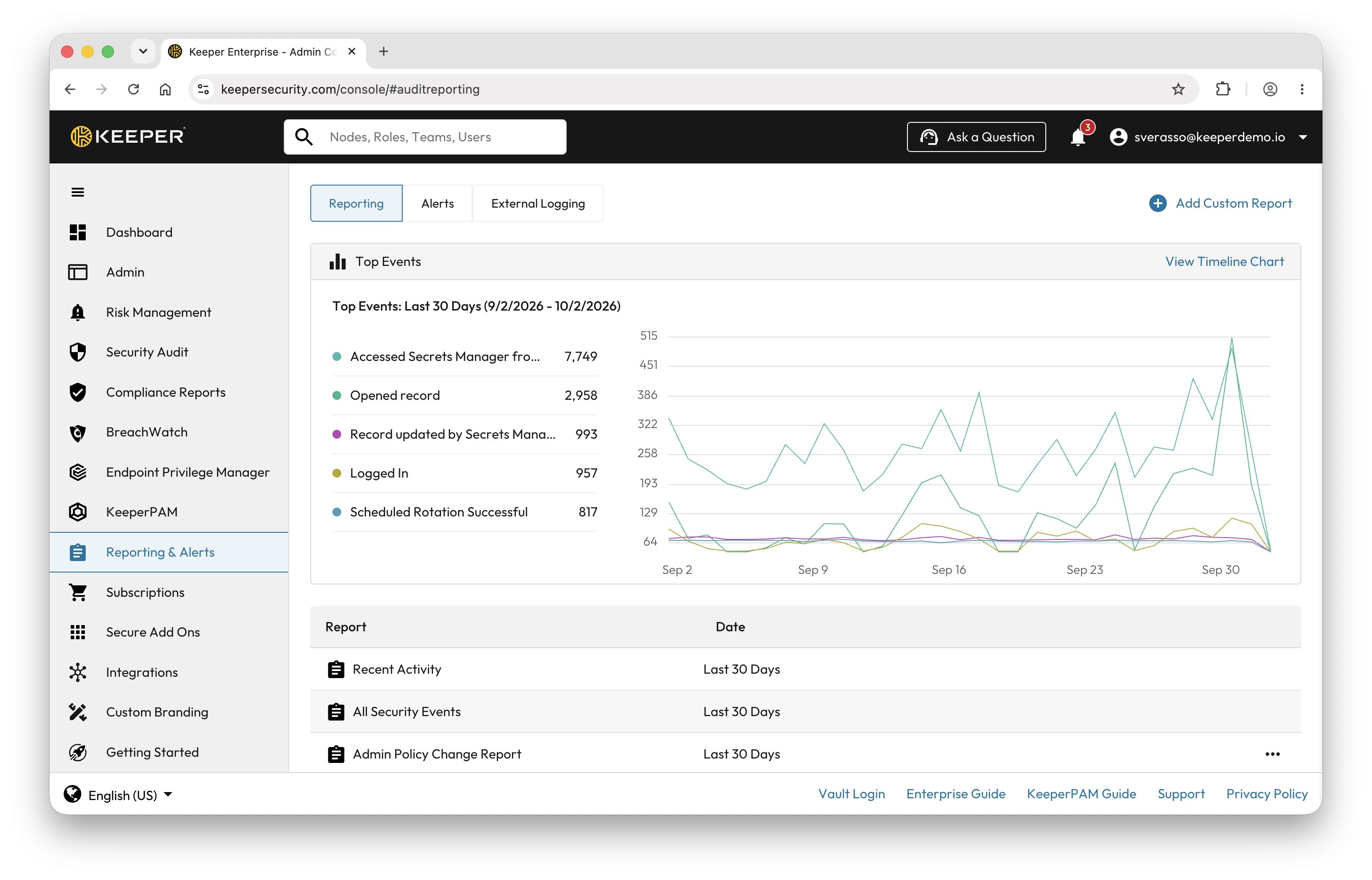
BreachWatchイベントがレポートモジュールに送信されたら、「レポートとアラート」画面にアクセスして、レポートを生成します。

<figure><img src="https://3468650114-files.gitbook.io/~/files/v0/b/gitbook-x-prod.appspot.com/o/spaces%2FeJwa6ByNJ2qindnPknCW%2Fuploads%2FvX5RlnW2S7CQUPSiuEPq%2FJP_Report%20and%20Alert.png?alt=media&#x26;token=1337b463-f8b1-404b-b4fe-e8d6b9b21d6a" alt=""><figcaption><p>レポートとアラート画面</p></figcaption></figure>

**\[カスタムレポート追加]** をクリックし、BreachWatchイベントを選択します。

![BreachWatchイベント](https://3468650114-files.gitbook.io/~/files/v0/b/gitbook-x-prod.appspot.com/o/spaces%2FeJwa6ByNJ2qindnPknCW%2Fuploads%2FvMczXiTqfZuhgpzZKUs5%2FJP_BWReportAlert.png?alt=media\&token=4abd0f52-579f-46ad-9eb0-9e1d70c4f3a7)

また、カスタムイベントの追跡を使用して、アラートを作成できます。

<figure><img src="https://3468650114-files.gitbook.io/~/files/v0/b/gitbook-x-prod.appspot.com/o/spaces%2FeJwa6ByNJ2qindnPknCW%2Fuploads%2FobxUYML9qnvBnqyjLGWh%2FJP_AdminBWAlerts.png?alt=media&#x26;token=bd349501-1cb4-41ff-aa1c-846ee6894846" alt=""><figcaption><p>アラート</p></figcaption></figure>

SlackチャネルアラートやMicrosoft Teamsなどのカスタムロジックを実行できるように、Webhookを使用してアラートを受信できます。

Webhookアラートを有効にする手順は以下のとおりです。

1. イベント名をクリックします。
2. **\[受信者]** タブをクリックします。
3. 新しい受信者を追加するか、既存の受信者をクリックします。
4. **\[Webhookを追加]** ボタンをクリックします。
5. URL、HTTPボディ、および任意のトークンを設定します。
6. **\[保存]** をクリックします。

![アラート受信者とWebhook](https://3468650114-files.gitbook.io/~/files/v0/b/gitbook-x-prod.appspot.com/o/spaces%2FeJwa6ByNJ2qindnPknCW%2Fuploads%2F79jmJWnB0FmOoRu6yog6%2FJP_Webhook.png?alt=media\&token=c37412d4-9cdf-4fb4-a1be-a71db50483f9)

また、サードパーティのSIEMソリューションにイベントを配信することもできます。

![SIEMの統合](https://3468650114-files.gitbook.io/~/files/v0/b/gitbook-x-prod.appspot.com/o/spaces%2FeJwa6ByNJ2qindnPknCW%2Fuploads%2FwHB41TAB0jTQL0aTj46y%2FJP_ReportAlert3rdparty.png?alt=media\&token=f8465f5d-51b0-42ed-8581-3a37738e3977)

#### 展開とレポートの有効化 <a href="#deployment-and-reporting-enablement" id="deployment-and-reporting-enablement"></a>

* BreachWatchはロール強制適用ポリシーにより、組織内へ選択的に展開できます。**\[クライアントデバイスでBreachWatchを一時停止]** トグルで、デバイスからレポート用イベントを送信するかどうか、またサービス自体を一時停止してユーザーデバイスに表示しないかどうかを制御できます。レポートモジュールへのイベント送信を有効にすると、レコードイベントのメタデータ (ユーザーのメールアドレス、レコードUID、IPアドレス、デバイスの種類) がKeeperのバックエンドから接続先のSIEM製品へ送信されます。
* 組織全体へ一度に展開しない場合は、**\[クライアントデバイスでBreachWatchを一時停止]** トグルで展開を制御できます。このノードのユーザーには、クライアントデバイス上でBreachWatchは有効になりません。

<figure><img src="https://3468650114-files.gitbook.io/~/files/v0/b/gitbook-x-prod.appspot.com/o/spaces%2FeJwa6ByNJ2qindnPknCW%2Fuploads%2FNKKJReQI8UM4HOdwLs5X%2FBreachWatch%20(Dark%20web)-11.png?alt=media&#x26;token=acf087a4-ff15-4243-b4ea-aac5672b6522" alt=""><figcaption></figcaption></figure>

## セキュリティ <a href="#security" id="security"></a>

BreachWatchは、ユーザーの情報を保護するために階層化された多数の手法を活用するゼロ知識アーキテクチャです。BreachWatchのセキュリティと暗号化モデルについて詳しくは、[Keeper暗号化モデルドキュメント](/enterprise-guide/jp/keeper-encryption-model.md#breachwatch)のBreachWatchの節をご参照ください。

## CLI (コマンドラインインターフェース) コマンド <a href="#cli-commands" id="cli-commands"></a>

BreachWatchは[KeeperコマンダーCLI](/keeperpam/jp/commander-cli/overview.md)で管理および使用できます。以下の関連コマンドをご参照ください。

* [`breachwatch`](/keeperpam/jp/commander-cli/command-reference/enterprise-management-commands/breachwatch-commands.md)


---

# Agent Instructions
This documentation is published with GitBook. GitBook is the documentation platform designed so that both humans and AI agents can read, navigate, and reason over technical content effectively. Learn more at gitbook.com.

## Querying This Documentation
If you need additional information that is not directly available in this page, you can query the documentation dynamically by asking a question.

Perform an HTTP GET request on the current page URL with the `ask` query parameter, and the optional `goal` query parameter:

```
GET https://docs.keeper.io/enterprise-guide/jp/breachwatch.md?ask=<question>&goal=<endgoal>
```

`ask` is the immediate question: it should be specific, self-contained, and written in natural language.
`goal` is optional and describes the broader end goal you are ultimately trying to accomplish on behalf of the user. GitBook uses it to tailor the answer towards what is most useful for that goal.

The response will contain a direct answer to the question and relevant excerpts and sources from the documentation.

Use this mechanism when the answer is not explicitly present in the current page, you need clarification or additional context, or you want to retrieve related documentation sections.