> For the complete documentation index, see [llms.txt](https://docs.keeper.io/llms.txt). Markdown versions of documentation pages are available by appending `.md` to page URLs; this page is available as [Markdown](https://docs.keeper.io/enterprise-guide/jp/event-reporting/elastic.md).
# Elastic
Keeper SIEMからElasticへのプッシュ連携
### 概要
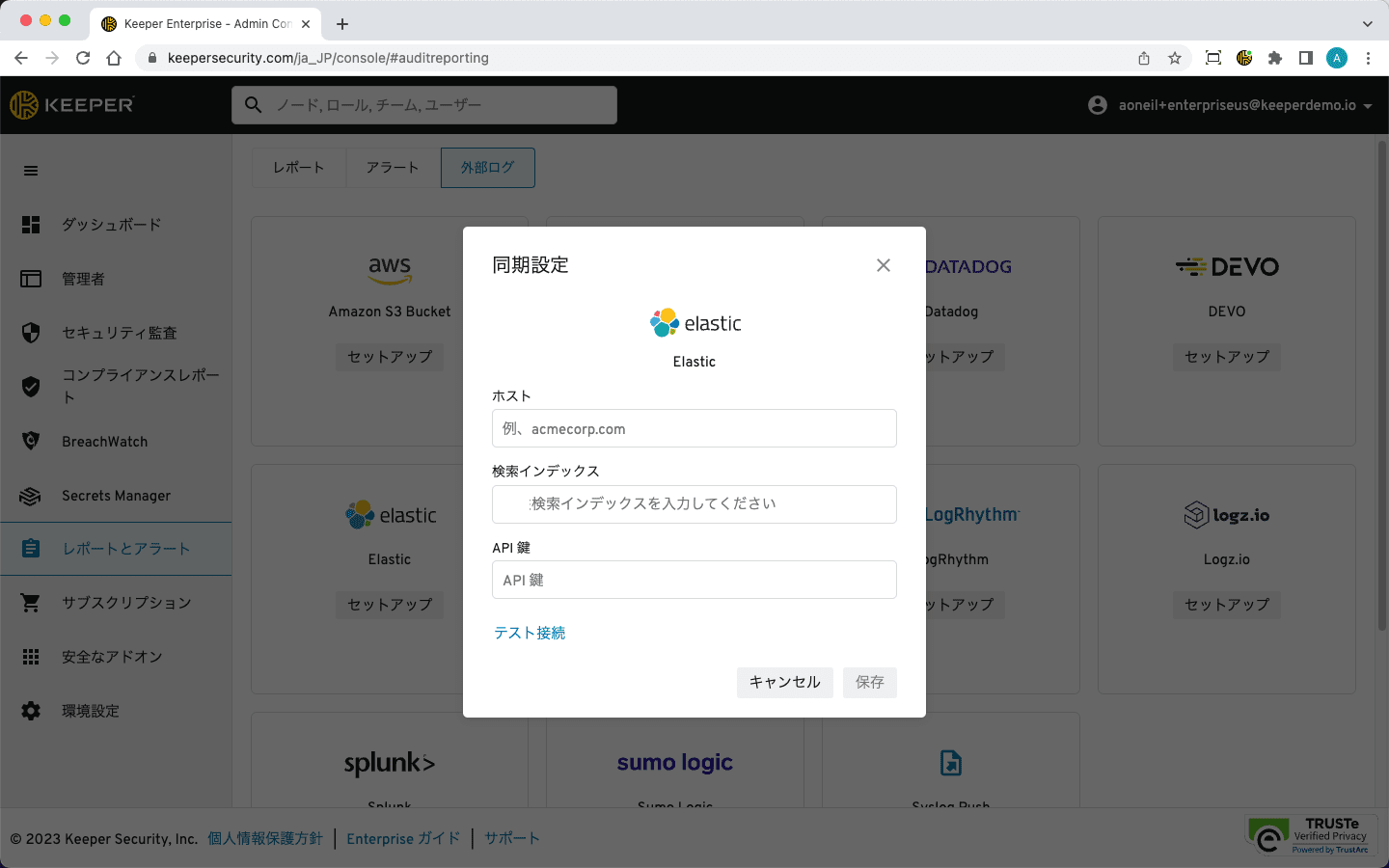
KeeperはElasticへのイベントストリーミングに対応しています。外部へのログ出力はリアルタイムで行われ、新しいイベントは数分以内に表示されます。設定手順は以下のとおりです。
Elastic連携では、送信先エンドポイントへのTCPプッシュを使用します。以下のフィールドが必要です。
* ホスト (**mycompany.gcp.cloud.us.io:9243**など)
* インデックス (**keeper**など)
* APIキー
APIキーの生成については、[Elasticのドキュメント](https://www.elastic.co/guide/en/elasticsearch/reference/current/security-api-get-api-key.html)をご参照ください。
{% hint style="info" %}
エンドポイントでは、証明書のサブジェクト名と一致する有効な署名付きSSL証明書を使用してください。証明書には、CAからの完全な証明書チェーンも含まれている必要があります。Keeperは自己署名証明書には接続しません。
また、ElasticサーバーでKeeperサーバーからのトラフィックが許可されていることも確認してください。詳しくは[ファイアウォールの設定ページ](/enterprise-guide/jp/event-reporting/firewall.md)をご参照ください。
{% endhint %}
### トラブルシューティング
KeeperがElasticインスタンスに接続できない場合は、以下をご確認ください。
* ホストフィールドに `http` または `https` を入力しないでください。
* 必ずポートを含めてください。
* スペースを使用している場合は、ホストフィールドのポートの後にスペース名を追加します (例: `example-elastic01.us-east.found.io:9243/s/spacename`)。
* Elasticの手前のファイアウォールが[ファイアウォールの設定ページ](/enterprise-guide/jp/event-reporting/firewall.md)の記載どおりに構成されていることを確認してください。
---
# Agent Instructions
This documentation is published with GitBook. GitBook is the documentation platform designed so that both humans and AI agents can read, navigate, and reason over technical content effectively. Learn more at gitbook.com.
## Querying This Documentation
If you need additional information that is not directly available in this page, you can query the documentation by asking a question.
Perform an HTTP GET request on the following URL with the `ask` and `goal` query parameters:
```
GET https://docs.keeper.io/enterprise-guide/jp/event-reporting/elastic.md?ask=&goal=
```
`ask` is the immediate question: it should be specific, self-contained, and written in natural language.
`goal` is what the user is ultimately trying to achieve, the reason they need the answer. Sharing it helps GitBook give you a better, more relevant answer. A goal is most helpful when it describes the outcome the user wants rather than restating the question. For example, with `ask=how do I create an API token`, a goal like `automate deployments from our CI pipeline` lets GitBook tailor the answer to that use case.
The response will contain a direct answer to the question and relevant excerpts and sources from the documentation.
Use this mechanism when the answer is not explicitly present in the current page, you need clarification or additional context, or you want to retrieve related documentation sections.