> For the complete documentation index, see [llms.txt](https://docs.keeper.io/llms.txt). Markdown versions of documentation pages are available by appending `.md` to page URLs; this page is available as [Markdown](https://docs.keeper.io/enterprise-guide/jp/keeperpam-privileged-access-manager/just-in-time-workflow.md).

# ジャストインタイムワークフロー

## 概要

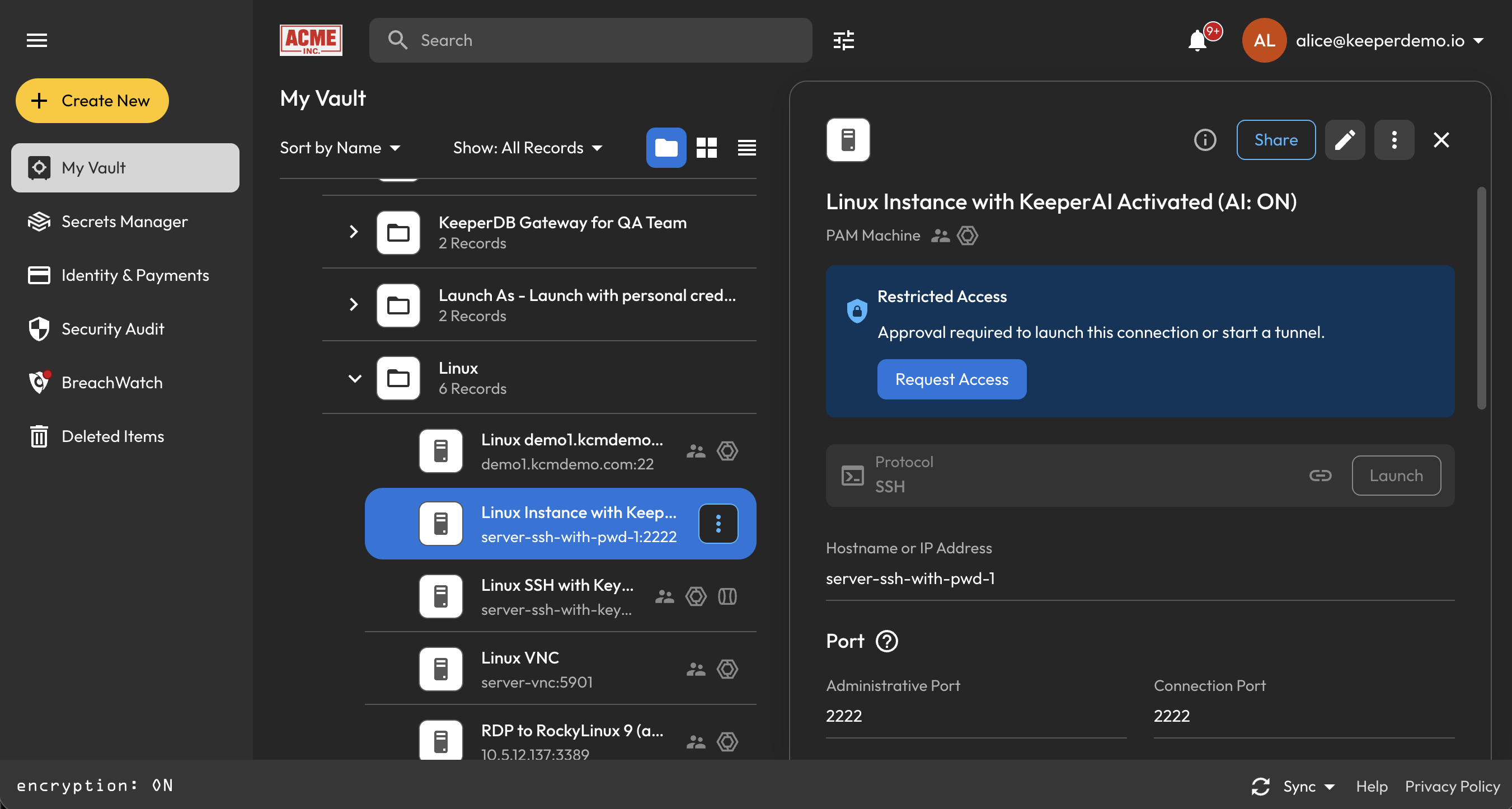
KeeperPAMワークフローは、特権リソースに対するジャストインタイムアクセスを適用し、スタンディング特権を抑えます。対象インフラ全体で、ゼロスタンディング特権に沿った運用が可能です。

ワークフローでは、Keeperボルトで保護されたリソースの承認、アクセスの時間枠、チェックインおよびチェックアウトを制御します。対象は、Keeperボルトで保護されたすべての特権リソースです。

<figure><img src="/files/gbTdA8sbQAzsVSINSGkf" alt=""><figcaption></figcaption></figure>

## 主な機能

* **多段階承認:** 複数承認者による承認の必須化、必要に応じた承認権限の委任
* **シングルユーザーモード (チェックイン/チェックアウト):** 同時アクセスを1人に制限。利用前にチェックアウトし、終了時にチェックイン。時間制限到達時にアクセスを自動失効
* **MFAの要件:** アクセス許可前に多要素認証の完了を必須化
* **アクセス時間の上限:** 定められた期間のみアクセスを許可し、時間枠終了時に自動失効
* **リアルタイム通知:** デスクトップ、ウェブ、モバイルなど、すべてのKeeperクライアントで承認者へ即時通知

{% hint style="info" %}
詳しくは[KeeperPAMジャストインタイムワークフロー](/keeperpam/jp/privileged-access-manager/just-in-time-access-jit/workflow.md)をご参照ください。
{% endhint %}

## はじめに

開始する前に、以下を満たしている必要があります。

* 有効なKeeperPAMのトライアルまたはサブスクリプションを利用していること
* 管理コンソールで **\[ワークフロー]** のロール強制ポリシーを有効にしていること

## ロール強制ポリシー

ユーザーがPAMレコードタイプでワークフローを設定できるようにするには、**管理コンソール → ロール → 強制適用ポリシー → 特権アクセスマネージャー** で **\[ワークフロー設定を管理できる]** を有効にします。

<figure><img src="/files/Jcd99Mv6OqoeKrXoor9L" alt=""><figcaption><p>KeeperPAMワークフローの強制適用ポリシー</p></figcaption></figure>

[KeeperコマンダーCLI](/keeperpam/jp/commander-cli/overview.md)を使って、以下のとおりポリシーを有効にすることもできます。

```
enterprise-role "My Role" --enforcement "ALLOW_CONFIGURE_WORKFLOW_SETTINGS":true
```

## ワークフローの設定

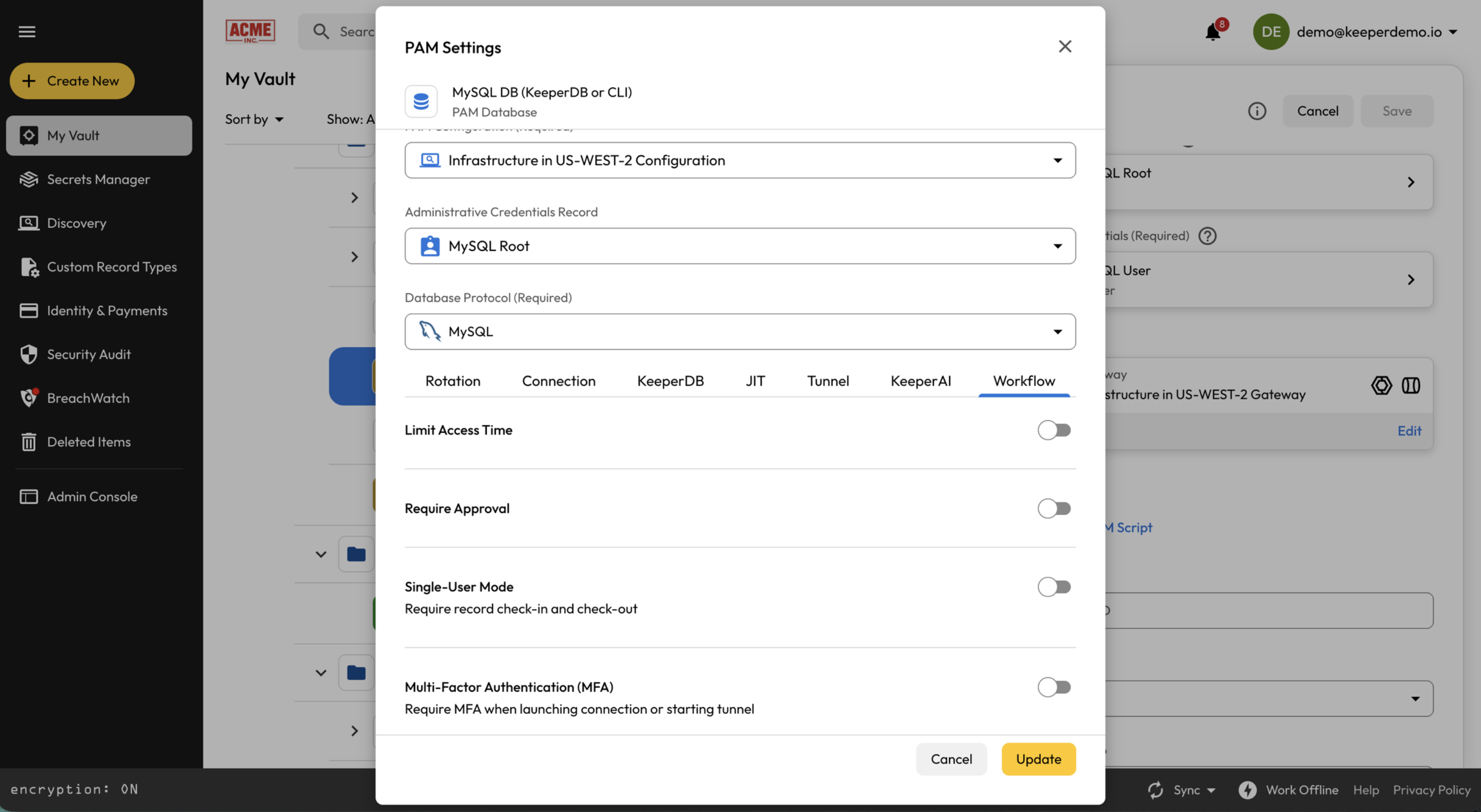
ワークフロー設定を管理できる権限を持つユーザーは、PAMレコードでワークフローを設定できます。

手順は以下のとおりです。

1. PAMのマシン、データベース、ディレクトリ、またはブラウザのレコードを開きます。
2. **\[PAM設定]** で **\[編集]** をクリックします。
3. ダイアログの **\[ワークフロー]** セクションを開きます。

<figure><img src="/files/AwUJnWvuZSmYYifd4q1Q" alt=""><figcaption><p>ワークフローの設定</p></figcaption></figure>


---

# Agent Instructions
This documentation is published with GitBook. GitBook is the documentation platform designed so that both humans and AI agents can read, navigate, and reason over technical content effectively. Learn more at gitbook.com.

## Querying This Documentation
If you need additional information that is not directly available in this page, you can query the documentation dynamically by asking a question.

Perform an HTTP GET request on the current page URL with the `ask` query parameter, and the optional `goal` query parameter:

```
GET https://docs.keeper.io/enterprise-guide/jp/keeperpam-privileged-access-manager/just-in-time-workflow.md?ask=<question>&goal=<endgoal>
```

`ask` is the immediate question: it should be specific, self-contained, and written in natural language.
`goal` is optional and describes the broader end goal you are ultimately trying to accomplish on behalf of the user. GitBook uses it to tailor the answer towards what is most useful for that goal.

The response will contain a direct answer to the question and relevant excerpts and sources from the documentation.

Use this mechanism when the answer is not explicitly present in the current page, you need clarification or additional context, or you want to retrieve related documentation sections.