> For the complete documentation index, see [llms.txt](https://docs.keeper.io/llms.txt). Markdown versions of documentation pages are available by appending `.md` to page URLs; this page is available as [Markdown](https://docs.keeper.io/keeper-connection-manager/high-availability.md).
# High Availability
High Availability (HA) Overview for Keeper Connection Manager
## Overview
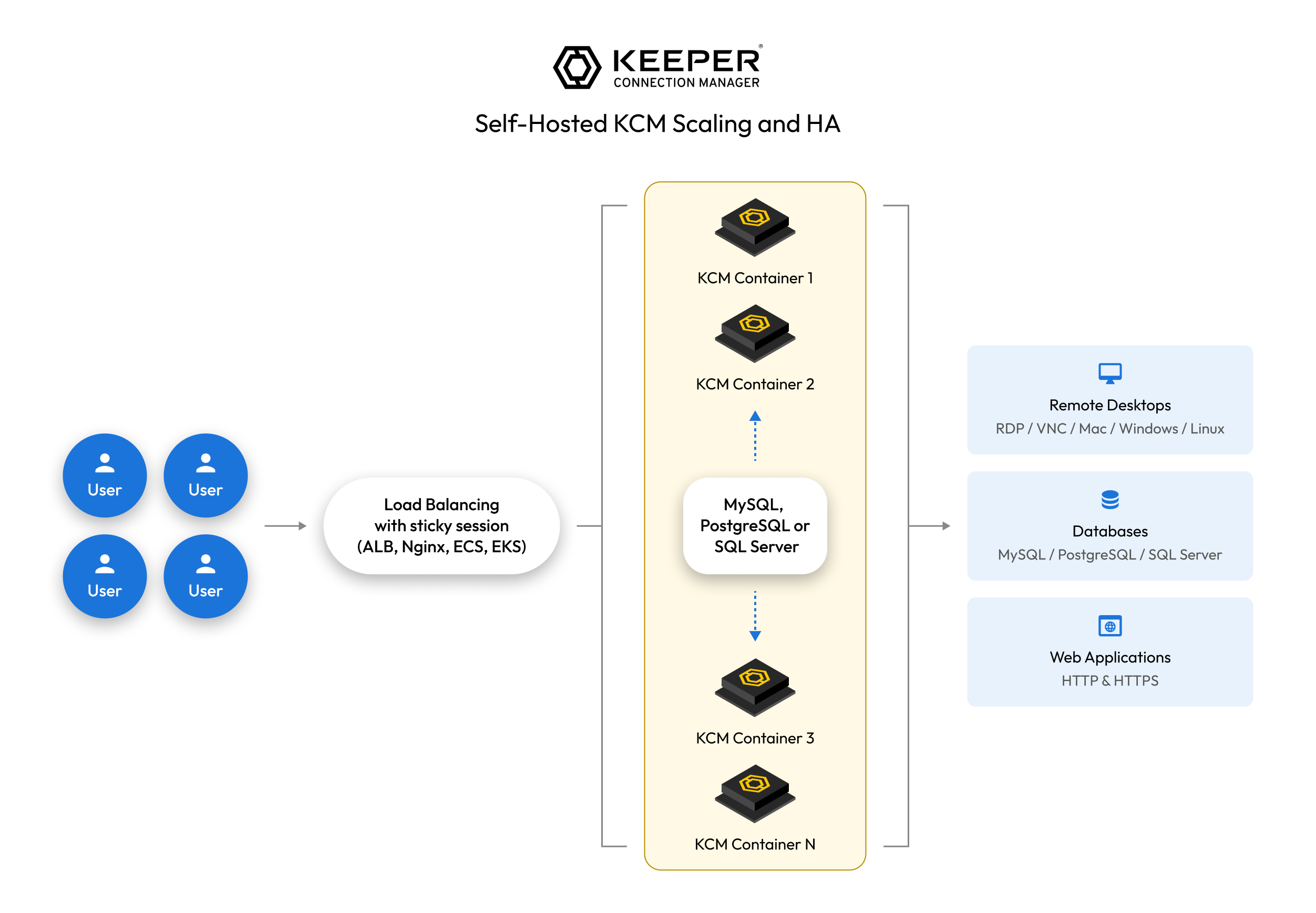
Below is a high-level overview of setting up Keeper Connection Manager (KCM) for High Availability (HA). This is an advanced implementation that requires familiarity with load balancing, databases, security groups, VPCs, etc.
### HA Approaches
#### Active-Active
* Multiple KCM servers handle traffic simultaneously.
* Requires a load balancer with session persistence (sticky sessions) to ensure users stay connected to the same KCM instance.
* Provides higher throughput and automatic failover.
#### Active-Passive
* One primary KCM server is active, with a standby instance ready to take over.
* Failover occurs only if the active server becomes unavailable.
* Simplifies troubleshooting but does not improve overall capacity.
### Key Requirements
* **External Database** – All KCM instances must share a single database (e.g., MySQL, PostgreSQL) to ensure consistency.
* **Load Balancing** – Required for both HA models. Use a load balancer with sticky sessions for Active-Active or a failover mechanism for Active-Passive.
* **Storage Considerations** – Session recordings in KCM are stored on the local disk of the KCM instance. If storage is full, new recordings fail while old ones remain. In a cluster, you may need to consider a shared drive or a cron job to sync the files.
* **SSL Termination**: By default, the KCM docker compose is configured with NGINX to terminate SSL with either a custom certificate or Let's Encrypt certificate. Based on your load balancer's features, you can decide to terminate the SSL at the load balancer or terminate on the KCM instance.
### Setup Steps
{% stepper %}
{% step %}
### Deploy Multiple KCM Instances
Ensure that the configuration is identical, using the same docker compose.
{% endstep %}
{% step %}
### Deploy Database
* Set up a cloud managed or locally managed database
* Ensure that database backups are enabled
* Migrate KCM data from local DB to shared DB (e.g. using `mysqldump`)
{% endstep %}
{% step %}
### Update KCM Configuration
* Update the KCM instances (e.g. `docker-compose.yml`) to point to the shared DB
* Configure the listeners on each container based on the load balancer setup
{% endstep %}
{% step %}
### Implement HA Model
* Active-Active: Deploy a load balancer with sticky sessions
* Active-Passive: Set up monitoring to detect failures and switch traffic
{% endstep %}
{% step %}
### Test & Validate
* Simulate failures, monitor performance, and verify automatic failover
{% endstep %}
{% endstepper %}
---
# Agent Instructions
This documentation is published with GitBook. GitBook is the documentation platform designed so that both humans and AI agents can read, navigate, and reason over technical content effectively. Learn more at gitbook.com.
## Querying This Documentation
If you need additional information that is not directly available in this page, you can query the documentation by asking a question.
Perform an HTTP GET request on the following URL with the `ask` and `goal` query parameters:
```
GET https://docs.keeper.io/keeper-connection-manager/high-availability.md?ask=&goal=
```
`ask` is the immediate question: it should be specific, self-contained, and written in natural language.
`goal` is what the user is ultimately trying to achieve, the reason they need the answer. Sharing it helps GitBook give you a better, more relevant answer. A goal is most helpful when it describes the outcome the user wants rather than restating the question. For example, with `ask=how do I create an API token`, a goal like `automate deployments from our CI pipeline` lets GitBook tailor the answer to that use case.
The response will contain a direct answer to the question and relevant excerpts and sources from the documentation.
Use this mechanism when the answer is not explicitly present in the current page, you need clarification or additional context, or you want to retrieve related documentation sections.