> For the complete documentation index, see [llms.txt](https://docs.keeper.io/llms.txt). Markdown versions of documentation pages are available by appending `.md` to page URLs; this page is available as [Markdown](https://docs.keeper.io/keeper-connection-manager/jp/readme.md).
# Keeperコネクションマネージャー
フルセルフホスト型PAMデプロイメント向けリモートアクセスゲートウェイ
### Keeperコネクションマネージャー
大半のデプロイメントでは、**KeeperPAM**を推奨します。
クラウド、仮想環境、オンプレミス環境など、自社環境でフルセルフホスト型ソリューションが必要な場合は、Keeperコネクションマネージャーをご利用ください。
{% hint style="info" %}
KeeperPAMは、多くの活用事例でKeeperが推奨するPAMプラットフォームです。
クラウドベースのアクセス制御プレーン上で、パスワード管理、シークレット管理、コネクション管理、データベース管理、エンドポイント特権管理、ゼロトラストネットワークアクセス、リモートブラウザ分離が1つのプラットフォームに統合されています。
[KeeperPAMの詳細](https://docs.keeper.io/keeperpam/jp/)
{% endhint %}
Keeperコネクションマネージャー (KCM) は、セルフホスト型、エージェント不要のリモートデスクトップゲートウェイであり、ウェブブラウザからデスクトップ、サーバー、データベース、ウェブアプリケーションへの迅速かつ安全なアクセスを実現します。
### Keeperコネクションマネージャーの利用シーン
以下のような場合にKeeperコネクションマネージャーを選択します。
* セルフホスト型デプロイメント
* 自社環境の完全な管理
* エアギャップ環境への対応
* 自社ネットワーク内のリモートアクセスゲートウェイ
### 主要機能
Keeperコネクションマネージャーでは、以下の機能を利用できます。
* RDP、SSH、VNC、K8sリモートアクセスプロトコルのサポート
* MySQL、PostgreSQL、SQL Serverデータベースプロトコルのサポート
* リモートブラウザ分離技術によるウェブアプリケーション保護
* セッション録画と再生
* 特権セッション管理
* マルチユーザーセッション共有
* ロール単位のアクセス制御
* TOTP、Duoなどの多要素認証オプション
* PIV/CACスマートカードログイン
* SSO、OpenID Connect、Active Directory、LDAP連携
* カスタムブランディング
### 概要動画
{% embed url="" %}
Keeper Connection Demo
{% endembed %}
### システム図
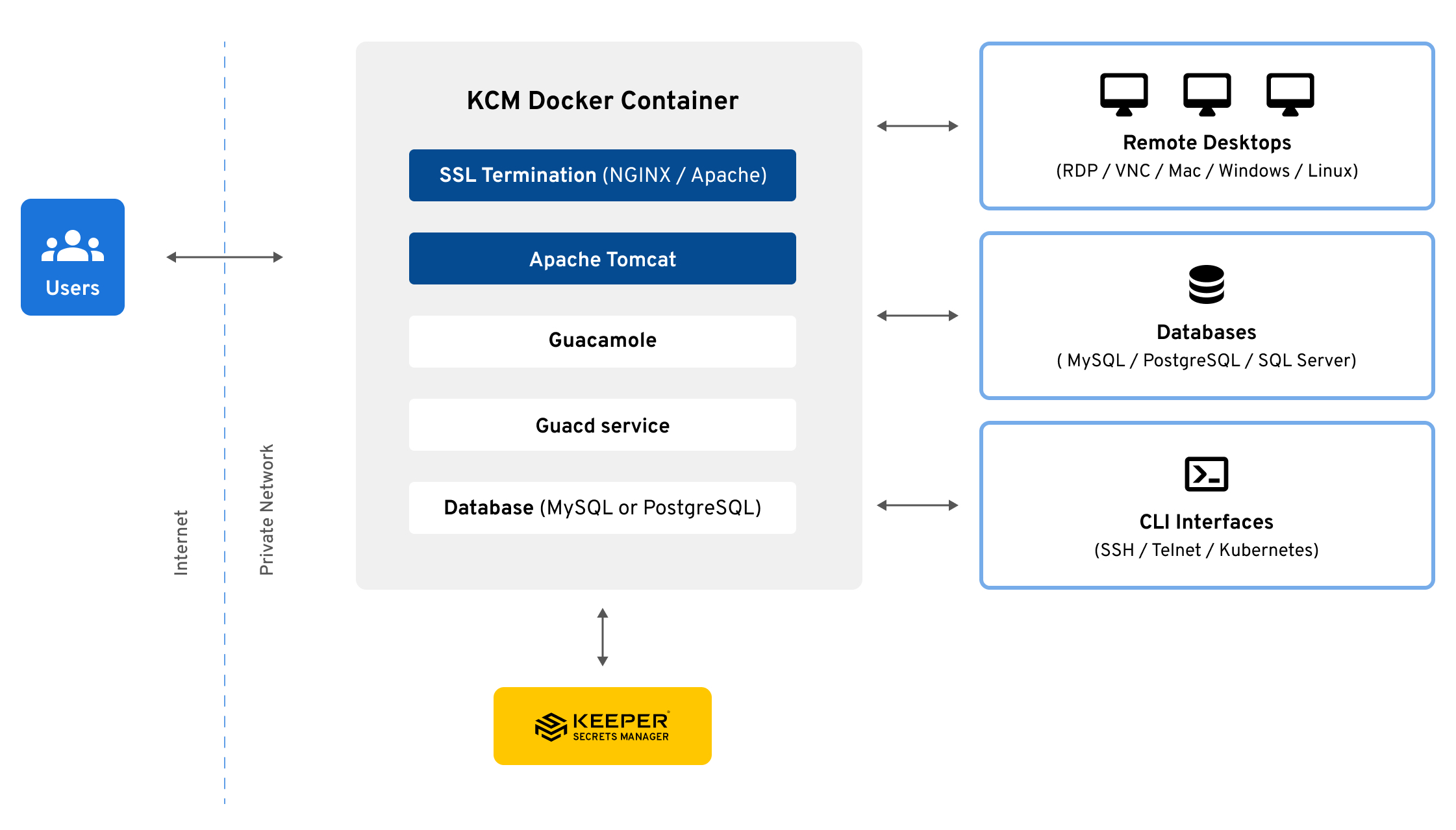
Keeperは通常Dockerコンテナとしてデプロイします。以下はシステムアーキテクチャ図となります。
Keeperコネクションマネージャー - システム図
### Apache Guacamole (アパッチワカモレ)
Keeperコネクションマネージャーは、リモートデスクトップアクセスのオープンソースプラットフォームであるApache Guacamoleのオリジナル開発者によって開発された、商用サポート付きのソリューションです。Guacamoleゲートウェイをベースに構築されており、機能拡張、高度な統合、継続的な機能開発が行われています。なお、Glyptodonは2021年12月にKeeper Securityが買収しました。
### KeeperPAMライセンス
Keeperコネクションマネージャーは、KeeperPAMのライセンスに含まれています。
大半のデプロイメントでは、まずKeeperPAMから始めてください。自社で管理するフルセルフホスト型デプロイメントが要件の場合は、Keeperコネクションマネージャーをご利用ください。
KeeperPAMの詳しくは以下をご覧ください。
* [KeeperPAMウェブサイト](https://www.keepersecurity.com/ja_JP/privileged-access-management/)
* [KeeperPAMの資料](https://docs.keeper.io/keeperpam/jp/)
### 始めましょう
セルフホスト型デプロイメントが必要な場合は、[インストール手順](/keeper-connection-manager/jp/installation.md)に進んでください。
---
# Agent Instructions
This documentation is published with GitBook. GitBook is the documentation platform designed so that both humans and AI agents can read, navigate, and reason over technical content effectively. Learn more at gitbook.com.
## Querying This Documentation
If you need additional information that is not directly available in this page, you can query the documentation by asking a question.
Perform an HTTP GET request on the following URL with the `ask` and `goal` query parameters:
```
GET https://docs.keeper.io/keeper-connection-manager/jp/readme.md?ask=&goal=
```
`ask` is the immediate question: it should be specific, self-contained, and written in natural language.
`goal` is what the user is ultimately trying to achieve, the reason they need the answer. Sharing it helps GitBook give you a better, more relevant answer. A goal is most helpful when it describes the outcome the user wants rather than restating the question. For example, with `ask=how do I create an API token`, a goal like `automate deployments from our CI pipeline` lets GitBook tailor the answer to that use case.
The response will contain a direct answer to the question and relevant excerpts and sources from the documentation.
Use this mechanism when the answer is not explicitly present in the current page, you need clarification or additional context, or you want to retrieve related documentation sections.
.png?alt=media)