> For the complete documentation index, see [llms.txt](https://docs.keeper.io/llms.txt). Markdown versions of documentation pages are available by appending `.md` to page URLs; this page is available as [Markdown](https://docs.keeper.io/keeper-connection-manager/jp/high-availability.md).
# 高可用性
Keeperコネクションマネージャーの高可用性 (HA) の概要
## 概要
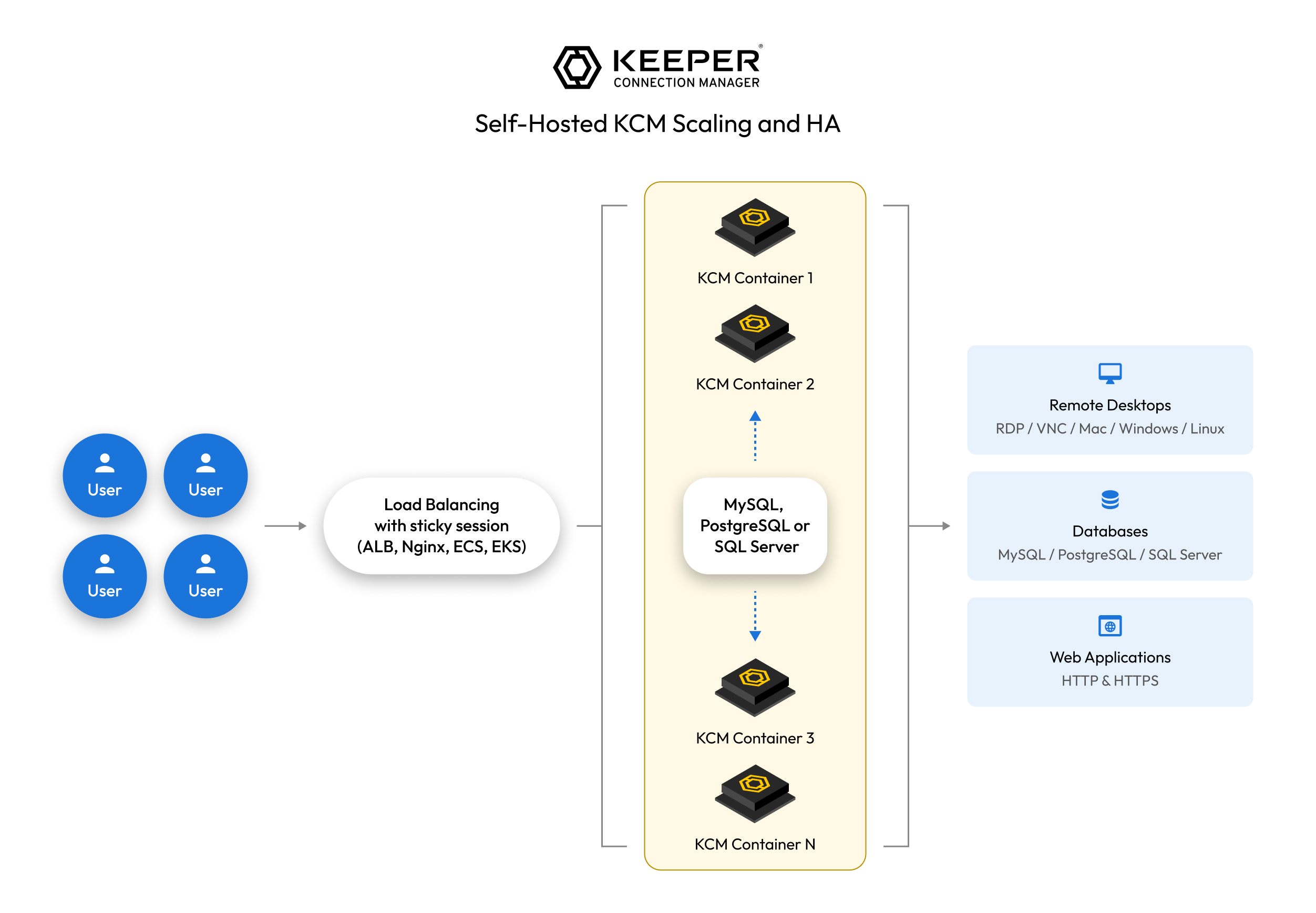
Keeperコネクションマネージャー (KCM) を高可用性 (HA) で構成する際の概要です。負荷分散、データベース、セキュリティグループ、VPCなどに精通している方向けの高度な実装です。
### HAの方式
#### アクティブ-アクティブ
* 複数のKCMサーバーが同時にトラフィックを処理
* ユーザーが同一のKCMインスタンスへ接続し続けるよう、セッション永続性 (スティッキーセッション) 付きのロードバランサーが必要
* スループットの向上と自動フェイルオーバーが可能
#### アクティブ-パッシブ
* 1台のプライマリKCMサーバーが稼働し、引き継ぎ可能なスタンバイインスタンスを用意
* 稼働中のサーバーが利用できなくなった場合にのみフェイルオーバーが発生
* トラブルシューティングは単純になる一方、全体の処理能力は向上しない
### 主な要件
* **外部データベース:** 一貫性を保つため、すべてのKCMインスタンスが単一のデータベース (MySQL、PostgreSQLなど) を共有する必要があります。
* **負荷分散:** どちらのHAモデルでも必要です。アクティブ-アクティブではスティッキーセッション付きのロードバランサーを、アクティブ-パッシブではフェイルオーバー機構を使用します。
* **ストレージ:** KCMのセッション録画は、KCMインスタンスのローカルディスクに保存されます。ストレージがいっぱいになると、既存の録画は残りますが新しい録画は失敗します。クラスタでは、共有ドライブの検討や、ファイルを同期するcronジョブが必要になる場合があります。
* **SSL終端:** デフォルトでは、KCMのDocker Composeは、カスタム証明書またはLet's Encrypt証明書でSSLを終端するようNGINXを設定しています。ロードバランサーの機能に応じて、ロードバランサー側でSSLを終端するか、KCMインスタンス側で終端するかを選択できます。
### セットアップ手順
{% stepper %}
{% step %}
### 複数のKCMインスタンスをデプロイする
同じDocker Composeを使用し、設定が同一であることを確認します。
{% endstep %}
{% step %}
### データベースをデプロイする
* クラウド管理またはローカル管理のデータベースをセットアップ
* データベースのバックアップを有効化
* ローカルDBから共有DBへKCMデータを移行 (`mysqldump` の使用など)
{% endstep %}
{% step %}
### KCMの設定を更新する
* KCMインスタンス (例: `docker-compose.yml`) を更新し、共有DBを参照するよう設定
* ロードバランサーの構成に合わせて、各コンテナのリスナーを設定
{% endstep %}
{% step %}
### HAモデルを実装する
* **アクティブ-アクティブ:** スティッキーセッション付きのロードバランサーをデプロイ
* **アクティブ-パッシブ:** 障害を検出してトラフィックを切り替える監視を設定
{% endstep %}
{% step %}
### テストと検証
* 障害のシミュレーション、パフォーマンスの監視、自動フェイルオーバーの確認
{% endstep %}
{% endstepper %}
---
# Agent Instructions
This documentation is published with GitBook. GitBook is the documentation platform designed so that both humans and AI agents can read, navigate, and reason over technical content effectively. Learn more at gitbook.com.
## Querying This Documentation
If you need additional information that is not directly available in this page, you can query the documentation by asking a question.
Perform an HTTP GET request on the following URL with the `ask` and `goal` query parameters:
```
GET https://docs.keeper.io/keeper-connection-manager/jp/high-availability.md?ask=&goal=
```
`ask` is the immediate question: it should be specific, self-contained, and written in natural language.
`goal` is what the user is ultimately trying to achieve, the reason they need the answer. Sharing it helps GitBook give you a better, more relevant answer. A goal is most helpful when it describes the outcome the user wants rather than restating the question. For example, with `ask=how do I create an API token`, a goal like `automate deployments from our CI pipeline` lets GitBook tailor the answer to that use case.
The response will contain a direct answer to the question and relevant excerpts and sources from the documentation.
Use this mechanism when the answer is not explicitly present in the current page, you need clarification or additional context, or you want to retrieve related documentation sections.