> For the complete documentation index, see [llms.txt](https://docs.keeper.io/llms.txt). Markdown versions of documentation pages are available by appending `.md` to page URLs; this page is available as [Markdown](https://docs.keeper.io/keeper-connection-manager/jp/installation/license-key.md).
# KCMライセンス
Keeperコネクションマネージャーのライセンスキーの有効化
Keeperコネクションマネージャーのバージョン2.19以降で、アプリケーションの使用を継続するには、Keeperからライセンスキーを取得する必要があります。
{% hint style="warning" %}
KCM 2.19以降のバージョンをインストールする前に、有効なライセンスキーを取得してください。**有効なライセンスキーがない場合、ユーザーと管理者は更新適用後にKCMを使用できなくなります。**
{% endhint %}
### KCMライセンスの要件
KCMライセンスキーを取得する前に、以下が必要です。
* [KeeperPAMライセンス](https://www.keepersecurity.com/privileged-access-management/)または
* [Keeperビジネス](https://www.keepersecurity.com/business.html)または[Keeperエンタープライズ](https://www.keepersecurity.com/enterprise.html)のライセンスに、KCMオンプレミスアドオンが含まれること
### ライセンスキーの取得
KCMライセンスキーを取得するには、以下の手順を実施します。
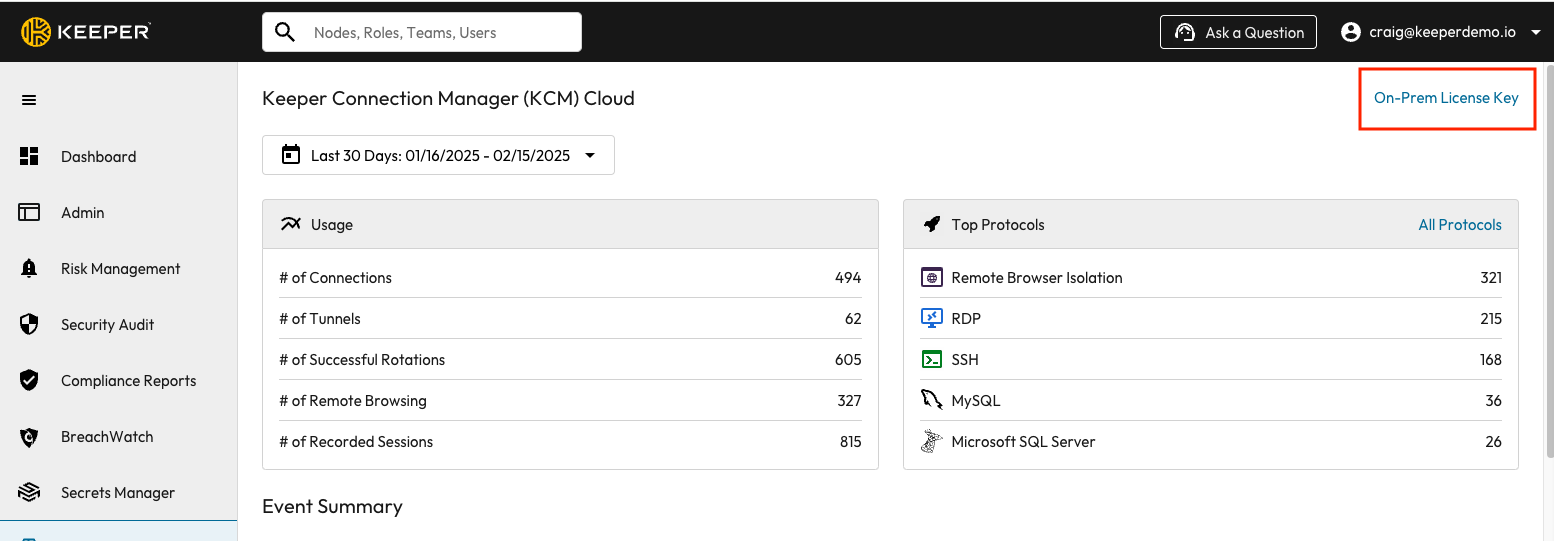
1. Keeper管理コンソールにログインします。
2. **\[コネクションマネージャー]** タブに移動します。
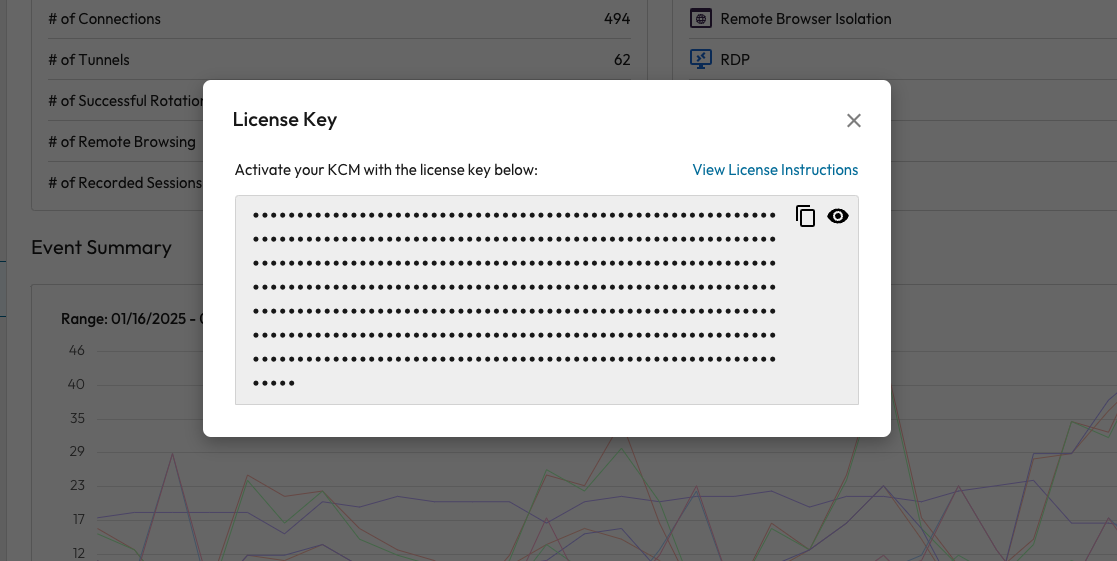
3. **\[オンプレミスライセンスキー]** をクリックします。
例:
```
guacamole:
image: keeper/guacamole:2
restart: unless-stopped
environment:
ACCEPT_EULA: "Y"
.
.
.
KCM_LICENSE: "XXXXXXXXXXXXXXXXXXXXXXXXXX"
volumes:
- "common-storage:/var/lib/guacamole:rw"
```
* (任意) ライセンスがコンテナ内のファイルに存在する場合は、代わりに **`KCM_LICENSE_FILE`** 環境変数を使用してそのファイルを指定することもできます。
* (任意) RPMパッケージを使用する場合は、ライセンスのみが `/etc/guacamole/kcm.license` の内容となるようにし、guacamoleグループによって読み取り可能である必要があります。
ライセンスキーを追加した後は、コンテナの再起動が必要です。Docker自動インストールをご使用の場合は、以下のコマンドを実行します。
```
sudo ./kcm-setup.run apply
```
### トラブルシューティング
サポートが必要でしたら、[こちらのページ](https://www.keepersecurity.com/support.html)からKeeperサポートまでご連絡ください。
リクエストに応じて、KeeperスタッフがKCMオンプレミスのライセンスキーを発行します。発行後、ライセンスキーはKeeper管理コンソールから直接取得できます。
---
# Agent Instructions
This documentation is published with GitBook. GitBook is the documentation platform designed so that both humans and AI agents can read, navigate, and reason over technical content effectively. Learn more at gitbook.com.
## Querying This Documentation
If you need additional information that is not directly available in this page, you can query the documentation by asking a question.
Perform an HTTP GET request on the following URL with the `ask` and `goal` query parameters:
```
GET https://docs.keeper.io/keeper-connection-manager/jp/installation/license-key.md?ask=&goal=
```
`ask` is the immediate question: it should be specific, self-contained, and written in natural language.
`goal` is what the user is ultimately trying to achieve, the reason they need the answer. Sharing it helps GitBook give you a better, more relevant answer. A goal is most helpful when it describes the outcome the user wants rather than restating the question. For example, with `ask=how do I create an API token`, a goal like `automate deployments from our CI pipeline` lets GitBook tailor the answer to that use case.
The response will contain a direct answer to the question and relevant excerpts and sources from the documentation.
Use this mechanism when the answer is not explicitly present in the current page, you need clarification or additional context, or you want to retrieve related documentation sections.