# Automation Commands

<figure><img src="https://762006384-files.gitbook.io/~/files/v0/b/gitbook-x-prod.appspot.com/o/spaces%2F-MJXOXEifAmpyvNVL1to%2Fuploads%2FnIVFraacbV1UmO3nW6rr%2FAutomation%20Commands%20Commander.png?alt=media&#x26;token=c8bd1cc1-9a13-4902-808f-0c65fbada85e" alt=""><figcaption></figcaption></figure>

## Overview <a href="#overview" id="overview"></a>

Automation Commands provide a unified way to automate credential provisioning for users in the organization. Using a single Commander action, the admin can create PAM Users, create Active Directory accounts, apply rotation settings, perform immediate password updates through the Keeper Gateway, and deliver credentials via one-time share links or direct vault sharing. The result is a repeatable, error-resistant workflow that accelerates employee onboarding and ensures security best practices are followed every time.

### Commands

<table><thead><tr><th width="197.6328125">Command</th><th width="91.671875">Alias</th><th>Purpose</th></tr></thead><tbody><tr><td><a href="#credential-provision"><code>credential-provision</code></a></td><td>cp</td><td>Automate PAM User credential provisioning with AD account creation, automated rotation, and credential delivery via email or direct vault sharing</td></tr></tbody></table>

## credential-provision

Automates the end-to-end process of creating PAM User credentials with optional Active Directory account creation, password rotation, folder organization, and secure credential delivery.

### Use Case

* Onboarding new employees with their identity provider credentials
* Creating Active Directory admin accounts and sharing them to user vaults
* Automating the process of end-user password resets
* Rotating and delivering on-demand credentials for any KeeperPAM resource
* Onboarding existing accounts whose current password is already known (bring-your-own-password)
* Provisioning new records without rotating immediately (cron-deferred or manual-trigger workflows)

### Details

The `credential-provision` command orchestrates multiple Commander operations in a single workflow. It accepts a YAML configuration file as the request parameters, and it processes the workflow in a single action.

1. **Parse Configuration** - Validates the provided YAML configuration file
2. **Username Resolution** - Resolves username from template (e.g., `{first_initial}{last_name}.adm`)
3. **Duplicate Detection** - Checks for existing PAM Users to prevent conflicts
4. **Password Determination** - Uses `account.existing_password` when supplied; otherwise generates a secure password from `rotation.password_complexity`; falls back to a built-in default when neither is supplied
5. **AD User Creation** - Creates user in Active Directory via PAM Gateway *(optional, when `directory_uid` and `distinguished_name` are provided; skipped when `account.existing_password` is set — the account is declared to already exist)*
6. **AD Group Assignment** - Adds user to specified AD groups *(optional, when `ad_groups` are provided; runs regardless of step 5)*
7. **PAM User Creation** - Creates PAM User record in specified folder
8. **Rotation Configuration** - Links to PAM Configuration and sets rotation schedule *(skipped entirely when no `rotation:` section is supplied)*
9. **Immediate Rotation** - Performs on-demand rotation of the password in the target directory via the Keeper Gateway *(skipped when `rotation.rotate_on_provision: false`, or when step 8 was skipped)*
10. **Direct Share** - Shares record directly to user's Keeper vault *(optional, when `delivery` section is present)*
11. **Email Delivery** - Sends welcome email with one-time share URL *(optional, when `email` section is present)*

{% hint style="info" %}
**Note:** Several steps are conditional:

* **Steps 4 & 5** (Password Determination & AD User Creation): if `account.existing_password` is supplied, Commander stores it verbatim in the vault and skips AD user creation — the account is declared to already exist. AD group additions (Step 6) still apply.
* **Steps 8 & 9** (Rotation Configuration & Immediate Rotation): if the `rotation:` section is omitted, no rotation is configured for the record. If `rotation.rotate_on_provision: false` is set, rotation is configured but no immediate rotation fires at provisioning — the scheduled cron (or a manual Rotate Now) handles all subsequent rotations.
* **Steps 10 and 11** are independent — you can use either, both, or neither. If both `delivery` and `email` sections are present, the record is shared to the user's vault AND emailed with a one-time share link. If neither is present, the record is created but not delivered.
  {% endhint %}

This automation eliminates manual steps, ensures proper security configuration, and provides a consistent provisioning experience.

### Parameters

* `-c, --pam-config <UID>` - PAM Configuration record UID (determines which Gateway to use). Can also be provided in YAML as `account.pam_config_uid` *(deprecated — use `-c` instead)*.
* `-config </path/to/file>` - Path to YAML configuration file containing provisioning settings
* `--config-base64 <base64 encoded file>` - YAML configuration encoded in base64 format (for Service Mode / REST API usage)

#### **Optional Parameters**

* `--dry-run` - Validate configuration without creating resources
* `--output <json|text>` - Output format (default: text)

### Prerequisites

In order to utilize this automation command, the following needs to be set up:

* An active KeeperPAM license
* PAM Configuration created for Active Directory, AWS, Azure or GCP depending on the target
* A Keeper Gateway set up which is able to rotate credentials in the target system

**For email delivery:**

* An Email Configuration set up for mail delivery

**For direct share delivery:**

* Target user must have an existing Keeper vault

**For AD user creation and group assignment:**

* Gateway v1.8.0 or later
* A PAM Directory record (`pamDirectory`) with `directoryType=ad` linked to the PAM Configuration
* Gateway must have network access to Active Directory

### **Security Constraints**

When `account.existing_password` is set, Commander enforces two invariants to prevent the supplied password from reaching any target system:

1. **AD-create is skipped.** The internal action that normally fires when `distinguished_name` or `ad_groups` is set will NOT run. The operator is declaring the account already exists; Commander stores the supplied password in the vault as the source of truth. AD group additions still apply.
2. **Immediate rotation must be explicitly deferred.** If a `rotation:` section is present alongside `existing_password`, you must set `rotation.rotate_on_provision: false` — otherwise the configuration is rejected at validation time. This prevents Commander from generating a new password and pushing it to the target at provisioning, which would defeat the bring-your-own-password intent.

To rotate an `existing_password`-onboarded account, click **Rotate Now** in the Vault UI (or use `pam action rotate <UID>`). At that point Commander generates a fresh password and the gateway pushes it to the target.

### YAML Configuration Structure

In the example YAML configuration below, Sarah Jones is a new employee that is being onboarded to Company.com. The identity provider / IGA / HR system (such as Workday, Aquera, Sailpoint, ConductorOne, etc) triggers a request to Keeper that performs the following:

* Identifies the user in the target directory
* Rotates the password in the directory, according to the desired complexity rules
* Saves the password as a PAM User record in the Commander user's vault
* Configures automated password rotation of the record for once per week
* Delivers the credential to the new employee's personal email address through a one-time share link
* One-time share link expires in 7 days

```yaml
user: # Employee information
  first_name: Sarah
  last_name: Admin
  personal_email: sarah.jones@company.com
  department: Marketing
account:  # Target account details
  username: sarah.jones
  distinguished_name: "CN=sarah.jones,OU=Marketing,OU=Corporate,DC=company,DC=com"
vault: # Vault storage configuration (optional)
  folder: "PAM Users/Marketing"
rotation: # Password rotation settings
  schedule: "0 0 0 * * ?" # Every Sunday at midnight
  password_complexity: "32,5,5,5,5"
email: # Email delivery settings
  config_name: "Company SMTP Server"
  send_to: "sarah.jones.demo@gmail.com"
  subject: "Welcome to Company.com - Your Credentials"
  share_url_expiry: "7d"
```

#### **User Section** (Required)

The "user" section identifies the end-user identity in the target directory.

<table><thead><tr><th width="161.75">Field</th><th width="83.75">Type</th><th width="116.09375">Required</th><th>Description</th></tr></thead><tbody><tr><td><code>first_name</code></td><td>string</td><td>Yes</td><td>New User's first name</td></tr><tr><td><code>last_name</code></td><td>string</td><td>Yes</td><td>Employee's last name</td></tr><tr><td><code>personal_email</code></td><td>string</td><td>Yes</td><td>Personal email for credential delivery</td></tr><tr><td><code>employee_id</code></td><td>string</td><td>No</td><td>Employee identifier</td></tr><tr><td><code>department</code></td><td>string</td><td>No</td><td>Department (used for folder organization)</td></tr></tbody></table>

#### **Account Section** (Required)

The "account" section identifies the PAM Configuration and user ID in the target directory.

<table><thead><tr><th width="183.48828125">Field</th><th width="83.75">Type</th><th width="108.38671875">Required</th><th>Description</th></tr></thead><tbody><tr><td><code>username</code></td><td>string</td><td>Yes*</td><td>Username for target system</td></tr><tr><td><code>username_template</code></td><td>string</td><td>Yes*</td><td>Template for deriving username (see Username Templates below)</td></tr><tr><td><code>pam_config_uid</code></td><td>string</td><td>No**</td><td>UID of PAM Configuration record <em>(deprecated — use <code>-c</code> flag instead)</em></td></tr><tr><td><code>directory_uid</code></td><td>string</td><td>Yes</td><td>UID of <code>pamDirectory</code> record for AD user creation</td></tr><tr><td><code>distinguished_name</code></td><td>string</td><td>No***</td><td>AD Distinguished Name (supports <code>{username}</code> placeholder)</td></tr><tr><td><code>ad_groups</code></td><td>list</td><td>No</td><td>List of AD group DNs to add the user to</td></tr><tr><td><code>existing_password</code></td><td>string</td><td>No</td><td>Account's current real password. Stored in the vault; never pushed to a target. Use when onboarding an account that already exists in AD. Validator forbids combining this with a rotation that would fire at provisioning — see Security Constraints.</td></tr></tbody></table>

\*Either `username` or `username_template` is required (not both).

\*\*Required if `-c / --pam-config` is not provided on the command line.

\*\*\*Required for Active Directory in multi-OU environments (recommended for all AD deployments). Supports `{username}` placeholder which is resolved from `username` or `username_template`.

#### Username Templates

The `username_template` field supports the following variables, resolved from the `user` section:

| Variable          | Example Input       | Result |
| ----------------- | ------------------- | ------ |
| `{first_name}`    | Felipe              | felipe |
| `{last_name}`     | Dias                | dias   |
| `{first_initial}` | Felipe              | f      |
| `{last_initial}`  | Dias                | d      |
| `{email_prefix}`  | <fdias@company.com> | fdias  |

All output is lowercased. Variables can be combined:

```yaml
username_template: "{first_initial}{last_name}.adm"    # fdias.adm
username_template: "{first_name}.{last_name}"           # felipe.dias
username_template: "{email_prefix}.admin"               # fdias.admin
```

#### **Vault Section** (Optional)

The "vault" section controls where the PAM User record is stored in the vault.

<table><thead><tr><th width="96.0625">Field</th><th width="83.75">Type</th><th width="108.38671875">Required</th><th>Description</th><th>Default</th></tr></thead><tbody><tr><td><code>folder</code></td><td>string</td><td>No</td><td>Subfolder path relative to gateway application folder, or a folder UID</td><td><code>PAM Users/{department}</code></td></tr></tbody></table>

To find the Application Folder, see the **Vault** > **Secrets Manager** > **PAM Configurations** > Application **Folder** setting.

<figure><img src="https://762006384-files.gitbook.io/~/files/v0/b/gitbook-x-prod.appspot.com/o/spaces%2F-MJXOXEifAmpyvNVL1to%2Fuploads%2FD5H61QH2R2eQQWespp8L%2FScreenshot%202025-11-26%20at%201.07.24%E2%80%AFPM.png?alt=media&#x26;token=d65a2a99-fede-42cb-b168-53416ba2d047" alt=""><figcaption></figcaption></figure>

**Example:** If the gateway folder is `My Infrastructure` and the `vault.folder` parameter is `Users/Service Accounts`, the final path becomes `My Infrastructure/Users/Service Accounts`.

```shell
{gateway_application_folder}/{vault.folder}
```

#### **Rotation Section** (**Optional**)

Controls password rotation settings. **Omit this section entirely to indicate Commander should not manage rotation for the new record.** When present, exactly one of `schedule` or `on_demand: true` must be specified (mutually exclusive).

<table><thead><tr><th width="216.7109375">Field</th><th width="93.4375">Type</th><th width="160.77734375">Required</th><th>Description</th></tr></thead><tbody><tr><td><code>schedule</code></td><td>string</td><td>Yes*</td><td>6-field CRON expression</td></tr><tr><td><code>on_demand</code></td><td>boolean</td><td>Yes*</td><td>Configures rotation for manual triggering only; no cron schedule is stored.</td></tr><tr><td><code>password_complexity</code></td><td>string</td><td>Yes</td><td>Password complexity rules</td></tr><tr><td><code>rotate_on_provision</code></td><td>boolean</td><td>No (default <code>true</code>)</td><td>When <code>false</code>, skips the immediate rotation at provisioning time. The configured schedule (or manual Rotate Now) handles all subsequent rotations.</td></tr></tbody></table>

{% hint style="info" %}
\* - Exactly one of `schedule` or `on_demand` is required when the section is present.
{% endhint %}

**Rotation Schedule (6-field CRON) Format:** `second minute hour day month day-of-week`

```yaml
"0 0 0 * * 0"      # Every Sunday at midnight
"0 0 2 * * *"      # Every day at 2 AM
"0 0 3 * * 1,5"    # Monday and Friday at 3 AM
"0 0 0 1 * *"      # First of month at midnight
"0 30 1 * * 1-5"   # Weekdays at 1:30 AM
```

**Password Complexity Format:** `"length,uppercase,lowercase,digits,special"`

```yaml
"32,5,5,5,5"       # 32 chars: 5 upper, 5 lower, 5 digits, 5 special
"16,3,3,3,3"       # 16 chars: 3 upper, 3 lower, 3 digits, 3 special
"64,10,10,10,10"   # 64 chars: 10 upper, 10 lower, 10 digits, 10 special
```

#### **Delivery Section (Optional)**

The "delivery" section controls direct vault sharing. When present, the PAM User record is shared directly to the specified user's Keeper vault. **This section is independent from the email section — you can use either, both, or neither.**

<table><thead><tr><th width="208.35546875">Field</th><th width="86.70703125">Type</th><th width="106.4140625">Required</th><th>Description</th><th width="94.71875">Default</th></tr></thead><tbody><tr><td><code>share_to</code></td><td>string</td><td>Yes</td><td>Keeper vault email of recipient</td><td>-</td></tr><tr><td><code>transfer_ownership</code></td><td>boolean</td><td>No</td><td>Transfer record ownership to recipient</td><td><code>false</code></td></tr><tr><td><code>permissions.can_edit</code></td><td>boolean</td><td>No</td><td>Allow recipient to edit the record</td><td><code>false</code></td></tr><tr><td><code>permissions.can_share</code></td><td>boolean</td><td>No</td><td>Allow recipient to share the record</td><td><code>false</code></td></tr></tbody></table>

{% hint style="warning" %}
**Warning:** `transfer_ownership` is incompatible with password rotation. Transferring ownership moves the record out of the Gateway's control, which prevents automated password rotation. Use `can_edit: true` instead if the user needs to manage the record while keeping rotation active.
{% endhint %}

#### **Email Section (Optional)**

The "email" section controls email delivery with a one-time share link. When present with a valid `config_name`, a one-time share URL is generated and emailed to the recipient. **This section is independent from the delivery section — you can use either, both, or neither.**

<table><thead><tr><th width="166.59375">Field</th><th width="83.75">Type</th><th width="106.171875">Required</th><th>Description</th><th>Default</th></tr></thead><tbody><tr><td><code>config_name</code></td><td>string</td><td>Yes</td><td>Email configuration name from Admin Console</td><td>-</td></tr><tr><td><code>send_to</code></td><td>string</td><td>Yes</td><td>Recipient email</td><td>"example@gmail.com"</td></tr><tr><td><code>subject</code></td><td>string</td><td>No</td><td>Email subject line</td><td>"Your New Credentials"</td></tr><tr><td><code>share_url_expiry</code></td><td>string</td><td>No</td><td>Share URL expiration time</td><td><code>"7d"</code></td></tr></tbody></table>

**Share URL Expiration Time Format:** `y` (year), `mo` (month), `d` (day), `h` (hour), `mi` (minute)

```yaml
"7d"    # 7 days
"24h"   # 24 hours
"60mi"  # 60 minutes (use 'mi' NOT 'm')
"1mo"   # 1 month
"1y"    # 1 year
```

### Executing the Automation

#### **CLI Execution**

The process of executing the Keeper automation is as follows:

1. Create a YAML file that defines the automation parameters
2. Call the Commander command:

   ```warp-runnable-command
   credential-provision -c <PAM-CONFIG-UID> --config /path/to/config.yaml

   # With pam_config_uid in YAML (deprecated — use -c instead)
   credential-provision --config /path/to/config.yaml
   # Dry run (validation only)
   credential-provision -c <PAM-CONFIG-UID> --config /path/to/config.yaml --dry-run
   # JSON output
   credential-provision -c <PAM-CONFIG-UID> --config /path/to/config.yaml --output json
   ```

#### **Service Mode / REST API Execution**

For automated workflows triggered by JIRA, Okta, or other systems, use the [Commander Service Mode REST API](https://docs.keeper.io/en/keeperpam/commander-cli/service-mode-rest-api):

```shellscript
# Start Commander Service Mode with credential-provision enabled
service-create -p 5555 -q y -c "credential-provision,share-record,sync-down"
service-start
```

Then call the REST API:

```shellscript
POST /api/v2/executecommand-async
Headers:
  Content-Type: application/json
  api-key: <your-api-key>

Body:
{
  "command": "credential-provision -c <PAM-CONFIG-UID> --config-base64 <BASE64-YAML> --output json"
}
```

Check the result:

```shellscript
GET /api/v2/result/<request-id>
Headers:
  api-key: <your-api-key>
```

### **Example Configurations**

#### **Active Directory Admin Account with Direct Share**

Creates an AD admin account in a specific OU, adds to AD groups, configures rotation, and shares directly to the user's Keeper vault.

```yaml
user:
  first_name: John
  last_name: Doe
  personal_email: john.doe@company.com

account:
  username_template: "{first_initial}{last_name}.adm"
  directory_uid: "XXXX-XXXX-XXXX"
  distinguished_name: "CN={username},OU=DomainAdmins,DC=company,DC=com"
  ad_groups:
    - "CN=Domain Admins,CN=Users,DC=company,DC=com"
    - "CN=VPN-Users,CN=Users,DC=company,DC=com"

vault:
  folder: "PAM-Admin"

rotation:
  schedule: "0 0 3 ? * 2"
  password_complexity: "24,4,4,4,4"

delivery:  # Direct vault sharing
  share_to: "john.doe@company.com"
  permissions:
    can_edit: true
    can_share: false
```

**Execution**

```
My Vault> credential-provision -c boj-GDQmTV-VGgBC3VRsow --config test.yaml
Loading configuration from: test.yaml
Resolved username: jdoe.adm
✅ Configuration validated
✅ AD user created: jdoe.adm
   Added jdoe.adm to AD group: CN=Domain Admins,CN=Users,DC=company,DC=com
   Added jdoe.adm to AD group: CN=VPN-Users,CN=Users,DC=company,DC=com
✅ Added to AD groups: CN=Domain Admins,CN=Users,DC=company,DC=com, CN=VPN-Users,CN=Users,DC=company,DC=com
✅ PAM User record created: g28IrIrHEfL1xnaEgeww7g
Selected 1 PAM record(s) for rotation
✅ Rotation configured
✅ Password rotation submitted
Record "g28IrIrHEfL1xnaEgeww7g" access permissions has been granted to user 'john.doe@company.com'
✅ Record shared to john.doe@company.com
```

#### **AD Account with Direct Share AND Email**

Creates an AD admin account, shares to the user's vault, AND sends an email with a one-time share link.

```yaml
user:
  first_name: Felipe
  last_name: Dias
  personal_email: fdias@company.com

account:
  username_template: "{first_initial}{last_name}.adm"
  directory_uid: "XXXX-XXXX-XXXX"
  distinguished_name: "CN={username},OU=DomainAdmins,DC=company,DC=com"

rotation:
  schedule: "0 0 3 ? * 2"
  password_complexity: "24,4,4,4,4"

delivery:  # Share to vault
  share_to: "fdias@company.com"
  permissions:
    can_edit: true

email:  # Also send email
  config_name: "Company-Mail-Server"
  send_to: "fdias@gmail.com"
  share_url_expiry: "7d"
```

**Execution:**

```shellscript
My Vault> credential-provision -c boj-GDQmTV-VGgBC3VRsow --config test.yaml
Loading configuration from: test.yaml
Resolved username: fdias.adm
✅ Configuration validated
✅ AD user created: fdias.adm
✅ PAM User record created: h72KxWpEfL1xnaEgeww7g
Selected 1 PAM record(s) for rotation
✅ Rotation configured
✅ Password rotation submitted
Record "h72KxWpEfL1xnaEgeww7g" access permissions has been granted to user 'fdias@company.com'
✅ Record shared to fdias@company.com
✅ Share URL generated for PAM User
[EMAIL] Sending email to fdias@gmail.com via smtp
[EMAIL] SMTP email sent to fdias@gmail.com via smtp.gmail.com
✅ Email with one-time share sent
```

#### Active Directory User with Email Delivery

```shellscript
user:
  first_name: John
  last_name: Doe
  personal_email: john.doe@company.com
  department: IT

account:
  username: john.doe-admin
  distinguished_name: "CN=john.doe-admin,CN=Users,DC=company,DC=com"

vault:
  folder: "PAM Users/IT Admins"

rotation:
  schedule: "0 0 3 ? * 2"
  password_complexity: "32,5,5,5,5"

email:  # Email delivery with one-time share link
  config_name: "Company-Mail-Server"
  send_to: "john.doe@gmail.com"
```

**Execution**

```
My Vault> credential-provision -c boj-GDQmTV-VGgBC3VRsow --config test.yaml
Loading configuration from: test.yaml
✅ Configuration validated
Selected 1 PAM record(s) for rotation
✅ PAM User created and linked
✅ Password rotation submitted
✅ Share URL generated for PAM User
[EMAIL] Sending email to john.doe@gmail.com via smtp
[EMAIL] SMTP email sent to john.doe@gmail.com via smtp.gmail.com
✅ Email with one-time share sent
My Vault>
```

#### Microsoft Entra ID User

<pre><code>user:
  first_name: Craig
  last_name: Lurey
  personal_email: craig@company.com
account:
  username: craig@company.com
rotation:
  schedule: "0 0 0 * * ?"
<strong>  password_complexity: "32,5,5,5,5"
</strong>email:
  config_name: "SMTP-Gmail"
  send_to: "craig@gmail.com"
  subject: "Your Microsoft Login"
  share_url_expiry: "7d"
</code></pre>

**Execution**

```
My Vault> cp -c hGn4IdC_18KWCo7tPCKoqQ --output json --config test.yaml
Selected 1 PAM record(s) for rotation
[EMAIL] Sending email to craig@gmail.com via smtp
[EMAIL] SMTP email sent to craig@gmail.com via smtp.gmail.com
{
  "success": true,
  "pam_user_uid": "g28IrIrHEfL1xnaEgeww7g",
  "share_url": "https://keepersecurity.com/vault/share/#XXXXXXXX",
  "username": "craig@company.com",
  "employee_name": "Craig Lurey",
  "rotation_status": "synced",
  "email_status": "sent",
  "message": "Credential provisioning complete"
}
```

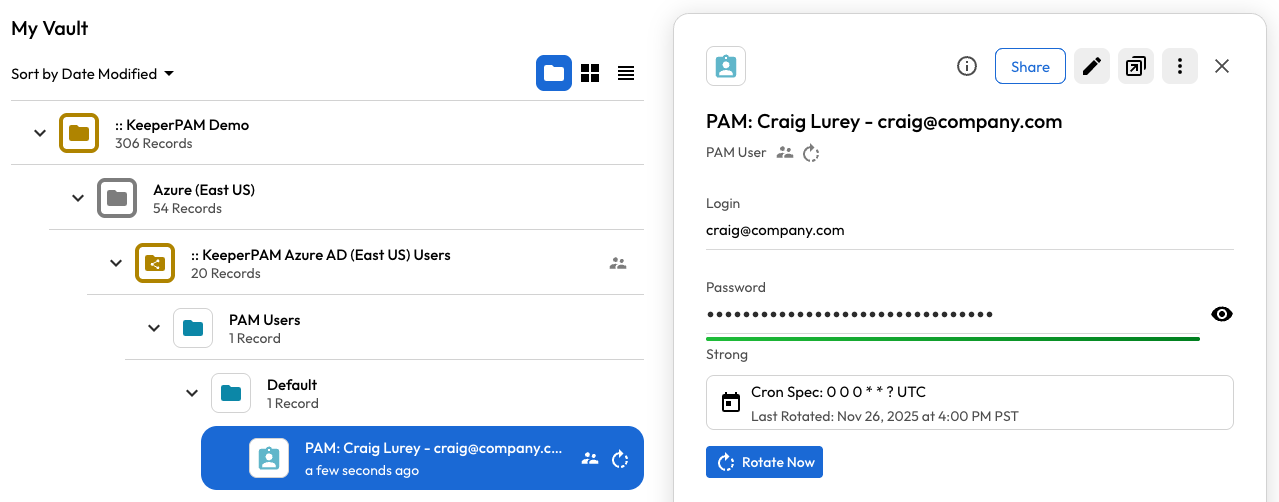
As a result, the PAM User record is created in the vault, rotated in the target directory and sent to the recipient as a one-time share that expires in 7 days.

<figure><img src="https://762006384-files.gitbook.io/~/files/v0/b/gitbook-x-prod.appspot.com/o/spaces%2F-MJXOXEifAmpyvNVL1to%2Fuploads%2FFkIJquNDymkFn89rrNQt%2FScreenshot%202025-11-26%20at%204.35.34%E2%80%AFPM.png?alt=media&#x26;token=4672a1e1-188a-4ded-a2e5-8c656561302f" alt=""><figcaption></figcaption></figure>

#### Onboard Existing Account with Bring-Your-Own-Password

Onboards an Active Directory account that already exists in the target directory, using its current password. Commander stores the password in the vault and configures on-demand rotation, but does *not* touch AD during provisioning. When the operator clicks **Rotate Now**, Commander generates a fresh password and pushes it to the existing AD account.

```shellscript
user:
  first_name: Service
  last_name: Account
  personal_email: ops@company.com
  department: Infrastructure

account:
  username: svc-existing
  existing_password: "CurrentPasswordOnTargetAccount!"
  distinguished_name: "CN=svc-existing,OU=Service,DC=company,DC=com"

rotation:
  on_demand: true
  password_complexity: "32,5,5,5,5"
  rotate_on_provision: false

email:
  config_name: "Company-Mail-Server"
  send_to: "ops@company.com"
```

Execution:

```shellscript
My Vault> credential-provision -c boj-GDQmTV-VGgBC3VRsow --config byo-onboard.yaml --output json
{
  "success": true,
  "pam_user_uid": "pv2tDoPpCpqi3LTydG0igA",
  "username": "svc-existing",
  "employee_name": "Service Account",
  "rotation_status": "on_demand",
  "message": "Credential provisioning complete"
}
```

#### Record Creation Only (No Delivery)

Creates a PAM User record with rotation configured, but does not share or email the credential. An admin can share the record manually later.

```shellscript
user:
  first_name: System
  last_name: Account
  personal_email: admin@company.com

account:
  username: svc-backup

rotation:
  schedule: "0 0 0 1 * ?"
  password_complexity: "64,10,10,10,10"
```

Execution:

```shellscript
My Vault> credential-provision -c boj-GDQmTV-VGgBC3VRsow --config test.yaml
Loading configuration from: test.yaml
✅ Configuration validated
✅ PAM User record created: k92IrWpHEfL1xnaEgeww7g
Selected 1 PAM record(s) for rotation
✅ Rotation configured
✅ Password rotation submitted
✅ Record created (no delivery configured)
```

JSON Output (Service Mode)

```json
{
  "success": true,
  "pam_user_uid": "g28IrIrHEfL1xnaEgeww7g",
  "username": "jdoe.adm",
  "employee_name": "John Doe",
  "rotation_status": "synced",
  "share_status": "shared",
  "shared_to": "john.doe@company.com",
  "message": "Credential provisioning complete"
}
```

#### Scheduled Rotation, Skip the Provisioning-Time Rotation

Creates the account with a Commander-generated password and configures cron-based rotation, but does *not* fire an immediate rotation at provisioning. The first rotation will happen at the next scheduled cron tick.

```shellscript
user:
  first_name: System
  last_name: Service
  personal_email: ops@company.com

account:
  username: svc-staged
  distinguished_name: "CN=svc-staged,CN=Users,DC=company,DC=com"

rotation:
  schedule: "0 0 3 1 * ?"          # First of every month at 3 AM UTC
  password_complexity: "32,5,5,5,5"
  rotate_on_provision: false        # NEW: skip immediate rotation; let cron handle it
```

#### Email Template

The recipient will receive an email containing an encrypted [one-time share](/enterprise-guide/sharing/one-time-share.md) link.

<figure><img src="https://762006384-files.gitbook.io/~/files/v0/b/gitbook-x-prod.appspot.com/o/spaces%2F-MJXOXEifAmpyvNVL1to%2Fuploads%2FGYqh0ClUXQftABeFhC2D%2FScreenshot%202025-11-26%20at%204.24.12%E2%80%AFPM.png?alt=media&#x26;token=3cf811ec-f776-4b26-b269-99e5e4f6f90a" alt=""><figcaption></figcaption></figure>

When the user clicks "View Credentials", they are able to decrypt and view the credentials.

<figure><img src="https://762006384-files.gitbook.io/~/files/v0/b/gitbook-x-prod.appspot.com/o/spaces%2F-MJXOXEifAmpyvNVL1to%2Fuploads%2Ftw6YnWDypryKvozN2QT2%2Fencrypted_share.gif?alt=media&#x26;token=0387bcb4-f9dd-45bf-bfec-53c9e7c7dc74" alt=""><figcaption></figcaption></figure>

### AD User Creation

When `directory_uid` and `distinguished_name` are provided in the account section, the command creates the user in Active Directory before creating the PAM User record in Keeper.

**Requirements:**

* **Gateway v1.8.0+** — AD user creation requires Gateway version 1.8.0 or later. The command will check the Gateway version and skip AD operations with a warning if the Gateway is below this version.
* A `pamDirectory` record with `directoryType=ad` must exist in the Gateway's shared folder
* The `pamDirectory` record must have admin credentials with permission to create users in the target OU
* The `directory_uid` field must reference this `pamDirectory` record
* `ad_groups` requires `directory_uid` to be set — the Gateway needs the PAM Directory record to know which AD to connect to for group operations
* AD group DNs must be full distinguished names (e.g., `CN=Group-Name,CN=Users,DC=domain,DC=com`)

### System-Specific Requirements

**Active Directory -** Distinguished Name is REQUIRED for multi-OU environments. Without it, rotation may fail if multiple users have the same username in different OUs.

**Azure AD -** Username MUST be in email format: `user@domain.com` OR `DOMAIN\user`

**AWS IAM** - Just use a plain username

### Related Commands

* [`pam`](/keeperpam/commander-cli/command-reference/keeperpam-commands.md) - PAM subsystem management
* [`email-config`](/keeperpam/commander-cli/command-reference/email-configuration-commands.md) - Email configuration
* [`sharing`](/keeperpam/commander-cli/command-reference/sharing-commands.md#sharing-commands) - Sharing commands
* [`service-create`](/keeperpam/commander-cli/service-mode-rest-api.md) - Create Commander Service Mode
* [`service-start`](/keeperpam/commander-cli/service-mode-rest-api.md) - Start Commander Service Mode


---

# Agent Instructions: Querying This Documentation

If you need additional information that is not directly available in this page, you can query the documentation dynamically by asking a question.

Perform an HTTP GET request on the current page URL with the `ask` query parameter:

```
GET https://docs.keeper.io/keeperpam/commander-cli/command-reference/automation-commands.md?ask=<question>
```

The question should be specific, self-contained, and written in natural language.
The response will contain a direct answer to the question and relevant excerpts and sources from the documentation.

Use this mechanism when the answer is not explicitly present in the current page, you need clarification or additional context, or you want to retrieve related documentation sections.
