# PostgreSQLプラグイン

{% hint style="warning" %}
パスワードのローテーションには、KeeperPAMによるゼロトラスト方式もあります。ほとんどの用途では、そちらの利用を推奨します。詳細は以下をご参照ください。

* [KeeperPAMを使用したパスワードローテーション](/keeperpam/jp/secrets-manager/password-rotation.md)
* [コマンダーのKeeperPAMコマンド](/keeperpam/jp/commander-cli/command-reference/keeperpam-commands.md)
  {% endhint %}

このプラグインを使用すると、PostgreSQLサーバーのユーザーのパスワードをローテーションできます

## 前提条件

#### psycopg2-binaryのインストール

```
pip3 install psycopg2-binary
```

## ローテーション用のレコードを準備

### ローテーション用のレコードを作成

ローテーションは、従来のレコードにもタイプ指定されたレコードにも対応しています。 タイプ指定されたレコードを使用する場合は、「ログイン」タイプのフィールドが必要です。 ローテーションの種類に応じて、その他のフィールドを追加することもできます。 以下の手順をご参照ください。

{% hint style="info" %}
従来のレコードとタイプ指定のあるレコードの詳細については、[トラブルシューティング](/keeperpam/jp/commander-cli/troubleshooting-commander-cli.md#typed-vs-untyped-records-v3-vs-v2)をご参照ください。
{% endhint %}

### PostgreSQLのログイン名とパスワードを設定

**Keeperのレコードの「ログイン」フィールドにPostgreSQLのログイン名を入力**

<figure><img src="https://859776093-files.gitbook.io/~/files/v0/b/gitbook-x-prod.appspot.com/o/spaces%2FPL6k1aGsLiFiiJ3Y7zCl%2Fuploads%2FWiAMy3MlY5ISlp7i9NxB%2Fimage.png?alt=media&#x26;token=e5d046d3-8628-4d34-9c6e-8825746de67d" alt=""><figcaption><p>コマンダーは、ログインとパスワードを使用してPostgreSQLアカウントにログインします</p></figcaption></figure>

### ホスト名とポートを設定

<figure><img src="https://859776093-files.gitbook.io/~/files/v0/b/gitbook-x-prod.appspot.com/o/spaces%2FPL6k1aGsLiFiiJ3Y7zCl%2Fuploads%2FNFGzIIqtYPWCiTs2RACm%2Fimage.png?alt=media&#x26;token=55482835-ccd7-4913-aa4b-d884782ab83a" alt=""><figcaption></figcaption></figure>

タイプ指定されていないレコードを使用する場合は、ホストとポートをカスタムフィールドに設定できます。以下をご参照ください。

{% hint style="info" %}
ローテーションのプラグインが指定されていない場合、コマンダーはポート番号またはホストのプレフィックスで使用するローテーションを推測します。 ポート5432または"postgresql://"で始まるホスト名がPostgreSQLのローテーションを使用します
{% endhint %}

### データベース名を入力

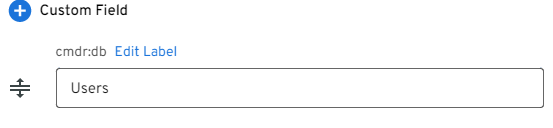
「cmdr:db」というラベルのレコードにカスタムフィールドを追加し、使用するデータベースの名前をそのフィールドに入力します。

<figure><img src="https://859776093-files.gitbook.io/~/files/v0/b/gitbook-x-prod.appspot.com/o/spaces%2FPL6k1aGsLiFiiJ3Y7zCl%2Fuploads%2FqK5Id5ekTHw7K16MzjOo%2Fimage.png?alt=media&#x26;token=2d1f7529-88a7-4d0a-879c-ba0ed58bd322" alt=""><figcaption></figcaption></figure>

### オプションのレコードフィールド

これらのフィールドを追加すると、ローテーションに影響する場合があります

<table><thead><tr><th width="157.33333333333334">ラベル</th><th width="195">値</th><th>コメント</th></tr></thead><tbody><tr><td>cmdr:plugin</td><td>postgresql</td><td>(任意) PostgreSQLローテーションを使用するようにコマンダーに指示します。 これは、レコードに設定するか、またはローテーションコマンドに指定する必要があります</td></tr><tr><td>cmdr:host</td><td></td><td>PostgreSQLサーバーのホスト名。従来のレコードにはこのカスタムフィールドが必要で、タイプ指定されたレコードはホスト名フィールドとポートフィールドを使用できます。</td></tr><tr><td>cmdr:rules</td><td><p>「大文字の数, 小文字の数, 数字の数, 記号の数」</p><p>(たとえば、4,6,3,8)</p></td><td>(任意) パスワード生成ルール</td></tr><tr><td>cmdr:port</td><td></td><td>(任意) PostgreSQLポート。 省略した場合は5432と見なされます</td></tr></tbody></table>

## Keeperコマンダーの`connect`コマンドとの連携

| カスタムフィールド名                 | カスタムフィールド値                                                                                         |
| -------------------------- | -------------------------------------------------------------------------------------------------- |
| connect:xxx:env:PGPASSWORD | ${password}                                                                                        |
| connect:xxx                | psql --host=${cmdr:host} --port=${cmdr:port} --username=${login} --dbname=${cmdr:db} --no-password |

このユースケースのKeeperボルトのレコードのスクリーンショットを以下に示します。

<figure><img src="https://859776093-files.gitbook.io/~/files/v0/b/gitbook-x-prod.appspot.com/o/spaces%2FPL6k1aGsLiFiiJ3Y7zCl%2Fuploads%2FeRejIdFzmSIiGB3lk6Bw%2Fimage.png?alt=media&#x26;token=f486b8c3-447d-4ba1-b0ee-669ce9af9b26" alt=""><figcaption><p>接続用のKeeperのレコードの設定</p></figcaption></figure>

{% hint style="info" %}
`connect`コマンドの詳細については、[こちらのページ](/keeperpam/jp/commander-cli/command-reference/connection-commands/connection-to-hosts.md)をご参照ください。
{% endhint %}


---

# Agent Instructions: Querying This Documentation

If you need additional information that is not directly available in this page, you can query the documentation dynamically by asking a question.

Perform an HTTP GET request on the current page URL with the `ask` query parameter:

```
GET https://docs.keeper.io/keeperpam/jp/commander-cli/command-reference/plugins/postgresql-plugin.md?ask=<question>
```

The question should be specific, self-contained, and written in natural language.
The response will contain a direct answer to the question and relevant excerpts and sources from the documentation.

Use this mechanism when the answer is not explicitly present in the current page, you need clarification or additional context, or you want to retrieve related documentation sections.