> For the complete documentation index, see [llms.txt](https://docs.keeper.io/llms.txt). Markdown versions of documentation pages are available by appending `.md` to page URLs; this page is available as [Markdown](https://docs.keeper.io/keeperpam/jp/endpoint-privilege-manager/policies/policy-types/least-privilege-policy-type.md).
# 最小権限ポリシー
Keeper最小権限ポリシーの設定と利用
## 概要
Keeperは最小権限ポリシーを通じて、対象エンドポイント上の標準ユーザーからローカル管理者権限を取り除きます。Windowsデバイスでは、組み込みの管理者アカウントやルートアカウントについては、管理者権限を取り除きません。詳細については[保護対象管理者の除外リスト](#protected-administrators-exclusion-list)をご参照ください。
コマンド単位の細かな制限を設けることで、昇格は承認済みのコマンドや運用上許可された範囲に限定できます。また、許可されたアプリケーションの利用であっても、不必要な権限の拡大を防ぎやすくなります。
## ポリシー間の連携と適用モデル
Keeperでは、最小権限ポリシーをアプリケーションの許可リスト (AllowList) および拒否リスト (DenyList) の制御と組み合わせて運用できます。デフォルト拒否の方針を採っている場合は、最小権限の適用により、明示的に許可したアプリケーションの利用と承認済みの昇格操作のみが許可されます。
## 最小権限の有効化前
最小権限は、対象ユーザーがマシン上で実行できる操作を直接変えるため、KEPMのポリシータイプの中でも影響が最も大きくなる可能性があります。**\[適用]** に切り替える前に、以下を確認してください。
* 特権昇格ポリシーが構成され、テスト済みであること。権限を下げたあとも、ユーザーが必要な操作 (承認済みソフトウェアのインストール、管理ツールの実行など) を行える、統制された経路が残るようにします。
* 除外リストを確定すること。ITスタッフ、ブレークグラスアカウント、常時の管理者権限が必要なサービスアカウントなど。以下の除外リストのセクションをご参照ください。
* 想定外の制限に遭遇したユーザー向けに、ヘルプデスクへのエスカレーション経路があること。
* 組織全体へ展開する前に、影響の小さい非重要な展開グループで試験的に適用すること。
段階的な展開手順の全体像については、[段階的ロールアウトの計画](/keeperpam/jp/endpoint-privilege-manager/setup/policy-phased-rollout-planning.md)をご参照ください。
## 最小権限ポリシーの有効化
Keeper管理コンソールで、**\[エンドポイント特権マネージャー]** → **\[ポリシー]** に移動し、新しいポリシーを作成します。ポリシータイプから **\[最小権限]** を選び、**\[適用]** を指定します。
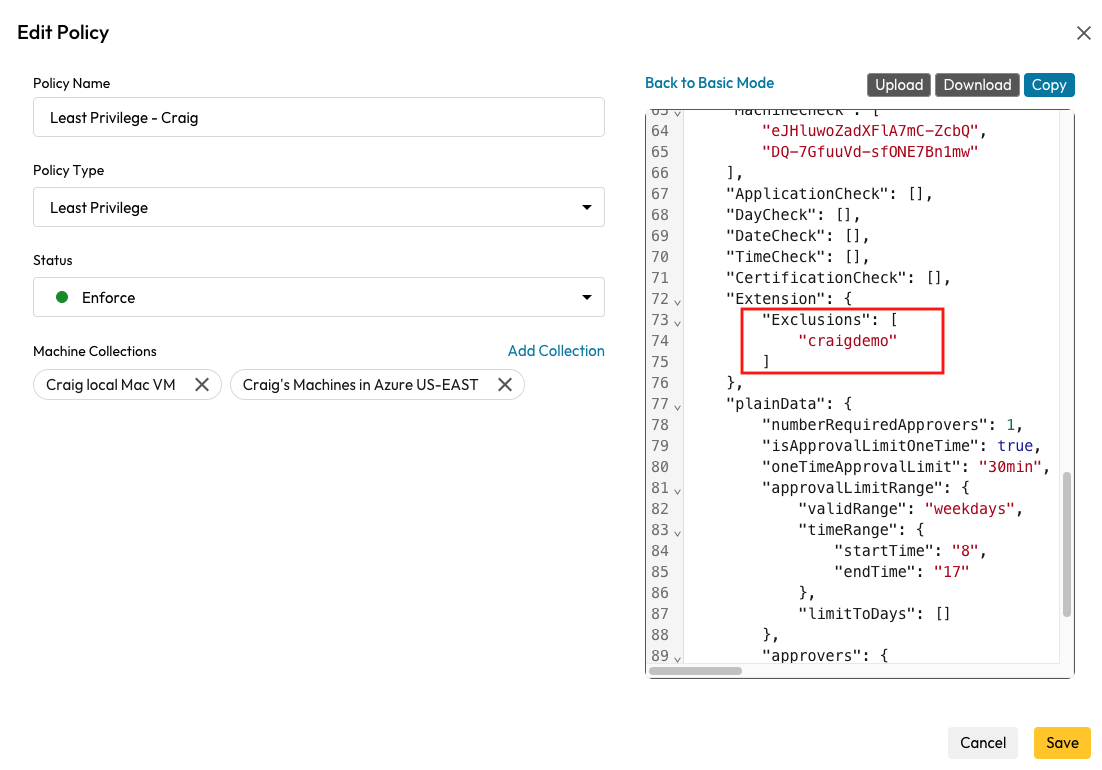
**\[詳細設定]** を開き、Keeperの管理対象外としたいローカル管理者向けの除外を設定します。
## 除外リスト
最小権限ポリシーが適用されると、Keeperは除外リストに含まれていないすべてのユーザーからローカル管理者権限を取り除きます。このリストを定義するには、ポリシー編集画面の **\[詳細設定]** を使用します。
{% hint style="danger" %}
デフォルトの管理者ユーザー名を必ず除外リストに追加してください。追加していない場合、ポリシー適用後にそのユーザーは管理者権限を失います。
{% endhint %}
修正する箇所は以下のとおりです。
```
"CertificationCheck": [],
"Extension": {
"Exclusions": [
"your_username_to_exclude"
]
},
```
***
## 保護対象管理者の除外リスト
Keeperは、SID ([セキュリティ識別子](https://learn.microsoft.com/en-us/windows-server/identity/ad-ds/manage/understand-security-identifiers)) のパターンマッチングと拡張検出により、以下の管理者アカウントを既定で保護します。これにより、ルートアカウントに対して最小権限を一方的に適用してしまう事態を防ぎます。
#### 1. 既知のSIDパターン
* `S-1-5-32-544` – 組み込みの管理者グループ
* `S-1-5-18` – SYSTEMアカウント
* `S-1-5-19` – LOCAL SERVICE
* `S-1-5-20` – NETWORK SERVICE
#### 2. ドメイン管理者SIDパターン
* `S-1-5-21-*-512` – ドメイン管理者 (任意のドメイン)
* `S-1-5-21-*-519` – エンタープライズ管理者 (フォレストのルートドメイン)
* `S-1-5-21-*-518` – スキーマ管理者 (フォレストのルートドメイン)
* `S-1-5-21-*-500` – 組み込みの管理者アカウント (任意のドメイン)
#### 追加の保護対象アカウント
* `KeeperUserSession` – 常に保護対象 (サービスアカウント)
* `Built-in Administrator` – 常に保護対象 (名前を変更していても対象から外れません)
#### Linux / macOS の保護対象アカウント
* LinuxおよびmacOSの `root` ユーザー
---
# Agent Instructions
This documentation is published with GitBook. GitBook is the documentation platform designed so that both humans and AI agents can read, navigate, and reason over technical content effectively. Learn more at gitbook.com.
## Querying This Documentation
If you need additional information that is not directly available in this page, you can query the documentation by asking a question.
Perform an HTTP GET request on the following URL with the `ask` and `goal` query parameters:
```
GET https://docs.keeper.io/keeperpam/jp/endpoint-privilege-manager/policies/policy-types/least-privilege-policy-type.md?ask=&goal=
```
`ask` is the immediate question: it should be specific, self-contained, and written in natural language.
`goal` is what the user is ultimately trying to achieve, the reason they need the answer. Sharing it helps GitBook give you a better, more relevant answer. A goal is most helpful when it describes the outcome the user wants rather than restating the question. For example, with `ask=how do I create an API token`, a goal like `automate deployments from our CI pipeline` lets GitBook tailor the answer to that use case.
The response will contain a direct answer to the question and relevant excerpts and sources from the documentation.
Use this mechanism when the answer is not explicitly present in the current page, you need clarification or additional context, or you want to retrieve related documentation sections.
-ja.png?alt=media)
.png?alt=media)