> For the complete documentation index, see [llms.txt](https://docs.keeper.io/llms.txt). Markdown versions of documentation pages are available by appending `.md` to page URLs; this page is available as [Markdown](https://docs.keeper.io/keeperpam/jp/privileged-access-manager/just-in-time-access-jit/keeper-privileged-cloud/configure-and-elevate-access-for-a-pam-machine.md).
# 管理対象マシンへのJITアクセス構成
管理対象のWindowsまたはLinuxサーバー向けのJIT昇格および承認設定
### 概要
本ページでは、構成済みIDプロバイダ経由で、管理対象のWindowsまたはLinuxサーバーへジャストインタイム昇格アクセスを付与する方法を取り扱います。
管理対象マシンリソースを共有し、JITおよびワークフロー設定を構成すると、ユーザーはアクセスを要求できます。承認されたユーザーは、承認された時間枠の間、グループベースの一時昇格を受け取ります。その後、常設特権なしでサーバーを起動できます。
サーバーまたはVMへのアクセスが承認、時間制限、完全な監査の対象である必要がある場合に、この構成を使用します。
### 管理対象マシンリソースの構成と共有
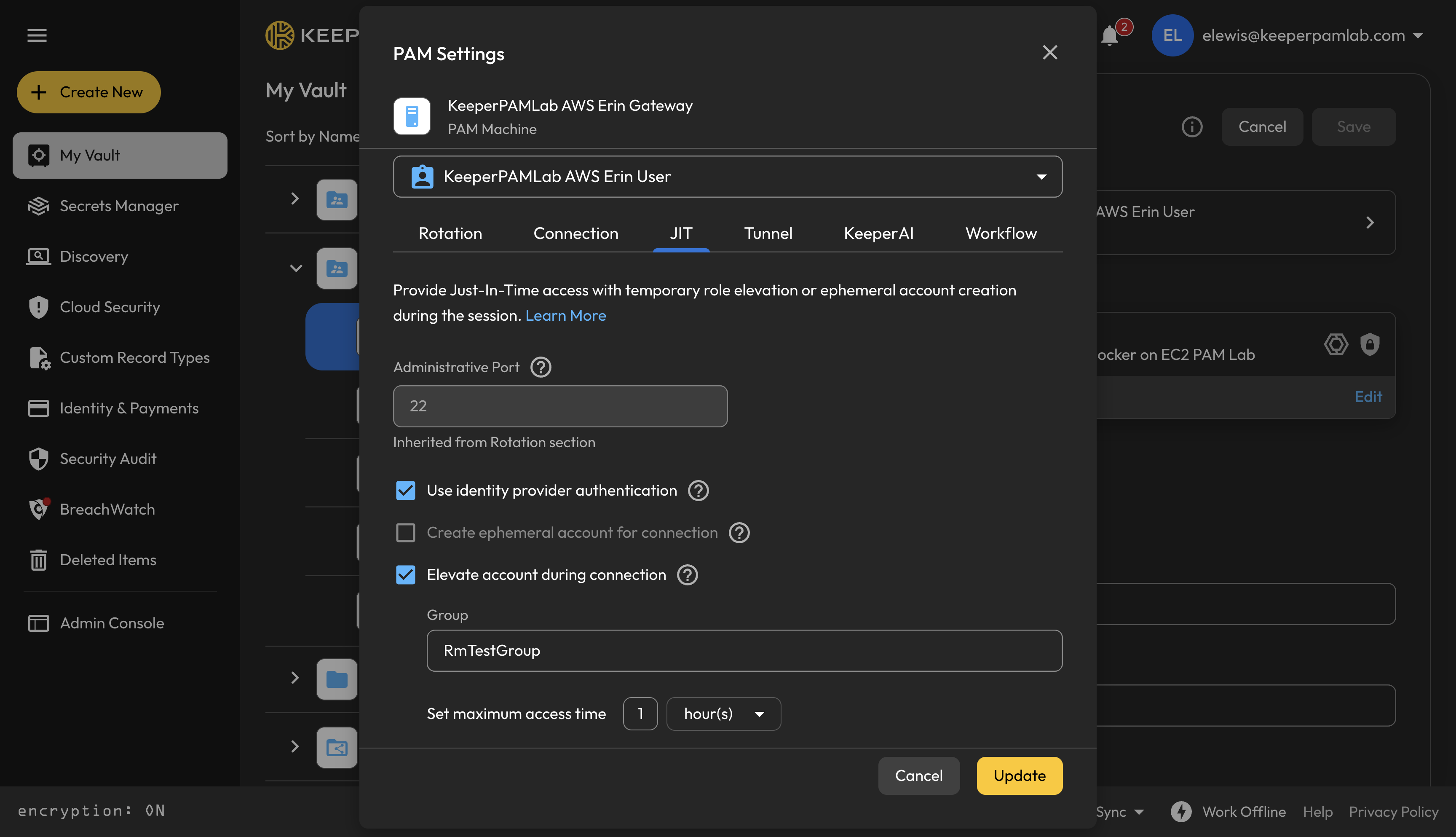
以下の例では、管理対象マシンリソースがIDプロバイダ経由で昇格アクセスを付与します。**PAM設定**の **\[編集]** を選択して、そのKeeperレコードのワークフローとJITを構成します。
詳細な構成情報は[SSH接続](https://docs.keeper.io/keeperpam/jp/privileged-access-manager/connections/session-protocols/ssh-connections.md)をご参照ください。
#### **JIT設定**
JIT設定では、承認後にユーザーへアクセスを付与する方法を定義します。以下の例では、管理対象マシンリソースがグループベースの特権昇格を使用しています。サーバーがIDプロバイダ経由で認証する場合は、IDプロバイダ認証を有効にします。グループ名は、IDプロバイダ内の対応するグループと一致している必要があります。承認後、ユーザーは構成された期間の間、一時的な昇格を受け取ります。現時点では、IDプロバイダ昇格によるロールベースの昇格には未対応です。
#### **ワークフロー設定**
ワークフロー設定では、管理対象マシンリソースへのアクセスに対する承認制御を定義します。以下の例では、アクセスに承認が必要で、アクセス時間は1時間に制限されています。アクセス時間枠が終了すると、アクティブなセッションは閉じられ、Keeperが一時的な昇格を削除します。各要求に理由とチケット番号を必須にすることもできます。
詳細は[ワークフロー](https://docs.keeper.io/keeperpam/jp/privileged-access-manager/just-in-time-access-jit/workflow.md)をご参照ください。
### アクセス要求
管理対象マシンリソースを共有し、JITおよびワークフロー設定を構成すると、ユーザーはKeeperボルトまたはコマンダーからアクセスを要求できます。承認後は、許可されたアクセス時間枠の間、サーバーを起動できます。
ワークフローの全体像については、[アクセスワークフロー](https://docs.keeper.io/keeperpam/jp/privileged-access-manager/just-in-time-access-jit/keeper-privileged-cloud.md#access-workflow)をご参照ください。
---
# Agent Instructions
This documentation is published with GitBook. GitBook is the documentation platform designed so that both humans and AI agents can read, navigate, and reason over technical content effectively. Learn more at gitbook.com.
## Querying This Documentation
If you need additional information that is not directly available in this page, you can query the documentation by asking a question.
Perform an HTTP GET request on the following URL with the `ask` and `goal` query parameters:
```
GET https://docs.keeper.io/keeperpam/jp/privileged-access-manager/just-in-time-access-jit/keeper-privileged-cloud/configure-and-elevate-access-for-a-pam-machine.md?ask=&goal=
```
`ask` is the immediate question: it should be specific, self-contained, and written in natural language.
`goal` is what the user is ultimately trying to achieve, the reason they need the answer. Sharing it helps GitBook give you a better, more relevant answer. A goal is most helpful when it describes the outcome the user wants rather than restating the question. For example, with `ask=how do I create an API token`, a goal like `automate deployments from our CI pipeline` lets GitBook tailor the answer to that use case.
The response will contain a direct answer to the question and relevant excerpts and sources from the documentation.
Use this mechanism when the answer is not explicitly present in the current page, you need clarification or additional context, or you want to retrieve related documentation sections.