# Rotation Overview

<figure><img src="https://762006384-files.gitbook.io/~/files/v0/b/gitbook-x-prod.appspot.com/o/spaces%2F-MJXOXEifAmpyvNVL1to%2Fuploads%2FJJ1EmrgIBh8GbZqCUjfj%2Fgetting%20started.jpg?alt=media&#x26;token=c04eaeb2-85cc-45a2-a439-9bd7376d83ee" alt=""><figcaption></figcaption></figure>

## Prerequisites

An active license is required in order to use the features available with KeeperPAM. This license is available for both business and enterprise customers.

* [KeeperPAM Homepage](https://www.keepersecurity.com/privileged-access-management/)
* [Request a Demo](https://www.keepersecurity.com/contact.html?t=b\&r=sales)
* [Contact Support](https://www.keepersecurity.com/support.html)

Prior to setting up password rotation, make sure to have the following set up:

* Learn about KeeperPAM in the [Getting Started](https://docs.keeper.io/en/keeperpam/privileged-access-manager/getting-started) section
* [Enable Enforcement Policies](#enable-enforcement-policies)
* [Deploy a Keeper Gateway](#deploy-a-keeper-gateway)
* [Create a PAM User record](#create-a-pam-user-record)
* [Create a PAM Resource](#create-a-pam-resource)
* [Configure rotation settings](#configure-rotation-settings)

### Enable Enforcement Policies

Enforcement policies for KeeperPAM password rotation are managed in the Keeper Admin Console under **Admin** > **Roles** > **Enforcement Policies** > **Privileged Access Manager**.

<figure><img src="https://762006384-files.gitbook.io/~/files/v0/b/gitbook-x-prod.appspot.com/o/spaces%2F-MJXOXEifAmpyvNVL1to%2Fuploads%2FWjChJvfoO14GjFwRqbVj%2FScreenshot%202025-01-21%20at%2011.50.51%E2%80%AFAM.png?alt=media&#x26;token=979ba299-1710-4c92-adfc-36437e9631ce" alt=""><figcaption><p>KeeperPAM Enforcement Policies</p></figcaption></figure>

For Password Rotation capabilities, enable the necessary policies:

<table><thead><tr><th>Enforcement Policy</th><th>Commander Enforcement</th><th>Definition</th></tr></thead><tbody><tr><td>Can create applications and manage secrets</td><td><pre><code>ALLOW_SECRETS_MANAGER
</code></pre></td><td>Allow users to create a Secrets Manager Application</td></tr><tr><td>Can create, deploy and manage Keeper Gateways</td><td><pre><code>ALLOW_PAM_GATEWAY
</code></pre></td><td>Allow users to deploy and manage a Keeper Gateway</td></tr><tr><td>Can configure rotation settings</td><td><pre><code>ALLOW_PAM_ROTATION
</code></pre></td><td>Allow users to set up rotation on a PAM User record</td></tr><tr><td>Can configure rotation settings (legacy setting)</td><td><pre><code>ALLOW_CONFIGURE_ROTATION_SETTINGS
</code></pre></td><td>This should be set the same as ALLOW_PAM_ROTATION</td></tr><tr><td>Can rotate credentials</td><td><pre><code>ALLOW_ROTATE_CREDENTIALS
</code></pre></td><td>All users to perform a password rotation action</td></tr></tbody></table>

Rotation can also be enabled on the [Keeper Commander CLI](https://docs.keeper.io/en/keeperpam/commander-cli/command-reference/secrets-manager-commands#overview) using the `enterprise-role` command:

<pre data-overflow="wrap"><code>enterprise-role "Keeper Administrator" --enforcement "ALLOW_SECRETS_MANAGER":true
enterprise-role "Keeper Administrator" --enforcement "ALLOW_PAM_GATEWAY":true
<strong>enterprise-role "Keeper Administrator" --enforcement "ALLOW_PAM_ROTATION":true
</strong>enterprise-role "Keeper Administrator" --enforcement "ALLOW_CONFIGURE_ROTATION_SETTINGS":true
enterprise-role "Keeper Administrator" --enforcement "ALLOW_ROTATE_CREDENTIALS":true
</code></pre>

### Deploy a Keeper Gateway

If you haven't yet created a Keeper Gateway yet, a new Gateway deployment can be created by clicking on **Create New** > **Gateway** from the Web Vault or Desktop App (version 17.1 or newer). We have also posted a page describing how to create a sandbox environment in [just a few steps](https://docs.keeper.io/en/keeperpam/privileged-access-manager/quick-start-sandbox):

* [Quick Start: Sandbox](https://docs.keeper.io/en/keeperpam/privileged-access-manager/quick-start-sandbox)

<figure><img src="https://762006384-files.gitbook.io/~/files/v0/b/gitbook-x-prod.appspot.com/o/spaces%2F-MJXOXEifAmpyvNVL1to%2Fuploads%2FJqEuJZeecb5LfP3K7V6q%2FScreenshot%202025-01-23%20at%204.06.12%E2%80%AFPM.png?alt=media&#x26;token=744231d5-5291-4a04-8dd0-e76fd35aeedf" alt=""><figcaption><p>Deploy a Keeper Gateway</p></figcaption></figure>

### Create an Application

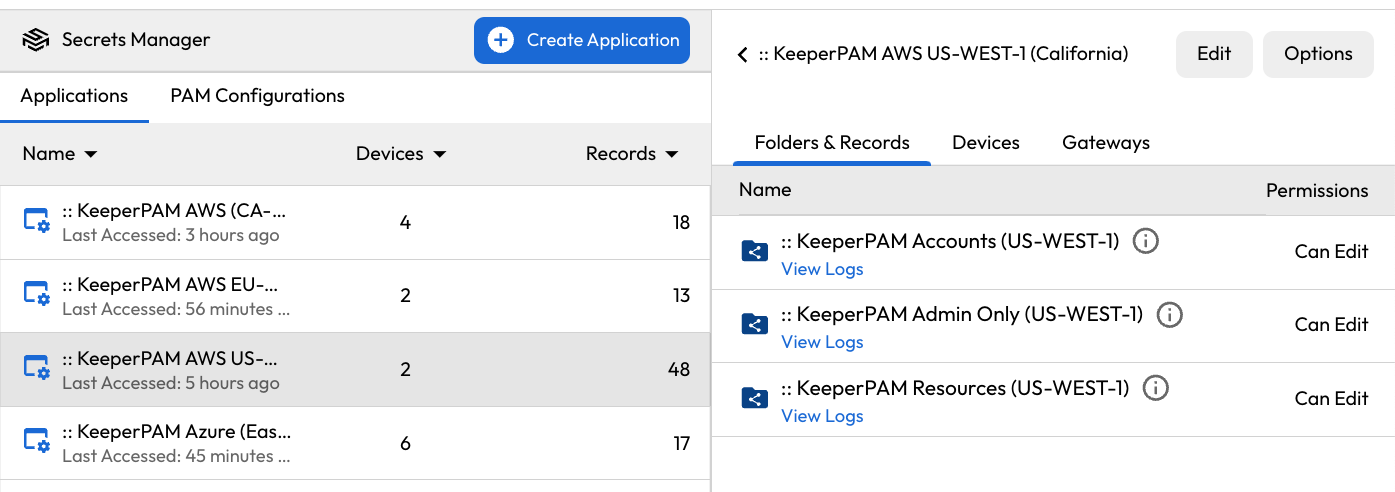
When you use the Gateway using the **Create New** > **Gateway** feature, Keeper will automatically create the Secrets Manager Application, Shared Folders and PAM Configuration. In the Secrets Manager section of the vault, you'll see the Application assigned to Shared Folders and also assigned to the Gateway.

<figure><img src="https://762006384-files.gitbook.io/~/files/v0/b/gitbook-x-prod.appspot.com/o/spaces%2F-MJXOXEifAmpyvNVL1to%2Fuploads%2Fr5CNpfdmi7982p2LLEPW%2FScreenshot%202025-01-23%20at%208.52.29%E2%80%AFPM.png?alt=media&#x26;token=ddfc8aa7-03d5-4b0e-85ae-790606fe1250" alt=""><figcaption><p>Application Setup</p></figcaption></figure>

<figure><img src="https://762006384-files.gitbook.io/~/files/v0/b/gitbook-x-prod.appspot.com/o/spaces%2F-MJXOXEifAmpyvNVL1to%2Fuploads%2Fxizqlyax5mqRDzXj3nzr%2FScreenshot%202025-01-23%20at%208.52.38%E2%80%AFPM.png?alt=media&#x26;token=8a93210b-b97c-4571-a2cb-81798746ce74" alt=""><figcaption><p>Application associated to Gateway</p></figcaption></figure>

### Create a PAM User record

A PAM user record holds a privileged account credential, password or private key. For steps on creating a PAM User, [follow this page](https://docs.keeper.io/en/keeperpam/privileged-access-manager/getting-started/pam-resources/pam-user). The example below shows a PAM User record for an admin password on a Windows server. The PAM User record is added to a Shared Folder containing user accounts.

<figure><img src="https://762006384-files.gitbook.io/~/files/v0/b/gitbook-x-prod.appspot.com/o/spaces%2F-MJXOXEifAmpyvNVL1to%2Fuploads%2FGCqcghltvhAORFknVdSp%2FScreenshot%202025-01-23%20at%204.11.48%E2%80%AFPM.png?alt=media&#x26;token=d1adef52-0c13-4184-9121-277a85720655" alt=""><figcaption><p>Creating a PAM User record</p></figcaption></figure>

### Create a PAM Resource

A PAM Resource represents a Machine, Database or Directory.

<figure><img src="https://762006384-files.gitbook.io/~/files/v0/b/gitbook-x-prod.appspot.com/o/spaces%2F-MJXOXEifAmpyvNVL1to%2Fuploads%2FR1hmpUel9ZXA5o7zGXdY%2FScreenshot%202025-01-23%20at%206.11.08%E2%80%AFPM.png?alt=media&#x26;token=f74953bc-6f1a-42ac-82c0-ee9795989670" alt=""><figcaption><p>Create new Machine, Database or Directory</p></figcaption></figure>

<figure><img src="https://762006384-files.gitbook.io/~/files/v0/b/gitbook-x-prod.appspot.com/o/spaces%2F-MJXOXEifAmpyvNVL1to%2Fuploads%2FFz0pYcGhsLK9lp2uwg3y%2FScreenshot%202025-01-23%20at%206.09.44%E2%80%AFPM.png?alt=media&#x26;token=22339c1c-868f-412b-b885-489af2921bca" alt=""><figcaption></figcaption></figure>

<figure><img src="https://762006384-files.gitbook.io/~/files/v0/b/gitbook-x-prod.appspot.com/o/spaces%2F-MJXOXEifAmpyvNVL1to%2Fuploads%2Fa5kba8hczTefC8VFsEO0%2FScreenshot%202025-01-23%20at%206.12.14%E2%80%AFPM.png?alt=media&#x26;token=9a1fb78e-a39a-4833-b67e-a307342b7c82" alt=""><figcaption></figcaption></figure>

### Configure rotation settings

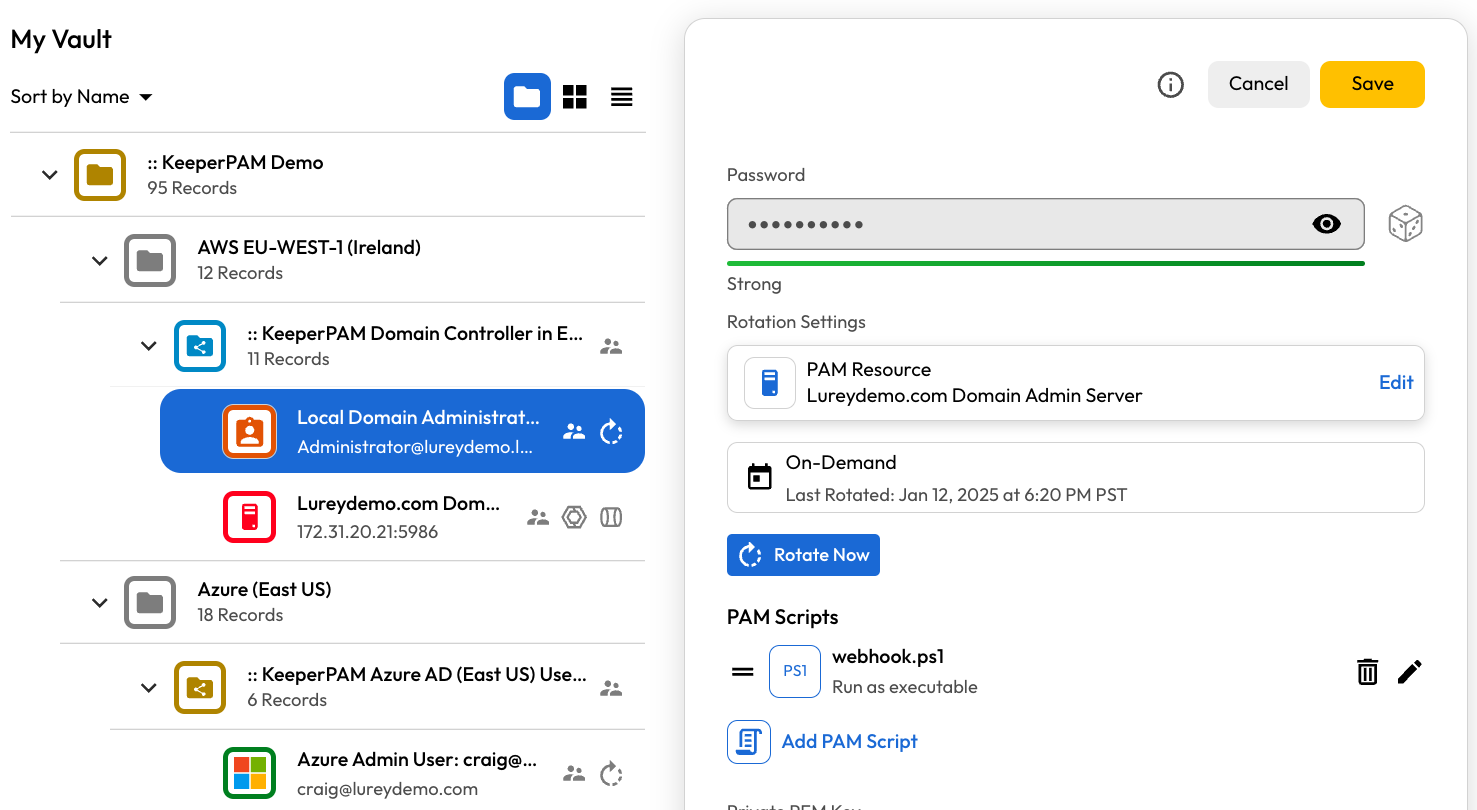
<figure><img src="https://762006384-files.gitbook.io/~/files/v0/b/gitbook-x-prod.appspot.com/o/spaces%2F-MJXOXEifAmpyvNVL1to%2Fuploads%2FOXi2mFqCpWzFOEFamNfS%2FScreenshot%202025-01-23%20at%204.33.26%E2%80%AFPM.png?alt=media&#x26;token=5fdba450-37b9-4cf8-9ecb-f9ce341948c3" alt=""><figcaption><p>PAM User record editing</p></figcaption></figure>

### Password Rotation Settings

<table><thead><tr><th>Field</th><th width="235">Description</th><th>Required</th></tr></thead><tbody><tr><td>Rotation Type</td><td>Specifies which type of rotation is being performed (and which protocol is utilized).</td><td><strong>Required</strong><br><br>"General", "IAM User" or "Run PAM Scripts Only". See below for details.</td></tr><tr><td>PAM Resource</td><td>For General rotation type, specifies the PAM Resource record which can provide the necessary privilege.<br><br>For IAM User rotation type, specifies the PAM Configuration utilizing cloud APIs.</td><td><strong>Required</strong> only for "General" and "IAM User" rotation types</td></tr><tr><td>Rotation Schedule</td><td>Rotation can be performed on-demand or on a specific schedule.</td><td>For advanced scheduling, see the <a href="https://github.com/Keeper-Security/gitbook-secrets-manager/blob/master/privileged-access-manager/references/cron-spec/README.md">cron spec</a>.</td></tr><tr><td>Password Complexity</td><td>Applies to password-based rotations, not PEM keys.</td><td>Select "Show More" to control special characters and symbols.</td></tr></tbody></table>

### Rotation Type

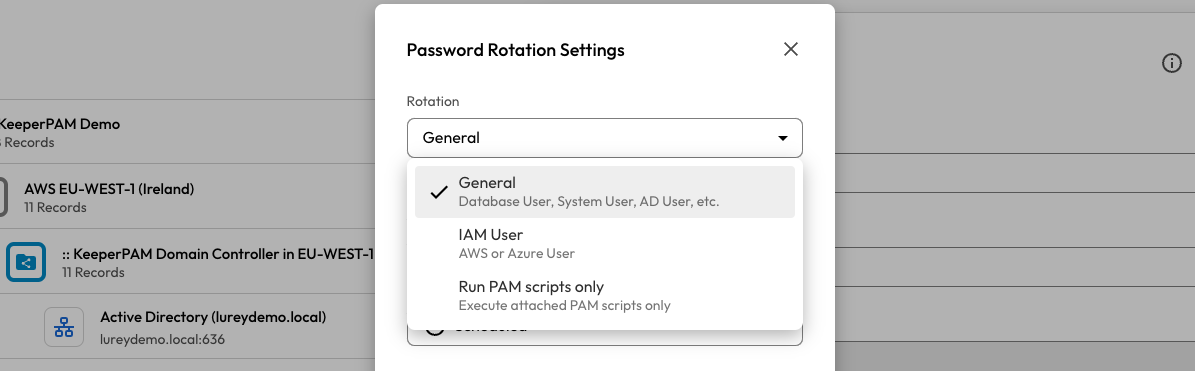
Keeper supports 3 different types of rotation:

* **General:** Uses native protocols for performing the rotation, such as LDAP, Databases, SSH keys, etc.
* **IAM User:** Uses the cloud-specific APIs for performing rotation, such as AWS IAM users, Azure managed resources, and Google Workspace principals. In this case, only the PAM Configuration is required since it contains the necessary credentials.
* **Run PAM scripts only:** Skips the standard rotation and only executes the attached PAM Scripts.

<figure><img src="https://762006384-files.gitbook.io/~/files/v0/b/gitbook-x-prod.appspot.com/o/spaces%2F-MJXOXEifAmpyvNVL1to%2Fuploads%2F5nWthY6PzkuyCPswOm1g%2FScreenshot%202025-01-14%20at%209.42.30%E2%80%AFAM.png?alt=media&#x26;token=b0fffa2c-42ee-4f11-97de-b37e14d56924" alt=""><figcaption><p>Password Rotation Settings</p></figcaption></figure>

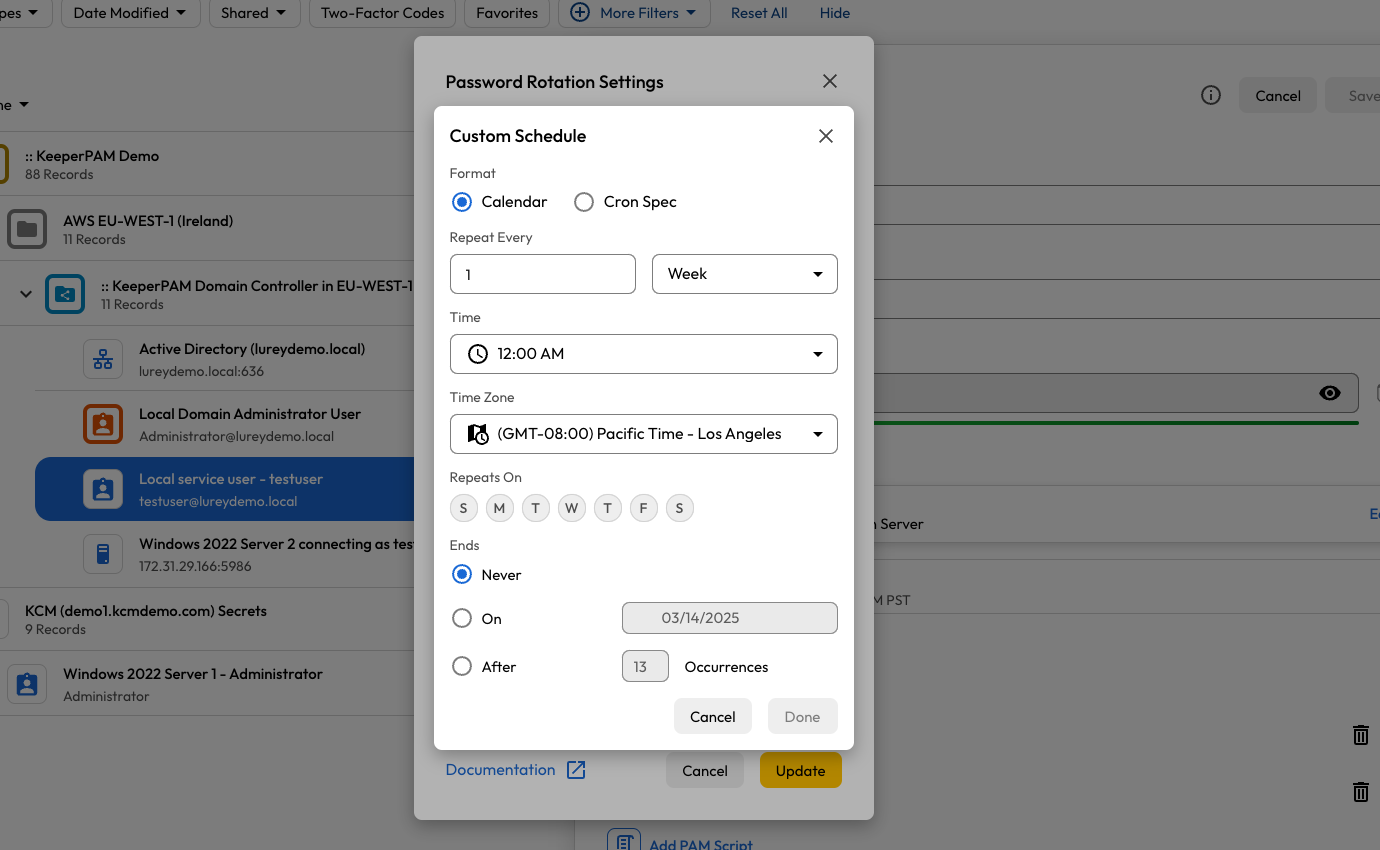
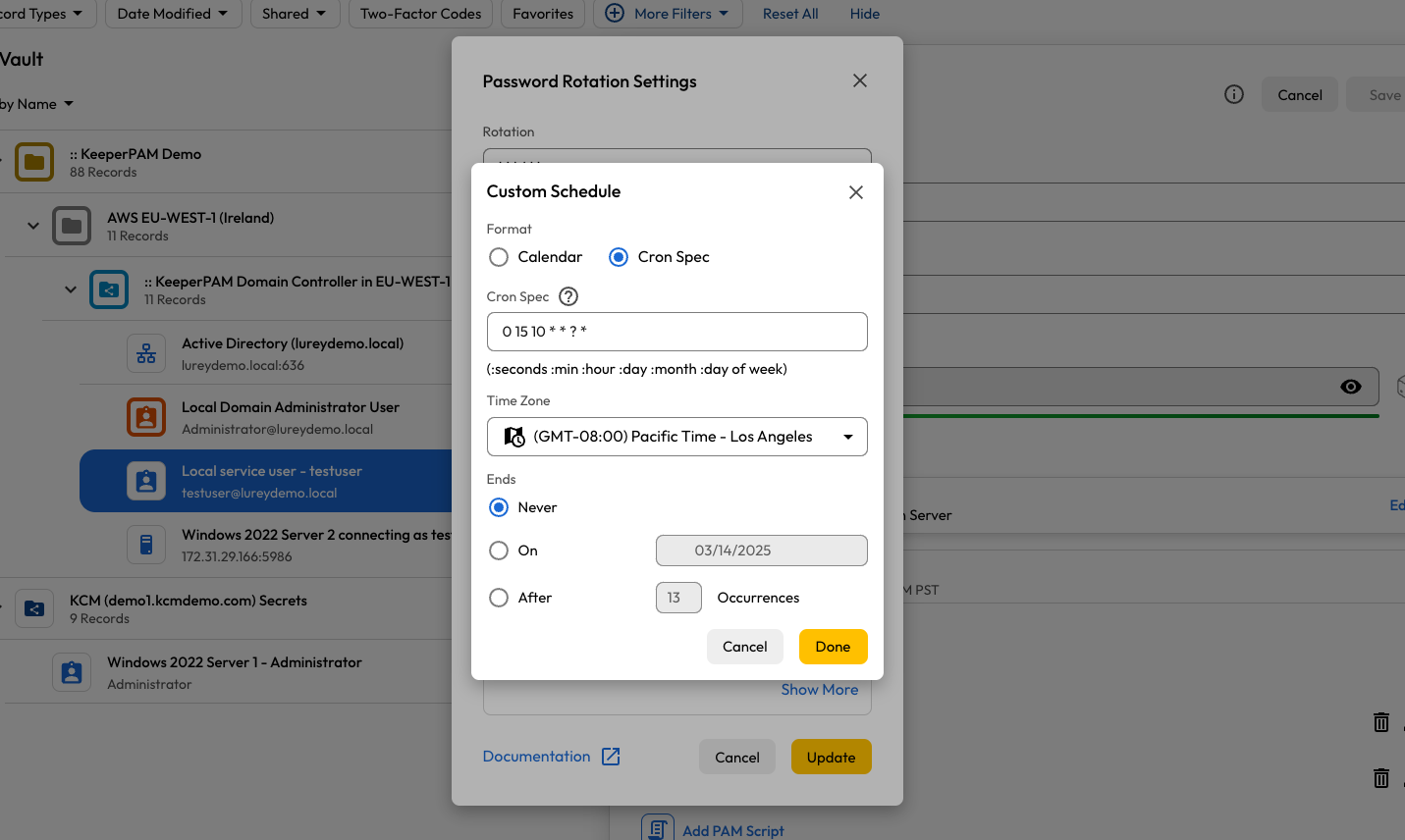
The rotation schedule can be set on a specific interval, or using a [cron spec](https://docs.keeper.io/en/keeperpam/privileged-access-manager/references/cron-spec).

<figure><img src="https://762006384-files.gitbook.io/~/files/v0/b/gitbook-x-prod.appspot.com/o/spaces%2F-MJXOXEifAmpyvNVL1to%2Fuploads%2FTmiv0hvl0miQxomi0CnG%2FScreenshot%202025-01-14%20at%209.50.46%E2%80%AFAM.png?alt=media&#x26;token=fd5381d6-f451-4f2a-8e46-c4cab48e3b47" alt=""><figcaption><p>Custom Schedule</p></figcaption></figure>

<figure><img src="https://762006384-files.gitbook.io/~/files/v0/b/gitbook-x-prod.appspot.com/o/spaces%2F-MJXOXEifAmpyvNVL1to%2Fuploads%2F0he1Hr0prQpo7N7GqIZ3%2FScreenshot%202025-01-14%20at%209.50.56%E2%80%AFAM.png?alt=media&#x26;token=fc6b40d7-0612-415d-b029-8df7d6ba3d1e" alt=""><figcaption><p>Calendar Settings</p></figcaption></figure>

<figure><img src="https://762006384-files.gitbook.io/~/files/v0/b/gitbook-x-prod.appspot.com/o/spaces%2F-MJXOXEifAmpyvNVL1to%2Fuploads%2F4y6jRZ4RfZ7fDm0KQN3Y%2FScreenshot%202025-01-14%20at%209.51.03%E2%80%AFAM.png?alt=media&#x26;token=b4e3104e-b14e-462d-84e2-2b19e946b9ed" alt=""><figcaption><p>Cron Spec</p></figcaption></figure>

### PAM Resource

To complete the Rotation setup, you need to select a resource, which depends on the rotation type.

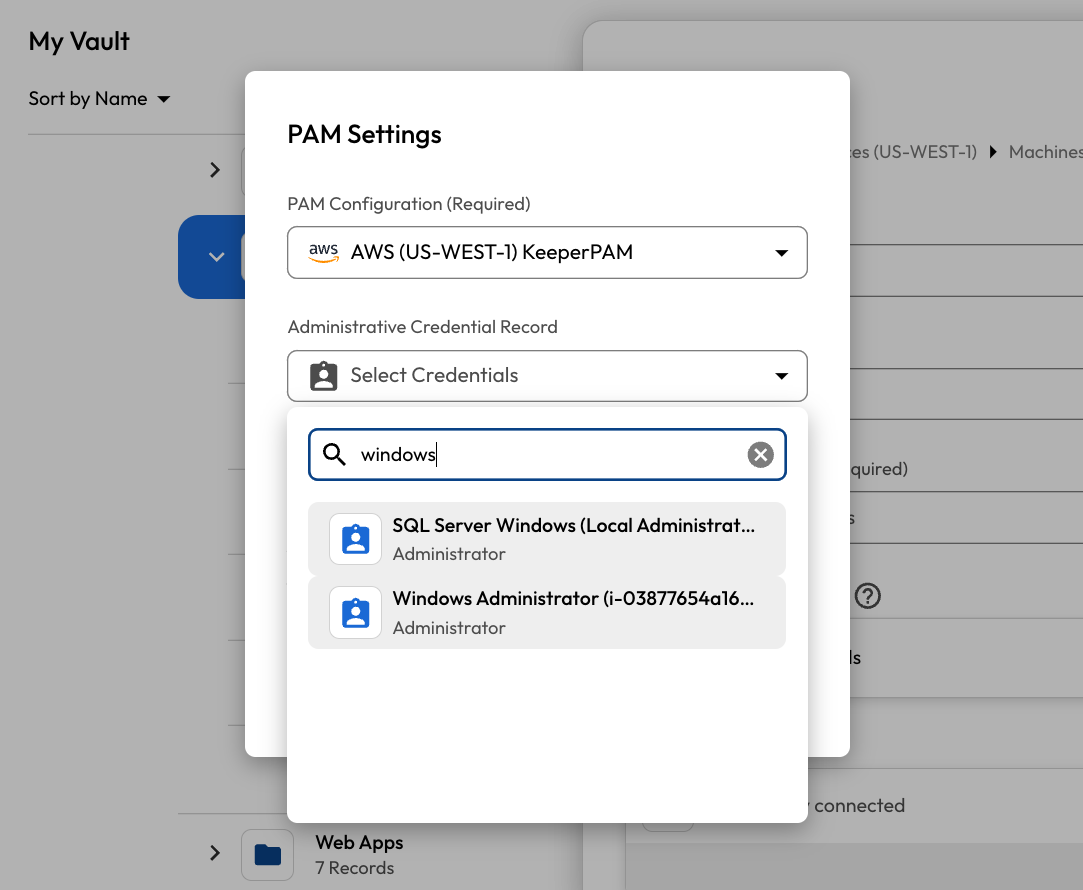
For a "General" rotation, the Keeper Gateway uses a native protocol for performing the necessary rotation, and the rotation will be executed on the associated PAM Resource supplied. If necessary, the rotation will use the associated administrative credential on the PAM Resource.

In the example below, a Windows service account password is going to be rotated on the associated Windows Server.

<figure><img src="https://762006384-files.gitbook.io/~/files/v0/b/gitbook-x-prod.appspot.com/o/spaces%2F-MJXOXEifAmpyvNVL1to%2Fuploads%2F8OB6YiUox2fAgFUgyNWv%2FScreenshot%202025-01-23%20at%206.13.23%E2%80%AFPM.png?alt=media&#x26;token=fe9db3bc-0e29-4734-9778-3f2fb1c14783" alt=""><figcaption><p>Rotation Resource</p></figcaption></figure>

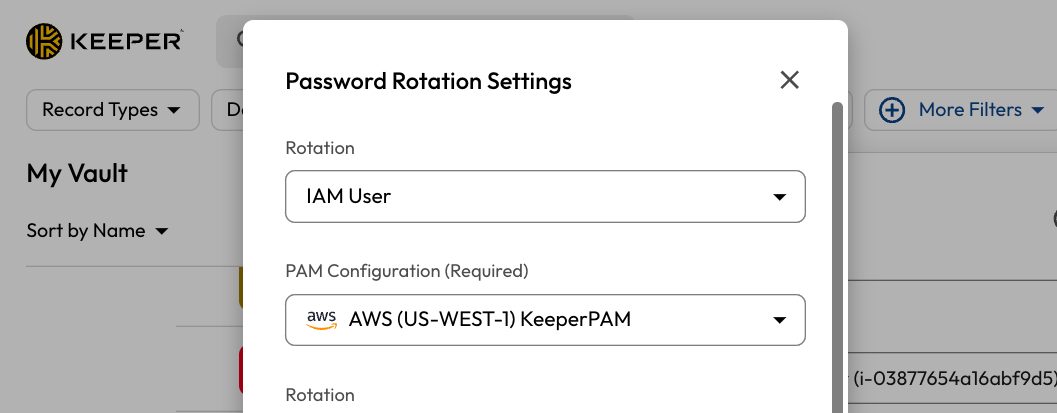
For an "IAM User" rotation type, the Keeper Gateway will use the referenced PAM Configuration to determine which APIs and methods are used to perform the rotation. In the example below, an IAM user in AWS will use the "AWS (US-WEST-1)" configuration.

When using the IAM User rotation method, it is assumed that the Keeper Gateway either inherits its privilege from the instance role policy, or through explicit access keys that are provided on the PAM Configuration record.

<figure><img src="https://762006384-files.gitbook.io/~/files/v0/b/gitbook-x-prod.appspot.com/o/spaces%2F-MJXOXEifAmpyvNVL1to%2Fuploads%2F06v6s4b2EYgJJhux1s2N%2FScreenshot%202025-01-23%20at%206.14.34%E2%80%AFPM.png?alt=media&#x26;token=9ae719fc-b73d-406c-9c25-6cd0b2ee9778" alt=""><figcaption><p>IAM User rotation type</p></figcaption></figure>

### In Summary:

* The PAM User record holds the credential that is being rotated.
* The Rotation Settings of the PAM User record references a specific PAM Machine, PAM Database or PAM Directory resource. This is the target resource where the rotation is performed.
* The Keeper Gateway uses the Admin Credential associated to the PAM Machine, PAM Database or PAM Directory resource to perform the rotation with native protocols.
* For AWS, Azure and GCP managed resources, Keeper uses Instance Role permission of the Gateway, or specific PAM Configuration secrets to perform the rotation with APIs.
* For Google Cloud managed resources, Keeper uses the Service Account permissions of the Gateway.

### Examples

Below are some examples of PAM User records.

* Windows Domain Admin

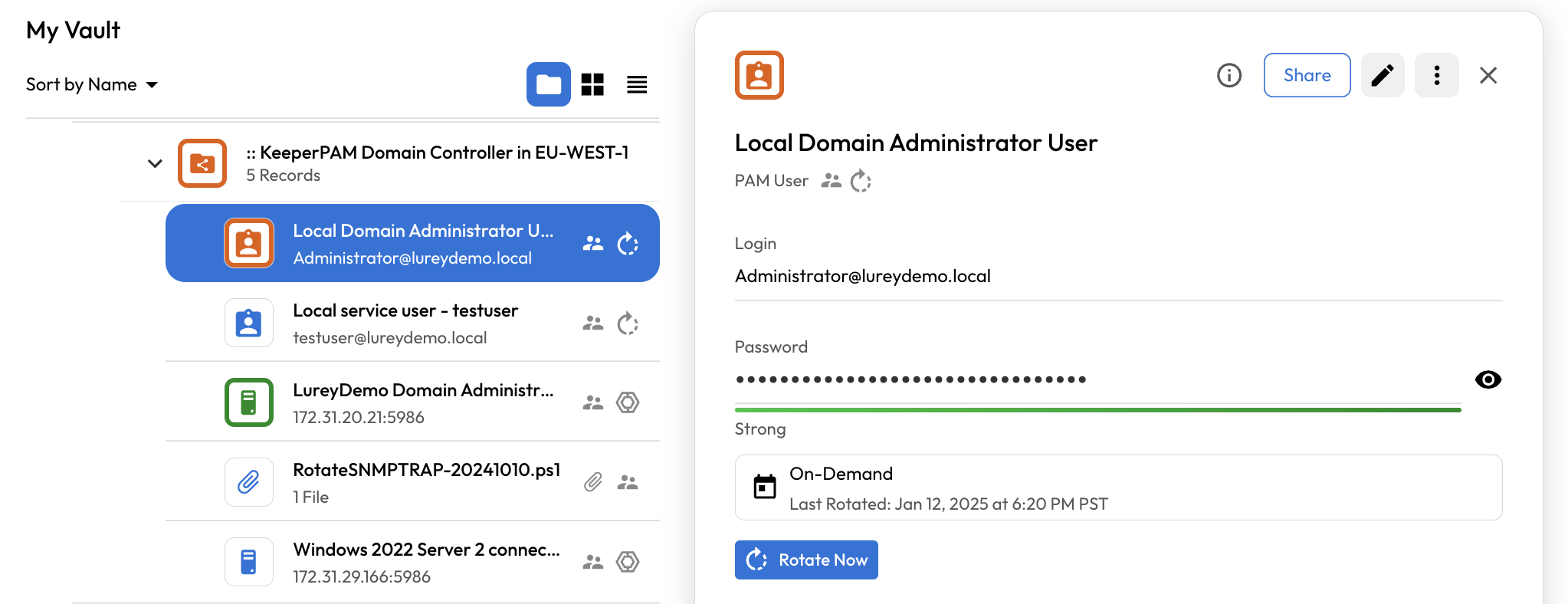
<figure><img src="https://762006384-files.gitbook.io/~/files/v0/b/gitbook-x-prod.appspot.com/o/spaces%2F-MJXOXEifAmpyvNVL1to%2Fuploads%2F29D3LswWwgW5pvSOMUMl%2FScreenshot%202025-01-12%20at%207.16.05%E2%80%AFPM.png?alt=media&#x26;token=01c3c45f-518a-4ca5-b198-723ff0f1a227" alt=""><figcaption><p>Windows Domain Admin User</p></figcaption></figure>

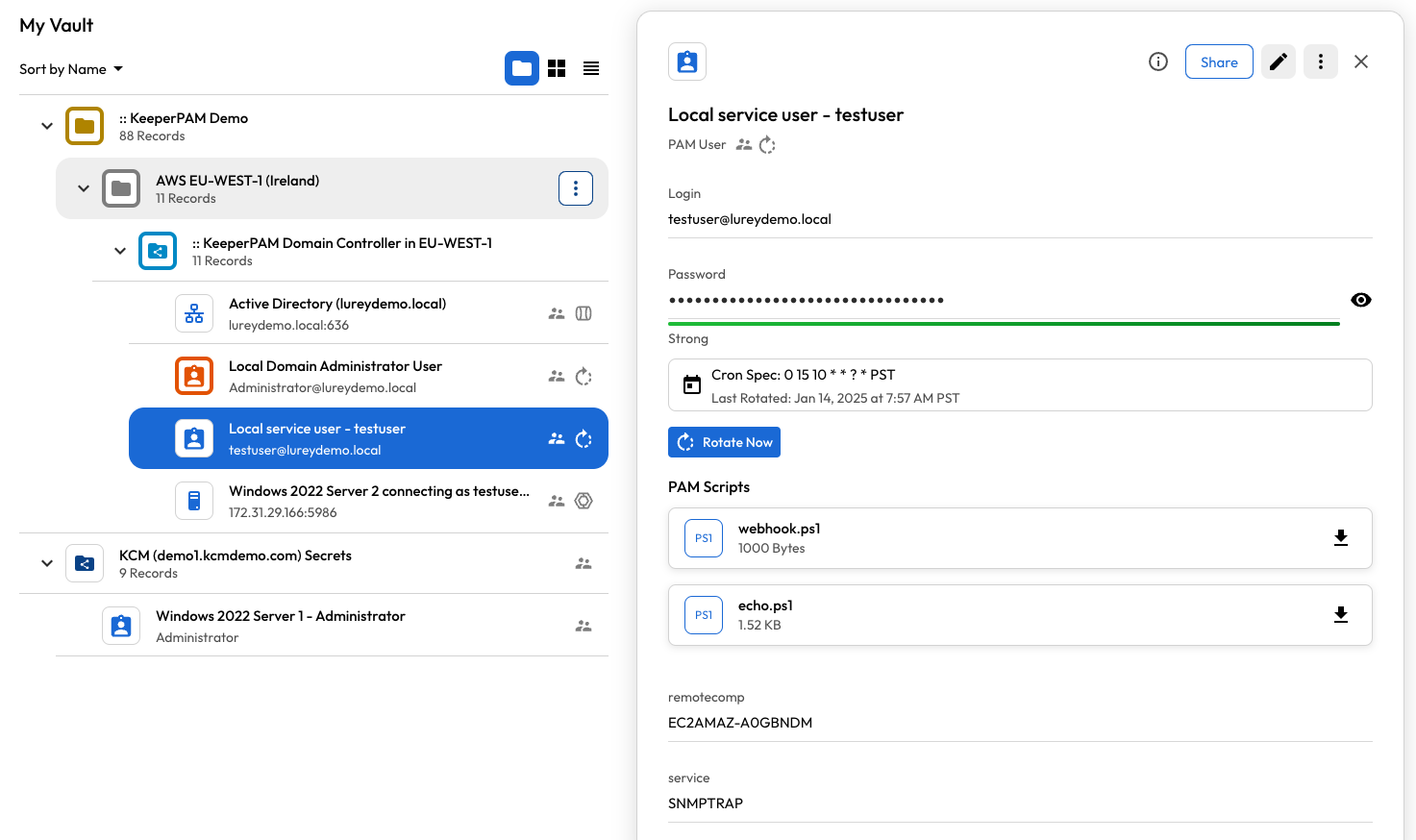
* Windows Domain User with post-rotation scripts

<figure><img src="https://762006384-files.gitbook.io/~/files/v0/b/gitbook-x-prod.appspot.com/o/spaces%2F-MJXOXEifAmpyvNVL1to%2Fuploads%2FUBcUVVRpqUFzjfXGUd47%2FScreenshot%202025-01-14%20at%209.32.50%E2%80%AFAM.png?alt=media&#x26;token=a49d938d-f2b3-420a-9cdb-301ea9b9a1ad" alt=""><figcaption><p>Windows Domain User with post-rotation scripts</p></figcaption></figure>

* AWS IAM User

<figure><img src="https://762006384-files.gitbook.io/~/files/v0/b/gitbook-x-prod.appspot.com/o/spaces%2F-MJXOXEifAmpyvNVL1to%2Fuploads%2FvL1pNfWvzwMfSUbfG6oA%2FScreenshot%202025-01-12%20at%207.17.12%E2%80%AFPM.png?alt=media&#x26;token=975b84a9-26a5-4040-b193-bbd90e272827" alt=""><figcaption><p>AWS IAM User</p></figcaption></figure>

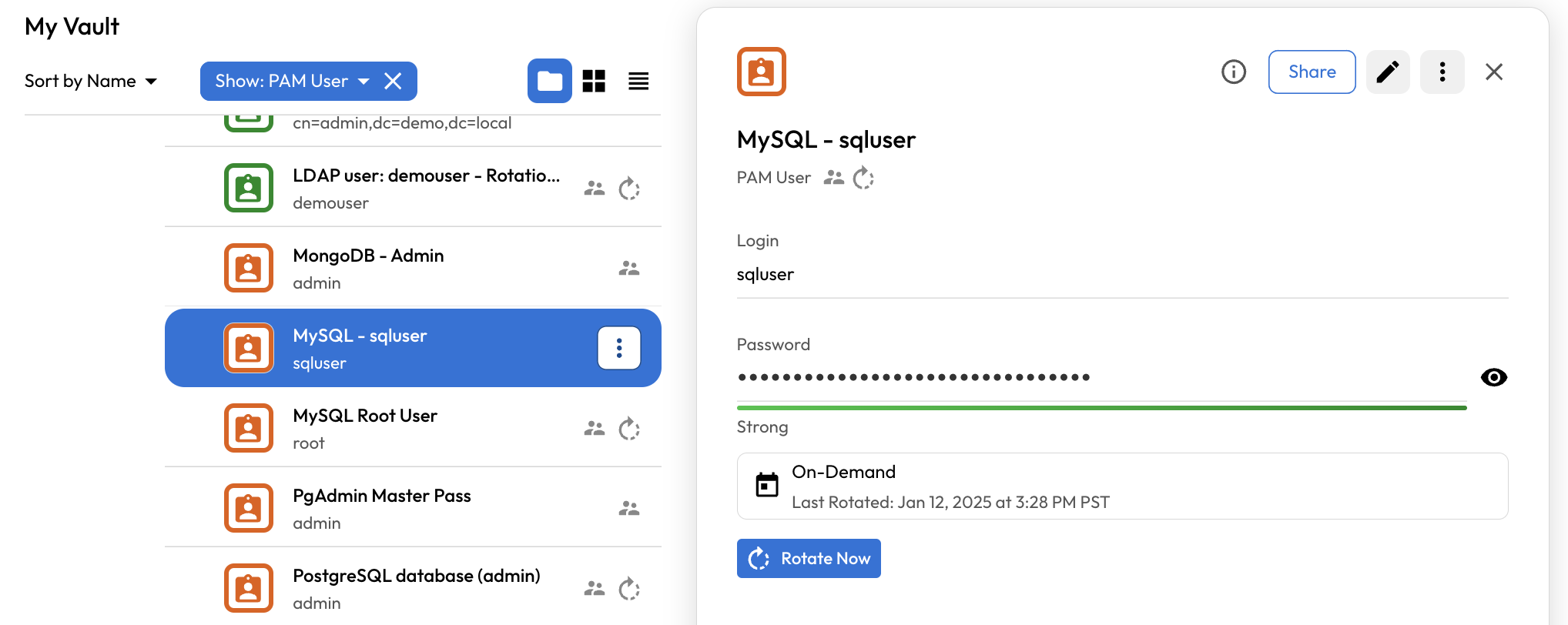
* Database user

<figure><img src="https://762006384-files.gitbook.io/~/files/v0/b/gitbook-x-prod.appspot.com/o/spaces%2F-MJXOXEifAmpyvNVL1to%2Fuploads%2FwQ8O48hEFY00feefNoI4%2FScreenshot%202025-01-12%20at%207.17.32%E2%80%AFPM.png?alt=media&#x26;token=f4ecf7da-2231-4dd7-902e-80a57cbadb52" alt=""><figcaption><p>Database user</p></figcaption></figure>

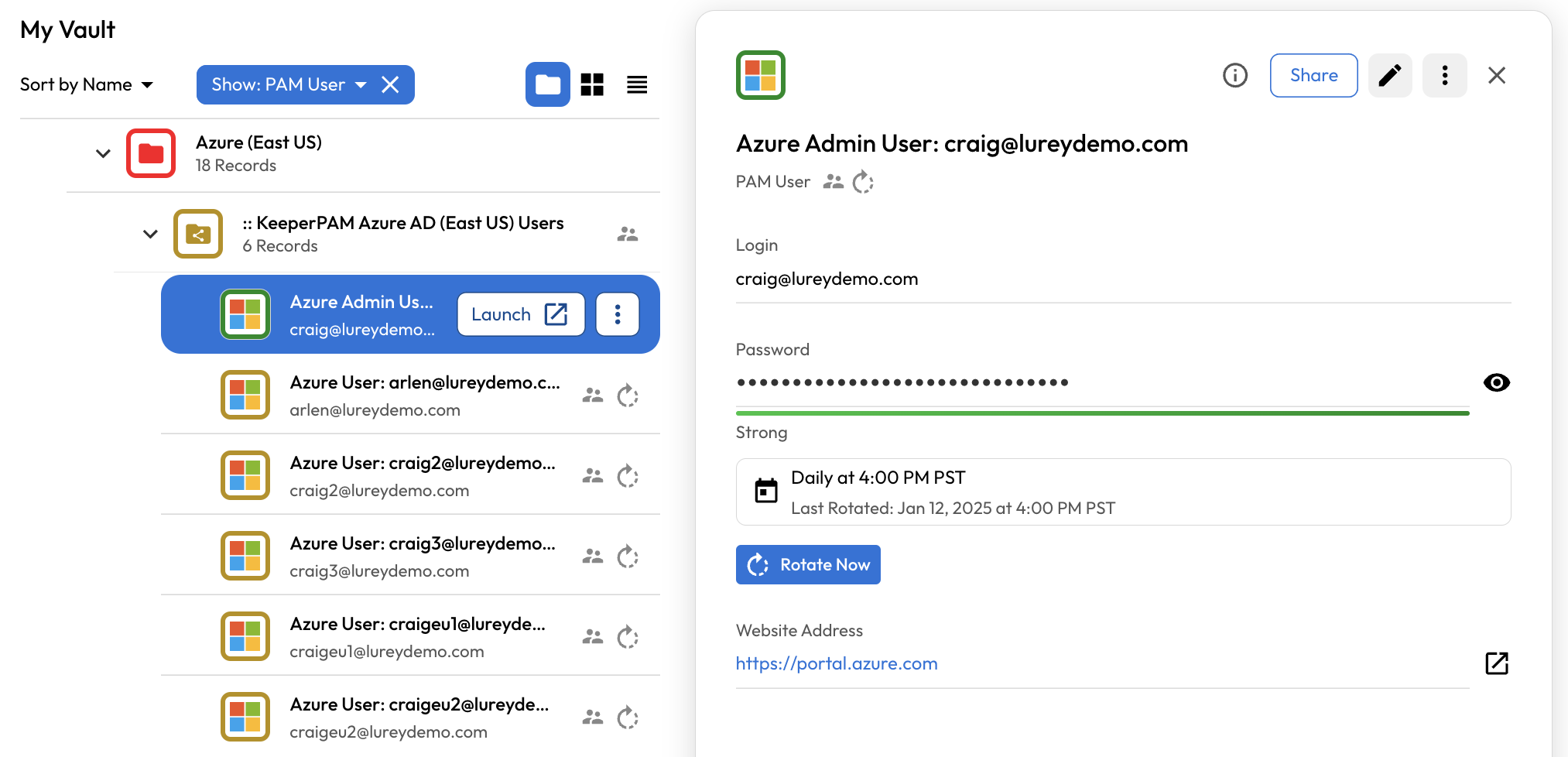
* Azure AD User

<figure><img src="https://762006384-files.gitbook.io/~/files/v0/b/gitbook-x-prod.appspot.com/o/spaces%2F-MJXOXEifAmpyvNVL1to%2Fuploads%2FGzKgObBvzWPED5PdcznT%2FScreenshot%202025-01-12%20at%207.18.52%E2%80%AFPM.png?alt=media&#x26;token=393cb4c4-0d1f-44ad-bc09-fc66a93e666f" alt=""><figcaption><p>Azure AD User</p></figcaption></figure>

## Record Types for Rotation

The rotation of credentials is restricted to the [PAM User](https://docs.keeper.io/en/keeperpam/privileged-access-manager/getting-started/pam-resources/pam-user) record type.

{% hint style="info" %}
In previous versions of Keeper, rotation was permitted on PAM Machine, PAM Database and PAM Directory records. In the latest version of KeeperPAM, you will be prompted to separate the PAM Resources from the PAM User. See the [Record Linking](https://docs.keeper.io/en/keeperpam/privileged-access-manager/getting-started/record-linking) documentation for more info.
{% endhint %}

When you have activated Keeper Secrets Manager or KeeperPAM, the following new record types will be available to users:

* **PAM User**\
  Contains a login / password, private key, or both.
* **PAM Directory**\
  Information about your on-prem or cloud-based directory
* **PAM Database**\
  Self-hosted or managed cloud-based databases such as MySQL, SQL Server, etc.
* **PAM Machine**\
  Windows, Linux, macOS machines on-prem or in the cloud
* **PAM Remote Browser**\
  Remote browser isolation to protect web-based applications

All 5 record types can be added in the Vault, placed in folders, and shared like any other Keeper records.

* See [PAM Resources](https://docs.keeper.io/en/keeperpam/privileged-access-manager/getting-started/pam-resources)

## PAM Configurations

When rotation is activated, within the Secrets Manager screen of the vault you'll see a section called **PAM Configurations**. A PAM Configuration is an object which is contains the following:

* **Environment**\
  Local Network, AWS or Azure
* **Keeper Gateway**\
  Service which you install into your on-prem or cloud infrastructure
* **Application Folder**\
  Shared Folder which contains the Secrets Manager application and associated records
* **Administrative Credentials**\
  Keeper record which contains privileged credentials for performing rotation and discovery.

Customers may have any number of PAM Configurations, Applications and Gateways.

* More information on: [PAM Configuration](https://docs.keeper.io/en/keeperpam/privileged-access-manager/getting-started/pam-configuration), [Applications](https://docs.keeper.io/en/keeperpam/privileged-access-manager/getting-started/applications) and [Gateways](https://docs.keeper.io/en/keeperpam/privileged-access-manager/getting-started/gateways)

## How to Rotate a Password

The basic steps to rotation of passwords in any target environment are:

* Add PAM User records to the Shared Folder
* Add PAM Resource (Machine, Database, Directory) records to a Shared Folder
* Configure rotation settings on each PAM User record
* Create a Secrets Manager application
* Assign the Secrets Manager application to the Shared Folders
* Set the shared folder permissions containing the PAM Users from Read Only to Can Edit
* Add a [Keeper Gateway](https://docs.keeper.io/en/keeperpam/privileged-access-manager/getting-started/gateways) to the Secrets Manager application
* Create a [PAM Configuration](https://docs.keeper.io/en/keeperpam/privileged-access-manager/getting-started/pam-configuration) which ties everything together
* Assign rotation settings to the [PAM User](https://docs.keeper.io/en/keeperpam/privileged-access-manager/getting-started/pam-resources/pam-user) records

## Rotation on Keeper Commander

For automation of Rotation capabilities, [Keeper Commander](https://docs.keeper.io/en/keeperpam/commander-cli/overview) supports KeeperPAM rotation using the following commands:

* [`pam action rotate`](https://docs.keeper.io/en/keeperpam/commander-cli/command-reference/keeperpam-commands)
* [`pam action job-info`](https://docs.keeper.io/en/keeperpam/commander-cli/command-reference/keeperpam-commands)

Example:

```
My Vault> pam action rotate -r 5NaygwI4LK1BDZmH3Ib
Scheduled action id: MfKbPR3ac6A/oBDZpctpOg==

My Vault> pam action job-info MfKbPR3ac6A/oBDZpctpOg== -g QPkRsR8KQm6_4vnHTcofZA
Job id to check [MfKbPR3ac6A/oBDZpctpOg==]
Execution Details
-------------------------
	Status              : finished
	Duration            : 0:00:17.525641
	Response Message    : Rotation completed for record uid 5NaygwI4LK1BDZmH3Ib
My Vault>
```

## Services and Scheduled Tasks

Keeper Rotation can also update the "log on" credentials for Windows service accounts and scheduled tasks. See the [Service Management](https://docs.keeper.io/en/keeperpam/privileged-access-manager/password-rotation/service-management) documentation.

## Record Import

Keeper supports importing in bulk from JSON format. See the [Importing PAM Records](https://docs.keeper.io/en/keeperpam/privileged-access-manager/references/importing-pam-resources) section for more details.