For the complete documentation index, see llms.txt. This page is also available as Markdown.

Secrets Manager Configuration

Information about Keeper Secrets Manager configuration files

About

Each Keeper Secrets Manager SDK and integration uses a "configuration" to store connection tokens, encryption keys, identifiers and domain information used to authenticate and decrypt data from the Keeper Secrets Manager APIs.

Secrets Manager configurations are created from One Time Access Tokens and have a one to one relationship with client devices.

Configuration Uniformity

All Keeper Secrets Manager SDKs and integrations use the same configuration format. Raw configurations are in JSON format, though some integrations accept base64 format.

Creating a Secrets Manager Configuration

In the Keeper Vault

A Secrets Manager configuration can be created in the Keeper Vault when creating a new Secrets Manager device.

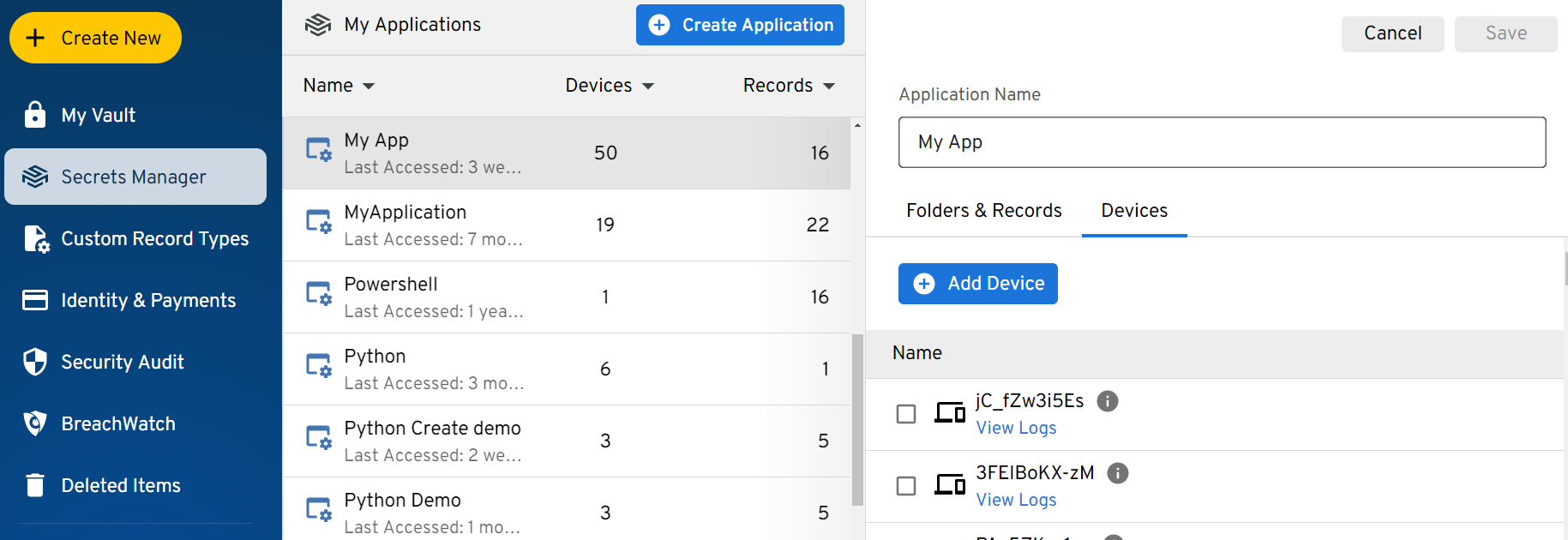
First navigate to the Secrets Manager tab, and select an Application from the list.

Then, select the "Devices" tab in the right-hand application pane, and click "Edit" to go into edit mode.

From the edit view, you can click "Add Device" to create a new Secrets Manager device to the application.

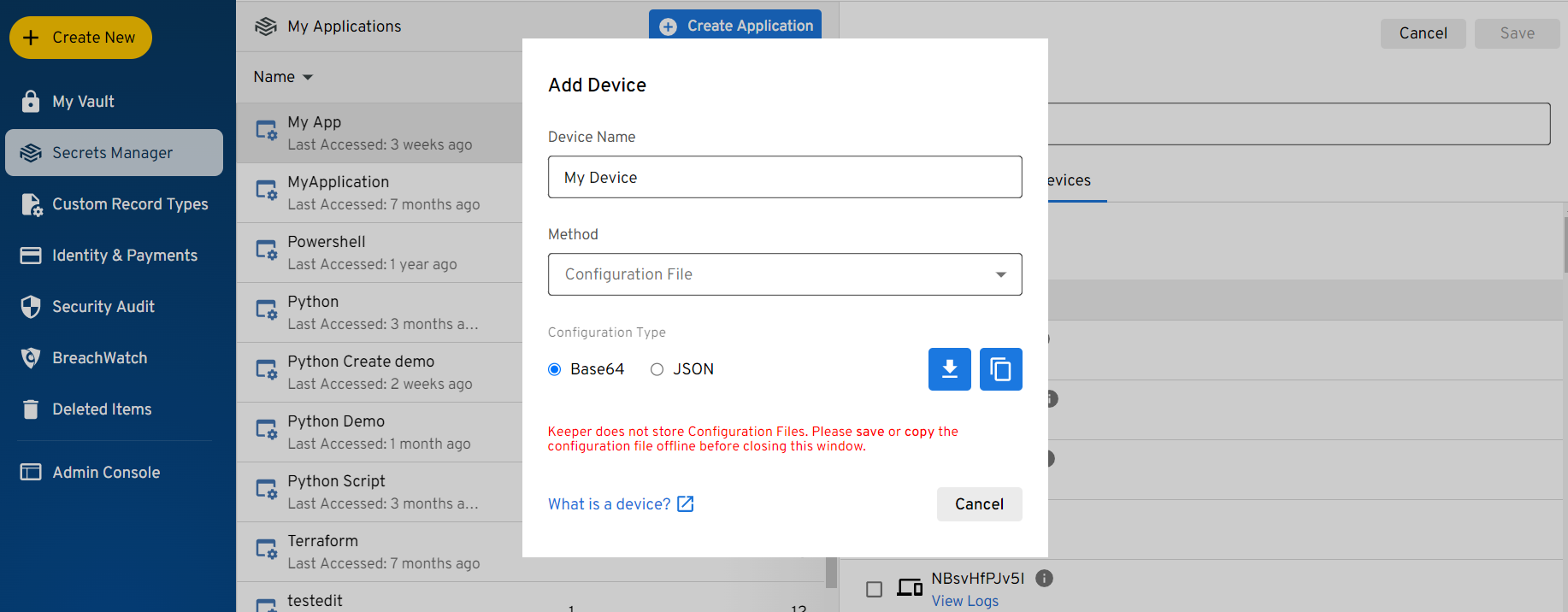
The Add Device menu will appear. Enter a name for this device, and then select "Configuration File" from the method dropdown.

After Configuration File is selected, you are given options for receiving the configuration. You can choose to generate a configuration in Base64 or json format, and download the configuration to a file, or copy it to the clipboard.

Most Secrets Manager integrations use a base64 string, but you may need a json file in some circumstances.

When ready, click the download or copy button to receive you configuration. Note that when you do this the first time, the device will be created. You are able to download or copy the configuration multiple times.

Using a SDK/Integration

Many Keeper Secrets Manager SDKs and Integrations support creating their own configuration file. You need to pass a One Time Access Token, and the configuration is created automatically.

SDK Example

Below is an example of how to use the Python SDK to create a configuration file. The configuration is created when Secrets Manager is initialized with a One Time Access Token.

In this example, the configuration is being saved to a file named "config.json"

When using a SDK to create a configuration, you only need to initialize and create the configuration file once. After the file has been created, you can use the file to initialize the SDK and remove the One Time Access Token.

Integration Example

Below is in example of using the Keeper Secrets Manager Jenkins Plugin.

The Jenkins plugin takes a One Time Access Token to initialize and creates a configuration automatically behind-the-scenes. In this example, simply enter a One Time Access Token in the form and click 'OK'.

Using a CLI Tool

A Secrets Manager configuration can be initialized from a One Time Access Token using the Secrets Manager CLI as well as the Commander CLI tools. Some Keeper Secrets Manager integrations require a pre-initialized configuration and you will need to use the CLI tools to create a configuration in these cases.

Secrets Manager CLI

The Secrets Manager CLI (KSM) tool can initialize a One Time Access Token and create a configuration.

To do this, run the init command

Commander CLI

Commander CLI can be used to initialize a One Time Access Token and create Secrets Manager configuration.

Use the secrets-manager client add Command with --config-init to create a configuration. Configurations can be created in json or base64 formats, or in integration-specific formats in some cases. (see the integrations documentation for more information on what format each integration accepts)

When initializing a configuration in Commander, typically --unlock-ip should be included in the command. If it is not included, the client device will be locked to the IP Address that Commander is using.

Binding Lifecycle

A configuration moves through three states. Knowing which one you are in matters whenever you store a configuration somewhere other than a local file, because its contents change after the first successful call.

  • Initialized — the constructor has run but no network call has happened. The configuration holds only what the one-time token carried. No token has been redeemed yet.

  • Bound — the first API call (for example, the first get_secrets) redeems the one-time token. The server response is written back into the configuration. The application key and client identifier are added and the one-time token is removed. The token is now consumed and cannot be reused.

  • Reused — every later call, and every later process that loads the bound configuration, authenticates with the stored keys and skips redemption entirely.

The constructor does not contact Keeper. A one-time token is redeemed by the first API call, not by creating the client. This is why generating a configuration "for later use" requires at least one read operation to bind the token.

What the configuration holds in each state

These are the JSON configuration keys. For the encryption role of each key, see Security & Encryption Model.

Configuration key
Initialized
Bound
Notes

hostname

Yes

Yes

Keeper region; set when the configuration is created

clientKey

Yes

Removed

The one-time token's secret value (the token you pass to the constructor is REGION:clientKey); used on the first call to derive clientId and unwrap appKey, then removed

privateKey

Yes

Yes

Client device private key; signs every request; never removed

serverPublicKeyId

Optional

Yes

Identifies the Keeper public key used for the transmission wrapper

clientId

Added

Client device identifier derived from the redeemed token

appKey

Added

Application key that decrypts your secrets; returned on the first call

appOwnerPublicKey

Added when returned

Owner public key, used for creating and updating records

Persisting and rebuilding a bound configuration

When the configuration lives in an external store (a database, a cloud secret, a KMS-wrapped blob) rather than a local file, persist it after it has bound:

  1. Construct the client with the one-time token.

  2. Make one call (for example get_secrets) to bind it.

  3. Read the now-bound configuration back out and save it to your store.

  4. In later processes, load the bound configuration from your store and construct the client from it — no token needed.

Each SDK page shows the same persist-and-rebuild step using that language's storage class.

Last updated