> For the complete documentation index, see [llms.txt](https://docs.keeper.io/llms.txt). Markdown versions of documentation pages are available by appending `.md` to page URLs; this page is available as [Markdown](https://docs.keeper.io/keeperpam/secrets-manager/integrations/azure-logic-app-connector.md).
# Azure Logic Apps
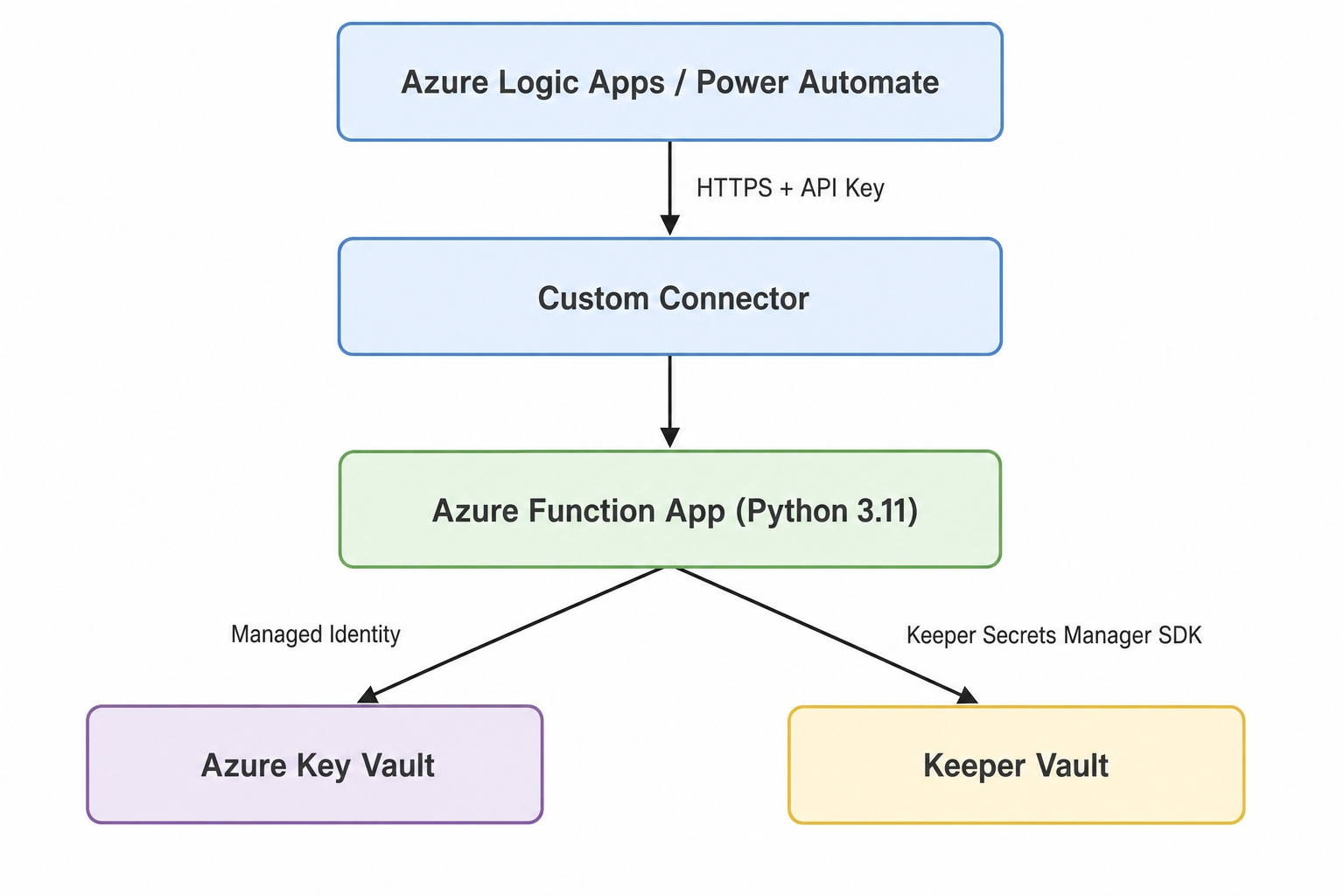
Connect Keeper Secrets Manager to Azure Logic Apps and Power Automate through an Azure Function middleware.
Manage secrets in your Keeper Vault from Azure Logic Apps and Power Automate. Retrieve credentials at runtime, create new secrets, rotate passwords, and audit your vault without hardcoding sensitive values in workflows.
Connector URL:
### About
The Keeper Secrets Manager connector connects Azure Logic Apps and Power Automate to Keeper Secrets Manager. It uses a lightweight Python middleware service deployed as an Azure Function App. That service communicates with your Keeper Vault through the Keeper Secrets Manager [Python SDK](/keeperpam/secrets-manager/developer-sdk-library/python-sdk.md).
All secrets stay protected by Keeper's zero-knowledge architecture. They are decrypted locally inside the Azure Function App and never pass through Keeper's servers. The middleware configuration is stored in Azure Key Vault through a Managed Identity reference.
### Features
* **Runtime Secret Retrieval:** Fetch credentials on demand without hardcoding secrets in flows.
* **Create and Update Secrets:** Provision and rotate credentials directly from workflows.
* **Dynamic Dropdowns:** Secret and folder pickers auto-populate in the Logic App designer.
* **Zero-Knowledge Encryption:** Secrets are decrypted locally and never leave your Azure environment.
* **One-Click Deployment:** An ARM template provisions all Azure resources in minutes.
* **Certified Connector:** Published on the Microsoft Power Platform marketplace.
### Prerequisites
* **Keeper Security Account**
* **Subscription:** A Keeper subscription with KeeperPAM or Secrets Manager enabled
* **Application:** A Keeper Secrets Manager application configured in the Keeper Vault with at least one shared folder
* **Device Configuration:** A Base64-encoded device configuration, or one-time access token, generated from the Admin Console
* **Azure Account**
* **Subscription:** An Azure subscription with either **Owner** on the resource group, or **Contributor + User Access Administrator**. The ARM template creates infrastructure, role assignments, and a deployment script. **Contributor** alone is enough only for manual setup.
### Setup
#### Step 1: Create a Keeper Secrets Manager Application
1. Sign in to the Keeper Vault
2. Navigate to **Secrets Manager** in the left menu
3. Click **Create Application** and give it a descriptive name (e.g., "Azure Logic Apps Connector")
4. Share one or more vault folders with the application. These folders determine which secrets the connector can access
5. Navigate to the **Devices** tab and click **Add Device**
6. Enter a **Device Name**, select **Configuration File** as the method, choose **Base64** as the configuration type, and click **Copy Configuration**
{% hint style="warning" %}
The device configuration (one-time access token) can only be used once. After the first connection, the Keeper Secrets Manager SDK derives and stores a persistent configuration. Store the Base64 string securely and do not commit it to source control.
{% endhint %}
For more details on configuration files and the Python SDK, see the [KSM Developer SDKs](/keeperpam/secrets-manager/developer-sdk-library.md) documentation.
#### Step 2: Deploy the Azure Function Middleware
Click the **Deploy to Azure** button in the [middleware repository](https://github.com/Keeper-Security/azure-logic-apps). In the Azure portal, select or create a **Resource Group**, then enter:
| Parameter | Value |
| --------------------- | ------------------------------------------------------------------------ |
| **Function App Name** | A globally unique name, 3-60 characters (e.g., `keeper-middleware-acme`) |
| **Keeper Config** | The Base64-encoded device configuration from Step 1 |
| **Location** | Azure region (defaults to the resource group location) |
Click **Review + create** and wait for deployment to finish. This usually takes 5 to 7 minutes. The template provisions all resources and deploys the middleware code automatically. You do not need to run `func publish`.
ARM deployment requires either **Owner** on the resource group, or **Contributor + User Access Administrator**.
**Provisioned resources**
The template provisions the following resources:
| Resource | Purpose |
| ---------------------------------- | ---------------------------------------------------------------------------------------- |
| **Azure Function App** | Python 3.11, Linux Consumption plan, System Managed Identity |
| **App Service Plan** | Linux Consumption (Dynamic Y1) hosting plan |
| **Azure Key Vault** | Stores the KSM configuration as a secret (`KSM-CONFIG`) |
| **Key Vault Access Policy** | Grants the Function App `GET` permission on Key Vault secrets |
| **Storage Account** | Required by the Azure Functions runtime |
| **User-Assigned Managed Identity** | Used by the Deployment Script to deploy middleware code to the Function App |
| **Contributor Role Assignment** | Grants the UAMI permission to deploy to the Function App during provisioning |
| **Deployment Script** | Downloads and deploys the middleware code into the Function App; auto-cleaned on success |
All resources enforce **HTTPS only** and **TLS 1.2+**. The Deployment Script resource is removed automatically after successful provisioning. The User-Assigned Managed Identity and its Contributor role assignment remain after deployment. You can delete them manually after provisioning completes.
{% hint style="info" %}
**Manual setup:** You can also create the required resources in the Azure portal instead of using the ARM template.\
\
For the full step-by-step guide, see [Manual Setup](https://github.com/Keeper-Security/azure-logic-apps/tree/dev#manual-setup-alternative) in the repository.
{% endhint %}
**Manual setup**
After you create the Resource Group, Key Vault, Storage Account, and Function App, deploy the middleware code with Azure Functions Core Tools:
{% code overflow="wrap" %}
```zsh
git clone https://github.com/Keeper-Security/azure-logic-apps.git
cd azure-logic-apps/keeperLogicAppMiddleware
func azure functionapp publish --python
```
{% endcode %}
Replace `` with your Function App name. Wait for "Remote build succeeded!" (2-5 minutes).
#### Step 3: Copy the Function Host Key
1. In the [Azure portal](https://portal.azure.com), navigate to your deployed Function App
2. In the left menu, select **App keys** (under the Functions section)
3. Copy the **default** host key
#### Step 4: Add the connector
In the Logic App Designer, click **Add an action**, search for **Keeper Secrets Manager**, and select it from the connector list. The certified connector is available out of the box. No import is required.
{% hint style="info" %}
**For development or self-hosted deployments**: You can manually import the connector by uploading `apiDefinition.swagger.json` via **Custom connectors** in the Azure portal or Power Automate.
{% endhint %}
#### Step 5: Create a connection
When prompted, enter:
1. **Function App URL** — the hostname of your Azure Function App, for example `yourapp.azurewebsites.net`
2. **API Key** — the host key from Step 3, sent as the `x-functions-key` header on every request
All subsequent flows reuse this connection.
### Quick start
Once connected, add any Keeper Secrets Manager action to your Logic App flow. The connector provides five operations:
| Operation | Method | Description |
| ----------------- | -------------------- | ---------------------------------------------------------------------------------------------------------------------------------------------- |
| **List Secrets** | `GET /secrets` | Returns all accessible secrets (UID, title, type, folder) |
| **Get Secret** | `GET /secrets/{uid}` | Returns full secret details including login, password, URL, notes, TOTP code, passkeys, file references, custom fields, and editability status |
| **Create Secret** | `POST /secrets` | Creates a new login-type secret in a shared folder (requires `folder_uid` and `title`) |
| **Update Secret** | `PUT /secrets/{uid}` | Updates any combination of `title`, `login`, `password`, `url`, and `notes` |
| **List Folders** | `GET /folders` | Returns all accessible folders (UID, name, parent, record count) |
**Get Secret** and **Update Secret** provide a dynamic dropdown populated by List Secrets. **Create Secret** provides a dynamic dropdown for selecting the target folder, populated by List Folders.
### Automation flows
Common patterns for using the connector with other Azure Logic App connectors.
#### Automated password rotation
Rotate credentials on a schedule and notify your team.
Uses: **Keeper Secrets Manager** + Compose + Office 365 Outlook
#### Credential injection for API calls
Fetch API keys from your vault at runtime instead of storing them in the flow.
Uses: **Keeper Secrets Manager** + HTTP + SharePoint
#### Employee credential provisioning
Automatically create vault credentials when a new employee joins.
Uses: **Keeper Secrets Manager** + Azure AD + Office 365 Outlook
#### Vault compliance audit
Generate a weekly inventory report of all secrets and folders.
Uses: **Keeper Secrets Manager** + Data Operations + SharePoint + Office 365 Outlook
#### GitHub secret sync
Keep GitHub repository secrets in sync with your Keeper Vault.
Uses: **Keeper Secrets Manager** + HTTP
#### Database connection string retrieval
Build connection strings from vault-stored credentials on demand.
Uses: **Keeper Secrets Manager** + Compose + Request/Response
### Security
| Control | Detail |
| ----------------------- | ------------------------------------------------------------------------------------------------------------------------------------------------------------------------------------------------------------------------------ |
| **Zero-knowledge** | Secrets decrypted locally inside the Azure Function via the [Keeper Secrets Manager SDK](https://docs.keeper.io/en/keeperpam/secrets-manager/developer-sdk-library/python-sdk); plaintext secrets never transit Keeper servers |
| **Key Vault storage** | Device configuration stored in Azure Key Vault via Managed Identity reference, never in plaintext |
| **HTTPS + TLS 1.2+** | Enforced at the Azure App Service level |
| **Function-level auth** | Every request requires the `x-functions-key` header |
| **Rate limiting** | Best-effort per-worker rate limiting (60 requests per 60-second window) protects against accidental overload; returns `429 Too Many Requests` with a `Retry-After` header when exceeded |
| **Input validation** | Content-Type, field lengths, and required parameters are validated |
| **Safe error messages** | No sensitive data is exposed in API error responses |
### Known limitations
* **Login record type only** — Create Secret supports only the `login` record type. Other Keeper record types, such as SSH keys and database credentials, cannot be created through this connector.
* **No folder creation** — Create folders in the Keeper Vault or Admin Console. The connector does not support folder creation.
* **File attachments** — Secrets with file attachments are listed, but attachment binary content is not returned.
* **Cold start latency** — Expect 2 to 5 seconds on the Azure Consumption plan. Use an App Service plan for latency-sensitive workloads.
### Troubleshooting
#### `KSM_CONFIG` environment variable is not set
**Cause:** Missing or invalid Key Vault reference in Function App settings.
**Solution**
1. In the Azure portal, navigate to Function App > **Configuration** > **Application settings**
2. Verify that `KSM_CONFIG` exists and contains a valid Key Vault reference (e.g., `@Microsoft.KeyVault(SecretUri=...)`)
#### 401 Unauthorized
**Cause:** Invalid or mismatched host key.
**Solution**
1. Verify the host key in your connector connection matches the key from Function App > **App keys**
2. Ensure the `x-functions-key` header is being sent
#### 404 Not Found
**Cause:** Invalid or deleted secret.
**Solution**
* The secret UID is invalid, or the secret was deleted from the vault
* Verify that the UID exists in your Keeper Vault
#### 400 Bad Request
**Cause:** Missing required parameters.
**Solution**
* Ensure `folder_uid` is provided when creating a secret
* Verify that the folder is accessible to the application
#### 429 Too Many Requests
**Cause:** Rate limit exceeded.
**Solution**
* Wait for the duration specified in the `Retry-After` response header
* Reduce request frequency or spread requests over time
#### Slow first request
**Cause:** Cold start on the Consumption plan.
**Solution**
* This is normal on the Azure Consumption plan
* Upgrade to an App Service plan or enable [Always On](https://learn.microsoft.com/en-us/azure/azure-functions/dedicated-plan#always-on) for lower latency
{% hint style="info" %}
Use `GET /api/health` to verify the Function App is running and reachable. It returns `{"status": "ok"}` when the middleware is healthy.
{% endhint %}
### Next steps
* **Full API reference** — See the detailed connector documentation for complete request and response schemas, error codes, and advanced usage.
* **Middleware repository** — Visit the [Azure Function Middleware repository](https://github.com/Keeper-Security/azure-logic-apps) for local development, CLI deployment, and testing.
* **Keeper Secrets Manager SDKs** — Explore the [KSM Developer SDKs](https://docs.keeper.io/en/keeperpam/secrets-manager/developer-sdk-library) for direct SDK integrations beyond Logic Apps.
#### Resources
* [Keeper Secrets Manager Documentation](/keeperpam/secrets-manager/overview.md)
* [KSM Python SDK](/keeperpam/secrets-manager/developer-sdk-library/python-sdk.md)
* [Azure Function Middleware Repository](https://github.com/Keeper-Security/azure-logic-apps)
* [Microsoft Power Platform Connectors](https://github.com/microsoft/PowerPlatformConnectors)
* [Azure Logic Apps Documentation](https://learn.microsoft.com/en-us/azure/logic-apps/)
{% hint style="info" %}
Feature requests? Email
{% endhint %}
---
# Agent Instructions
This documentation is published with GitBook. GitBook is the documentation platform designed so that both humans and AI agents can read, navigate, and reason over technical content effectively. Learn more at gitbook.com.
## Querying This Documentation
If you need additional information that is not directly available in this page, you can query the documentation by asking a question.
Perform an HTTP GET request on the following URL with the `ask` and `goal` query parameters:
```
GET https://docs.keeper.io/keeperpam/secrets-manager/integrations/azure-logic-app-connector.md?ask=&goal=
```
`ask` is the immediate question: it should be specific, self-contained, and written in natural language.
`goal` is what the user is ultimately trying to achieve, the reason they need the answer. Sharing it helps GitBook give you a better, more relevant answer. A goal is most helpful when it describes the outcome the user wants rather than restating the question. For example, with `ask=how do I create an API token`, a goal like `automate deployments from our CI pipeline` lets GitBook tailor the answer to that use case.
The response will contain a direct answer to the question and relevant excerpts and sources from the documentation.
Use this mechanism when the answer is not explicitly present in the current page, you need clarification or additional context, or you want to retrieve related documentation sections.