> For the complete documentation index, see [llms.txt](https://docs.keeper.io/llms.txt). Markdown versions of documentation pages are available by appending `.md` to page URLs; this page is available as [Markdown](https://docs.keeper.io/keeperpam/secrets-manager/integrations/sailpoint-saas-connector.md).
# SailPoint SaaS Connector
Manage identity and access to Keeper vaults with the SailPoint SaaS connector.
***
## Overview
The Keeper Security connector provides identity governance for your Keeper enterprise through SailPoint Identity Security Cloud (ISC).
The connector aggregates accounts and refreshes individual accounts. It also aggregates node, team, role, folder, and record entitlements. You can create, update, enable, disable, and delete Keeper accounts.
## Features
| SailPoint Connector Features | Description |
| ---------------------------- | ---------------------------------------------------------------------------------------------------------------------------------------------------------------------------------------------------------------------------------------------------------------------------------------------------------------------------------------------------------------------------------------------------------------------------------------------------------------------------------------------------------------------------------------------------------------------------------------------------- |
| Entitlement Aggregation |
List roles available in your Keeper organization.
List teams available in your Keeper organization.
List nodes available in your Keeper organization.
List records and their permissions.
List folders and their permissions.
|
| Account Aggregation |
List users from your Keeper organization in SailPoint.
Map users to their existing Keeper Vault entitlements.
|
| Account Update |
Invite users from SailPoint and provision a Keeper Vault for each invited user.
Update the user's name and email in SailPoint
Assign available roles, teams, and nodes through SailPoint entitlement assignments.
Share records and folders through SailPoint record and folder entitlement provisioning.
Enable or disable access to the Keeper Vault through SailPoint.
Delete an account. This transfers its Keeper Vault to the target user configured in sailpoint-app-setup, then removes the departing Keeper account.
|
## Example use case
### Invite User to Keeper Vault and share record
{% stepper %}
{% step %}
#### Select identity in SailPoint
Select the identity in SailPoint. The identity email must match the user's Keeper email address.
Request Keeper account provisioning for the identity. The connector creates a Keeper invitation.
{% endstep %}
{% step %}
#### Complete Keeper account setup
The user accepts the Keeper invitation from their email. They then complete their vault setup.
The user's vault must be active before you share records directly with them. For invitation details, see [Creating and Inviting Users](/keeperpam/commander-cli/command-reference/enterprise-management-commands/creating-and-inviting-users.md).
{% endstep %}
{% step %}
#### Assign the record entitlement
In SailPoint, assign the required **Record** entitlement to the identity. Select the permission level that matches the user's access requirements.
The connector provisions the record share to the user's Keeper account.
{% endstep %}
{% step %}
#### Verify access
Refresh the user's Keeper account in SailPoint. Confirm that the record entitlement appears for the identity.
{% endstep %}
{% endstepper %}
## Prerequisites
1. **Keeper enterprise** with administrative access to manage users, teams, roles, and sharing.
2. **Keeper Commander Service Mode** **API v2** running and reachable from SailPoint or your approved network path, with a valid Service Mode API key.
3. **SailPoint ISC** administrator permissions to create sources, configure correlation, and run aggregations.
4. **SailPoint CLI** must be install on your machine to manage the connector lifecycles.
## Commander Service Mode Setup
To keep zero-knowledge and end-to-end encryption, **Commander Service Mode** runs on your infrastructure and is the only path the SailPoint connector uses to talk to Keeper.
Use `sailpoint-app-setup` to create the Docker-based Service Mode deployment and SailPoint-specific settings in one flow.
#### Before you start
1. [Install Keeper Commander](https://docs.keeper.io/keeperpam/commander-cli/commander-installation-setup) on a workstation.
2. Prefer a dedicated Keeper **service account** with rights to manage enterprise users and to share the folders/records you will govern from ISC.
3. Log in to Commander with that account:
```
keeper shell
login serviceuser@company.com
```
4. Ensure Docker is available on the host where Service Mode will run.
#### Run SailPoint setup
```
My Vault> sailpoint-app-setup
```
The command runs in two phases and writes a `docker-compose.yml` with a **Commander-only** service (no separate SailPoint container).
**Phase 1 — Service Mode / Docker**
Creates the shared folder, Docker config record, KSM application, and client config, then prompts for:
| Prompt | Description |
| ---------------------------- | ------------------------------------------------------------------------ |
| **Port** | Local port for Commander Service Mode. Default: `8900`. |
| **Enable ngrok?** | Optional public URL via ngrok. Default: No. |
| **Ngrok Auth Token** | Required if ngrok is enabled. |
| **Ngrok Custom Domain** | Optional (for example `myapp.ngrok.io`). Press Enter to skip. |
| **Enable Cloudflare?** | Asked only if ngrok is disabled. Default: No. |
| **Cloudflare Tunnel Token** | Required if Cloudflare is enabled. |
| **Cloudflare Custom Domain** | Required if Cloudflare is enabled (for example `commander.company.com`). |
> **Ngrok and Cloudflare are mutually exclusive.** For SailPoint ISC (SaaS), the Service Mode URL must be reachable from SailPoint’s connector runtime. If Commander is on a private network, enable **ngrok** or **Cloudflare Tunnel** and use that public HTTPS URL as **Keeper Commander Service Mode API URL** in the source.
Queue mode (API v2) is enabled automatically. The command allowlist is limited to SailPoint-safe operations (user lifecycle and sharing). Secret-bearing commands such as `get`, `export`, and `find-password` are excluded.
**Phase 2 — SailPoint options**
| Prompt | Description |
| -------------------------- | --------------------------------------------------------------------------------------------------------------------------------------- |
| **Allow folder shares?** | Whether SailPoint may manage folder share entitlements (`share-folder` / `nsf-share-folder`). Default: Yes. |
| **Allow record shares?** | Whether SailPoint may manage record share entitlements (`share-record` / `nsf-share-record`). Default: Yes. |
| **Allow role assignment?** | Whether SailPoint may assign roles via `enterprise-user` / `enterprise-role`. Default: Yes. |
| **Allow team assignment?** | Whether SailPoint may assign teams via `enterprise-user`. Default: Yes. |
| **Transfer target email** | Active user that receives vault data when SailPoint offboards via transfer-user. (required) |
| **Interval seconds** | How often Commander re-checks invited users and applies queued entitlements after they become **Active**. Default: `60`. Minimum: `15`. |
> Disabled capabilities are rejected by Service Mode (HTTP 403). Nodes are never gated — `--node` remains available for invites and moves.
Resources created (defaults):
| Resource | Default name |
| -------------------------- | -------------------------------------------------- |
| Shared folder | `Commander Service Mode - SailPoint` |
| KSM application | `Commander Service Mode - KSM App` |
| Docker config record | `Commander Service Mode Docker Config` |
| SailPoint config record | `Commander Service Mode SailPoint Config` |
| Docker service / container | `commander-sailpoint` / `keeper-service-sailpoint` |
> Re-running setup rewrites `docker-compose.yml` (manual edits are lost) but preserves queued pending entitlements on the SailPoint config record.
#### Deploy
```
My Vault> quit
rm ~/.keeper/config.json
docker compose up -d
docker ps
docker logs keeper-service-sailpoint
curl http://localhost:/health
```
Delete the local `config.json` before starting Docker so the container does not conflict with the same device token. Docker loads its own config through KSM.
#### Values for the ISC source
After the service is healthy:
1. **Keeper Commander Service Mode API URL** — public base URL **without** `/api/v2/` (tunnel URL if you enabled ngrok/Cloudflare, otherwise your reachable host URL).
2. **Keeper Commander Service Mode API Key** — from the Docker/service config record created during setup (stored in the vault after the container starts Service Mode).
Use those values in Source configuration.
#### Deferred entitlements (Invited users)
Keeper cannot fully apply some entitlements until the user is **Active**. Commander queues role, team, folder, and record grants requested while the user is still **Invited**, then applies them after activation (on the poll interval from Phase 2).
This matches ISC create behavior: initial **roles** / **teams** on create are applied once the user becomes active.
#### Optional CLI flags
```
My Vault> sailpoint-app-setup \
--folder-name "Commander Service Mode - SailPoint" \
--app-name "Commander Service Mode - KSM App" \
--config-record-name "Commander Service Mode Docker Config" \
--sailpoint-record-name "Commander Service Mode SailPoint Config" \
--skip-device-setup
```
| Flag | Description |
| ------------------------- | ---------------------------------------------- |
| `--folder-name` | Shared folder name |
| `--app-name` | KSM application name |
| `--config-record-name` | Docker/service config record name |
| `--sailpoint-record-name` | SailPoint config record name |
| `--config-path` | Path to Commander `config.json` |
| `--timeout` | Device timeout (default: `30d`) |
| `--skip-device-setup` | Skip device registration if already configured |
***
## Install and Authenticate SailPoint CLI
To install and configure the CLI on your machine, follow the official [SailPoint CLI setup instructions here](https://developer.sailpoint.com/docs/tools/cli).
Make sure the CLI is authenticated with your SailPoint Identity Security Cloud (ISC) tenant before proceeding.
***
## Download the Connector ZIP
1. Go to the [Keeper Security SailPoint Connector Releases](https://github.com/Keeper-Security/sailpoint-saas-connector/releases) page.
2. Locate the latest release.
3. Download the connector ZIP file, typically named:
```
keeper-security-.zip
```
4. Open a terminal in the directory containing the downloaded ZIP file.
***
## Upload to your SailPoint Tenant
Once the SailPoint CLI is installed and authenticated, upload the connector ZIP file to your ISC tenant.
### **Create an empty connector**
Run:
```bash
sail conn create keeper-security
```
This creates an empty connector in your ISC tenant and returns a **Connector ID**.
### Upload the Connector ZIP
Using the connector name:
```bash
sail conn upload -c keeper-security -f ./keeper-security-.zip
```
Or using the Connector ID returned by the create command:
```bash
sail conn upload -c -f ./keeper-security-.zip
```
> **Note:** Replace `` with the version of the downloaded connector ZIP.
### **Verify and Configure**
Verify that the connector has been uploaded successfully:
```bash
sail conn list
```
The Keeper Security connector should appear in the list of connectors.
> **Note:** For detailed information on uploading connectors, see [SailPoint's Connector Upload documentation](https://developer.sailpoint.com/docs/connectivity/saas-connectivity/test-build-deploy#upload-connector-zip-file-to-identity-security-cloud).
***
## Source Configuration
1. Log in to SailPoint with administrator credentials. Go to **Admin → Sources**.
2. On the **Sources** page, click **Create New**. Search for **Keeper Security**, then select **Configure**.
3. Configure the source with a **Source Name**, **Description**, and **Owner**, then click **Continue**.
4. Under **Configuration**, set up the Keeper Commander Service Mode authentication credentials.
When configuration is complete, click **Review and Test** to verify the connection between Service Mode and SailPoint.
## Entitlement Aggregation
After establishing the connection between Service Mode and SailPoint, run entitlement aggregation.
This step collects and lists available nodes, roles, teams, records, and folders with their permissions.
The Keeper Security SaaS Connector supports the following entitlement types.
## Entitlement types
| Type | Description |
| ------ | ------------------------------------------------------------------------------------------------------------------------------------- |
| Node | An organizational unit in the Keeper enterprise hierarchy. Each user belongs to one node. |
| Team | A group of Keeper users. Assign this entitlement to add a user to the team. |
| Role | A role in Keeper. Assign this entitlement to grant its permissions. |
| Folder | Access to a shared folder, including its assigned permission level. This supports classic and nested shared folders (NSF). |
| Record | A record shared directly with a user, including its assigned permission level. This supports classic and nested shared folders (NSF). |
1. Under **Entitlement Management**, click **Entitlement Aggregation**, then click **Start Aggregation**.
After entitlement aggregation completes, view the entitlements under **Entitlements**.
## Account Aggregation
After entitlement aggregation completes, run account aggregation. This imports users from your Keeper enterprise and maps each user to their assigned entitlements and existing access.
1. Under **Account Management**, click **Account Aggregation**, then click **Start Aggregation**.
After aggregation completes, view the accounts under **Accounts**.
Select a user to view their assigned entitlements.
## Entitlement Assignment
Follow these steps to assign entitlements.
1. Set up an access profile in SailPoint. See the [official SailPoint documentation](https://documentation.sailpoint.com/saas/help/access/access-profiles.html).
2. Under **Manage → Entitlements** in the access profile, select the entitlement to assign to the access profile.
3. After configuring the access profile, create a SailPoint role. Add the access profile and assign users who need its entitlements. See the [official SailPoint documentation for creating roles](https://documentation.sailpoint.com/saas/help/access/roles.html).
4. Under **Manage Access**, add the access profile created earlier.
Click **Define Assignment**, then add the account or identity that needs the entitlement.
When configuration is complete, turn on **Enable Role** and apply the changes to provision the entitlements.
This provisions the entitlement to the user and assigns the teams, roles, and records configured in the SailPoint role.
## Troubleshooting and logging
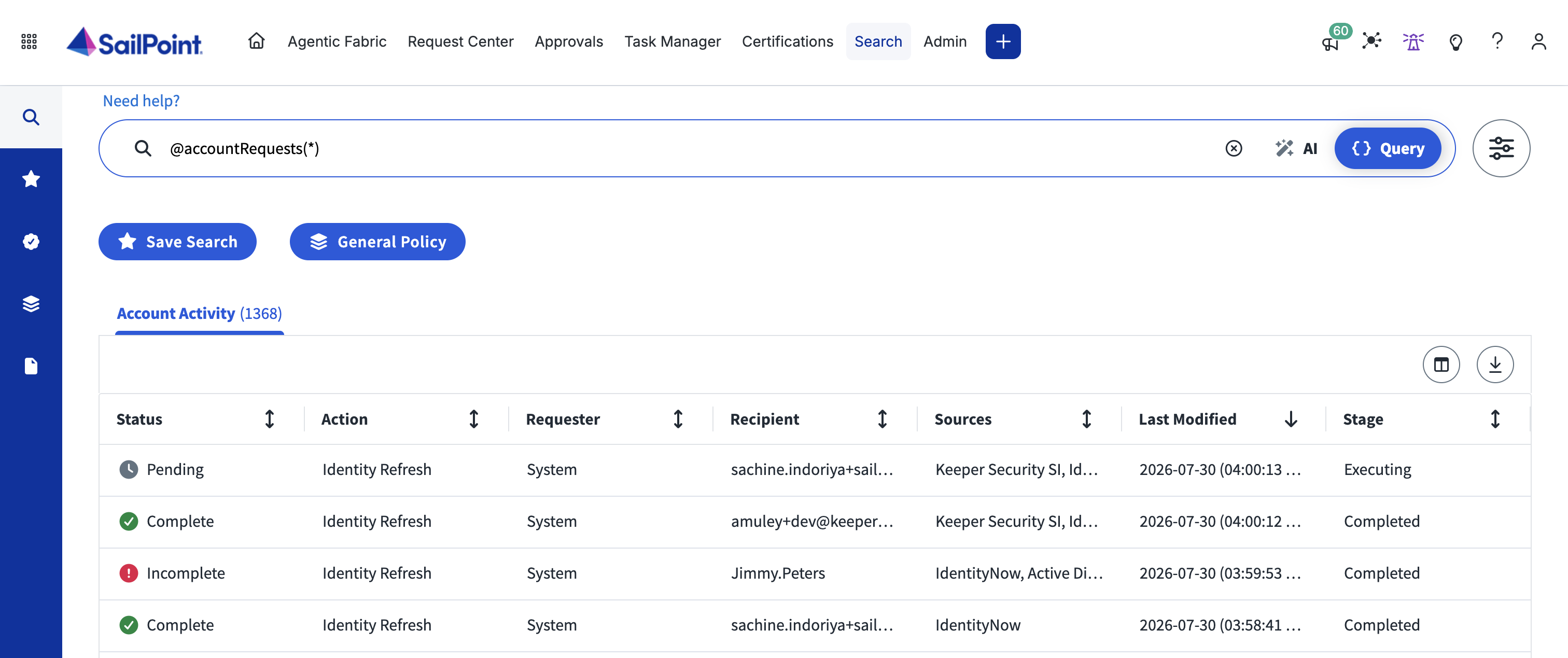
To review provisioning activity and troubleshoot errors, go to **Admin → Identity Management → Activities**.
---
# Agent Instructions
This documentation is published with GitBook. GitBook is the documentation platform designed so that both humans and AI agents can read, navigate, and reason over technical content effectively. Learn more at gitbook.com.
## Querying This Documentation
If you need additional information that is not directly available in this page, you can query the documentation by asking a question.
Perform an HTTP GET request on the following URL with the `ask` and `goal` query parameters:
```
GET https://docs.keeper.io/keeperpam/secrets-manager/integrations/sailpoint-saas-connector.md?ask=&goal=
```
`ask` is the immediate question: it should be specific, self-contained, and written in natural language.
`goal` is what the user is ultimately trying to achieve, the reason they need the answer. Sharing it helps GitBook give you a better, more relevant answer. A goal is most helpful when it describes the outcome the user wants rather than restating the question. For example, with `ask=how do I create an API token`, a goal like `automate deployments from our CI pipeline` lets GitBook tailor the answer to that use case.
The response will contain a direct answer to the question and relevant excerpts and sources from the documentation.
Use this mechanism when the answer is not explicitly present in the current page, you need clarification or additional context, or you want to retrieve related documentation sections.