> For the complete documentation index, see [llms.txt](https://docs.keeper.io/llms.txt). Markdown versions of documentation pages are available by appending `.md` to page URLs; this page is available as [Markdown](https://docs.keeper.io/release-notes/desktop/web-vault-+-desktop-app/vault-release-18.1.0.md).
# Vault Release 18.1.0
## New Features
### Universal Secrets Sync
Universal Secrets Sync ("USS") is now available as part of the Zero-Trust KeeperPAM Platform. USS enables automatic synchronization of secrets from Keeper Secrets Manager shared folders directly to your cloud provider's native secret management service — keeping your secrets in sync across your infrastructure without manual intervention.
#### **Supported Cloud Providers**
**AWS Secrets Manager:** Secrets synced to AWS are automatically replicated across all configured regions, ensuring availability and consistency across your entire AWS footprint.
**Azure Key Vault:** USS automatically creates Azure Key Vaults as needed and configures hybrid permissions, reducing the overhead of manual vault provisioning and access management.
**Google Cloud Secret Manager:** Secrets synced to Google Cloud are automatically replicated across zones, providing high availability without additional configuration.
#### **How It Works**
USS monitors one or more Keeper shared folders and syncs the records contained within them to your configured cloud provider. You can choose between two sync modes depending on your operational needs:
**Automatic Sync** — Changes to record content trigger a sync automatically, ensuring your cloud secrets are always up to date without any manual steps.
**Manual Sync (Dry-Run Mode)** — USS generates a preview of all secrets to be created or updated before anything is written. Your team can review the proposed changes and approve or deny the sync operation — ideal for environments that require change control or additional oversight.
An optional role can also be assigned to the Keeper Gateway to scope and control the permissions used during sync operations.
{% hint style="info" %}
To learn more about [Universal Secrets Sync](/keeperpam/privileged-access-manager/universal-secrets-sync.md)
{% endhint %}
#### **Key Capabilities**
* **Multi-folder sync** — Sync secrets from multiple Keeper shared folders in a single configuration
* **Multi-region support** — AWS syncs are replicated across all configured regions automatically
* **Auto-creation** — Azure Key Vaults are created on the fly as needed
* **Metadata & tagging** — Secrets are tagged with content type and source information for traceability
* **Dry-run mode** — Preview and approve changes before they are applied to your cloud environment
* **Error recovery** — USS gracefully handles missing secrets and permission issues, reducing the risk of failed syncs going unnoticed
### Wiz CNAPP Integration
The KeeperPAM CNAPP integration with Wiz remediates Wiz findings that require just-in-time access, credential rotation, or protection for an identity or resource such as a machine, database, or user.
#### **How It Works**
* An admin receives a finding in Wiz.
* The admin reviews the finding and sends it to Keeper for remediation.
* A Keeper admin receives the finding and onboards the affected resource into Keeper.
* After remediation, Keeper marks the finding in Wiz as in-progress.
* On the next Wiz scan cycle, the issue is cleared.
#### Key Capabilities
* **Closed-loop remediation workflow** — Issues can automatically be sent to Keeper through the CNAPP provider, admins remediate the issue though KeeperPAM, and once remediated Keeper notifies the CNAPP provider.
* **Streamlined rotation** — Admins can rotate credentials directly though the Cloud Security Dashboard.
* **Streamlined Onboarding** — Admins can directly onboard and map Keeper resources to Wiz issues though the Cloud Security Dashboard.
### KeeperPAM CNAPP integration
The KeeperPAM CNAPP integration with Wiz remediates findings that require just-in-time access, credential rotation, or protection for an identity or resource such as a machine, database, or user. This integration bridges the gap between cloud security posture management and privileged access management — enabling security teams to move from identifying a risk to resolving it faster, with less manual effort and without leaving their workflow.
By creating a direct automated path from discovery to remediation, teams eliminate the need to manually track and coordinate across tools, significantly reducing mean time to remediate (MTTR). Exposed identities and resources are onboarded into Keeper immediately upon discovery, shrinking the attack surface before a vulnerability can be exploited. Access is granted only when needed and automatically rotated or revoked, and a closed-loop workflow ensures every finding is tracked from Wiz through Keeper and back — with a clear audit trail to support compliance.
#### User Experience
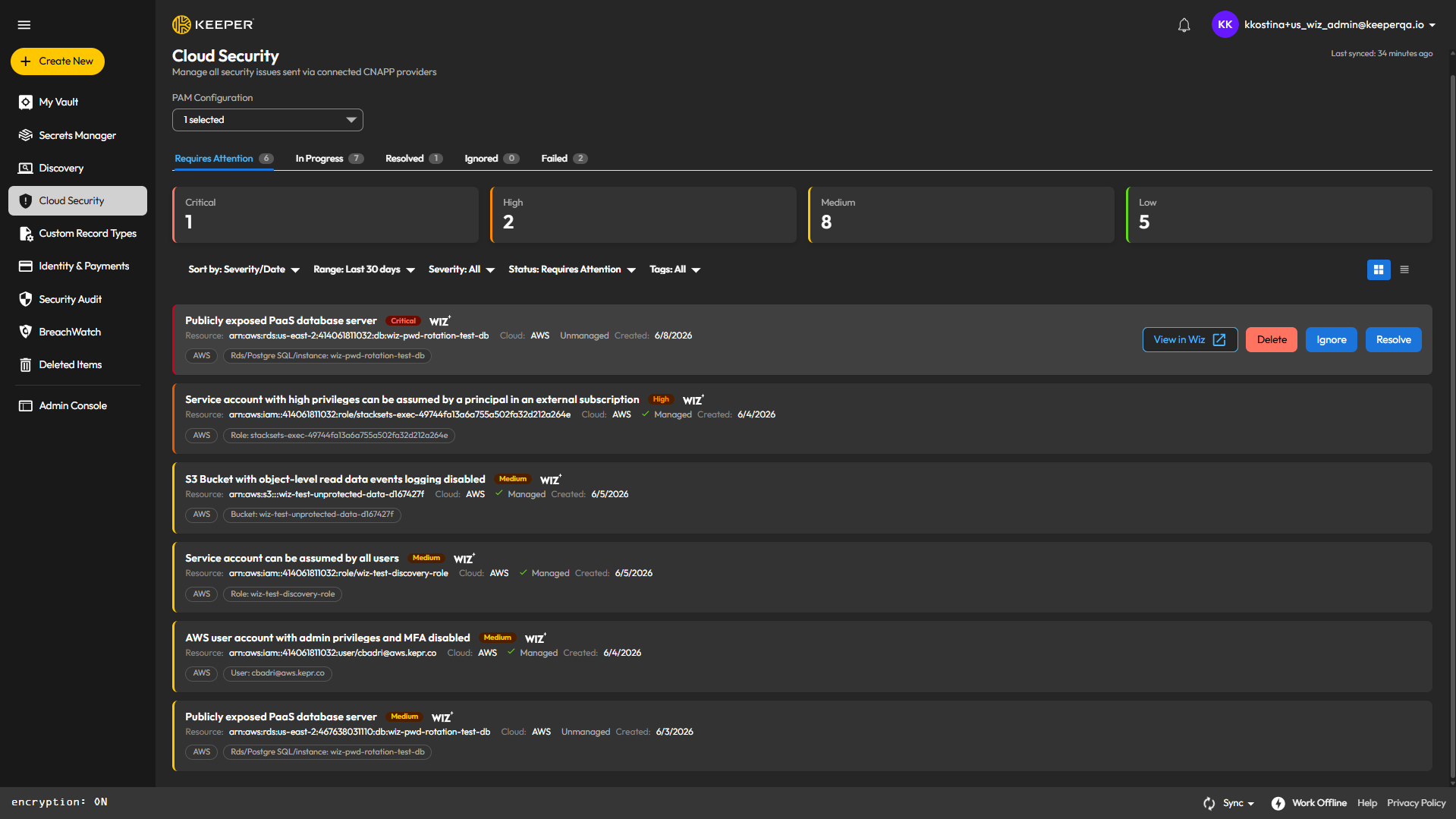
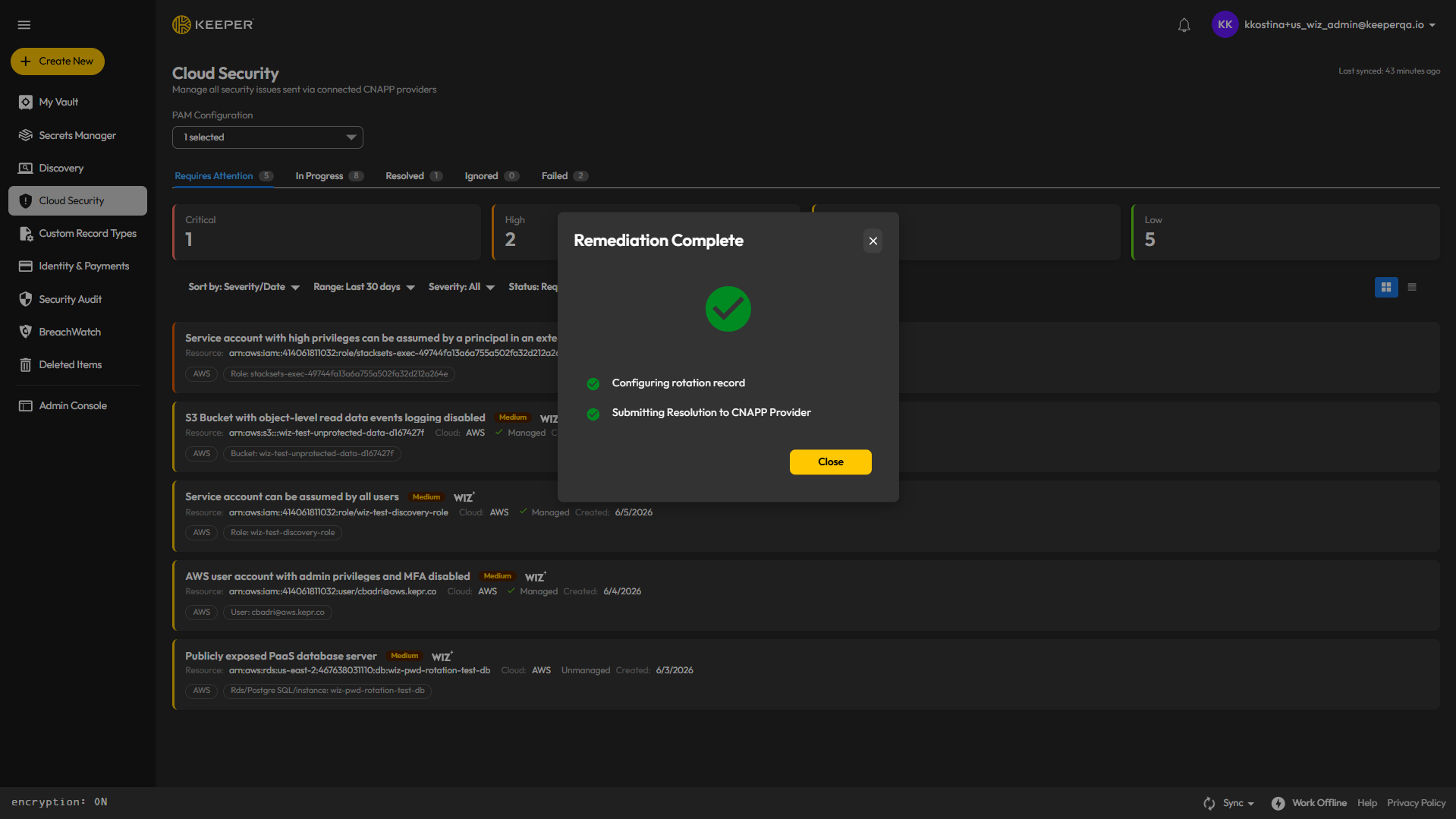
Once CNAPP is successfully configured and issues are pushed from Wiz to Keeper, admins can navigate to the Cloud Security dashboard to view and resolve them. Any issues sent in error can be deleted from Keeper. Issues can also be marked as ignored, and the CNAPP provider will be notified of this status.
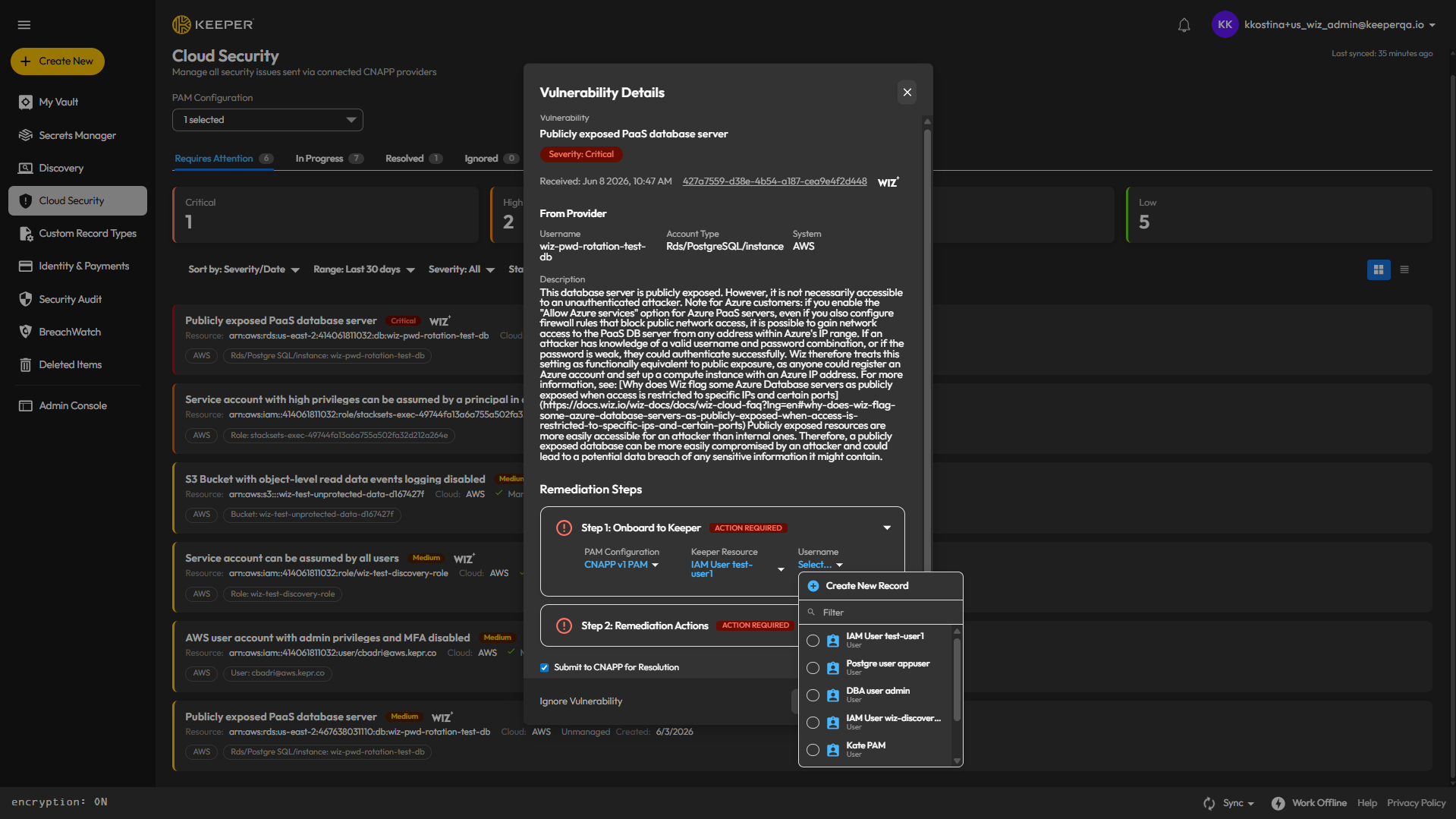
When an admin clicks the "Resolve" button, they can onboard a new resource or select an existing resource to map to this issue.
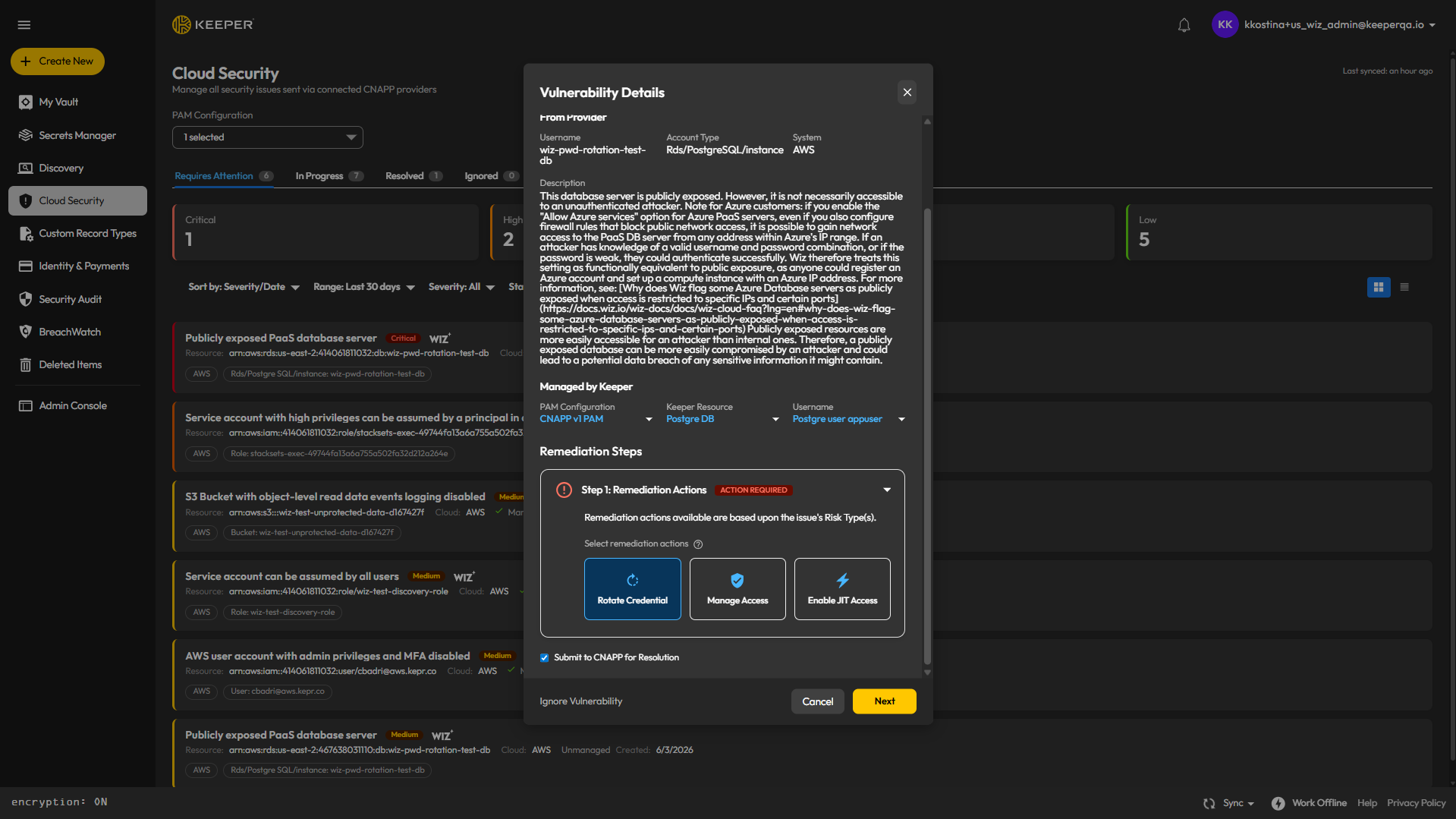
Once, the appropriate resources are selected, the admin can attempt to remediate the issue using one of three possible KeeperPAM features. Currently streamline remediation is only available for Credential Rotation.
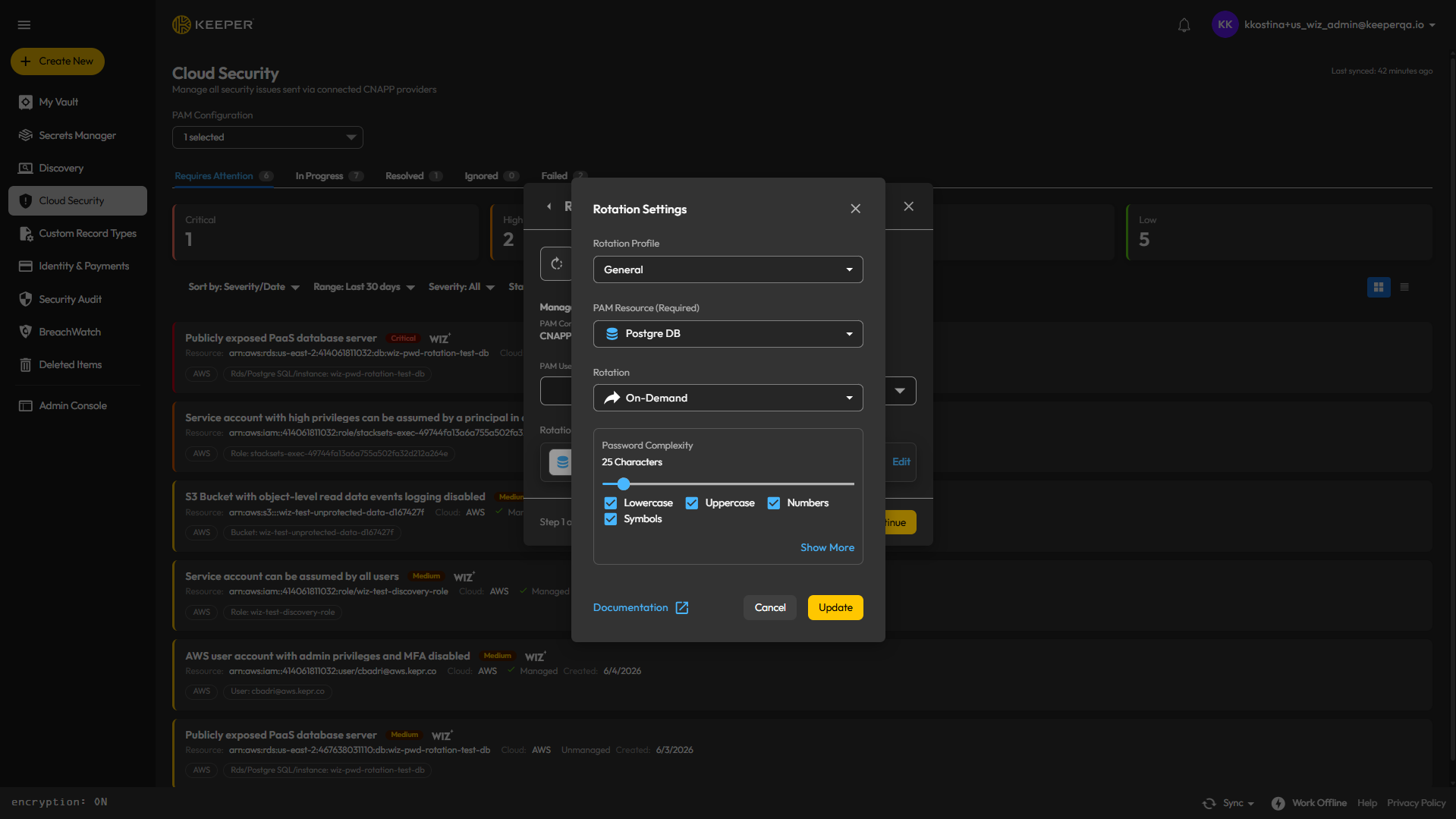
The admin can then choose to temporarily update the rotation profile and perform the rotation.
The CNAPP provider is automatically notified of the the remediation and the issue moves to the In Progress tab.
After a new Wiz scan is complete and an admin sends the resolved issue back to Keeper, the issue transitions from the In Progress tab to Resolved tab.
{% hint style="info" %}
To learn more about [KeeperPAM Cloud Security](/keeperpam/privileged-access-manager/cloud-security.md) with Wiz
{% endhint %}
### Keeper Privileged Cloud
Privileged Cloud provides Just-In-Time (JIT) access across cloud identity platforms, enabling zero standing privilege access for users who need access to resources within cloud identity platforms. Using Privileged Cloud elevation, organizations significantly reduce their attack surface by ensuring that privileged access is only granted when needed, for the duration required, and with appropriate approvals.
#### **Understanding JIT and ZSP**
**Just-In-Time (JIT) Access**: Provides users with privileged access only at the moment they need it, for a limited time period, and often with approval workflows.
**Zero Standing Privilege (ZSP)**: A security approach where users have no permanent privileged access to systems, eliminating the risk associated with compromised privileged accounts.
### Supported Identity Platforms
Keeper Privileged Cloud supports JIT privilege elevation on the following identity platforms:
* AWS IAM
* Azure Entra ID
* GCP (Through GSuite)
* Okta
* Active Directory
{% hint style="info" %}
Learn more about [Keeper Privileged Cloud](/keeperpam/privileged-access-manager/just-in-time-access-jit/keeper-privileged-cloud.md)
{% endhint %}
## Improvements
* **VAUL-6802:** Customers can now view and download their billing receipts directly from the Web Vault.
* **KDE-2095:** Added a new `revealed_password` event that fires when a user views a password field from the UI, including KFFA support.
* **VAUL-8382:** Improved PAM connection performance by sending trickle ICE candidates and START over WebSocket instead of HTTP.
* **VAUL-8887:** Implemented Socket Firewall from Socket.dev for enhanced supply chain security.
* **VAUL-8937:** Replaced node-forge dependency due to licensing requirements.
* **VAUL-8866:** Reduced the number of dependency overrides in the Web Vault.
* **VAUL-8967:** Updated flagged dependencies for the 18.1.0 release.
* **VAUL-8951:** Implemented Claude Skill to automatically fix vulnerabilities.
* **VAUL-8941:** Added Claude improvements and shared skills to the Vault repo.
* **VAUL-8952:** Reorganized the gitignore file for better maintainability.
* **KDE-1748:** Implemented secure DLL loading to address a DLL side-loading vulnerability on Windows.
* **KDE-2085:** Upgraded Electron from 40.8.5 to 41.7.0.
* **KDE-2071:** Reduced the number of dependency overrides for improved maintainability.
* **KDE-2098:** Updated the Software Bill of Materials (SBOM).
* **KDE-2053:** Rebuilt the Snap package to receive the latest package security updates on Linux.
## Bug Fixes
* **VAUL-6304:** Fixed an error that occurred after importing records for a new user during Security Audit.
* **VAUL-8134:** Fixed an issue where 1Password data was not importing correctly.
* **VAUL-8873:** Fixed an issue preventing users from creating a new Drive PAM Configuration.
* **VAUL-8950:** Fixed gateway provisioning failure (404 bad\_path) when adding PAM configuration in the Docker gateway wizard.
* **VAUL-8886:** Fixed the folder selector in the Create Record modal to work correctly with the classic record checkbox.
* **VAUL-8867:** Fixed an issue where switching folder location to "My Vault" in the New Folder dialog incorrectly opened the legacy Shared Folder modal instead of the KD folder creation dialog.
* **VAUL-8948:** Fixed Billing History not displaying for Family accounts.
* **VAUL-8960:** Fixed Billing History being erased after upgrading from Unlimited to Family plan.
* **VAUL-8974:** Fixed a misleading message for object location on non-KD accounts.
* **VAUL-8981:** Fixed database records generated by the wizard to allow KeeperDB by default.
* **VAUL-8946:** Fixed SvgButton icon color specificity issue.
* **KDE-2070:** Fixed a Windows AppService PFN bypass vulnerability that could expose the platform-key via the UWP package container.
* **KDE-2087:** Fixed an issue where the SSH Agent "Limit SSH Agent access to records" setting was not consistently persisted after exiting the app.
* **KDE-2068:** Fixed the 2FA "PIN Required" layout exceeding the KFFA window size, which caused scrollbars to appear.
* **KDE-1791:** Fixed an issue where the desktop icon did not launch the Snap application on Linux.
* **KDE-1774:** Fixed the Ubuntu Store App being unable to point to the QA environment.
* **KDE-1472:** Fixed the onboarding flow not being clickable in the Desktop App.
## Web Vault Update Instructions
* To ensure you're using the latest Web Vault, simply reload the vault login page (or Shift+Ctrl/Cmd+R to force refresh)
## Desktop Update Instructions
* If you installed Keeper Desktop directly from the Keeper website, download the latest version from:\
* If you installed Keeper Desktop from the Mac App Store or Microsoft Store, visit the store to perform the update.
---
# Agent Instructions
This documentation is published with GitBook. GitBook is the documentation platform designed so that both humans and AI agents can read, navigate, and reason over technical content effectively. Learn more at gitbook.com.
## Querying This Documentation
If you need additional information that is not directly available in this page, you can query the documentation dynamically by asking a question.
Perform an HTTP GET request on the current page URL with the `ask` query parameter:
```
GET https://docs.keeper.io/release-notes/desktop/web-vault-+-desktop-app/vault-release-18.1.0.md?ask=
```
The question should be specific, self-contained, and written in natural language.
The response will contain a direct answer to the question and relevant excerpts and sources from the documentation.
Use this mechanism when the answer is not explicitly present in the current page, you need clarification or additional context, or you want to retrieve related documentation sections.