> For the complete documentation index, see [llms.txt](https://docs.keeper.io/llms.txt). Markdown versions of documentation pages are available by appending `.md` to page URLs; this page is available as [Markdown](https://docs.keeper.io/release-notes/desktop/web-vault-+-desktop-app/vault-release-18.6.4.md).
# Vault Release 18.6.4
Released on September 28, 2026
## Overview
Web Vault 18.6.4 focuses primarily on CNAPP (Cloud-Native Application Protection Platform) and introduces Tenable as a new integration partner alongside Wiz, featuring a dedicated setup modal, mapping of Tenable issues to the Cloud Security schema and status management capabilities. This release also includes a redesigned Vulnerability Details screen, a new search feature for CNAPP issues, enhancements to the Remove Standing Privilege remediation flow including group and role listing, and several bug fixes.
## New Features
### Tenable Integration
Keeper now integrates with Tenable to streamline the remediation of cloud security findings. Tenable identifies exposed identities, risky access paths, and cloud misconfigurations — and this integration allows those findings to flow directly into Keeper Cloud Security where they can be acted on immediately.
Once a finding is sent to Keeper, teams can remediate it using KeeperPAM controls including credential rotation, managed onboarding, and privileged access management. Remediation status stays synchronized across both platforms, giving security teams a single, consistent view of what has been resolved and what still needs attention.
#### How it Works
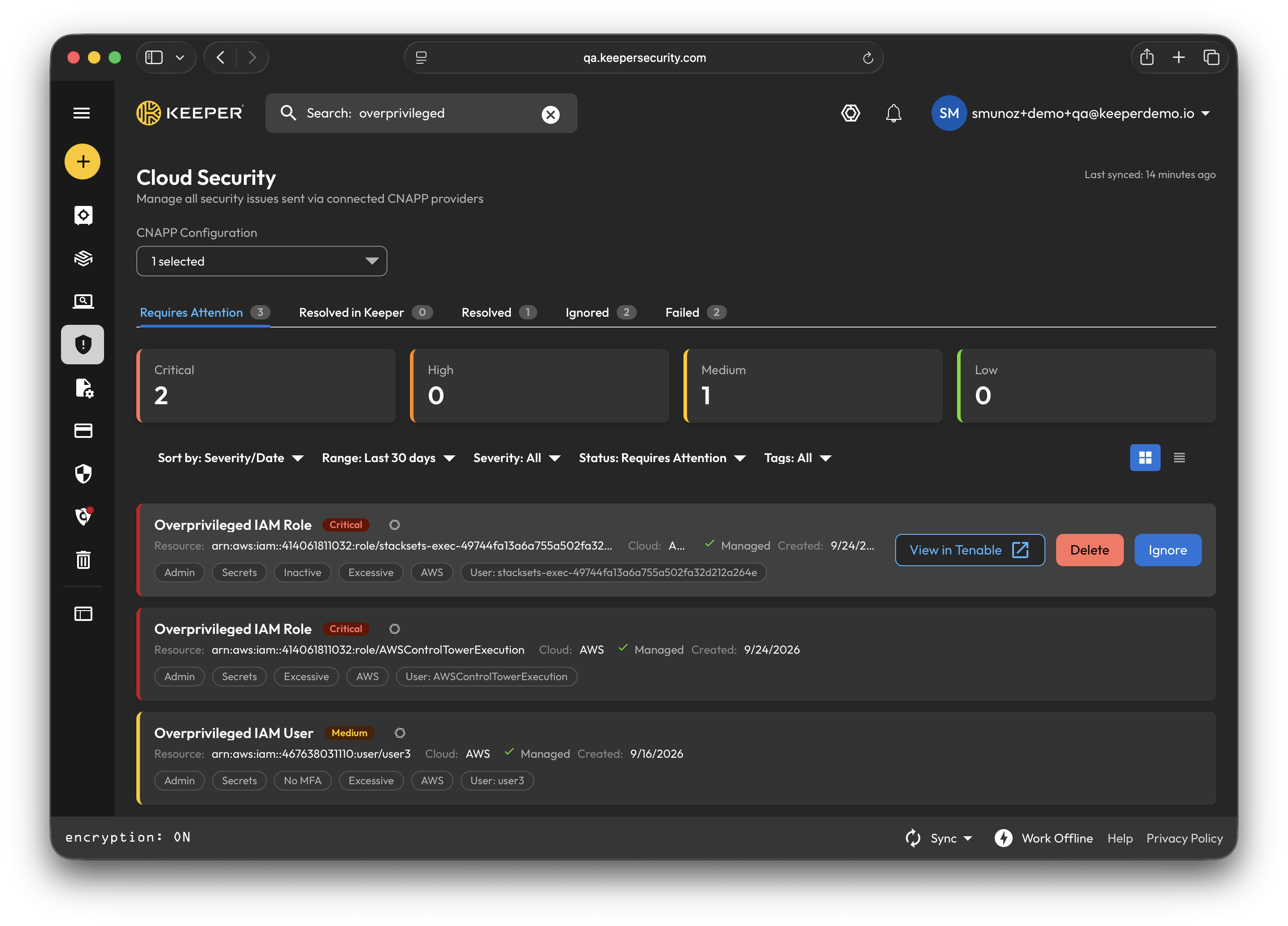
Once the integration is configured, any vulnerabilities identified by Tenable will appear in Keeper's Cloud Security Dashboard, complete with the full resource details required to remediate the issue.
Cloud Security Dashboard
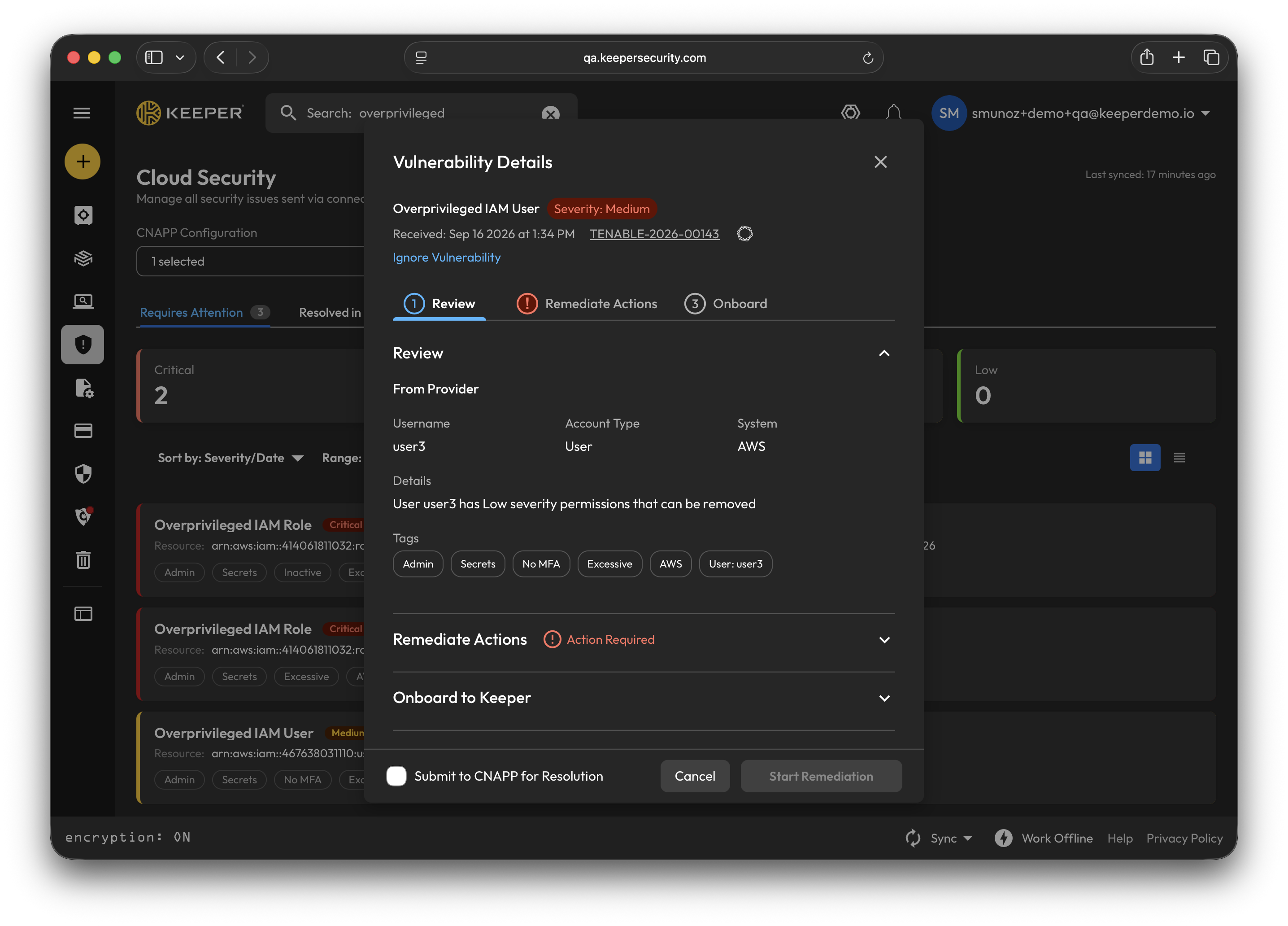
Vulnerability Details
Once you reviewed the vulnerability details you can choose between four remediation actions:
* Rotate Credential
* Manage Access
* Enable JIT Access
* Remove Standing Privilege
To onboard the resource required to remediate the issue, select the appropriate record type for the resource you wish to onboard (PAM database, machine, directory, remote browser and cloud) and begin the remediation.
Onboard Resource
After remediation is complete, Keeper automatically syncs with Tenable, and the resolved status appears in both platforms without any manual intervention.
Remediation Complete
{% hint style="info" %}
For setup instructions and more detailed information for Keeper's Tenable integration, [click here](/keeperpam/privileged-access-manager/cloud-security/tenable-integration.md).
{% endhint %}
## Improvements
* **VAUL-9346:** Added a dedicated CNAPP integration setup modal for Tenable
* **VAUL-9345:** Mapped Tenable-specific findings onto the Cloud Security schema
* **VAUL-9408:** Added support for setting the status of Tenable issues
* **VAUL-9440:** Added a popup notification when updating a CNAPP issue's status fails or results in an unexpected status
* **VAUL-9449:** Implemented search functionality on the Cloud Security screen to quickly find CNAPP issues
* **VAUL-9215:** Added a download button for the Encrypter `docker-compose.yml` file on the CNAPP Setup modal
* **VAUL-9395:** Enhanced the "Remove Standing Privilege" flow
* **VAUL-9430:** Refined the Vulnerability Details multi-step wizard UI
* **VAUL-9434:** Improved the Vulnerability Details modal and PAM settings with larger action buttons, disabled auto-collapsing sections and retry controls
* **VAUL-9454:** UI refinements across the Cloud Security screen, including forced status refresh and duplicate role name validation
* **VAUL-9455:** Updated dependency for the Web Vault application
## Bug Fixes
* **VAUL-9291:** Fixed an issue where the selected PAM configuration was not persisting on the vulnerability details screen
* **VAUL-9309:** Resolved an issue where clicking outside the Tags filter or PAM Configuration dropdown failed to close the dropdown
* **VAUL-9456:** Fixed the Encrypter connection verification link in the CNAPP integration setup to resolve a 401 API token error
## Web Vault Update Instructions
* To ensure you're using the latest Web Vault, simply reload the vault login page (or Shift+Ctrl/Cmd+R to force refresh)
## Desktop Update Instructions
* If you installed Keeper Desktop directly from the Keeper website, download the latest version from:\
* If you installed Keeper Desktop from the Mac App Store or Microsoft Store, visit the store to perform the update.
---
# Agent Instructions
This documentation is published with GitBook. GitBook is the documentation platform designed so that both humans and AI agents can read, navigate, and reason over technical content effectively. Learn more at gitbook.com.
## Querying This Documentation
If you need additional information that is not directly available in this page, you can query the documentation by asking a question.
Perform an HTTP GET request on the following URL with the `ask` and `goal` query parameters:
```
GET https://docs.keeper.io/release-notes/desktop/web-vault-+-desktop-app/vault-release-18.6.4.md?ask=&goal=
```
`ask` is the immediate question: it should be specific, self-contained, and written in natural language.
`goal` is what the user is ultimately trying to achieve, the reason they need the answer. Sharing it helps GitBook give you a better, more relevant answer. A goal is most helpful when it describes the outcome the user wants rather than restating the question. For example, with `ask=how do I create an API token`, a goal like `automate deployments from our CI pipeline` lets GitBook tailor the answer to that use case.
The response will contain a direct answer to the question and relevant excerpts and sources from the documentation.
Use this mechanism when the answer is not explicitly present in the current page, you need clarification or additional context, or you want to retrieve related documentation sections.
.png?alt=media&token=6976ba5a-0ab6-429b-8764-2f866774ee4a)

