> For the complete documentation index, see [llms.txt](https://docs.keeper.io/llms.txt). Markdown versions of documentation pages are available by appending `.md` to page URLs; this page is available as [Markdown](https://docs.keeper.io/release-notes/jp/desktop/keeperdb/keeperdb-2.5.1.md).
# KeeperDB 2.5.1
2026年9月10日リリース
### KeeperDBとは
**KeeperDB**は、高速で安全なクロスプラットフォーム対応のデータベース管理ツールです。KeeperPAM接続の中で利用するほか、Windows、macOS、Linux向けのスタンドアロンデスクトップアプリとしても利用できます。
{% embed url="" %}
PostgreSQL、MySQL、SQLite、Microsoft SQL Server、Oracle、Amazon Redshift、MongoDB、Amazon DynamoDBに対するクエリ実行、データ探索、運用作業を、単一のインターフェースから行えます。
KeeperDBはエンジニアおよびデータサイエンティスト向けに構築されています。DBeaver、MySQL Workbench、pgAdminなどの従来のツールに代わる製品です。KeeperPAMでは、パスワードレスで完全管理された環境内で主要なデータベース運用ワークフローを利用できます。
クイックリンク: [製品ドキュメント](/keeperpam/jp/privileged-access-manager/keeperdb.md) | [ダウンロード](https://www.keepersecurity.com/ja_JP/features/keeper-db/)
### バージョン2.5.1の概要
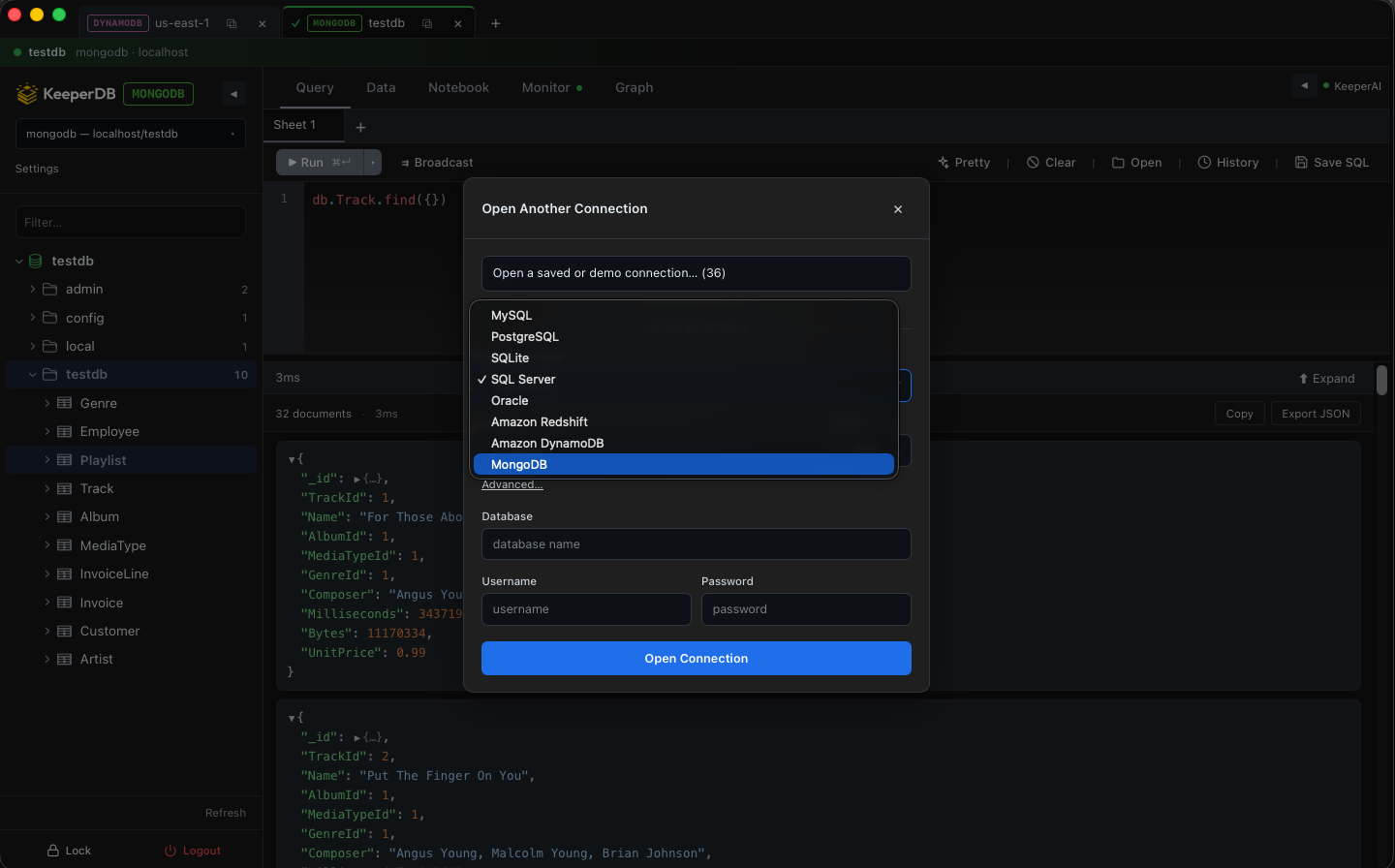
KeeperDB 2.5.1はメンテナンスリリースです。追加の接続を開く際にAmazon DynamoDBとMongoDBを選択できるようになり、Microsoft SQL Serverでは既存のトークンベースサインインに加えて、従来型のEntra IDユーザー名/パスワードサインインにも対応しました。また、保存済みの接続情報を設定から変更できるようになりました。その他はドライバーの修正と、複数接続を同時に利用する際の安定性向上です。
{% hint style="info" %}
KeeperDB 2.5.1はスタンドアロン版として利用できるほか、今後のKeeperゲートウェイリリースにも組み込まれます。
{% endhint %}
#### 新しい接続タイプ
**別の接続を開く**ピッカーから、既存の接続と同様にAmazon DynamoDBとMongoDBを開けるようになりました。
#### MSSQLサインインの改善
* 既存のトークンベースのEntraサインインに加えて、Entra IDのユーザー名とパスワード (Entra Legacy OAuth \[ROPC]) でAzure SQLおよびSQL Serverにサインイン可能。
* Windows形式のユーザー名 (`DOMAIN\user`) の自動検出に対応し、追加の操作なしでWindows認証 (NTLM) が選択されるよう改善。
#### 保存済み接続の詳細を変更
接続の詳細情報を設定から更新できるようになりました。
#### ドライバーと安定性の改善
* PostgreSQL、SQL Server、Oracleで、スキーマ表示時にビューの定義がエラーではなく正しく表示されるよう修正。
* Amazon Redshiftのスキーマ参照とビュー定義の不具合を修正。
* 接続タブまたはクエリタブを切り替えても、実行中または完了直後のクエリ結果が失われないよう修正。
* 接続文字列にオーバーライドを指定したOracleデータベースへの接続が遅い場合、接続試行が無期限にハングしないよう修正。
### リソース
* [KeeperDBドキュメント](/keeperpam/jp/privileged-access-manager/keeperdb.md)
* [KeeperDBプロキシドキュメント](/keeperpam/jp/privileged-access-manager/keeperdb-proxy.md)
* [KeeperDB機能紹介ページ](https://www.keepersecurity.com/ja_JP/features/keeper-db/)
* [KeeperAIドキュメント](/keeperpam/jp/privileged-access-manager/keeperai.md)
* [KeeperPAM機能紹介ページ](https://www.keepersecurity.com/ja_JP/privileged-access-management/)
### ロードマップ
お客様のフィードバックに基づき、毎月更新を公開しています。機能リクエストや不具合の報告は、までご連絡いただくか、[Redditコミュニティページ](https://www.reddit.com/r/KeeperSecurity/)へご投稿ください。
---
# Agent Instructions
This documentation is published with GitBook. GitBook is the documentation platform designed so that both humans and AI agents can read, navigate, and reason over technical content effectively. Learn more at gitbook.com.
## Querying This Documentation
If you need additional information that is not directly available in this page, you can query the documentation dynamically by asking a question.
Perform an HTTP GET request on the current page URL with the `ask` query parameter, and the optional `goal` query parameter:
```
GET https://docs.keeper.io/release-notes/jp/desktop/keeperdb/keeperdb-2.5.1.md?ask=&goal=
```
`ask` is the immediate question: it should be specific, self-contained, and written in natural language.
`goal` is optional and describes the broader end goal you are ultimately trying to accomplish on behalf of the user. GitBook uses it to tailor the answer towards what is most useful for that goal.
The response will contain a direct answer to the question and relevant excerpts and sources from the documentation.
Use this mechanism when the answer is not explicitly present in the current page, you need clarification or additional context, or you want to retrieve related documentation sections.