> For the complete documentation index, see [llms.txt](https://docs.keeper.io/llms.txt). Markdown versions of documentation pages are available by appending `.md` to page URLs; this page is available as [Markdown](https://docs.keeper.io/release-notes/jp/desktop/web-vault-+-desktop-app/vault-release-18.6.4.md).
# ボルトリリース 18.6.4
2026年9月28日リリース
## 概要
ウェブボルト 18.6.4では、CNAPP (Cloud-Native Application Protection Platform) を中心に強化を実施し、Wizに加えて新たにTenableを連携先として追加しました。専用のセットアップモーダル、Tenableの検出結果をクラウドセキュリティのスキーマへマッピングする機能、ステータス管理機能を搭載しています。また、脆弱性詳細画面を再設計し、CNAPP問題を検索する機能を新たに追加するとともに、「常時付与されている権限を削除」の修復フローをグループおよびロール一覧表示を含めて強化し、各種不具合も修正しました。
## 新機能
### Tenable連携
Keeperは、クラウドセキュリティの検出結果の修復を効率化するため、Tenableとの連携に対応しました。Tenableは、露出したアイデンティティ、危険なアクセス経路、クラウドの誤設定を検出します。この連携により、それらの検出結果がKeeperクラウドセキュリティへ直接取り込まれ、即座に対応できるようになります。
検出結果がKeeperに送信されると、認証情報のローテーション、マネージドオンボーディング、特権アクセス管理などのKeeperPAMの制御機能を使って修復できます。修復ステータスは両プラットフォーム間で同期され、セキュリティチームは対応済みの項目と未対応の項目を一貫した単一のビューで確認できます。
#### 仕組み
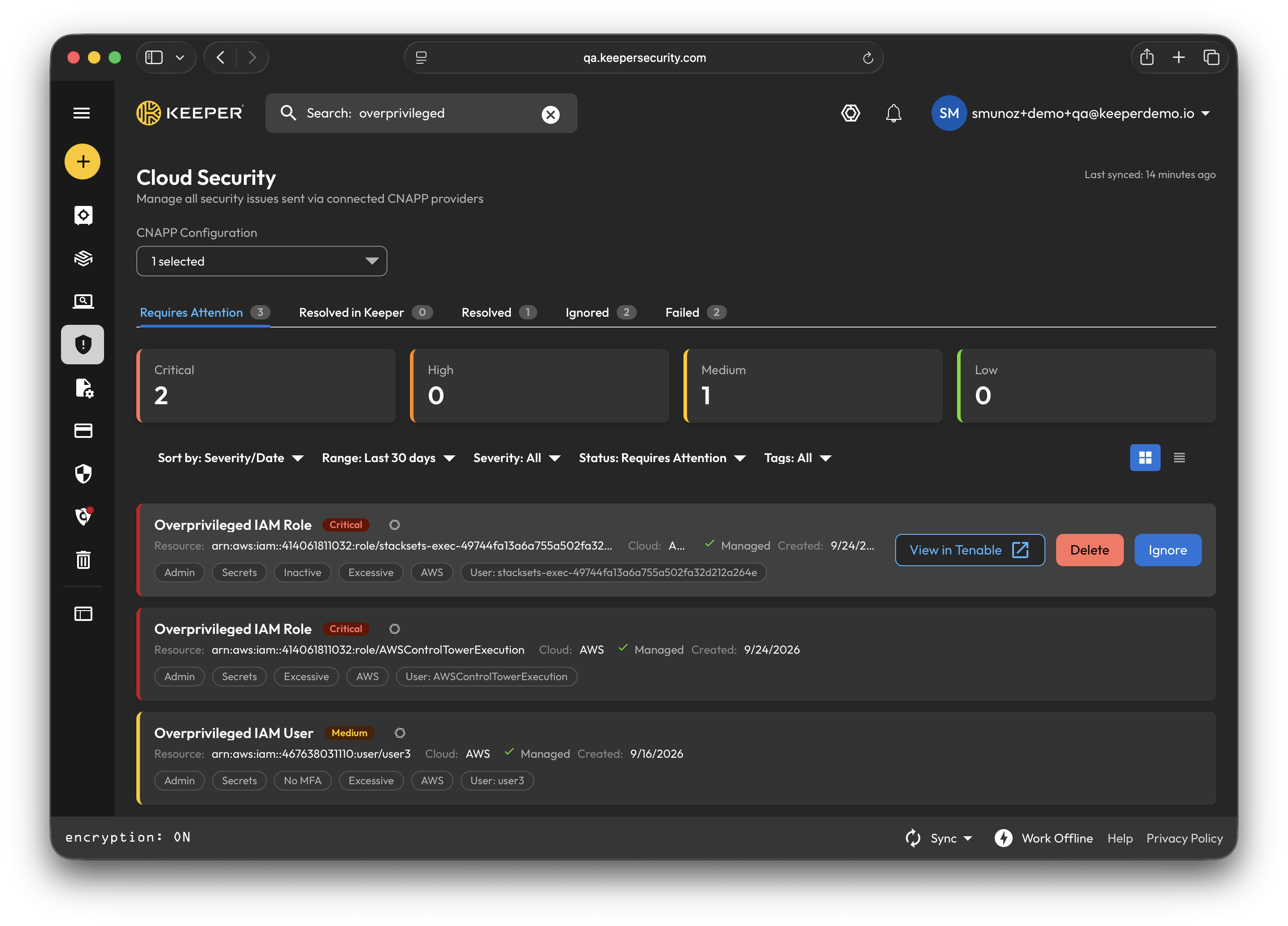
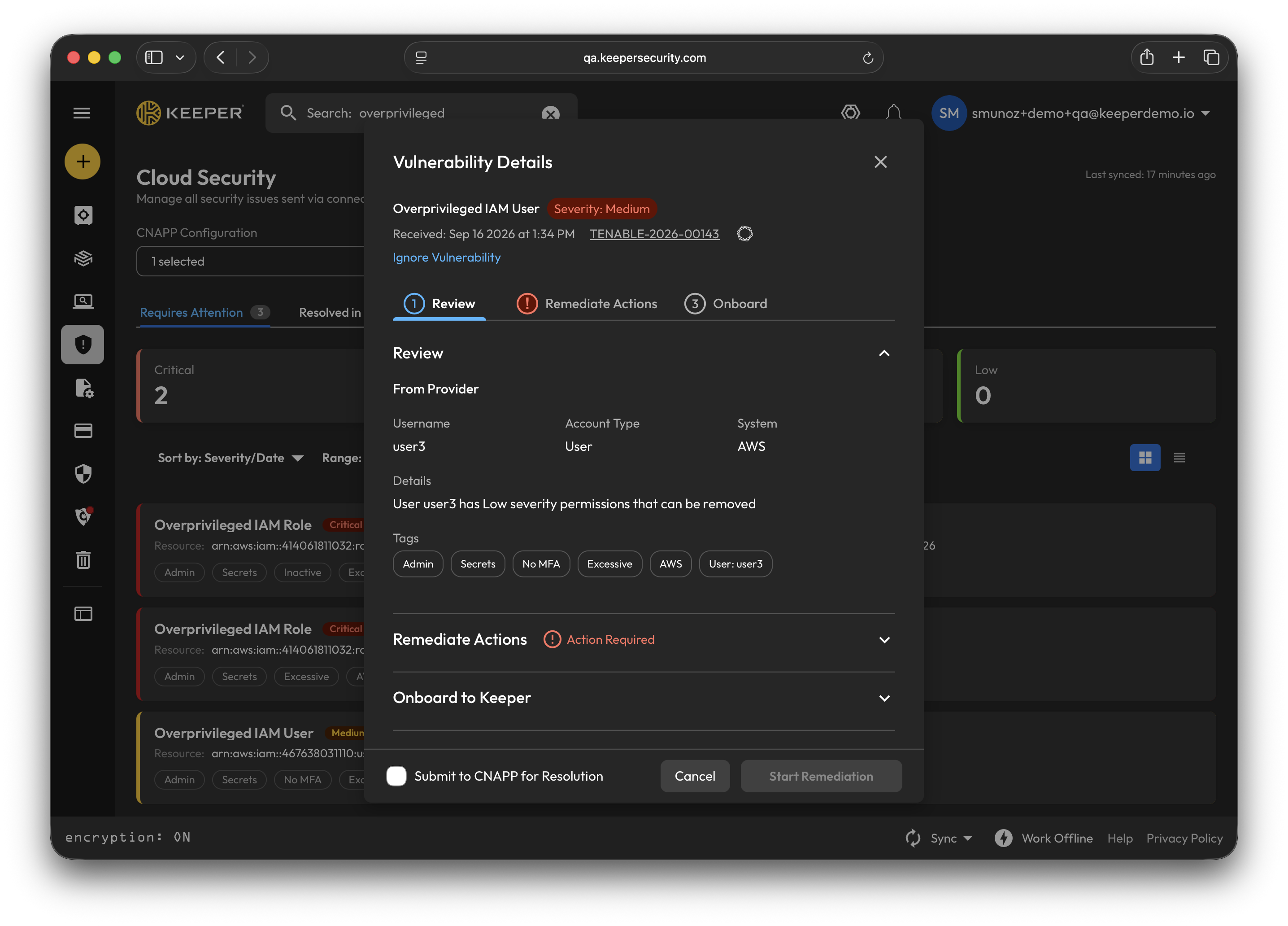
連携を設定すると、Tenableが検出した脆弱性がKeeperのクラウドセキュリティダッシュボードに表示され、問題の修復に必要なリソースの詳細情報もすべて確認できます。
クラウドセキュリティダッシュボード
脆弱性の詳細
脆弱性の詳細を確認した後は、以下4つの修復アクションから選択できます。
* 認証情報のローテーション
* アクセス権を管理
* JITアクセスを有効化
* 常時付与されている権限を削除
問題の修復に必要なリソースをオンボーディングするには、オンボーディングするリソースに応じたレコードタイプ (PAMデータベース、マシン、ディレクトリ、リモートブラウザ、クラウド) を選択し、修復を開始します。
修復が完了すると、KeeperはTenableと自動的に同期し、手動操作なしで両プラットフォームに解決済みのステータスが反映されます。
{% hint style="info" %}
KeeperのTenable連携のセットアップ手順や詳細については、[こちら](/keeperpam/jp/privileged-access-manager/cloud-security/tenable-integration.md)をご参照ください。
{% endhint %}
## 改善点
* **VAUL-9346:** Tenable向けの専用CNAPP連携セットアップモーダルを追加。
* **VAUL-9345:** Tenable固有の検出結果をクラウドセキュリティのスキーマへマッピング。
* **VAUL-9408:** Tenable問題のステータス設定に対応。
* **VAUL-9440:** CNAPP問題のステータス更新が失敗した場合や予期しないステータスになった場合に、ポップアップ通知を表示するように追加。
* **VAUL-9449:** クラウドセキュリティ画面にCNAPP問題を素早く見つけるための検索機能を実装。
* **VAUL-9215:** CNAPPセットアップモーダルに、Encrypterの `docker-compose.yml` ファイルをダウンロードするボタンを追加。
* **VAUL-9395:** 「常時付与されている権限を削除」フローを強化。
* **VAUL-9430:** 脆弱性詳細のマルチステップウィザードUIを改善。
* **VAUL-9434:** 脆弱性詳細モーダルとPAM設定で、アクションボタンを大きくし、セクションの自動折りたたみを無効化、再試行コントロールを追加して改善。
* **VAUL-9454:** クラウドセキュリティ画面全体のUIを改善 (ステータスの強制更新、ロール名の重複検証など)。
* **VAUL-9455:** ウェブボルトアプリケーションの依存関係を更新。
## バグ修正
* **VAUL-9291:** 脆弱性詳細画面で選択したPAM構成が保持されない不具合を修正。
* **VAUL-9309:** タグフィルターまたはPAM構成のドロップダウンの外側をクリックしてもドロップダウンが閉じない不具合を修正。
* **VAUL-9456:** CNAPP連携セットアップにおけるEncrypterの接続確認リンクで401 APIトークンエラーが発生する不具合を修正。
## ウェブボルトのアップデート手順
* 最新のウェブボルトを利用するには、ボルトのログインページを再読み込みしてください。Shift+Ctrl/Cmd+Rで強制的に再読み込みすることも可能です。
## デスクトップアプリのアップデート手順
* Keeperの公式サイトから直接Keeperデスクトップをインストールした場合は、以下から最新版をダウンロードしてください。\
* Mac App StoreまたはMicrosoft Storeからインストールした場合は、各ストアでアップデートしてください。
---
# Agent Instructions
This documentation is published with GitBook. GitBook is the documentation platform designed so that both humans and AI agents can read, navigate, and reason over technical content effectively. Learn more at gitbook.com.
## Querying This Documentation
If you need additional information that is not directly available in this page, you can query the documentation by asking a question.
Perform an HTTP GET request on the following URL with the `ask` and `goal` query parameters:
```
GET https://docs.keeper.io/release-notes/jp/desktop/web-vault-+-desktop-app/vault-release-18.6.4.md?ask=&goal=
```
`ask` is the immediate question: it should be specific, self-contained, and written in natural language.
`goal` is what the user is ultimately trying to achieve, the reason they need the answer. Sharing it helps GitBook give you a better, more relevant answer. A goal is most helpful when it describes the outcome the user wants rather than restating the question. For example, with `ask=how do I create an API token`, a goal like `automate deployments from our CI pipeline` lets GitBook tailor the answer to that use case.
The response will contain a direct answer to the question and relevant excerpts and sources from the documentation.
Use this mechanism when the answer is not explicitly present in the current page, you need clarification or additional context, or you want to retrieve related documentation sections.