> For the complete documentation index, see [llms.txt](https://docs.keeper.io/llms.txt). Markdown versions of documentation pages are available by appending `.md` to page URLs; this page is available as [Markdown](https://docs.keeper.io/user-guides/es/sharing/self-destructing-records.md).

# Registros que se autodestruyen

Los registros que se autodestruyen le permiten compartir registros con usuarios ajenos a Keeper, y eliminan automáticamente el registro de su bóveda y desactivan el enlace para compartir a la hora esp

<figure><img src="https://187056193-files.gitbook.io/~/files/v0/b/gitbook-x-prod.appspot.com/o/spaces%2Frp3ylVdg2U6pDdl81oP6%2Fuploads%2Fgit-blob-9a0359274e2836fbdada67b12456ffd9436bd619%2FSelf-Destructing%20Record%20(1).jpg?alt=media" alt=""><figcaption></figcaption></figure>

## **Descripción general**

Los registros que se autodestruyen usan la tecnología de uso compartido único de Keeper, que permite compartir un registro de forma segura y por tiempo limitado con cualquier persona, aunque no tenga una cuenta de Keeper.

Los registros que se autodestruyen llevan el uso compartido único un paso más allá: eliminan automáticamente el registro de su bóveda cuando se desactiva el enlace para compartir y se revoca el acceso del destinatario. Así reduce el trabajo de revocar el acceso y de quitar el registro de la bóveda más adelante.

{% embed url="<https://vimeo.com/935970269>" %}
Registros que se autodestruyen (en inglés)
{% endembed %}

## Crear un registro que se autodestruye

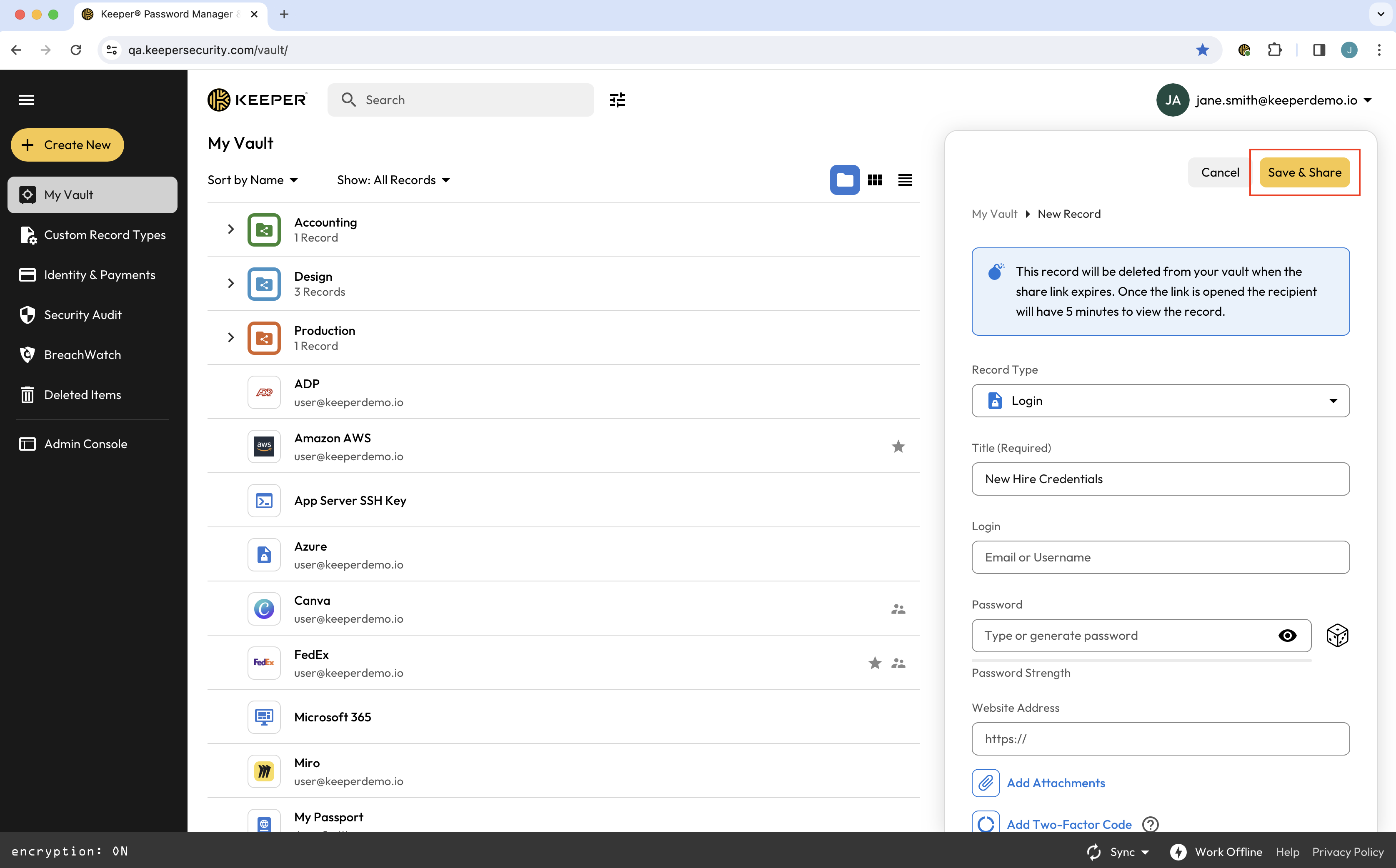
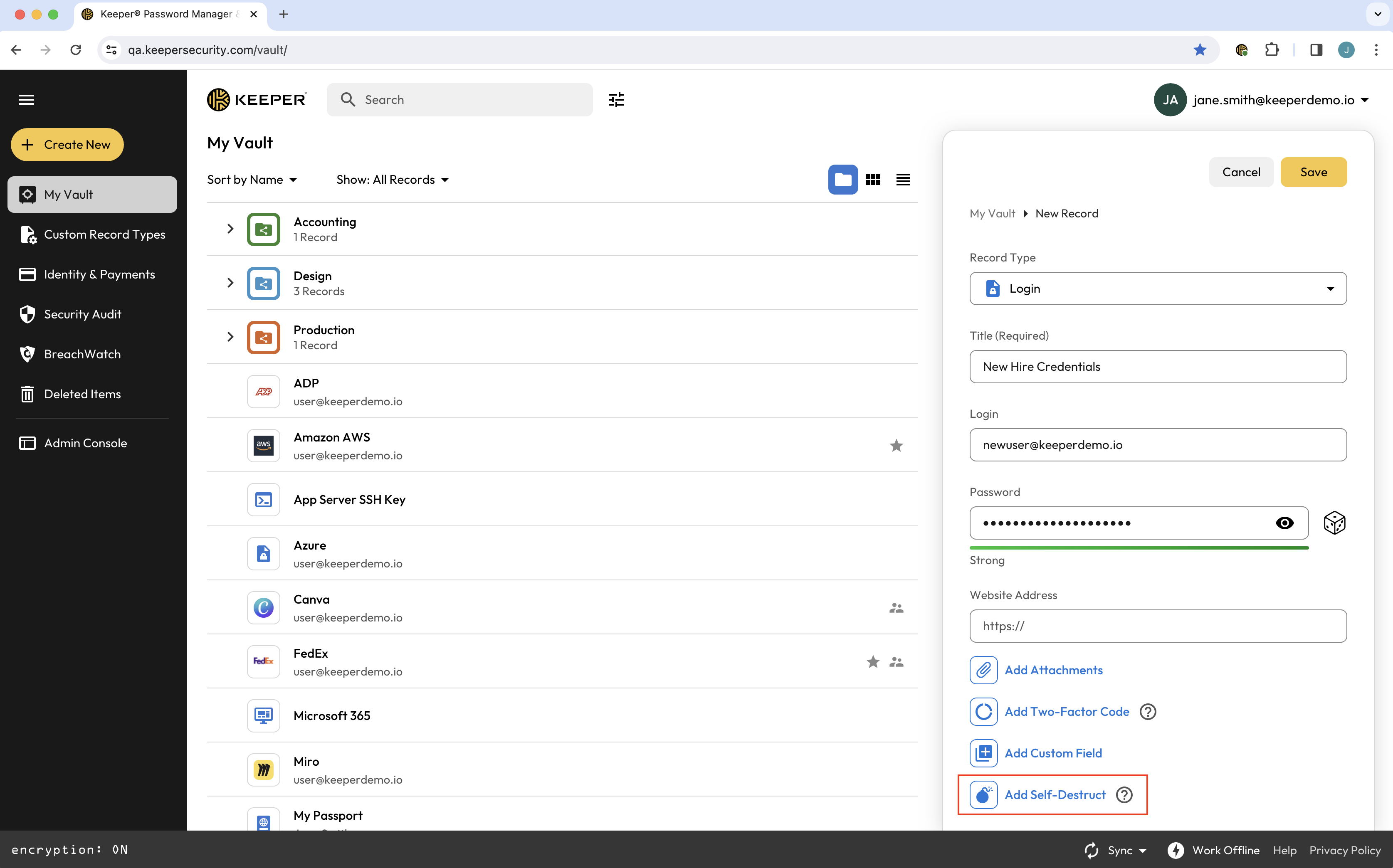
Para crear un registro que se autodestruye, cree un registro nuevo como de costumbre. Ingrese los detalles del registro y haga clic en **Añadir autodestrucción**.

<figure><img src="https://187056193-files.gitbook.io/~/files/v0/b/gitbook-x-prod.appspot.com/o/spaces%2Frp3ylVdg2U6pDdl81oP6%2Fuploads%2Fgit-blob-51a0eec61793552431c3d680437c958179674182%2FScreen%20Shot%202024-03-06%20at%209.49.17%20AM.png?alt=media" alt=""><figcaption><p>Añadir autodestrucción a un registro</p></figcaption></figure>

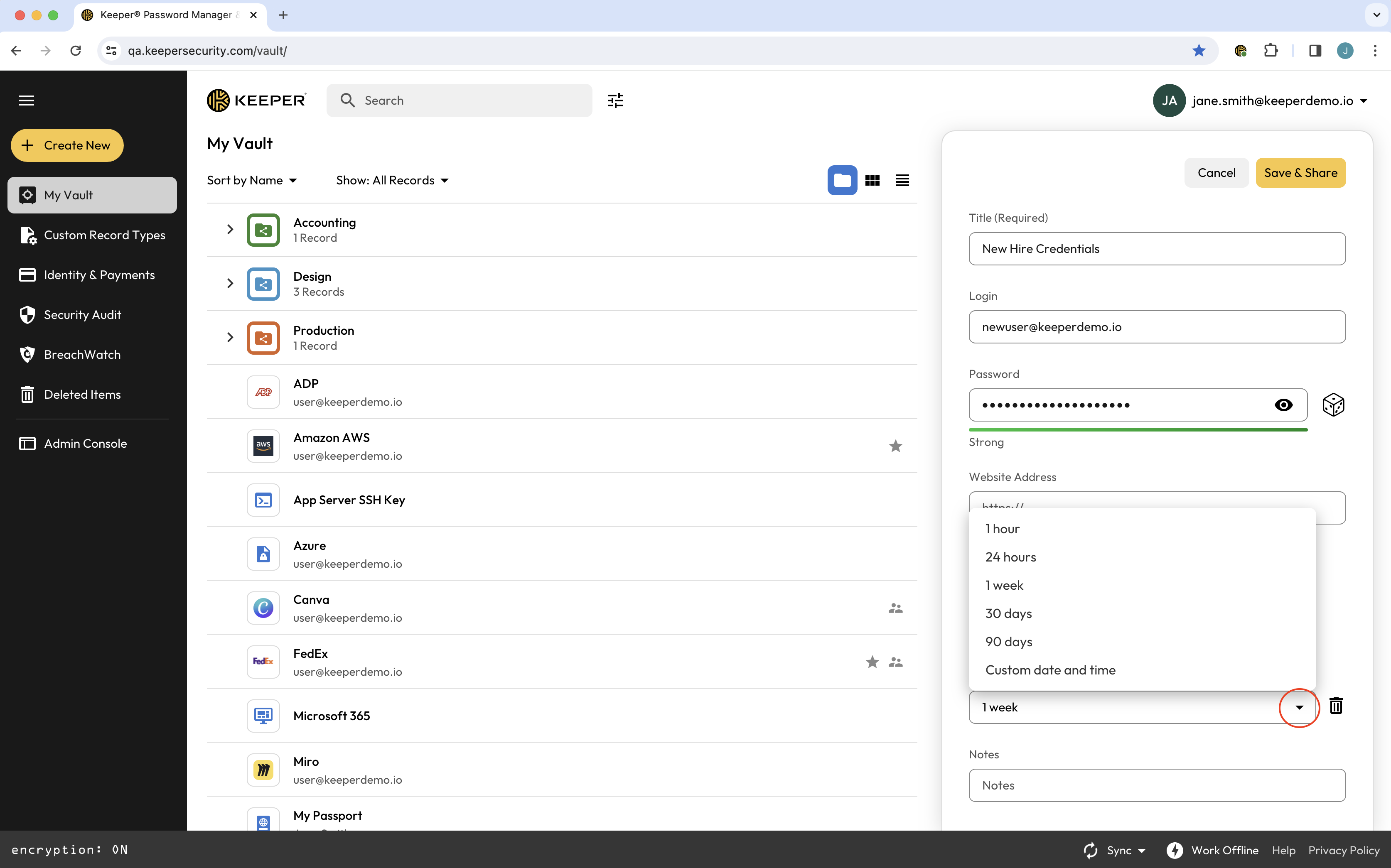
En el menú que aparece, seleccione cuándo desea que caduque el enlace para compartir.

<figure><img src="https://187056193-files.gitbook.io/~/files/v0/b/gitbook-x-prod.appspot.com/o/spaces%2Frp3ylVdg2U6pDdl81oP6%2Fuploads%2Fgit-blob-9ce8292dad5820f613fb9760a9365aaee662c038%2FScreen%20Shot%202024-03-06%20at%209.49.40%20AM.png?alt=media" alt=""><figcaption><p>Opciones de caducidad</p></figcaption></figure>

Cuando haya elegido, haga clic en **Guardar y compartir** para generar un enlace de uso compartido único.

<figure><img src="https://187056193-files.gitbook.io/~/files/v0/b/gitbook-x-prod.appspot.com/o/spaces%2Frp3ylVdg2U6pDdl81oP6%2Fuploads%2Fgit-blob-7fa51fb0ef56496ed4082ebde859a00c43006f75%2FScreen%20Shot%202024-03-06%20at%209.50.59%20AM.png?alt=media" alt=""><figcaption><p>Guardar y compartir registro</p></figcaption></figure>

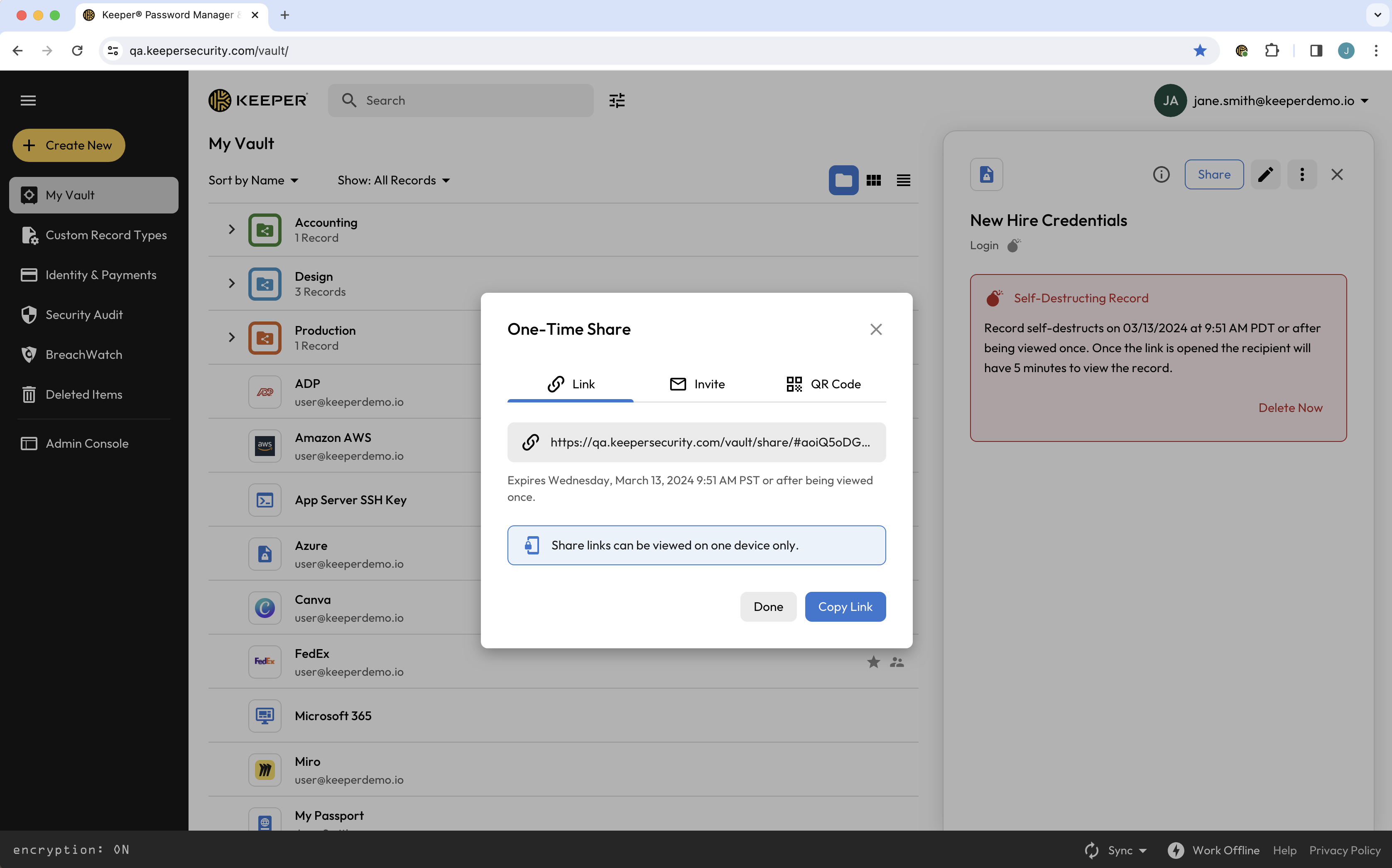
Puede copiar el enlace directamente, o enviarlo en una invitación o como código QR.

<figure><img src="https://187056193-files.gitbook.io/~/files/v0/b/gitbook-x-prod.appspot.com/o/spaces%2Frp3ylVdg2U6pDdl81oP6%2Fuploads%2Fgit-blob-2c6f801a5695987fe77b61375f49b11e8f5caddb%2FScreen%20Shot%202024-03-06%20at%209.51.16%20AM.png?alt=media" alt=""><figcaption><p>Copiar enlace de uso compartido único</p></figcaption></figure>

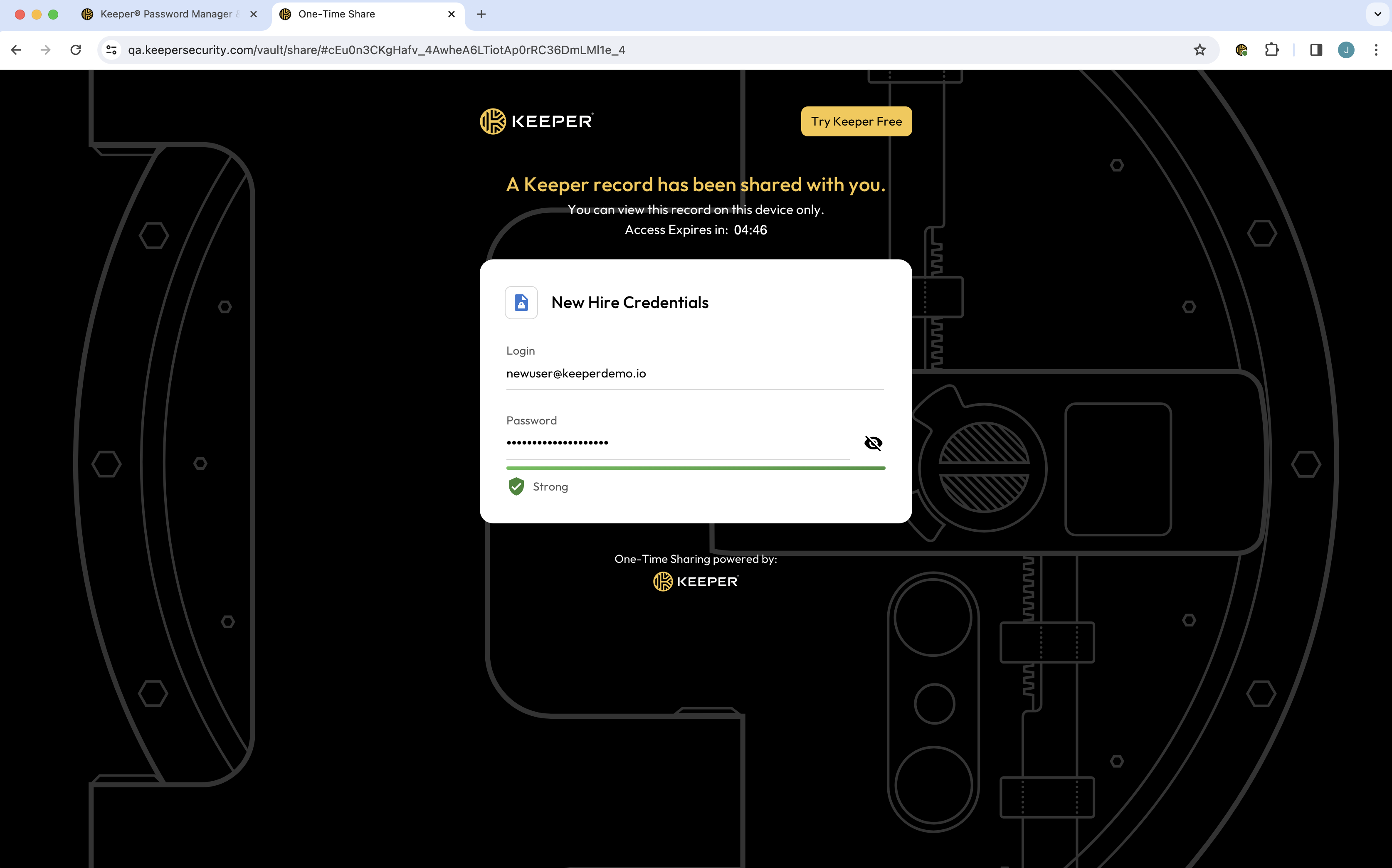
El destinatario de un registro que se autodestruye solo tiene que hacer clic en el enlace y verá de inmediato el registro compartido en su navegador. Los enlaces de uso compartido único quedan vinculados a un solo dispositivo, lo que refuerza la seguridad e impide la distribución no autorizada o la visualización en varios dispositivos. El enlace caducará a la hora especificada o cuando el destinatario haya visto el registro durante cinco minutos, lo que ocurra primero.

<figure><img src="https://187056193-files.gitbook.io/~/files/v0/b/gitbook-x-prod.appspot.com/o/spaces%2Frp3ylVdg2U6pDdl81oP6%2Fuploads%2Fgit-blob-df10555a6644db011f64171837849648908f4579%2FScreen%20Shot%202024-03-06%20at%209.57.39%20AM.png?alt=media" alt=""><figcaption><p>Enlace de uso compartido único</p></figcaption></figure>

## Compartir archivos de forma segura con autodestrucción

Los registros que se autodestruyen de Keeper le permiten compartir de forma segura registros con archivos adjuntos que se autodestruyen a la hora especificada.

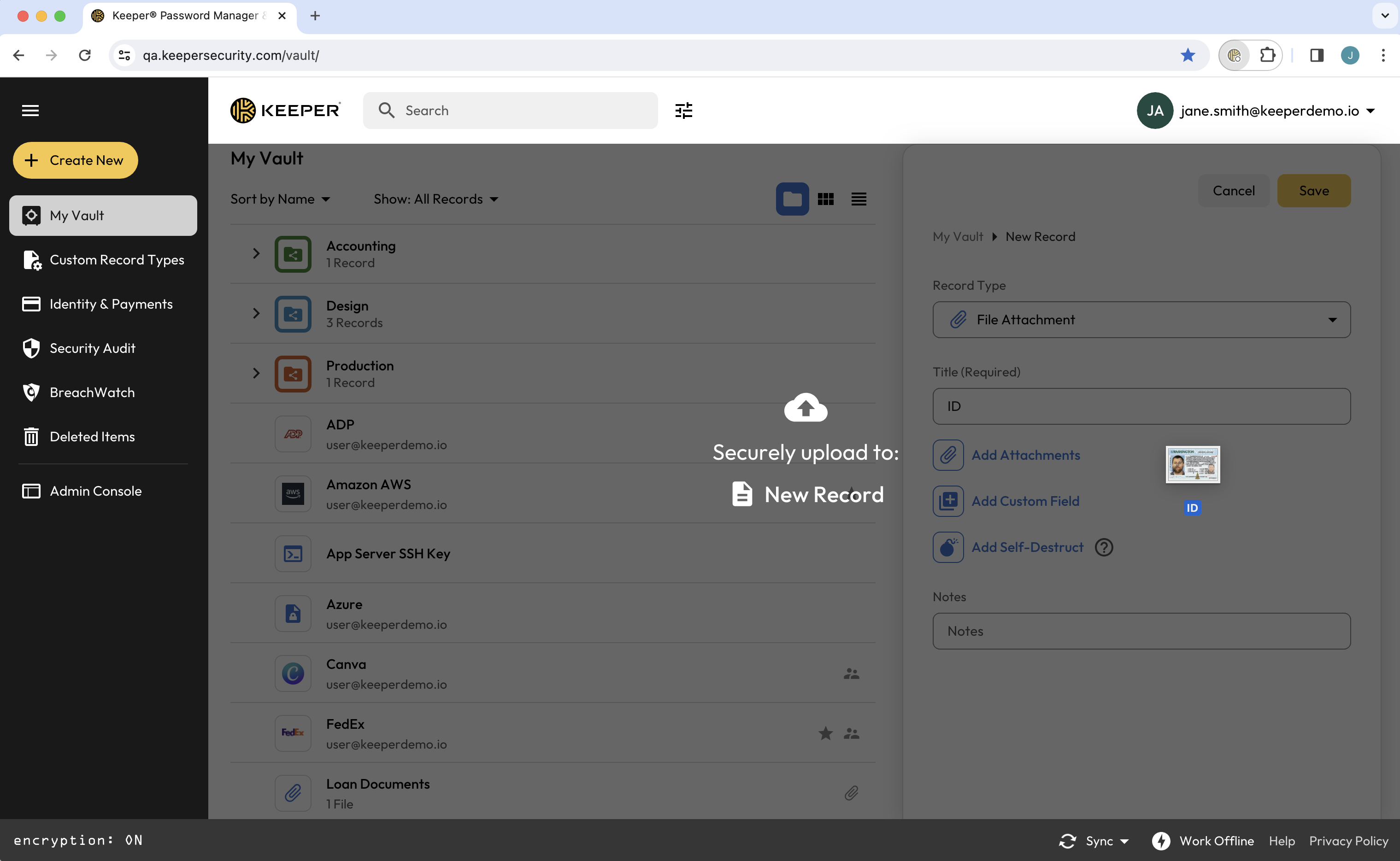
Cree un registro como de costumbre y haga clic en **Añadir adjuntos** para cargar el archivo, o arrastre y suelte el archivo directamente en su bóveda.

<figure><img src="https://187056193-files.gitbook.io/~/files/v0/b/gitbook-x-prod.appspot.com/o/spaces%2Frp3ylVdg2U6pDdl81oP6%2Fuploads%2Fgit-blob-1ce301a237ad111655df0c088be529083f7f1eb2%2FScreen%20Shot%202024-03-12%20at%209.48.02%20AM.png?alt=media" alt=""><figcaption><p>Añadir un archivo adjunto a un registro</p></figcaption></figure>

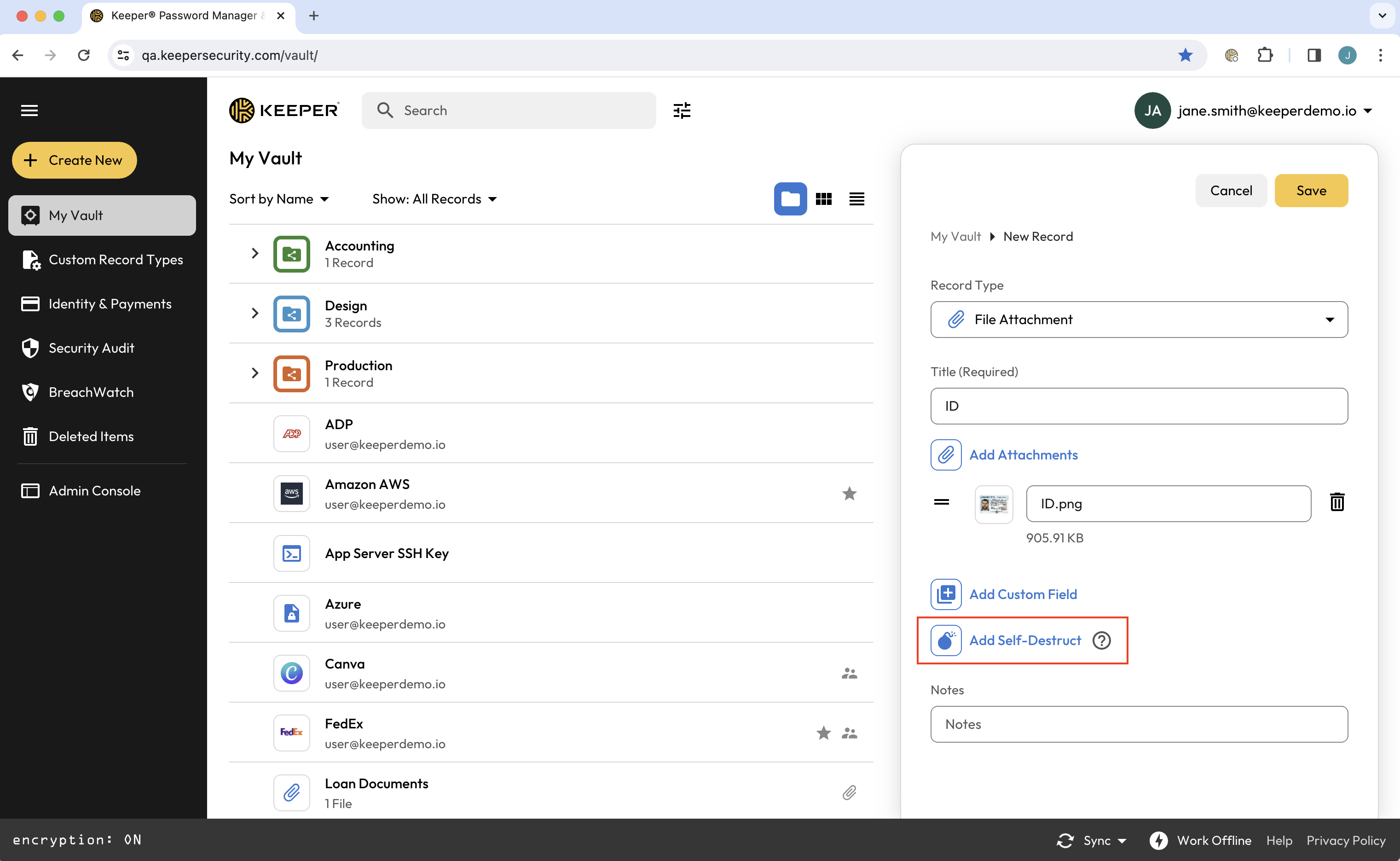
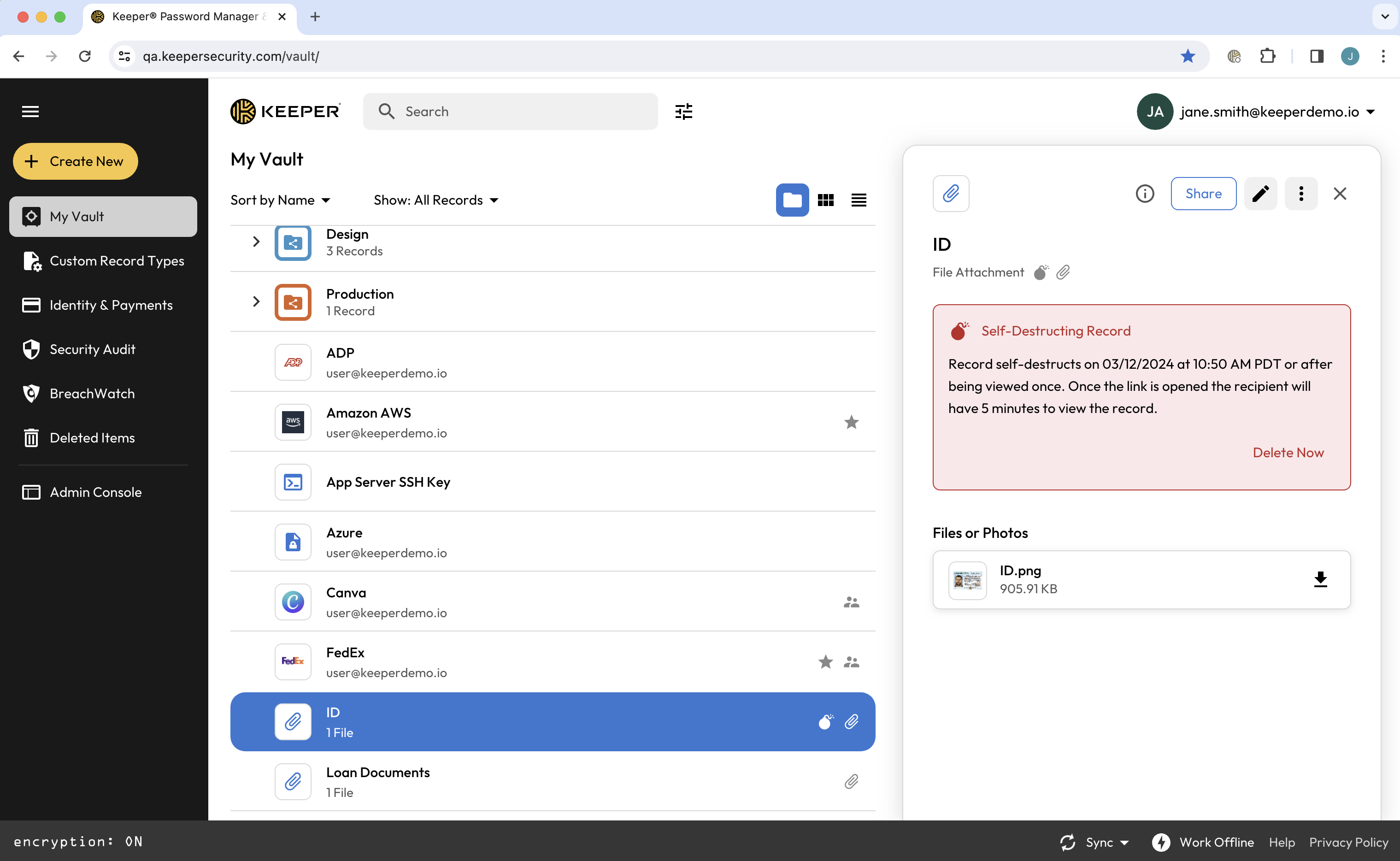
Haga clic en **Añadir autodestrucción**, seleccione cuándo desea que caduque el enlace para compartir y luego haga clic en **Guardar y compartir** para generar un enlace de uso compartido único.

<figure><img src="https://187056193-files.gitbook.io/~/files/v0/b/gitbook-x-prod.appspot.com/o/spaces%2Frp3ylVdg2U6pDdl81oP6%2Fuploads%2Fgit-blob-30664fc0e6bb40c8ed62f3ef2cfdfc282f399a59%2FScreen%20Shot%202024-03-12%20at%209.50.00%20AM.png?alt=media" alt=""><figcaption><p>Añadir autodestrucción a un registro</p></figcaption></figure>

<figure><img src="https://187056193-files.gitbook.io/~/files/v0/b/gitbook-x-prod.appspot.com/o/spaces%2Frp3ylVdg2U6pDdl81oP6%2Fuploads%2Fgit-blob-15ead14c8ad8151d2e2d3e9624e2a9bc6a452a35%2FScreen%20Shot%202024-03-12%20at%209.51.04%20AM.png?alt=media" alt=""><figcaption><p>Registro que se autodestruye con archivo adjunto</p></figcaption></figure>

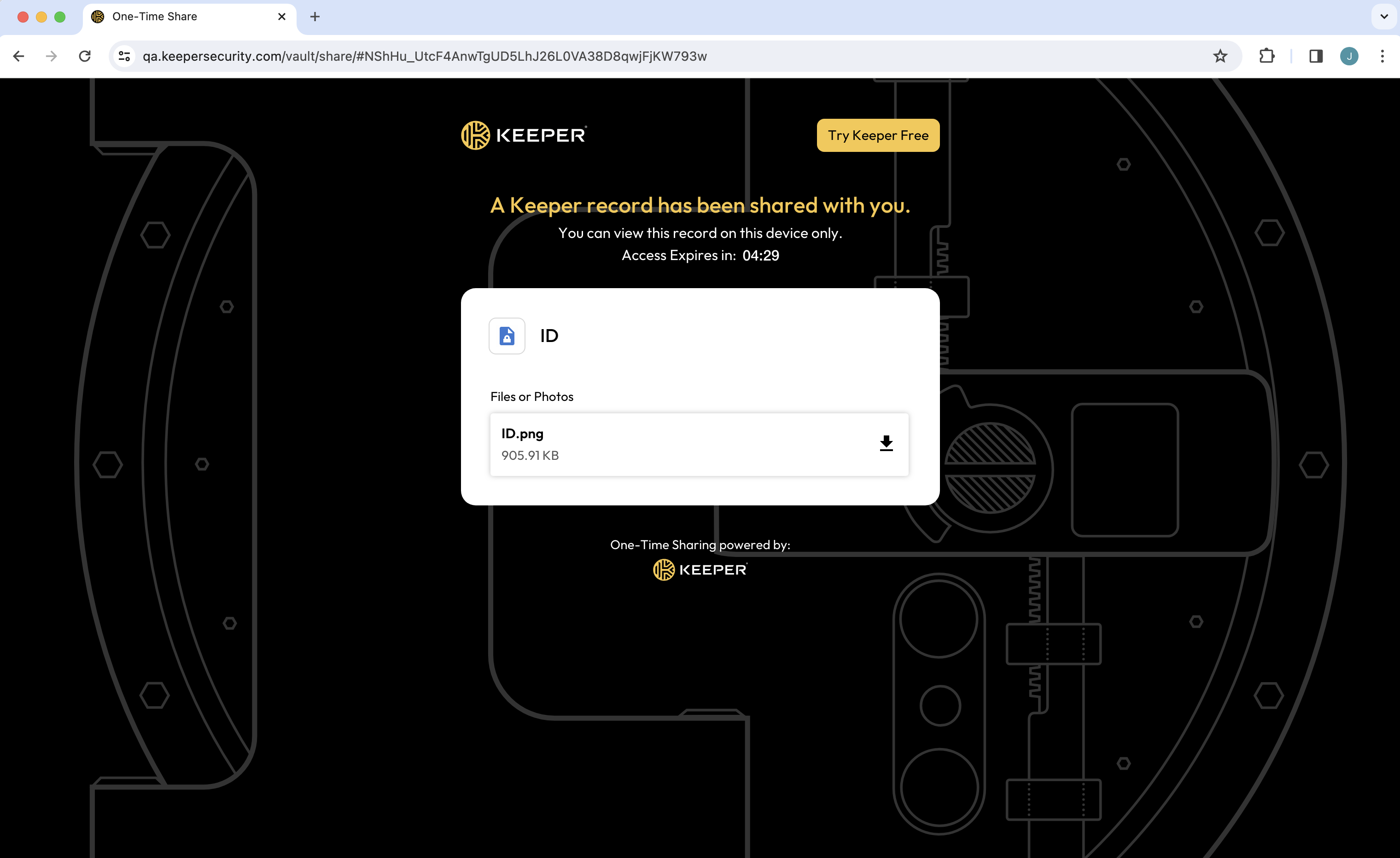
El destinatario de un registro que se autodestruye solo tiene que hacer clic en el enlace y verá de inmediato el registro compartido en su navegador. Luego puede hacer clic en el archivo para descargarlo a su dispositivo.

<figure><img src="https://187056193-files.gitbook.io/~/files/v0/b/gitbook-x-prod.appspot.com/o/spaces%2Frp3ylVdg2U6pDdl81oP6%2Fuploads%2Fgit-blob-39b5f115b9200d7533ed98d1fa4507a1667ca92e%2FScreen%20Shot%202024-03-12%20at%209.58.51%20AM.png?alt=media" alt=""><figcaption><p>Enlace de uso compartido único con archivo adjunto</p></figcaption></figure>

## Eliminar un registro que se autodestruye

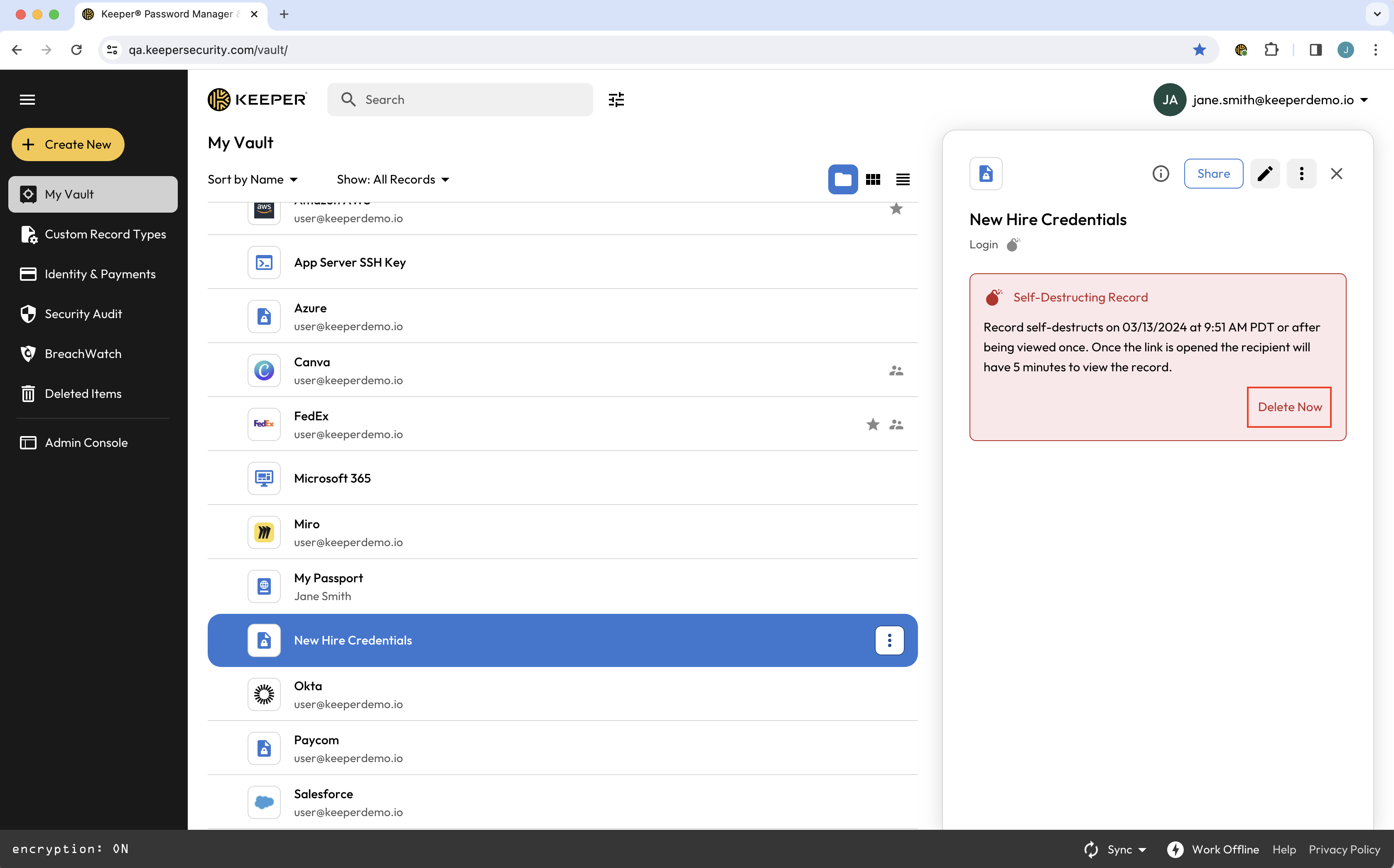
Puede eliminar un registro que se autodestruye en cualquier momento y, con ello, desactivar el enlace para compartir, haciendo clic en **Eliminar Ahora**. Los registros que se autodestruyen eliminados aparecerán en “Elementos eliminados” de su bóveda, con la opción de **Restaurar**.

<figure><img src="https://187056193-files.gitbook.io/~/files/v0/b/gitbook-x-prod.appspot.com/o/spaces%2Frp3ylVdg2U6pDdl81oP6%2Fuploads%2Fgit-blob-5352b0b077ebe64ed4bc0d7a79fcc86aa1de8533%2FScreen%20Shot%202024-03-06%20at%209.51.35%20AM.png?alt=media" alt=""><figcaption><p>Opción para eliminar un registro que se autodestruye</p></figcaption></figure>


---

# Agent Instructions
This documentation is published with GitBook. GitBook is the documentation platform designed so that both humans and AI agents can read, navigate, and reason over technical content effectively. Learn more at gitbook.com.

## Querying This Documentation
If you need additional information that is not directly available in this page, you can query the documentation by asking a question.

Perform an HTTP GET request on the following URL with the `ask` and `goal` query parameters:

```
GET https://docs.keeper.io/user-guides/es/sharing/self-destructing-records.md?ask=<question>&goal=<user_goal>
```

`ask` is the immediate question: it should be specific, self-contained, and written in natural language.
`goal` is what the user is ultimately trying to achieve, the reason they need the answer. Sharing it helps GitBook give you a better, more relevant answer. A goal is most helpful when it describes the outcome the user wants rather than restating the question. For example, with `ask=how do I create an API token`, a goal like `automate deployments from our CI pipeline` lets GitBook tailor the answer to that use case.

The response will contain a direct answer to the question and relevant excerpts and sources from the documentation.

Use this mechanism when the answer is not explicitly present in the current page, you need clarification or additional context, or you want to retrieve related documentation sections.