> For the complete documentation index, see [llms.txt](https://docs.keeper.io/llms.txt). Markdown versions of documentation pages are available by appending `.md` to page URLs; this page is available as [Markdown](https://docs.keeper.io/user-guides/it/import-records-1/import-json.md).
# Importazione/esportazione JSON di Keeper
Istruzioni per importare ed esportare un file JSON strutturato di Keeper
Keeper supporta l'importazione di un file JSON strutturato. Può usarlo, ad esempio, se ha eseguito il backup di un file Keeper da un'altra cassaforte o se sta creando un file a partire da un'altra origine dati. Si tratta di una funzione avanzata, tipicamente usata dagli amministratori di Keeper Enterprise o da clienti più tecnici. Se non è il Suo caso, vada all'[importazione CSV](/user-guides/it/import-records-1/import-a-.csv-file.md).
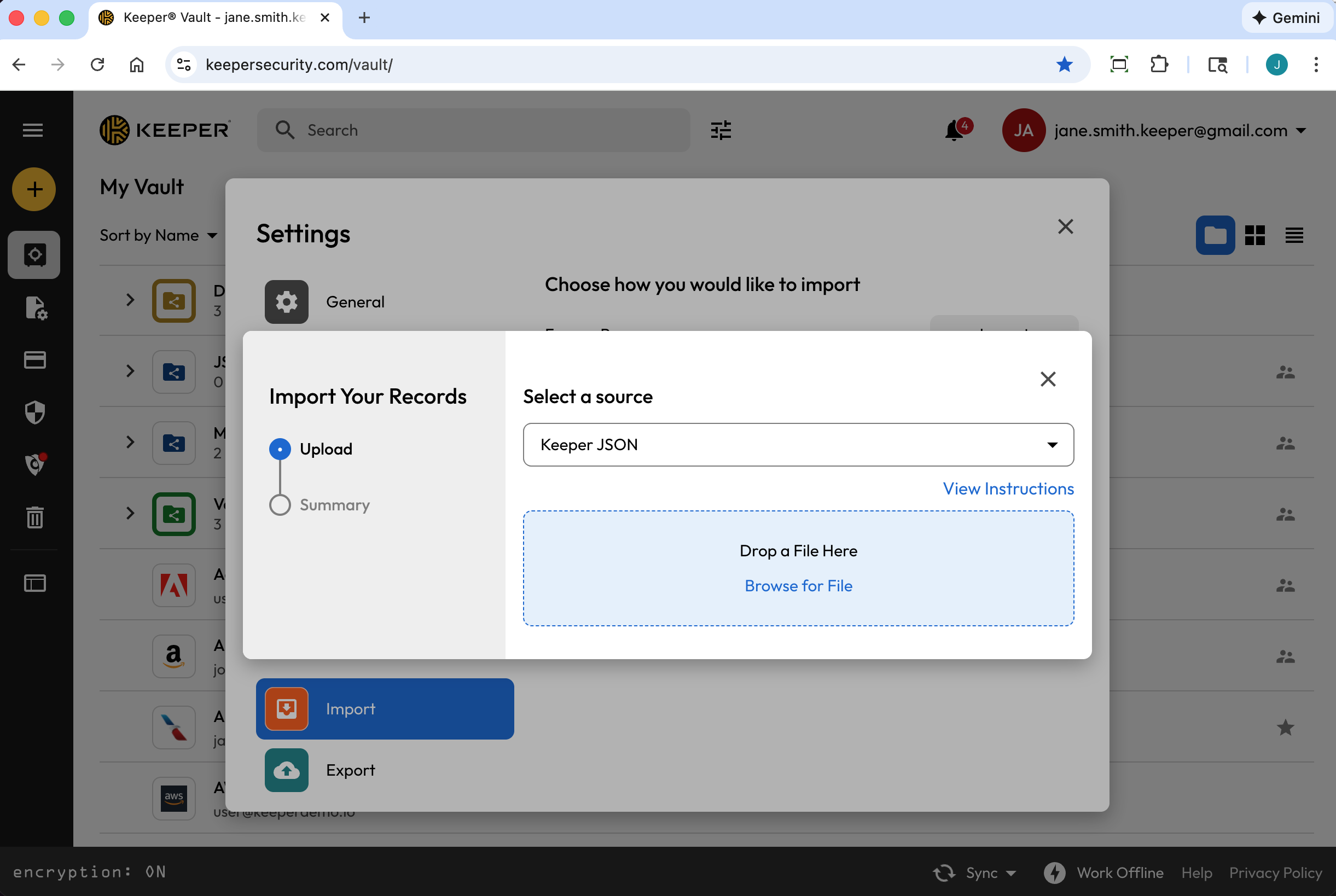
Per iniziare, dal **menu a discesa Account**, faccia clic su **Impostazioni** **> Importa > Importa** (accanto a «Usa un'altra fonte»). Dal menu a discesa, selezioni **Keeper JSON**.
Il file JSON può essere creato in diversi modi:
* Esportando un file .JSON dalla cassaforte di Keeper
* Esportando un .JSON dall'SDK di Keeper Commander
* Creando un file personalizzato
Dopo aver formattato correttamente il file JSON, trascini e rilasci il file sulla finestra «Trascina qui un file» di Keeper oppure lo cerchi sul computer.
{% hint style="info" %}
I file JSON devono essere codificati in UTF-8 per garantire che tutti i simboli e i caratteri vengano importati correttamente.
{% endhint %}
### Creare un file .JSON da una cassaforte di Keeper (esportazione)
Per creare un file .JSON dalla cassaforte di Keeper esistente, dal **menu a discesa Account**, faccia clic su **Impostazioni > Esporta**.
Selezioni **JSON** e faccia clic su **Esporta**. Se richiesto, inserisca la Password principale e faccia clic su **Esporta ora**.

### Creare un file JSON da Keeper Commander
Keeper Commander è uno strumento per sviluppatori/amministratori con molte funzionalità per gestire la cassaforte e l'account Enterprise.
Visiti il repository dell'SDK di Keeper Commander qui:\
Il comando per esportare una cassaforte in formato JSON è mostrato di seguito:
```
$ keeper shell
_ __
| |/ /___ ___ _ __ ___ _ _
| ' export --format json my_export_file.json
Processing... please wait.
318 records exported
```
### Creare un file .JSON personalizzato per l'importazione in Keeper
Quando crea un file JSON personalizzato per l'importazione, Keeper supporta un array di «records», «folders» e «shared\_folders». Di seguito sono inclusi diversi esempi che può importare nella cassaforte a scopo di test.
Esempio di file JSON: voci, cartelle e cartelle condivise
Questo file dimostra diverse funzioni di importazione JSON, tra cui:
* Array di voci
* Ogni voce può avere campi personalizzati, note ed essere aggiunta a cartelle
* Le cartelle possono essere create come cartelle normali (private) o cartelle condivise
* Le voci possono anche contenere seed TOTP (funzione avanzata; vedere la voce Facebook nell'esempio seguente)
```
{
"records": [
{
"title": "Dev Server 1",
"login": "root",
"password": "123123123",
"login_url": "https://myserver.com",
"notes": "These are some notes.",
"custom_fields": {
"Security Group": "Private"
},
"folders": [
{
"folder": "Private Folder 1"
}
]
},
{
"title": "Prod Server 1",
"login": "root",
"password": "kj949234723jhfs4jf7h",
"login_url": "https://myprodserver.com",
"notes": "These are some notes.",
"custom_fields": {
"Security Group": "Public",
"IP Address": "12.45.67.8"
},
"folders": [
{
"folder": "Private Folder 2"
},
{
"shared_folder": "My Shared Folder 1",
"can_edit": true,
"can_share": true
}
]
},
{
"title":"Google",
"login": "testing",
"password": "1234567890",
"login_url": "https://google.com",
"notes": "These are some notes.",
"custom_fields": {
"Favorite Food":"Cheetos"
},
"folders": [
{
"folder": "My Websites\\Online"
}
]
},
{
"title":"Facebook",
"$type": "login",
"login": "me@gmail.com",
"password": "123123123123",
"login_url": "https://facebook.com",
"notes": "This is our corporate shared record.",
"custom_fields": {
"Facebook Application ID":"ABC12345",
"$oneTimeCode":"otpauth://totp/Amazon:me@company.com?secret=JBSWY3DPEHPK3PXP&issuer=Amazon&algorithm=SHA1&digits=6&period=30"
},
"folders": [
{
"folder": "Social Media"
},
{
"shared_folder": "Shared Social",
"can_edit": false,
"can_share": false
}
]
}
]
}
```
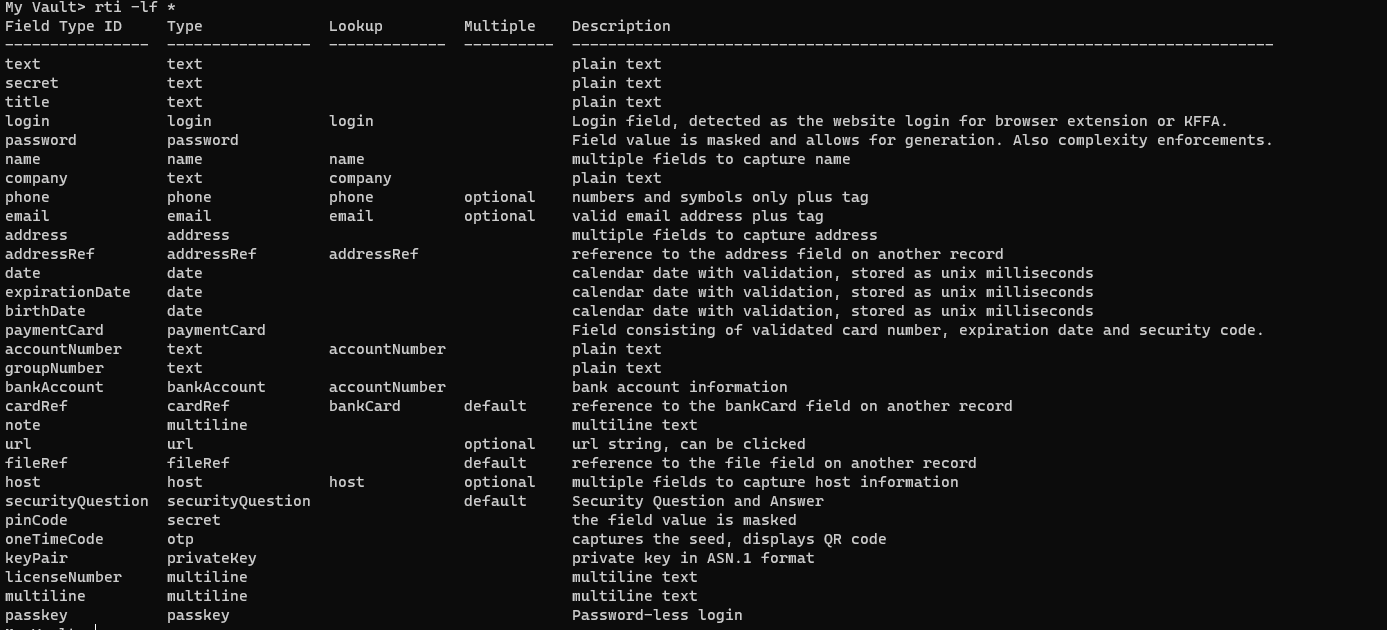
Di seguito è riportato un elenco di tutti i tipi di campo possibili (inclusi i campi personalizzati):
Tutti i tipi di campo
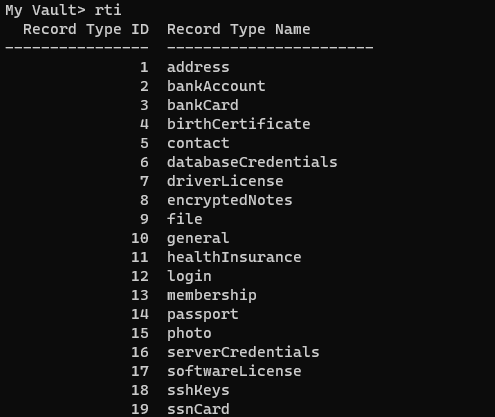
Di seguito sono riportati alcuni tipi di voce (ne può avere di più se ha creato tipi di voce personalizzati, o di meno se ne sta limitando alcuni):
Tipi di voce
**Esempio di file JSON: cartelle condivise e autorizzazioni - nessuna voce**
Il file JSON seguente dimostra la possibilità di creare una struttura di cartelle condivise (senza voci) con autorizzazioni configurate.
{% hint style="info" %}
Utilizzi il comando `import` della [Commander CLI](/keeperpam/commander-cli/overview.md) (in inglese) per importare cartelle vuote
{% endhint %}
Nota: i riferimenti di esempio a «UID», «Team UID» e simili sono segnaposto specifici della Sua cassaforte.
```
{
"shared_folders": [
{
"path": "My Shared Folder 1",
"manage_users": true,
"manage_records": true,
"can_edit": true,
"can_share": true,
"permissions": [
{
"uid": "kVM96KGEoGxhskZoSTd_jw",
"manage_users": true,
"manage_records": true
},
{
"name": "myusername@company.com",
"manage_users": true,
"manage_records": true
}
]
},
{
"path": "Customer1\\My Shared Folder 2",
"manage_users": false,
"manage_records": false,
"can_edit": false,
"can_share": false,
"permissions": [
{
"uid": "",
"manage_users": false,
"manage_records": false
},
{
"name": "",
"manage_users": true,
"manage_records": true
}
]
},
{
"path": "Customer2\\My Shared Folder 3",
"manage_users": true,
"manage_records": true,
"can_edit": true,
"can_share": true,
"permissions": [
{
"uid": "",
"manage_users": true,
"manage_records": true
},
{
"name": "myusername@company.com",
"manage_users": true,
"manage_records": true
}
]
}
]
}
```
**Esempio di file JSON: voci/cartelle private e voci/cartelle condivise**
L'esempio di file JSON seguente combina diverse funzioni: cartelle condivise, cartelle private, voci e seed TOTP.
Nota: i riferimenti di esempio a «UID», «Team UID» e simili sono segnaposto specifici della Sua cassaforte.
```
{
"shared_folders": [
{
"path": "My Customer 1",
"manage_users": true,
"manage_records": true,
"can_edit": true,
"can_share": true,
"permissions": [
{
"uid": "kVM96KGEoGxhskZoSTd_jw",
"manage_users": true,
"manage_records": true
},
{
"name": "user@mycompany.com",
"manage_users": true,
"manage_records": true
}
]
},
{
"path": "Testing\\My Customer 2",
"manage_users": true,
"manage_records": true,
"can_edit": true,
"can_share": true,
"permissions": [
{
"uid": "ih1CggiQ-3ENXcn4G0sl-g",
"manage_users": true,
"manage_records": true
},
{
"name": "user@mycompany.com",
"manage_users": true,
"manage_records": true
}
]
}
],
"records": [
{
"title": "Bank Account 1",
"login": "customer1234",
"password": "4813fJDHF4239fdk",
"login_url": "https://chase.com",
"notes": "These are some notes.",
"custom_fields": {
"Account Number": "123-456-789"
},
"folders": [
{
"folder": "Optional Private Folder 1"
}
]
},
{
"title": "Bank Account 2",
"login": "mybankusername",
"password": "w4k4k193f$^&@#*%2",
"login_url": "https://amex.com",
"notes": "Some great information here.",
"custom_fields": {
"Security Group": "Public",
"IP Address": "12.45.67.8",
"$oneTimeCode":"otpauth://totp/Amazon:me@company.com?secret=JBSWY3DPEHPK3PXP&issuer=Amazon&algorithm=SHA1&digits=6&period=30"
},
"folders": [
{
"folder": "Optional Private Folder 1"
},
{
"shared_folder": "My Customer 1",
"can_edit": true,
"can_share": true
}
]
}
]
}
```
---
# Agent Instructions
This documentation is published with GitBook. GitBook is the documentation platform designed so that both humans and AI agents can read, navigate, and reason over technical content effectively. Learn more at gitbook.com.
## Querying This Documentation
If you need additional information that is not directly available in this page, you can query the documentation by asking a question.
Perform an HTTP GET request on the following URL with the `ask` and `goal` query parameters:
```
GET https://docs.keeper.io/user-guides/it/import-records-1/import-json.md?ask=&goal=
```
`ask` is the immediate question: it should be specific, self-contained, and written in natural language.
`goal` is what the user is ultimately trying to achieve, the reason they need the answer. Sharing it helps GitBook give you a better, more relevant answer. A goal is most helpful when it describes the outcome the user wants rather than restating the question. For example, with `ask=how do I create an API token`, a goal like `automate deployments from our CI pipeline` lets GitBook tailor the answer to that use case.
The response will contain a direct answer to the question and relevant excerpts and sources from the documentation.
Use this mechanism when the answer is not explicitly present in the current page, you need clarification or additional context, or you want to retrieve related documentation sections.