> For the complete documentation index, see [llms.txt](https://docs.keeper.io/llms.txt). Markdown versions of documentation pages are available by appending `.md` to page URLs; this page is available as [Markdown](https://docs.keeper.io/user-guides/pt/sharing/self-destructing-records.md).

# Registros com autodestruição

Os Registros com autodestruição permitem compartilhar registros com usuários fora do Keeper, excluindo automaticamente o registro do seu cofre e desabilitando o link de compartilhamento no horário def

<figure><img src="https://257549050-files.gitbook.io/~/files/v0/b/gitbook-x-prod.appspot.com/o/spaces%2FrHF2FRF67XcTtI7RLPyS%2Fuploads%2Fgit-blob-9a0359274e2836fbdada67b12456ffd9436bd619%2FSelf-Destructing%20Record%20(1).jpg?alt=media" alt=""><figcaption></figcaption></figure>

## Visão geral

Os Registros com autodestruição utilizam a tecnologia existente de Compartilhamento único do Keeper, que permite o compartilhamento seguro e por tempo limitado de um registro com qualquer pessoa, mesmo que ela não tenha uma conta Keeper.

Os Registros com autodestruição vão além do Compartilhamento único ao excluir automaticamente o registro do seu cofre assim que o link de compartilhamento for desabilitado e o acesso do destinatário for revogado. Isso elimina a necessidade de revogar manualmente o acesso ao registro e removê-lo do cofre posteriormente.

{% embed url="<https://vimeo.com/935970269>" %}
Registros com autodestruição (em inglês)
{% endembed %}

## Criar um registro com autodestruição

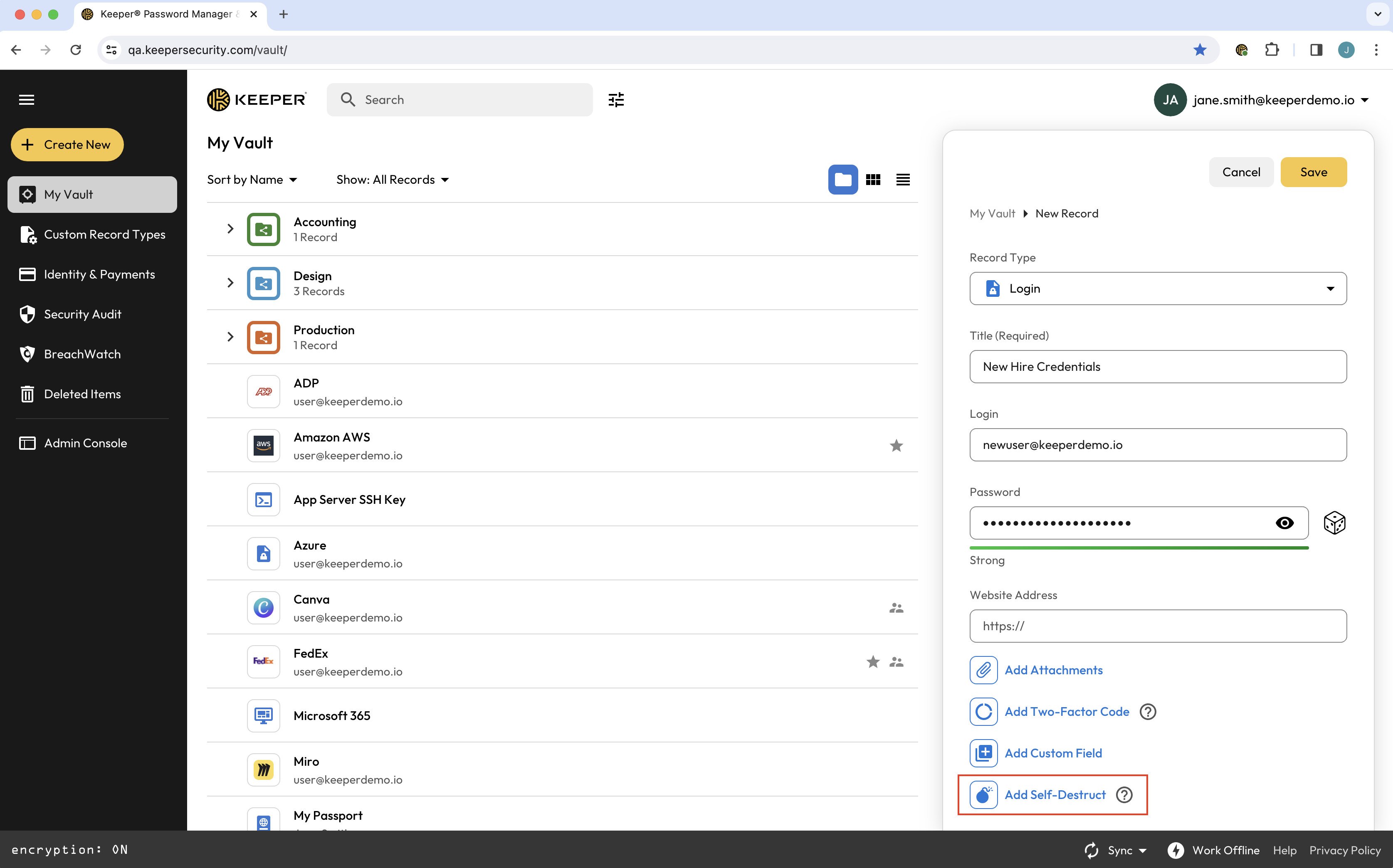
Para criar um registro com autodestruição, crie um novo registro como de costume. Informe os detalhes do registro e clique em **Adicionar autodestruição**.

<figure><img src="https://257549050-files.gitbook.io/~/files/v0/b/gitbook-x-prod.appspot.com/o/spaces%2FrHF2FRF67XcTtI7RLPyS%2Fuploads%2Fgit-blob-51a0eec61793552431c3d680437c958179674182%2FScreen%20Shot%202024-03-06%20at%209.49.17%20AM.png?alt=media" alt=""><figcaption><p>Adicionar autodestruição a um registro</p></figcaption></figure>

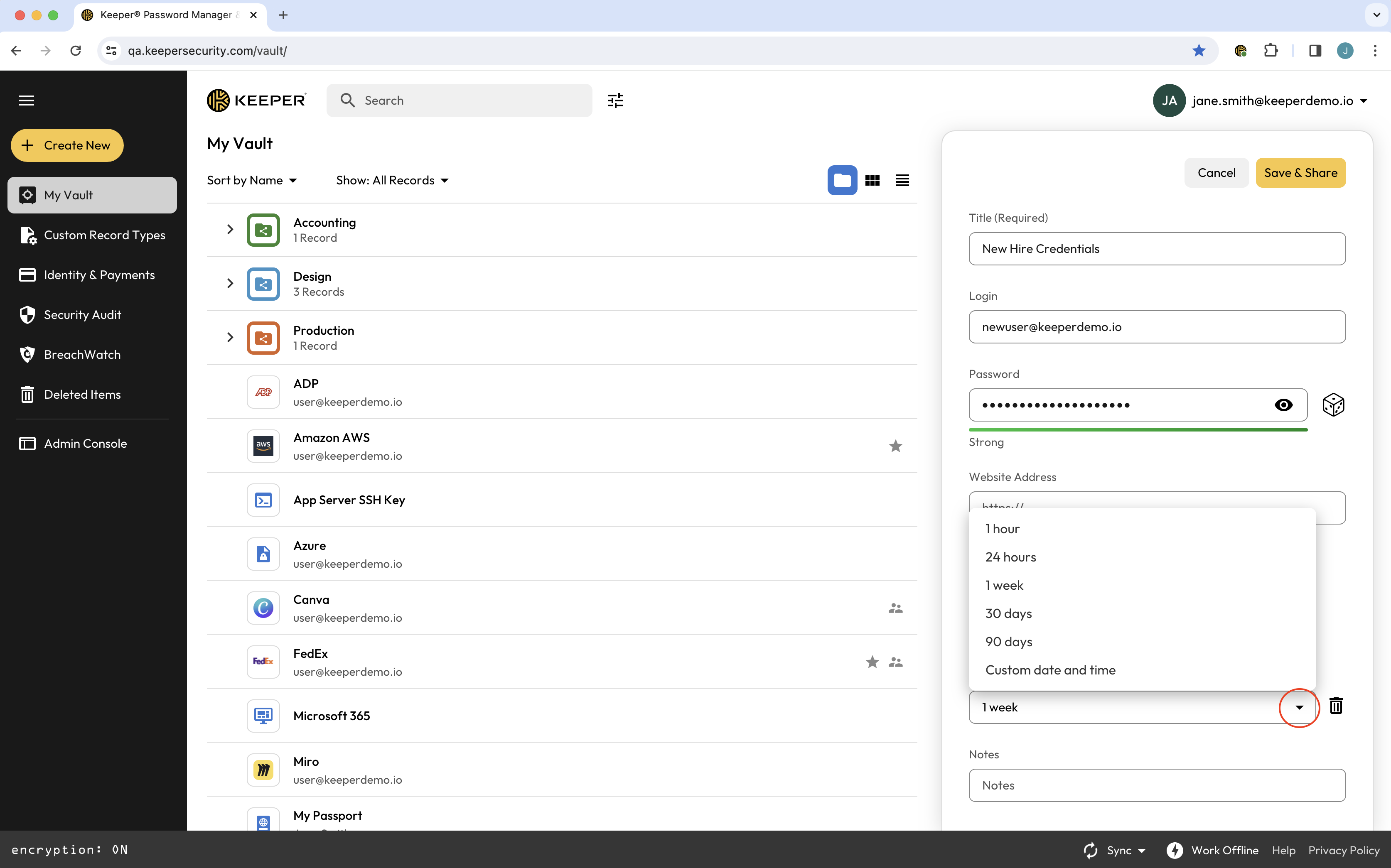
No menu exibido, selecione quando deseja que o link de compartilhamento expire.

<figure><img src="https://257549050-files.gitbook.io/~/files/v0/b/gitbook-x-prod.appspot.com/o/spaces%2FrHF2FRF67XcTtI7RLPyS%2Fuploads%2Fgit-blob-9ce8292dad5820f613fb9760a9365aaee662c038%2FScreen%20Shot%202024-03-06%20at%209.49.40%20AM.png?alt=media" alt=""><figcaption><p>Opções de expiração</p></figcaption></figure>

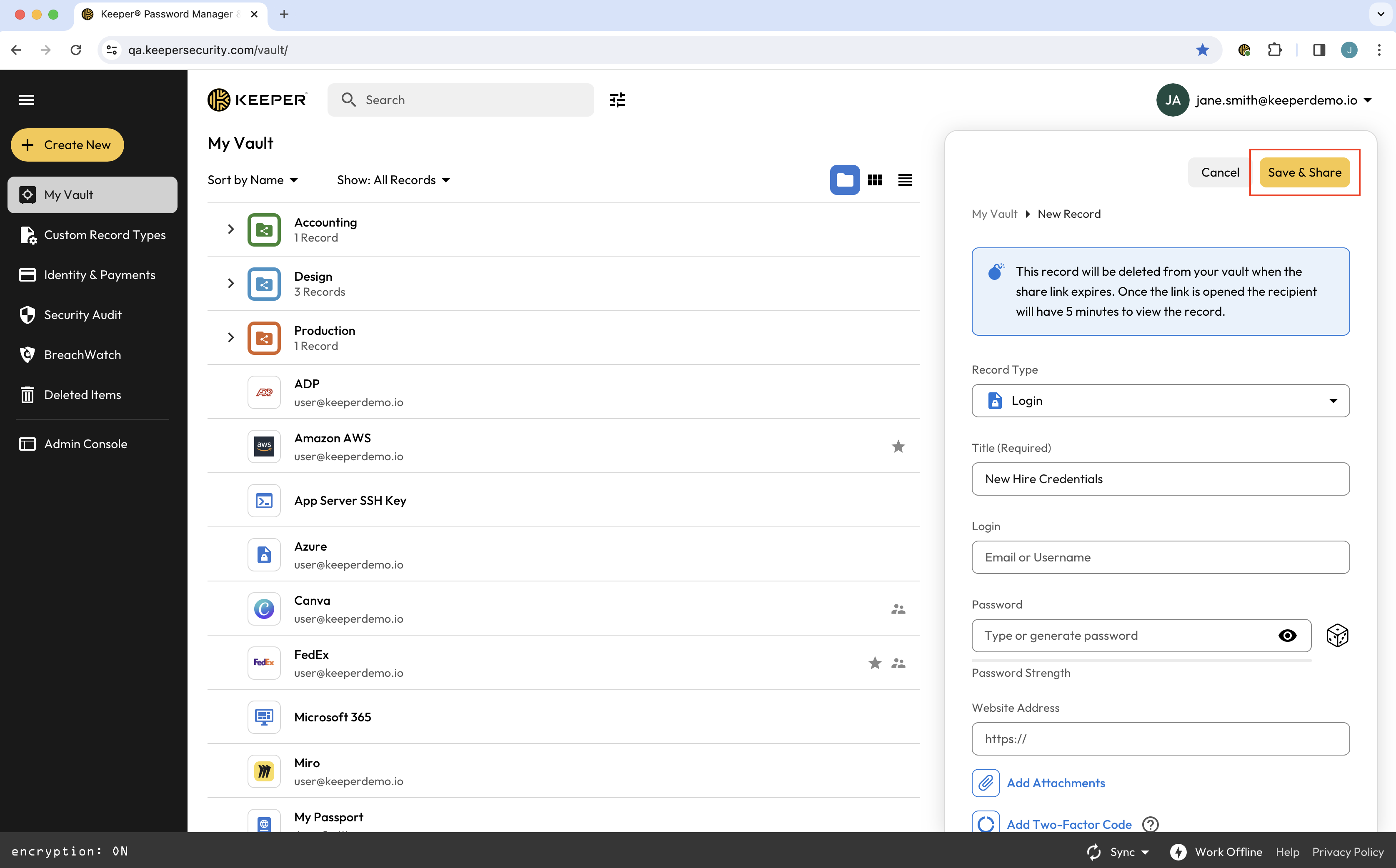
Depois de fazer sua seleção, clique em **Salvar e compartilhar** para gerar um link de Compartilhamento único.

<figure><img src="https://257549050-files.gitbook.io/~/files/v0/b/gitbook-x-prod.appspot.com/o/spaces%2FrHF2FRF67XcTtI7RLPyS%2Fuploads%2Fgit-blob-7fa51fb0ef56496ed4082ebde859a00c43006f75%2FScreen%20Shot%202024-03-06%20at%209.50.59%20AM.png?alt=media" alt=""><figcaption><p>Salvar e compartilhar registro</p></figcaption></figure>

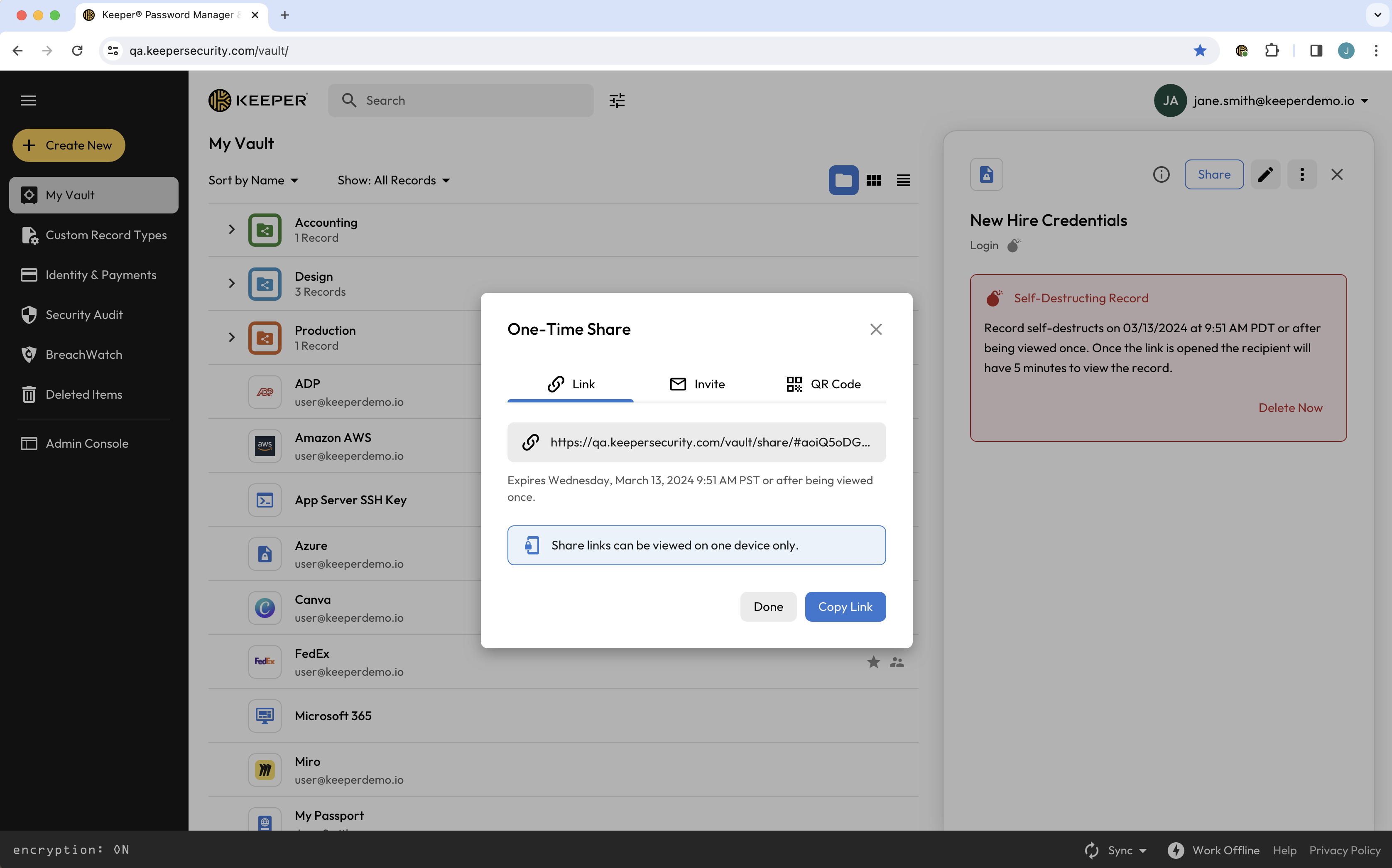
Você pode copiar o link diretamente ou enviá-lo como convite ou código QR.

<figure><img src="https://257549050-files.gitbook.io/~/files/v0/b/gitbook-x-prod.appspot.com/o/spaces%2FrHF2FRF67XcTtI7RLPyS%2Fuploads%2Fgit-blob-2c6f801a5695987fe77b61375f49b11e8f5caddb%2FScreen%20Shot%202024-03-06%20at%209.51.16%20AM.png?alt=media" alt=""><figcaption><p>Copiar link de Compartilhamento único</p></figcaption></figure>

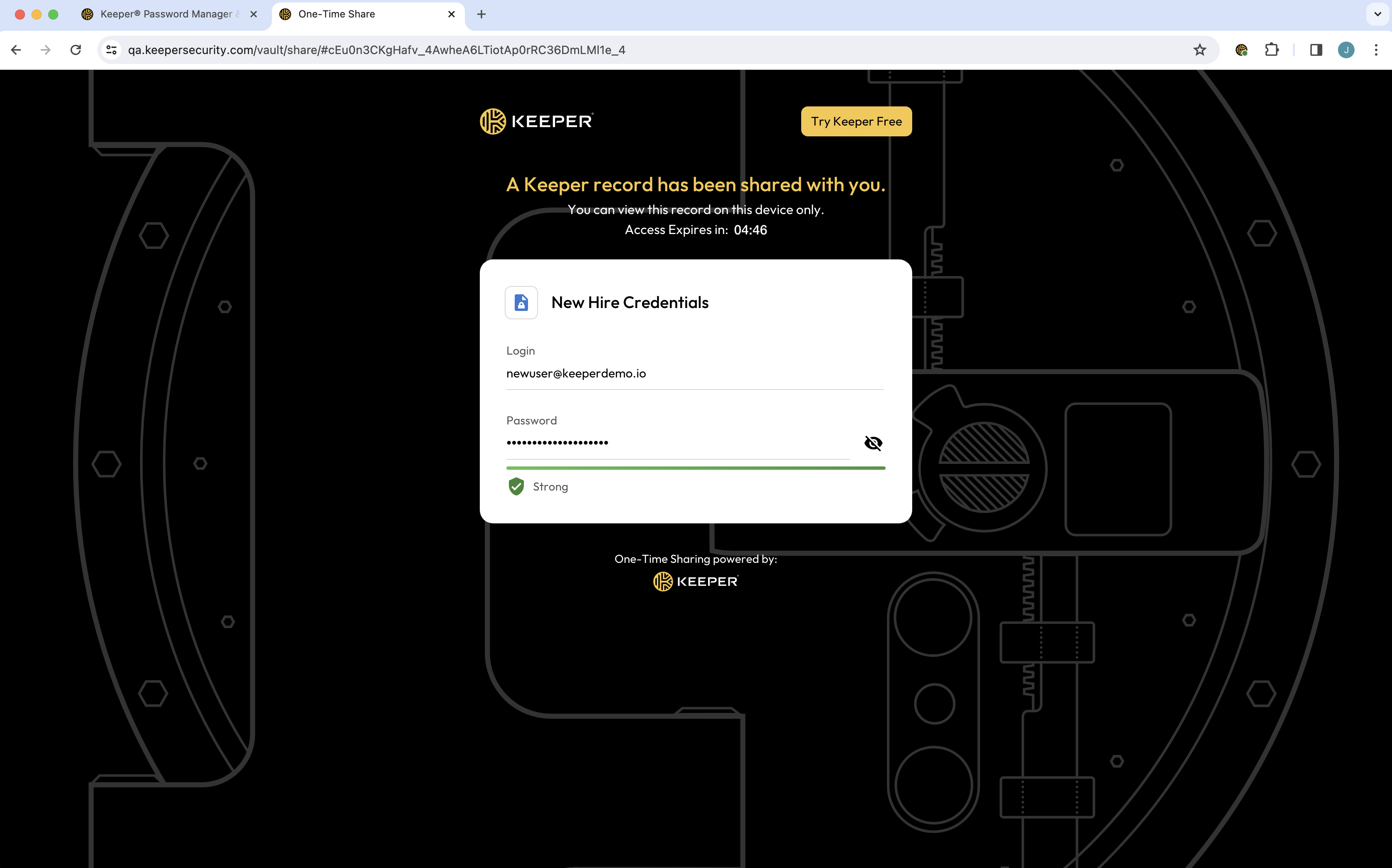
O destinatário de um registro com autodestruição basta clicar no link fornecido para ver o registro compartilhado instantaneamente no navegador. Os links de Compartilhamento único são vinculados a um único dispositivo, reforçando a segurança e impedindo a distribuição ou visualização não autorizada em vários dispositivos. O link expira no horário definido ou depois que o destinatário visualizar o registro por cinco minutos, o que ocorrer primeiro.

<figure><img src="https://257549050-files.gitbook.io/~/files/v0/b/gitbook-x-prod.appspot.com/o/spaces%2FrHF2FRF67XcTtI7RLPyS%2Fuploads%2Fgit-blob-df10555a6644db011f64171837849648908f4579%2FScreen%20Shot%202024-03-06%20at%209.57.39%20AM.png?alt=media" alt=""><figcaption><p>Link de Compartilhamento único</p></figcaption></figure>

## Compartilhar arquivos com segurança usando autodestruição

Os Registros com autodestruição do Keeper permitem compartilhar com segurança registros com anexos de arquivo que se autodestroem em um horário definido.

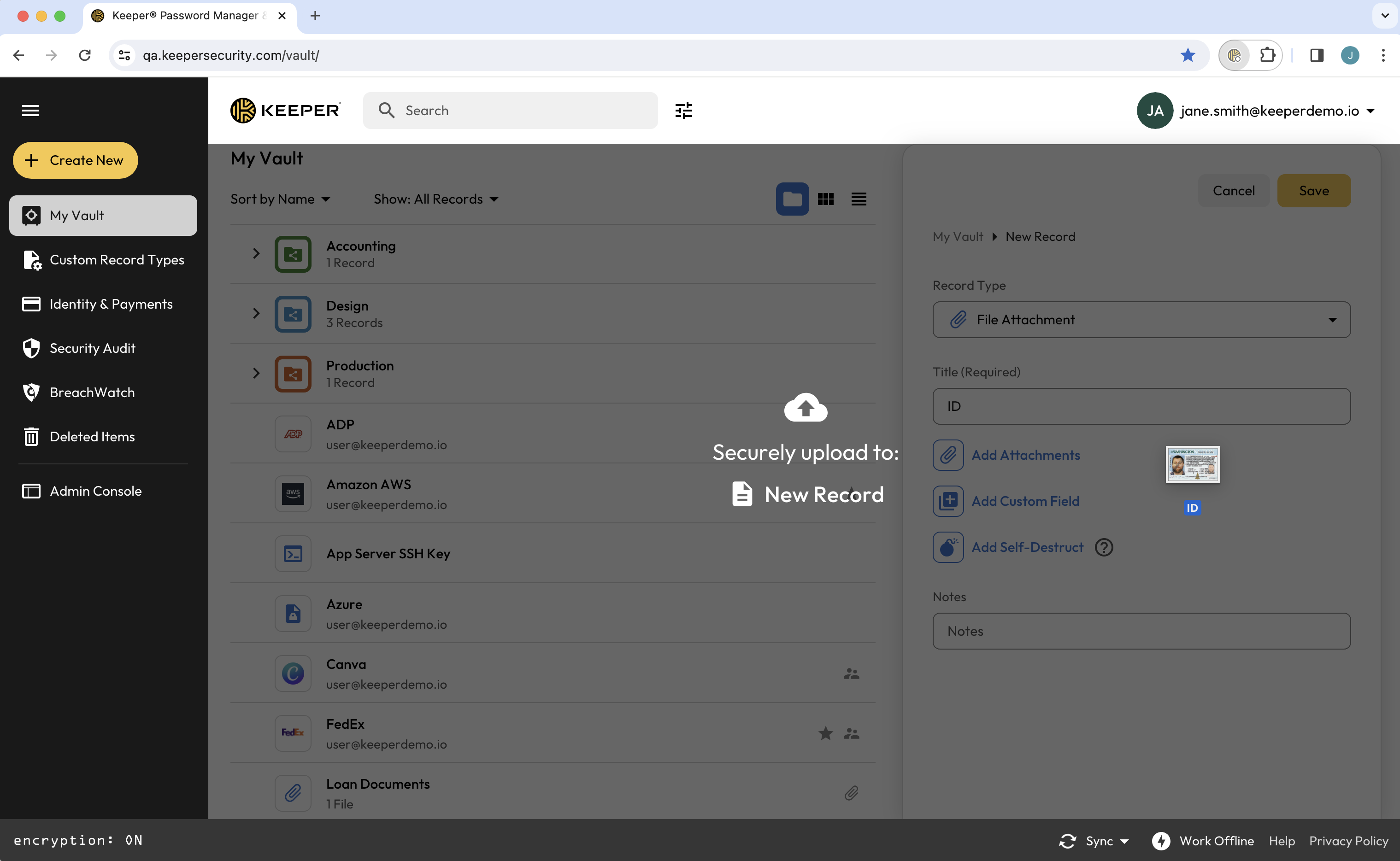
Crie um registro como de costume e clique em **Adicionar anexos** para fazer upload do arquivo, ou arraste e solte o arquivo diretamente no cofre.

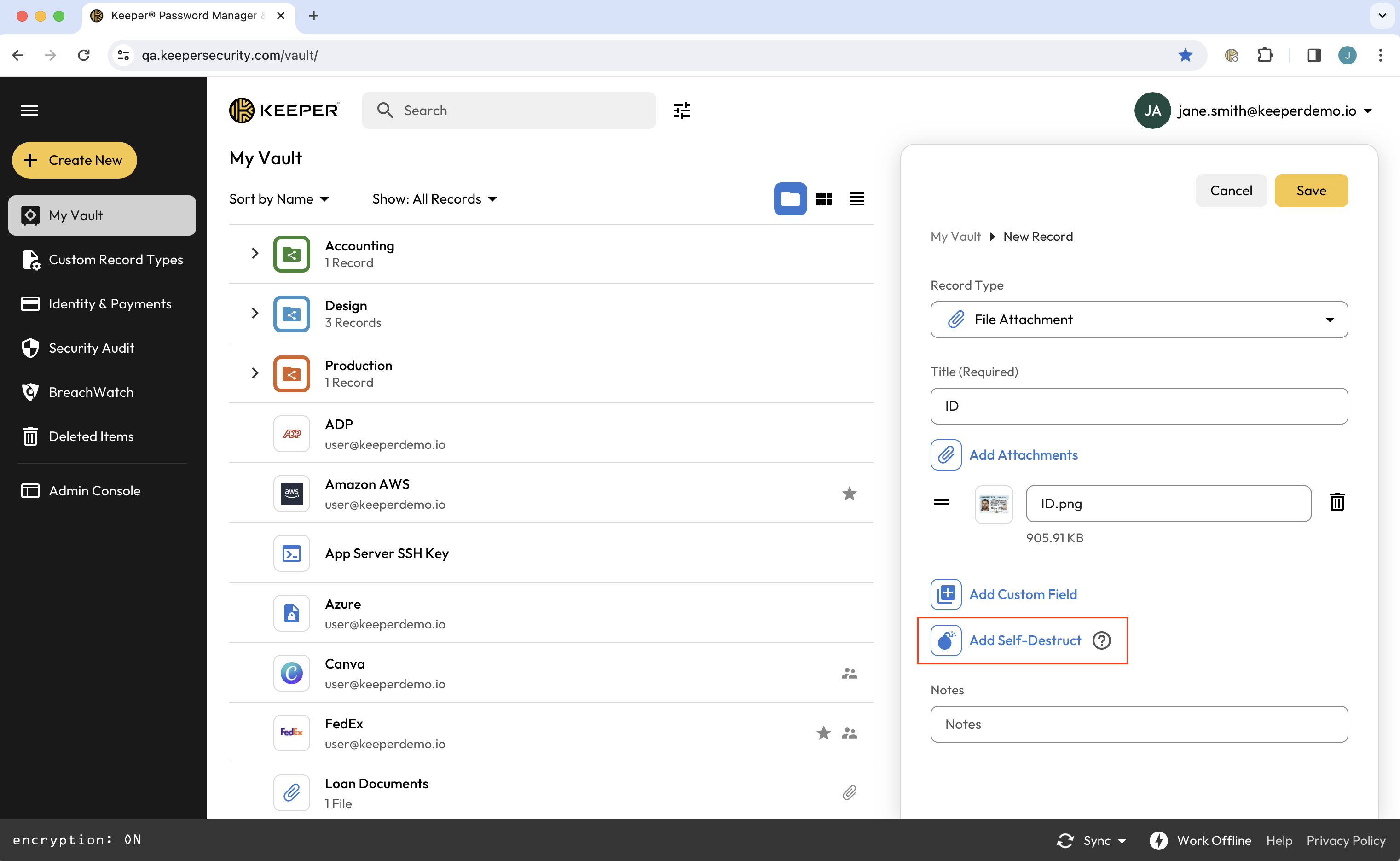
<figure><img src="https://257549050-files.gitbook.io/~/files/v0/b/gitbook-x-prod.appspot.com/o/spaces%2FrHF2FRF67XcTtI7RLPyS%2Fuploads%2Fgit-blob-1ce301a237ad111655df0c088be529083f7f1eb2%2FScreen%20Shot%202024-03-12%20at%209.48.02%20AM.png?alt=media" alt=""><figcaption><p>Adicionar anexo a um registro</p></figcaption></figure>

Clique em **Adicionar autodestruição**, selecione quando deseja que o link de compartilhamento expire e clique em **Salvar e compartilhar** para gerar um link de Compartilhamento único.

<figure><img src="https://257549050-files.gitbook.io/~/files/v0/b/gitbook-x-prod.appspot.com/o/spaces%2FrHF2FRF67XcTtI7RLPyS%2Fuploads%2Fgit-blob-30664fc0e6bb40c8ed62f3ef2cfdfc282f399a59%2FScreen%20Shot%202024-03-12%20at%209.50.00%20AM.png?alt=media" alt=""><figcaption><p>Adicionar autodestruição a um registro</p></figcaption></figure>

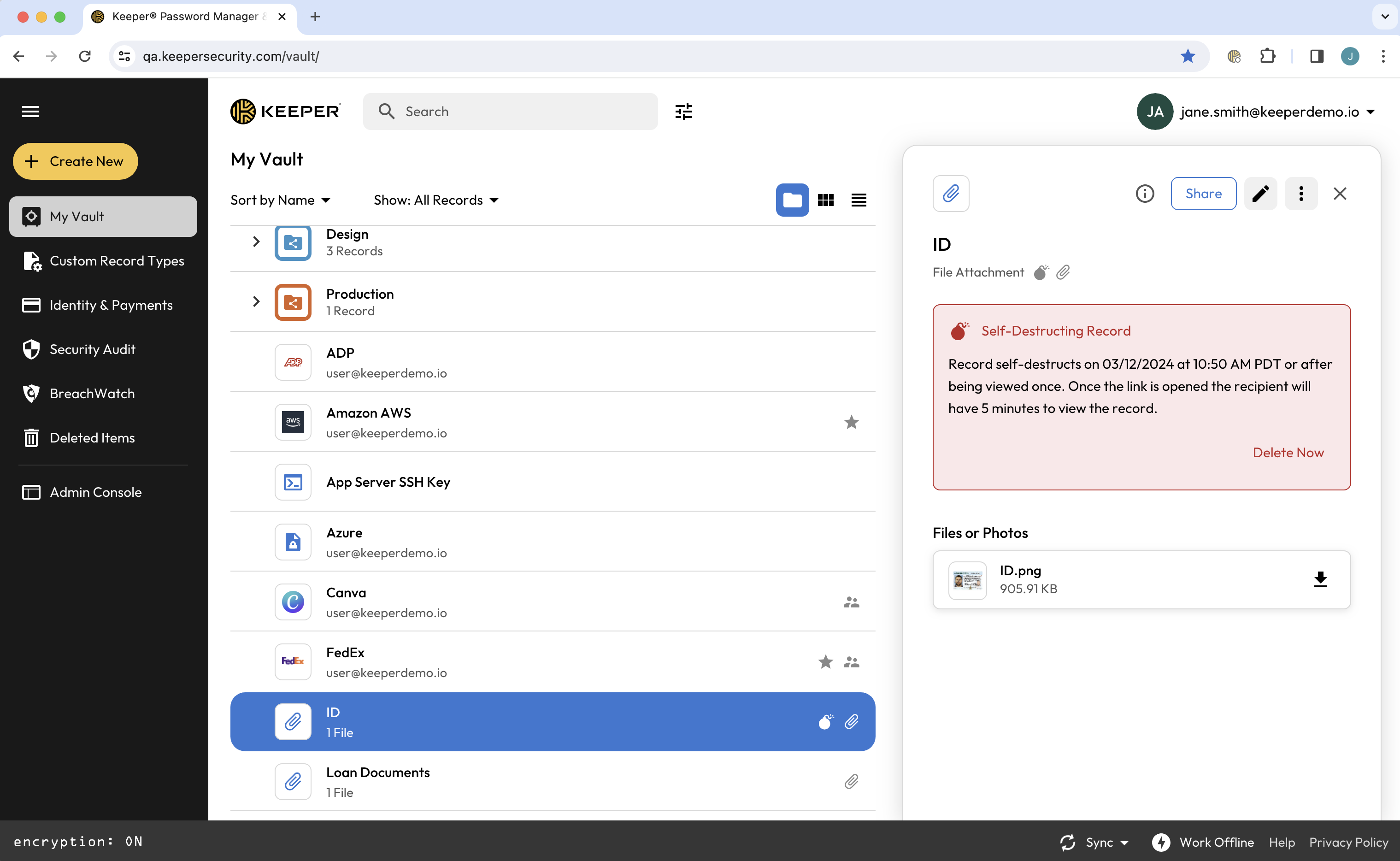
<figure><img src="https://257549050-files.gitbook.io/~/files/v0/b/gitbook-x-prod.appspot.com/o/spaces%2FrHF2FRF67XcTtI7RLPyS%2Fuploads%2Fgit-blob-15ead14c8ad8151d2e2d3e9624e2a9bc6a452a35%2FScreen%20Shot%202024-03-12%20at%209.51.04%20AM.png?alt=media" alt=""><figcaption><p>Registro com autodestruição e anexo de arquivo</p></figcaption></figure>

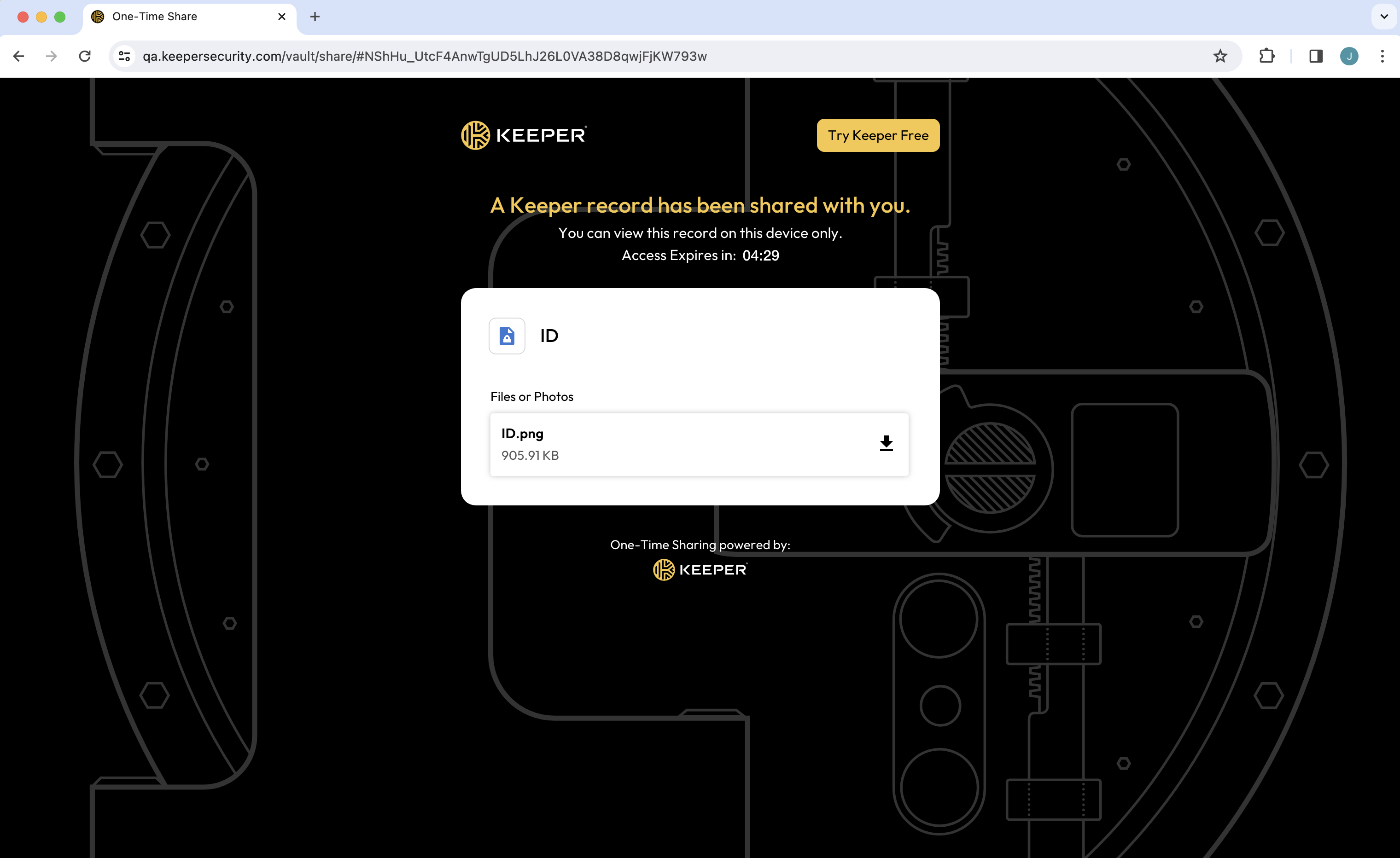
O destinatário de um registro com autodestruição basta clicar no link fornecido para ver o registro compartilhado instantaneamente no navegador. Em seguida, pode clicar no arquivo para baixá-lo no dispositivo local.

<figure><img src="https://257549050-files.gitbook.io/~/files/v0/b/gitbook-x-prod.appspot.com/o/spaces%2FrHF2FRF67XcTtI7RLPyS%2Fuploads%2Fgit-blob-39b5f115b9200d7533ed98d1fa4507a1667ca92e%2FScreen%20Shot%202024-03-12%20at%209.58.51%20AM.png?alt=media" alt=""><figcaption><p>Link de Compartilhamento único com anexo de arquivo</p></figcaption></figure>

## Excluir um registro com autodestruição

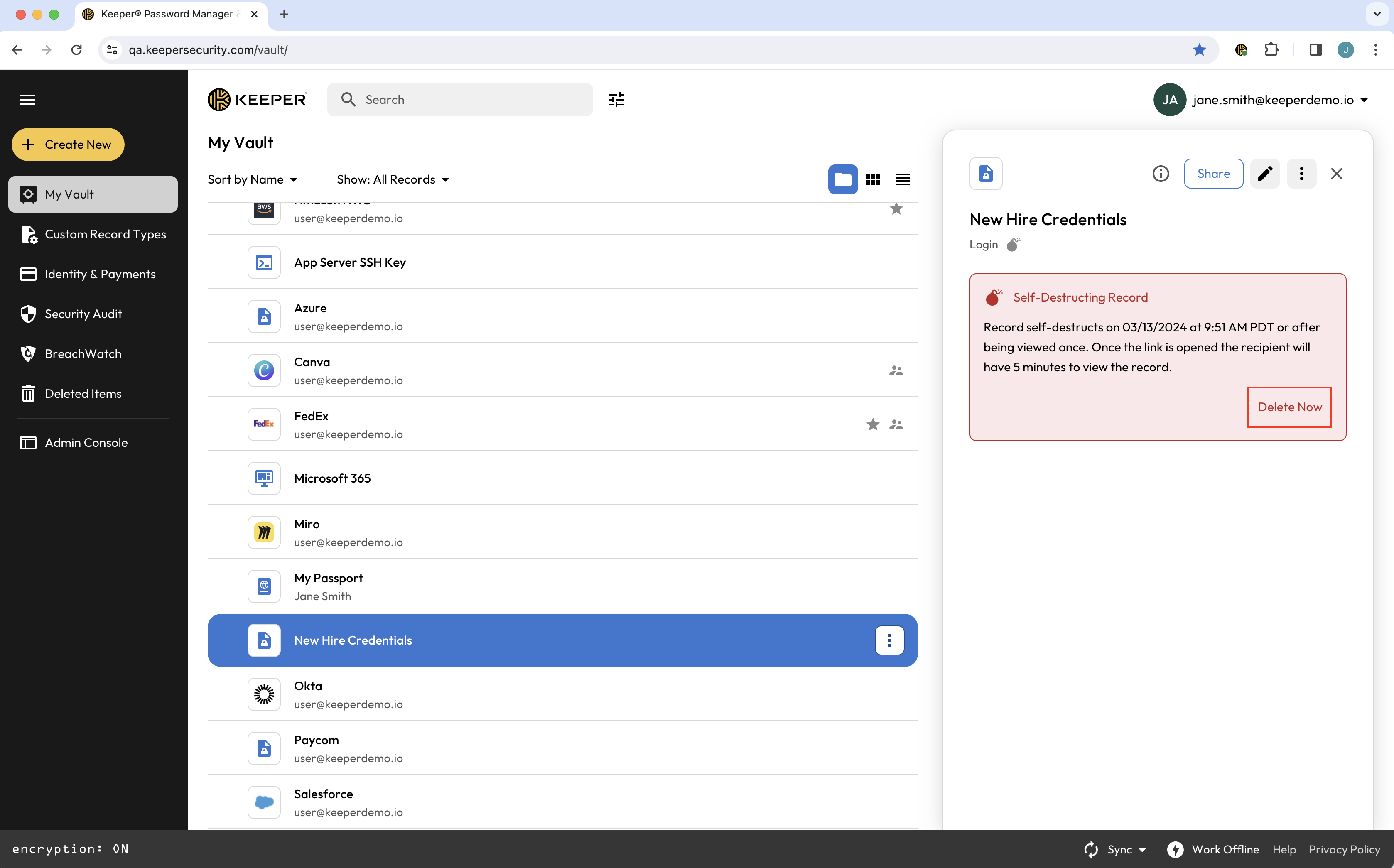
Você pode excluir um registro com autodestruição a qualquer momento, desabilitando o link de compartilhamento, clicando em **Excluir agora**. Registros com autodestruição excluídos aparecem em **Itens excluídos** do seu cofre, com a opção **Restaurar**.

<figure><img src="https://257549050-files.gitbook.io/~/files/v0/b/gitbook-x-prod.appspot.com/o/spaces%2FrHF2FRF67XcTtI7RLPyS%2Fuploads%2Fgit-blob-5352b0b077ebe64ed4bc0d7a79fcc86aa1de8533%2FScreen%20Shot%202024-03-06%20at%209.51.35%20AM.png?alt=media" alt=""><figcaption><p>Opção para excluir registro com autodestruição</p></figcaption></figure>


---

# Agent Instructions
This documentation is published with GitBook. GitBook is the documentation platform designed so that both humans and AI agents can read, navigate, and reason over technical content effectively. Learn more at gitbook.com.

## Querying This Documentation
If you need additional information that is not directly available in this page, you can query the documentation dynamically by asking a question.

Perform an HTTP GET request on the current page URL with the `ask` query parameter, and the optional `goal` query parameter:

```
GET https://docs.keeper.io/user-guides/pt/sharing/self-destructing-records.md?ask=<question>&goal=<endgoal>
```

`ask` is the immediate question: it should be specific, self-contained, and written in natural language.
`goal` is optional and describes the broader end goal you are ultimately trying to accomplish on behalf of the user. GitBook uses it to tailor the answer towards what is most useful for that goal.

The response will contain a direct answer to the question and relevant excerpts and sources from the documentation.

Use this mechanism when the answer is not explicitly present in the current page, you need clarification or additional context, or you want to retrieve related documentation sections.