> For the complete documentation index, see [llms.txt](https://docs.keeper.io/llms.txt). Markdown versions of documentation pages are available by appending `.md` to page URLs; this page is available as [Markdown](https://docs.keeper.io/keeperpam/endpoint-privilege-manager/managing-requests.md).
# Managing Requests
## Managing Elevation Requests
As end-users generate elevation requests, administrators can efficiently manage these requests through the Keeper Admin Console. This interface provides a streamlined process for approving or denying requests in real-time, ensuring that legitimate user needs are met while maintaining security.
All elevation and access requests are managed through a centralized global approval framework under **Admin → Approvals**. This unified interface consolidates request oversight across request types, enabling consistent governance and streamlined administrative review.
### Accessing the Requests Dashboard
To manage elevation requests:
1. Log in to the Keeper Admin Console
2. Navigate to **Endpoint** **Privilege Manager > Requests** tab
### Working with the Request Queue
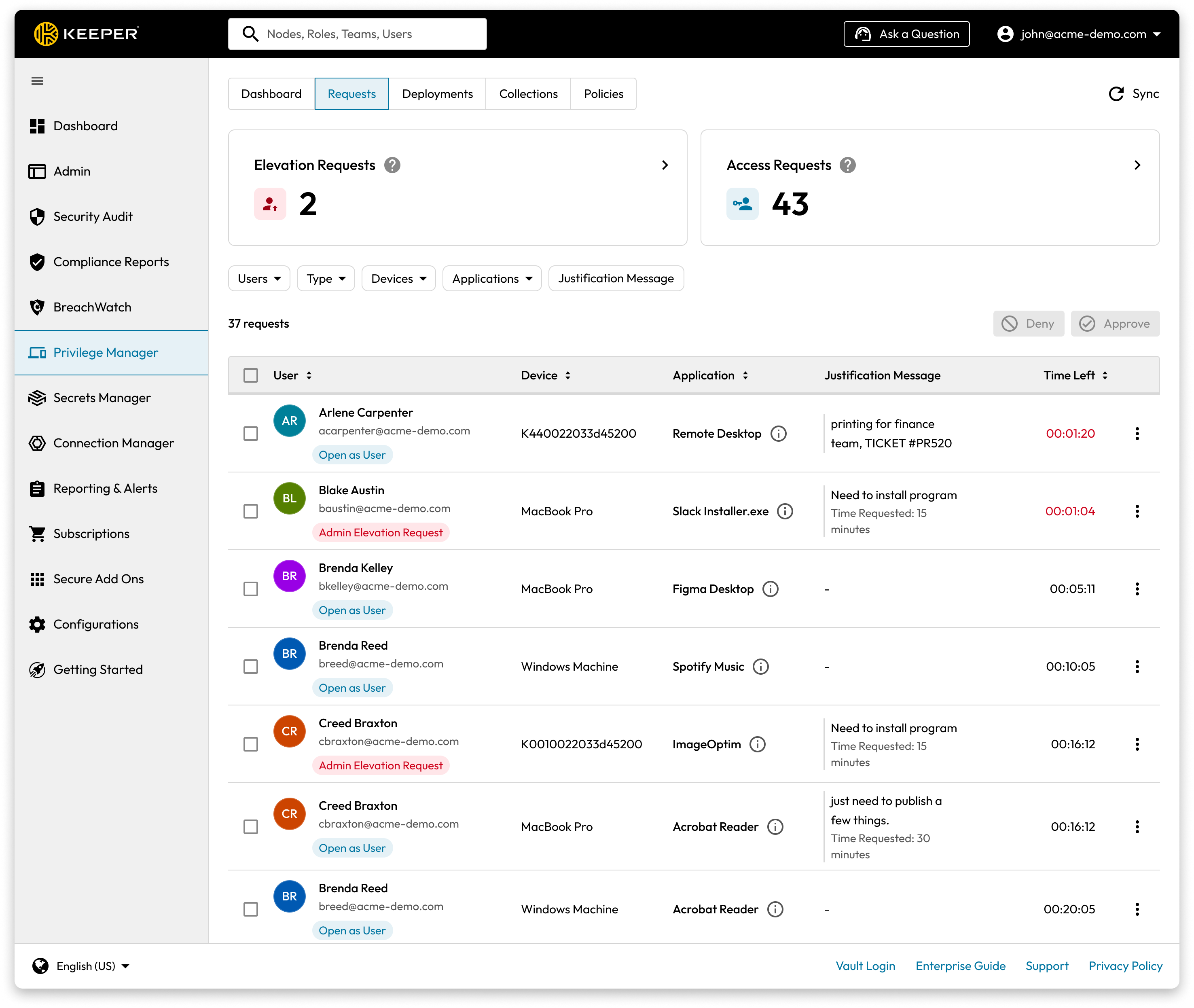
The requests dashboard displays all pending elevation requests across your environment. By default, requests are sorted by wait time and priority, ensuring that users are processed in the order received.
Request status updates are reflected in real time within the Requests interface. Approval decisions, state transitions, and execution outcomes update dynamically, ensuring administrators have immediate visibility into active and completed requests without needing to manually refresh the page.
Endpoint Privilege Manager Requests Dashboard
### Reviewing Request Details
Each request provides a consolidated view of the full elevation lifecycle, including submission details, approval actions, and execution results. This end-to-end visibility simplifies review and supports efficient decision-making during administrative oversight.
To review a specific request:
1. Click on any request in the queue to open its details
2. Review the detailed information provided:
* Application information
* User's justification message
* Endpoint details (IP address, device name, operating system)
* Request timestamp and duration
* Associated policies
* Elevation Account Used
* Associated MFA Identity
* File Path
* Command Line Parameters
This additional detail strengthens transparency and allows administrators to make informed approval or denial decisions.
Detailed View of an Elevation Request
### Taking Action on Requests
For each request, administrators can:
* **Approve**: Grant temporary elevated privileges for the requested process
* **Deny**: Reject the elevation request
The system provides clear and consistent messaging regarding approval decisions and enforcement outcomes. Status indicators and user-facing notifications help administrators understand how decisions are communicated to the requestor.
### Managing Request Volumes
For organizations with high volumes of elevation requests:
* **Delegation**: Configure multiple approvers across different teams or regions
* **Auto-Approval Rules**: Set up [policies](/keeperpam/endpoint-privilege-manager/policies.md) to automatically approve routine requests
* **Generate Alerts**: Keeper's Advanced Reporting & Alerts module can send real-time alerts.
### Alert Setup
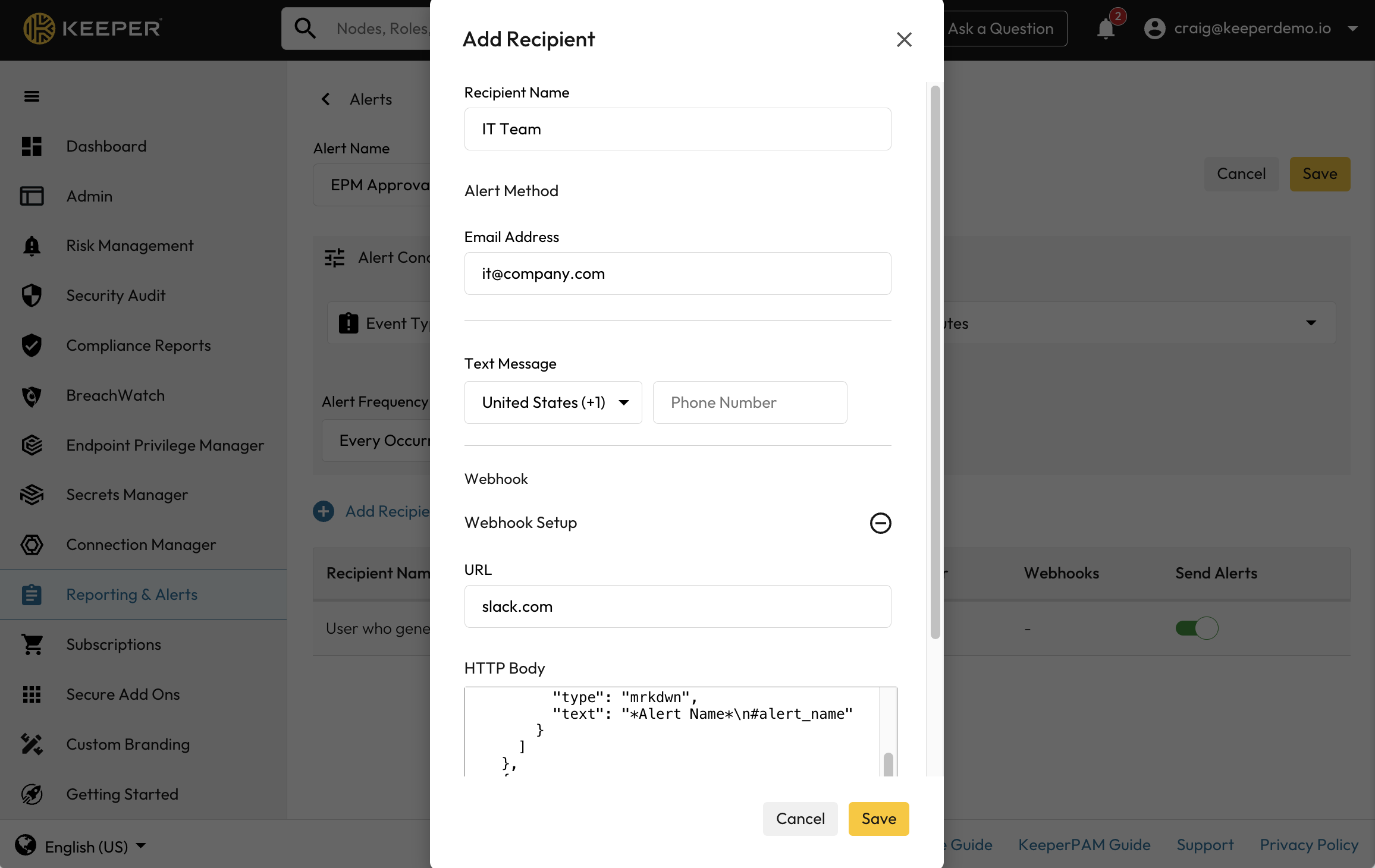
From the Keeper Admin Console, go to Reporting & Alerts > Alerts > and create a new Alert.
Select "Agent created approval request" from the event types and then choose the recipients.
The recipient can be an email address, SMS text message, or Webhook to any automation platform or ITSM such as Slack, Jira, ServiceNow, etc.
***
### ITSM and Messaging Integration
Requests can be processed directly in ITSM and messaging platforms. View the documentation to configure this for your preferred tool:
* [ServiceNow](/keeperpam/secrets-manager/integrations/servicenow-itsm.md)
* [Jira](/keeperpam/secrets-manager/integrations/jira-workflow.md)
* [Slack](/keeperpam/secrets-manager/integrations/slack-app.md)
***
### Automation with Commander
Keeper Commander supports request automation through our command-line interface, Service Mode [REST API](/keeperpam/commander-cli/service-mode-rest-api.md) and Python SDK. [Learn more](/keeperpam/commander-cli/command-reference/endpoint-privilege-manager-commands.md) about Endpoint Privilege Manager commands.
#### Approvals
The `epm approval` command provides management over approvals.
```
My Vault> epm approval -h
pedm command [--options]
Command Description
--------- -----------------------------
list List PEDM approval requests
action Modify PEDM approval requests
```
Approve or deny a request with `epm approval --approve` or `epm approval --deny`
```
My Vault> epm approval action -h
usage: action [-h] [--approve APPROVE] [--deny DENY] [--remove REMOVE]
Modify PEDM approval requests
options:
-h, --help show this help message and exit
--approve APPROVE Request UIDs for approval
--deny DENY Request UIDs for denial
--remove REMOVE Request UIDs for removal. UID, @approved, @denied, @pending
```
---
# Agent Instructions
This documentation is published with GitBook. GitBook is the documentation platform designed so that both humans and AI agents can read, navigate, and reason over technical content effectively. Learn more at gitbook.com.
## Querying This Documentation
If you need additional information that is not directly available in this page, you can query the documentation dynamically by asking a question.
Perform an HTTP GET request on the current page URL with the `ask` query parameter:
```
GET https://docs.keeper.io/keeperpam/endpoint-privilege-manager/managing-requests.md?ask=
```
The question should be specific, self-contained, and written in natural language.
The response will contain a direct answer to the question and relevant excerpts and sources from the documentation.
Use this mechanism when the answer is not explicitly present in the current page, you need clarification or additional context, or you want to retrieve related documentation sections.