> For the complete documentation index, see [llms.txt](https://docs.keeper.io/llms.txt). Markdown versions of documentation pages are available by appending `.md` to page URLs; this page is available as [Markdown](https://docs.keeper.io/release-notes/browser-extensions/browser-extension/preview-release.md).
# Preview Release
Installation of the Preview version of the Keeper browser extension
Keeper maintains a "Preview" channel release of the browser extension. Customers are encouraged to install the preview version which is published 1-2 weeks ahead of full public release.
{% hint style="danger" %}
**REMOVE YOUR EXISTING KEEPER EXTENSION BEFORE INSTALLING THE PREVIEW**
You should only have ONE extension installed at a time, or conflicts will occur.
{% endhint %}
## Chrome and Edge
**Important: Remove your existing Keeper extension before installing the preview.**
**Step 1.** Go to **Window** > **Extensions** and remove your existing Keeper extension.
**Step 2.** Install the Keeper preview extension from this link:\
**Step 3.** Pin the extension to your toolbar
Pin your Keeper Extension
Chrome and Edge customers may stay on the Preview channel indefinitely.
{% hint style="info" %}
Note: The Chromium preview will automatically update as Keeper releases new versions. You are welcome to use this version indefinitely. If you experience issues with the preview version, please email us at ****.
{% endhint %}
***
## Firefox (ESR, Nightly or Developer Edition)
If you are using the [Firefox Developer Edition](https://www.mozilla.org/en-US/firefox/developer/), the Keeper browser extension can be side-loaded for an indefinite period of time.
**Important: Remove your existing Keeper extension before installing the preview.**
**Step 1. Change security preferences**
Firefox [Extended Support Release (ESR)](https://www.mozilla.org/firefox/organizations/), Firefox [Developer Edition](https://www.mozilla.org/firefox/developer/) and [Nightly](https://nightly.mozilla.org/) versions of Firefox allow you to override the setting to enforce the extension signing requirement, by changing the preference `xpinstall.signatures.required` to **false** in the [Firefox Configuration Editor](https://support.mozilla.org/en-US/kb/about-config-editor-firefox) (*about:config* page). To override the language pack signing requirement, you would set the preference `extensions.langpacks.signatures.required` to **false**.
**Step 2. If you already have Keeper installed,** go to Extensions and click on the ellipsis icon next to the Keeper extension and select "Remove"

**Step 3**. Download the Firefox preview zip file:
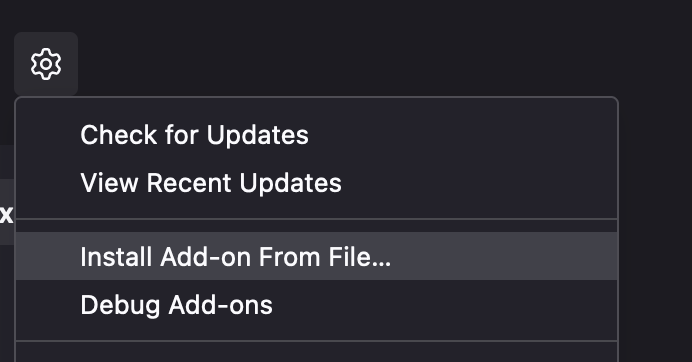
**Step 4.** Go to Extensions and click Settings > Install Add-on From File... and select the zip file.
Install Add-On From File
## Firefox (Standard Edition)
**Important: Remove your existing Keeper extension before installing the preview.**
**Step 1.** Go to Extensions and click on the ellipsis icon next to the keeper extension and select remove

**Step 2**. Download the Firefox preview zip file:
**Step 3.** Unzip the file in your downloads folder or preferred location
**Step 4.** Open **Firefox > Preferences > Extensions & Themes**
**Step 5.** Click on the **Gear icon > Debug Add-ons** and select **Load Temporary Add-on**
Select Load Temporary Add-on
**Step 6.** Select the `manifest.json` file located in the Firefox folder you downloaded in Step 2
{% hint style="info" %}
The Firefox sideload extension may not stay active between browser restarts.
{% endhint %}
***
## Safari
The Safari extension is now installed directly from the Mac App Store. We also distribute a Test Flight build through Apple which can be installed before the public release.
**Important: Remove your existing Keeper extension before installing the preview.**
**Instructions:**
**Step 1.** Open the below Test Flight link in Safari:
\
(Note: Latest version might be still waiting for Apple approval)
**Step 2.** Install Test Flight app following the instructions on screen
**Step 3.** Install the Keeper extension by clicking "Start Testing" following the instructions on screen.
You may need to restart Safari for the changes to take effect. Make sure that there is only one Keeper extension installed.
If you experience any issues with the preview, please email .
{% hint style="info" %}
Note: The Safari Test Flight version will automatically update as Keeper releases new versions. You are welcome to use this version indefinitely. If you experience issues with the preview version, please email us at .
{% endhint %}
---
# Agent Instructions
This documentation is published with GitBook. GitBook is the documentation platform designed so that both humans and AI agents can read, navigate, and reason over technical content effectively. Learn more at gitbook.com.
## Querying This Documentation
If you need additional information that is not directly available in this page, you can query the documentation by asking a question.
Perform an HTTP GET request on the following URL with the `ask` and `goal` query parameters:
```
GET https://docs.keeper.io/release-notes/browser-extensions/browser-extension/preview-release.md?ask=&goal=
```
`ask` is the immediate question: it should be specific, self-contained, and written in natural language.
`goal` is what the user is ultimately trying to achieve, the reason they need the answer. Sharing it helps GitBook give you a better, more relevant answer. A goal is most helpful when it describes the outcome the user wants rather than restating the question. For example, with `ask=how do I create an API token`, a goal like `automate deployments from our CI pipeline` lets GitBook tailor the answer to that use case.
The response will contain a direct answer to the question and relevant excerpts and sources from the documentation.
Use this mechanism when the answer is not explicitly present in the current page, you need clarification or additional context, or you want to retrieve related documentation sections.