# Batch Import and API

## Overview

#### [Jump to the API Section](#importing-connections-via-api-1)

### Importing Connections with CSV, JSON, or YAML

Keeper Connection Manager enables administrators to create connections and assign permissions to those connections by uploading a [CSV, JSON, or YAML file.](#supported-file-types)

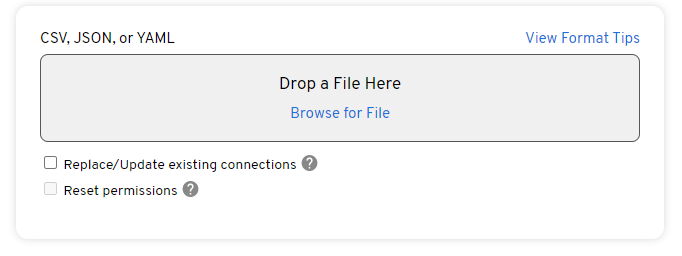
Administrators can also update existing connections by checking the "Replace/Update existing connections" checkbox within the import UI:

<figure><img src="https://3357255970-files.gitbook.io/~/files/v0/b/gitbook-x-prod.appspot.com/o/spaces%2Fb7weUpu7VBcMnESSH8vG%2Fuploads%2FnZVR8wx7XTZNpbFloBhe%2Fimage.png?alt=media&#x26;token=fc28bdec-a0ff-46c5-8f5f-d06257ff1aeb" alt=""><figcaption></figcaption></figure>

Existing connections are identified by their name and parent connection group.

### Importing Connections via API

Additionally, Keeper Connection Manager enables administrators to also create connections and assign permissions to those connections via [API](#importing-connections-with-csv).

## File Data in Supported File Types <a href="#supported-file-types" id="supported-file-types"></a>

The following file types are supported for connection import: CSV, JSON, and YAML.

In each of the file types, a connection is defined with the following data:

* Connection Name
* Connection Protocol
  * For a list of supported connection protocols visit this [page](/en/keeper-connection-manager/supported-protocols.md)
* Connection Parameters (optional)
* Connection Group Location (optional)
* List of Users to grant access (optional)
* List of User Groups to grant access (optional)
* Connection Attributes (optional)

### Importing Connections with CSV <a href="#importing-connections-with-csv" id="importing-connections-with-csv"></a>

The connection import CSV file has one connection record per row where each column will specify a connection field.

The following sections will cover all the valid connection fields (columns) that are supported in the connection import CSV file:

#### Required Connection Fields - name & protocol

At minimum, the connection **name** and **protocol** must be specified.

KCM supports the following connections protocols, and the corresponding "Internal name" must be used:

| Protocol                                                                                          | Internal name |
| ------------------------------------------------------------------------------------------------- | ------------- |
| [VNC](/en/keeper-connection-manager/supported-protocols/vnc.md)                                   | `vnc`         |
| [RDP](/en/keeper-connection-manager/supported-protocols/rdp.md)                                   | `rdp`         |
| [SSH](/en/keeper-connection-manager/supported-protocols/ssh.md)                                   | `ssh`         |
| [Telnet](/en/keeper-connection-manager/supported-protocols/telnet.md)                             | `telnet`      |
| [Kubernetes](/en/keeper-connection-manager/supported-protocols/kubernetes.md)                     | `kubernetes`  |
| [MySQL](/en/keeper-connection-manager/supported-protocols/mysql.md)                               | `mysql`       |
| [PostgreSQL](/en/keeper-connection-manager/supported-protocols/postgresql.md)                     | `postgresql`  |
| [Microsoft SQL Server](/en/keeper-connection-manager/supported-protocols/microsoft-sql-server.md) | `sql-server`  |

#### Optional Connection Fields - connection parameters

The connection's parameters are dependent on your connection's protocol.

For more information on the available parameters for your connection protocol, refer to the table above and navigate to your protocol or visit this [page](/en/keeper-connection-manager/supported-protocols.md)

#### Optional Connection Fields - group or parentIdentifier

The connection group ID that the connection should be imported into may be directly specified with "parentIdentifier", or the path to the parent group may be specified using "group".

If a user or group identifier within the semicolon-separated list of users/groups needs to contain a semicolon, the semicolon can be escaped with a backslash. For example: "first\\;last"

#### Optional Connection Fields - users and groups

Lists of user or user group identifiers must be semicolon-separated and defined in the users and **groups** connection fields

#### Optional Connection Fields - **attributes**

Additional connection characteristics for your connection

#### Examples

```csv
name,protocol,username,password,private-key,hostname,group,users,groups,guacd-encryption (attribute)
conn1,vnc,alice,pass1,,conn1.web.com,ROOT,guac user 1;guac user 2,Connection 1 Users,none
conn2,rdp,bob,pass2,,conn2.web.com,ROOT/Parent Group,guac user 1,,ssl
conn3,ssh,${KEEPER_SERVER_USERNAME},,${KEEPER_SERVER_KEY},conn3.web.com,ROOT/Parent Group/Child Group,guac user 2;guac user 3,,
conn4,kubernetes,,,,,,,,
```

**Note**: The first row in the above example specified the header

In most cases, there should be no conflict between fields, but if needed, an " (attribute)" or " (parameter)" suffix may be added to disambiguate.

### Importing Connections with JSON <a href="#importing-connections-with-json" id="importing-connections-with-json"></a>

The connection import JSON file has a list of connection objects. Each connection object supports the following keys:

<table><thead><tr><th width="249">Key</th><th>Description</th></tr></thead><tbody><tr><td>name</td><td>Name of the connection</td></tr><tr><td>protocol</td><td>Connection's protocol. For a list of supported connection protocols visit this <a href="/pages/8PpXnZThxB8SSGUuwPkk">page</a></td></tr><tr><td>parameters</td><td>Connection's parameters to establish protocol connection. For required parameters visit this <a href="/pages/8PpXnZThxB8SSGUuwPkk">page</a>. (Optional)</td></tr><tr><td>parentIdentifier or group</td><td>The connection group ID that the connection should be imported into may be directly specified with a <code>parentIdentifier</code> key, or the path to the parent group may be specified using a <code>group</code> key (Optional)</td></tr><tr><td>users</td><td>An array of user(s) to grant access to (Optional)</td></tr><tr><td>groups</td><td>An array of user group(s) to grant access to (Optional)</td></tr><tr><td>attributes</td><td>Connection's attributes</td></tr></tbody></table>

At minimum the connection name and protocol must be specified in each connection object.

#### Examples

```json
[
  {
    "name": "conn1",
    "protocol": "vnc",
    "parameters": { "username": "alice", "password": "pass1", "hostname": "conn1.web.com" },
    "parentIdentifier": "ROOT",
    "users": [ "guac user 1", "guac user 2" ],
    "groups": [ "Connection 1 Users" ],
    "attributes": { "guacd-encryption": "none" }
  },
  {
    "name": "conn2",
    "protocol": "rdp",
    "parameters": { "username": "bob", "password": "pass2", "hostname": "conn2.web.com" },
    "group": "ROOT/Parent Group",
    "users": [ "guac user 1" ],
    "attributes": { "guacd-encryption": "none" }
  },
  {
    "name": "conn3",
    "protocol": "ssh",
    "parameters": { "username": "${KEEPER_SERVER_USERNAME}", "private-key": "${KEEPER_SERVER_KEY}", "hostname": "conn3.web.com" },
    "group": "ROOT/Parent Group/Child Group",
    "users": [ "guac user 2", "guac user 3" ]
  },
  {
    "name": "conn4",
    "protocol": "kubernetes"
  }
]
```

### Importing Connections with YAML <a href="#importing-connections-with-yaml" id="importing-connections-with-yaml"></a>

A connection import YAML file is a list of connection objects with exactly the same structure as the JSON format.

```yaml
---
  - name: conn1
    protocol: vnc
    parameters:
      username: alice
      password: pass1
      hostname: conn1.web.com
    group: ROOT
    users:
      - guac user 1
      - guac user 2
    groups:
      - Connection 1 Users
    attributes:
      guacd-encryption: none
  - name: conn2
    protocol: rdp
    parameters:
      username: bob
      password: pass2
      hostname: conn2.web.com
    group: ROOT/Parent Group
    users:
      - guac user 1
    attributes:
      guacd-encryption: none
  - name: conn3
    protocol: ssh
    parameters:
      username: ${KEEPER_SERVER_USERNAME}
      private-key: ${KEEPER_SERVER_KEY}
      hostname: conn3.web.com
    group: ROOT/Parent Group/Child Group
    users:
      - guac user 2
      - guac user 3
  - name: conn4
    protocol: kubernetes
```

## Importing Connections via API

Keeper Connection Manager also enables administrators to batch import connections directly through the API by using the same endpoints that the Batch Import UI uses from the user interface.

To create or replace multiple connections, the HTTP PATCH method should be used on the connection directory resource, located at `/api/session/data/{DATA_SOURCE}/connections`. The data source specifies where the connections should be created, and will generally be the name of the database that was selected at install time i.e. `mysql`, `postgres`, or `sqlserver`. In the examples provided below, the `mysql` data source will be used.

See the [KCM protocol documentation](/en/keeper-connection-manager/supported-protocols.md) for more information on the possible parameters for any given connection protocol type.

{% hint style="warning" %}
Note that directory PATCH methods guarantee atomicity - the entire request must succeed; if any included patch fails, all changes in the batch will be rolled back.
{% endhint %}

### Logging In - API Authentication Token

Before using any other API endpoints, you'll need an auth token (HEX value). This can be extracted by examining the requests of a logged in user on the web app, or by directly making a request to the tokens endpoint. For example:

```bash
curl 'https://kcm.example.com/api/tokens' \
  -H 'Content-Type: application/x-www-form-urlencoded' \
  -d 'username=kcm_admin&password=kcm_admin_pass123'
```

The response will include the auth token, as well as the data source that authorized the login:

```json
{
  "authToken": "TG9YZW0GAXBZDW0GZG9SB3IGC2L0",
  "username": "kcm_admin",
  "dataSource": "mysql",
  "availableDataSources": [
    "mysql",
    "mysql-shared"
  ]
}
```

You can use your favorite API tool. If using Postman, when sending a GET or PATCH, set your authorization to "Inherit auth from parent", and **set a header with the key Guacamole-Token with the value set to your token**. Keep in mind the default expiration of tokens is 60 minutes.

<figure><img src="https://3357255970-files.gitbook.io/~/files/v0/b/gitbook-x-prod.appspot.com/o/spaces%2Fb7weUpu7VBcMnESSH8vG%2Fuploads%2FcyPl0zV7Wy0UEkb4CiTQ%2Fpostman.png?alt=media&#x26;token=315b907c-5967-4d50-8fb1-4e0f4e3228a9" alt=""><figcaption><p>Example using Postman</p></figcaption></figure>

### Creating New Connection

Each connection to be created must be represented by a separate PATCH in the request body, using the "add" operation. For example, to create a couple of new connections:

```bash
cat << 'EOF' | curl 'https://kcm.example.com/api/session/data/mysql/connections' \
  -X 'PATCH' \
  -H 'Content-Type: application/json' \
  -H 'Guacamole-Token: TG9YZW0GAXBZDW0GZG9SB3IGC2L0' \
  -d '@-'
[
  {
    "op": "add",
    "path": "/",
    "value": {
      "parentIdentifier": "ROOT",
      "name": "conn1 ssh",
      "protocol": "ssh",
      "parameters": {
        "hostname": "conn1.web.com",
        "color-scheme": "white-black",
        "username": "${KEEPER_SERVER_USERNAME}", 
        "private-key": "${KEEPER_SERVER_KEY}"
      },
      "attributes": {
        "guacd-encryption": "none"
      }
    }
  },
  {
    "op": "add",
    "path": "/",
    "value": {
      "parentIdentifier": "1",
      "name": "conn2 vnc",
      "protocol": "vnc",
      "parameters": {
        "hostname": "conn2.web.com",
        "username": "alice", 
        "password": "password123"
      },
      "attributes": {}
    }
  }
]
```

Users, user groups, connection groups, and sharing profiles can also be modified using the same PATCH semantics as connections. The API endpoints for each of these, respectively, are:

* `/api/session/data/{DATA_SOURCE}/users`
* `/api/session/data/{DATA_SOURCE}/userGroups`
* `/api/session/data/{DATA_SOURCE}/connectionGroups`
* `/api/session/data/{DATA_SOURCE}/sharingProfiles`

For a list of supported key-value pairs, visit this [section](#importing-connections-with-json) of this document

The response will include the operation and ID for every connection, in the same order the patches were submitted:

```json
{
  "patches": [
    {
      "op": "add",
      "identifier": "1",
      "path": "/"
    },
    {
      "op": "add",
      "identifier": "2",
      "path": "/"
    }
  ]
}
```

### Updating Existing Connections

To replace an existing connection, the "replace" operation can be used. Note that the "replace" operation will completely replace any connection fields, but any existing user or user group permissions will be retained. For example, to replace the connections created above, submit a "replace" patch for each:

```bash
cat << 'EOF' | curl 'https://kcm.example.com/api/session/data/mysql/connections' \
  -X 'PATCH' \
  -H 'Content-Type: application/json' \
  -H 'Guacamole-Token: TG9YZW0GAXBZDW0GZG9SB3IGC2L0' \
  -d '@-'
[
  {
    "op": "replace",
    "path": "/1",
    "value": {
      "parentIdentifier": "ROOT",
      "name": "conn1 ssh (updated)",
      "protocol": "ssh",
      "parameters": {
        "hostname": "conn1-new.web.com",
        "color-scheme": "white-black",
        "username": "${KEEPER_SERVER_USERNAME}", 
        "private-key": "${KEEPER_SERVER_KEY}"
      },
      "attributes": {
        "guacd-encryption": "ssl"
      }
    }
  },
  {
    "op": "replace",
    "path": "/2",
    "value": {
      "parentIdentifier": "1",
      "name": "conn2 vnc (updated)",
      "protocol": "vnc",
      "parameters": {
        "hostname": "conn2-new.web.com",
        "username": "bob", 
        "password": "password12345"
      },
      "attributes": {}
    }
  }
]
```

### Fully Replacing Existing Connections

To fully replace an existing connection, resetting all permissions granted for that connection, the connection should be deleted and recreated. This can be done using a pair of patches with the "remove" and "add" operations. For example, to fully replace the connections created earlier, submit a pair of patches for each:

```bash
cat << 'EOF' | curl 'https://kcm.example.com/api/session/data/mysql/connections' \
  -X 'PATCH' \
  -H 'Content-Type: application/json' \
  -H 'Guacamole-Token: TG9YZW0GAXBZDW0GZG9SB3IGC2L0' \
  -d '@-'
[
  {
    "op": "remove",
    "path": "/1"
  },
  {
    "op": "add",
    "path": "/",
    "value": {
      "parentIdentifier": "ROOT",
      "name": "conn1 ssh (completely replaced)",
      "protocol": "ssh",
      "parameters": {
        "hostname": "conn1-newest.web.com",
        "username": "${KEEPER_SERVER_USERNAME}", 
        "private-key": "${KEEPER_SERVER_KEY}"
      },
      "attributes": {}
    }
  },
  {
    "op": "remove",
    "path": "/2"
  },
  {
    "op": "add",
    "path": "/",
    "value": {
      "parentIdentifier": "1",
      "name": "conn2 vnc (completely replaced)",
      "protocol": "vnc",
      "parameters": {
        "hostname": "conn2-newest.web.com",
        "username": "carol", 
        "password": "password123456789"
      },
      "attributes": {}
    }
  }
]
```

### Granting Access to Connections

To grant access to connections for a user or user group, submit a patch to grant access for each connection, by connection ID. For example, to grant access to the user "KCM\_User\_1", submit the following patches:

```bash
cat << 'EOF' | curl 'https://kcm.example.com/api/session/data/mysql/users/KCM_User_1/permissions' \
  -X 'PATCH' \
  -H 'Content-Type: application/json' \
  -H 'Guacamole-Token: TG9YZW0GAXBZDW0GZG9SB3IGC2L0' \
  -d '@-'
[
  {
    "op": "add",
    "path": "/connectionPermissions/1",
    "value": "READ"
  },
  {
    "op": "add",
    "path": "/connectionPermissions/2",
    "value": "READ"
  }
]
```

To grant permissions to a user group, use: `/api/session/data/{DATA_SOURCE}/userGroups/{GROUP_ID}/permissions`

e.g.:

`/api/session/data/mysql/userGroups/KCM%20Administrators/permissions`

### Logging Out

Once you're done using the API, the auth token should be explicitly disabled:

```bash
curl 'https://kcm.example.com/api/session' \
  -X 'DELETE' \
  -H 'Guacamole-Token: TG9YZW0GAXBZDW0GZG9SB3IGC2L0'
```

### Errors

If an error is encountered while submitting a list of patches, an overall error will be returned, including any patch-specific errors. For example, when attempting to create connections that already exist with the same name at the same connection group:

```json
{
  "message": "The provided patches failed to apply.",
  "translatableMessage": {
    "key": "APP.TEXT_UNTRANSLATED",
    "variables": {
      "MESSAGE": "The provided patches failed to apply."
    }
  },
  "statusCode": null,
  "expected": null,
  "patches": [
    {
      "op": "add",
      "identifier": null,
      "path": "/",
      "error": {
        "key": "APP.TEXT_UNTRANSLATED",
        "variables": {
          "MESSAGE": "The connection \"KCM connection 1\" already exists."
        }
      }
    },
    {
      "op": "add",
      "identifier": null,
      "path": "/",
      "error": {
        "key": "APP.TEXT_UNTRANSLATED",
        "variables": {
          "MESSAGE": "The connection \"KCM connection 2\" already exists."
        }
      }
    }
  ],
  "type": "BAD_REQUEST"
}
```


---

# Agent Instructions: Querying This Documentation

If you need additional information that is not directly available in this page, you can query the documentation dynamically by asking a question.

Perform an HTTP GET request on the current page URL with the `ask` query parameter:

```
GET https://docs.keeper.io/en/keeper-connection-manager/using-keeper-connection-manager/creating-connections/batch-import-and-api.md?ask=<question>
```

The question should be specific, self-contained, and written in natural language.
The response will contain a direct answer to the question and relevant excerpts and sources from the documentation.

Use this mechanism when the answer is not explicitly present in the current page, you need clarification or additional context, or you want to retrieve related documentation sections.
