> For the complete documentation index, see [llms.txt](https://docs.keeper.io/llms.txt). Markdown versions of documentation pages are available by appending `.md` to page URLs; this page is available as [Markdown](https://docs.keeper.io/keeper-connection-manager/readme.md).
# Keeper Connection Manager
.png?alt=media\&token=fd21e7ab-49b8-4772-8d4c-f14c7a2b5e38)
### Keeper Connection Manager
Keeper recommends **KeeperPAM** for most deployments.
Use Keeper Connection Manager when you need a fully hosted solution in your own cloud, virtual or on-prem environment.
{% hint style="info" %}
KeeperPAM is Keeper's recommended PAM platform for most use cases.
It provides a cloud-based access control plane and unifies password management, secrets management, connection management, database management, endpoint privileged management, zero-trust network access and remote browser isolation in one platform.
[Learn more about KeeperPAM](https://docs.keeper.io/keeperpam/)
{% endhint %}
Keeper Connection Manager is a self-hosted, agentless remote desktop gateway. It provides secure browser-based access to desktops, servers, databases and web applications.
### When to use Keeper Connection Manager
Choose Keeper Connection Manager when you need:
* Self-hosted deployment
* Full control of the environment
* Support for air-gapped networks
* A remote access gateway that stays inside your network
### Core capabilities
Keeper Connection Manager includes:
* Support for RDP, SSH, VNC, K8s remote access protocols
* Support for MySQL, PostgreSQL, SQL Server database protocols
* Support for web application protection through Remote Browser Isolation technology
* Session Recording and playback
* Privileged Session Management
* Multi-User Session Sharing
* Role-Based Access Controls
* MFA Options: TOTP, Duo
* PIV/CAC smart card authentication
* SSO, OpenID Connect, Active Directory, LDAP Integration
* Custom Branding
### Video Overview
{% embed url="" %}
Keeper Connection Demo
{% endembed %}
### System Diagram
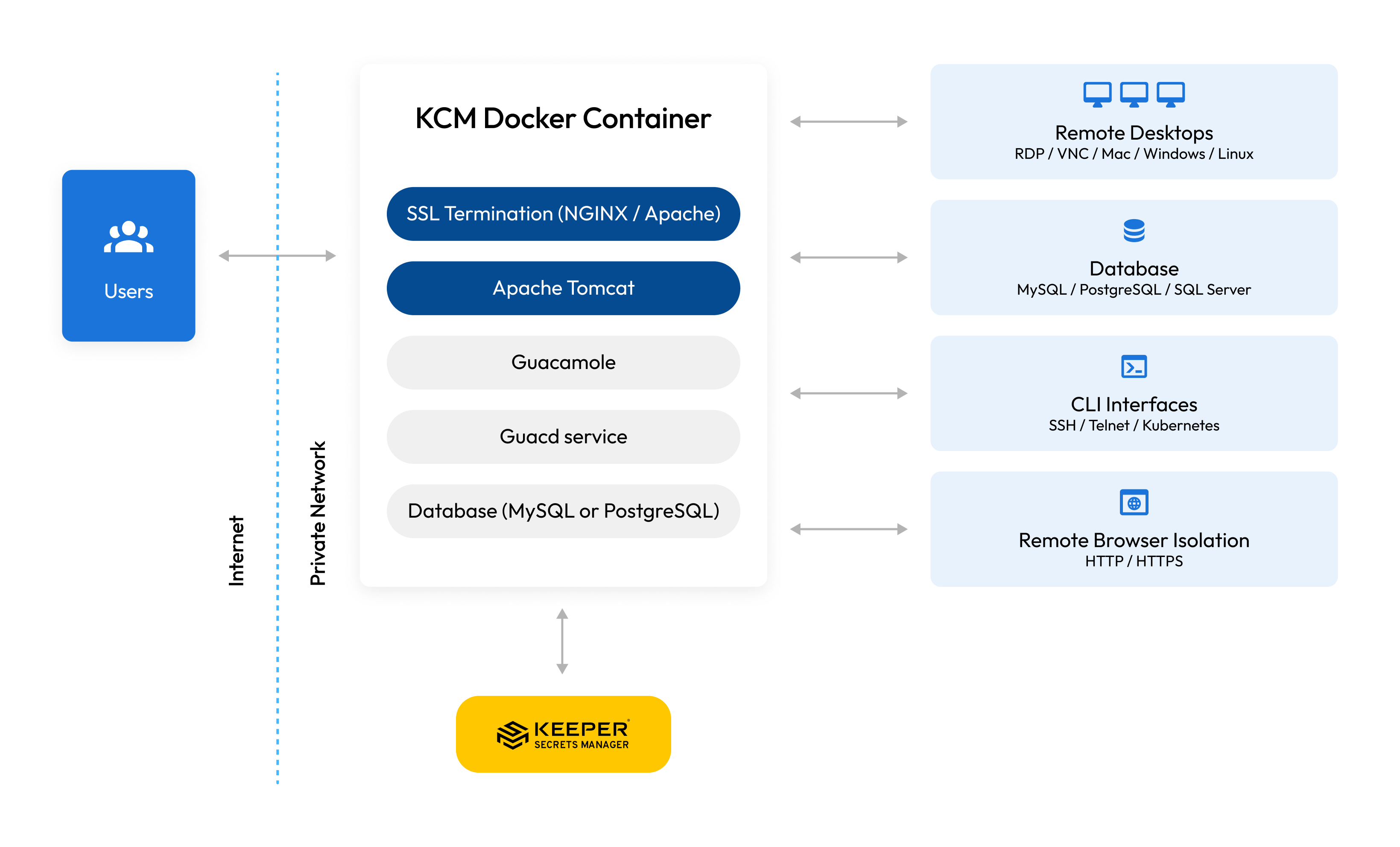
Keeper is typically deployed as a Docker container. The system architecture diagram is below.
Keeper Connection Manager - System Diagram
### Apache Guacamole
Keeper Connection Manager is the commercially-supported solution produced by the original creators of Apache Guacamole, the open source platform used by millions of people for accessing remote desktops. Keeper Connection Manager is built on top of the Guacamole gateway, with expanded capabilities, advanced integrations and ongoing feature development. Glyptodon was Acquired by Keeper Security in December 2021.
### KeeperPAM Licensing
Keeper Connection Manager is included with KeeperPAM licensing.
For most deployments, start with KeeperPAM. Use Keeper Connection Manager when your requirement is a fully hosted deployment that you manage yourself.
Learn more about KeeperPAM:
* [KeeperPAM Website](https://www.keepersecurity.com/privileged-access-management/)
* [KeeperPAM Documentation](https://docs.keeper.io/keeperpam/)
### Getting Started
If you need a self-hosted deployment, proceed to the [installation instructions](https://newdocs.keeper.io/kcm-linux-rpm-method/installation).
---
# Agent Instructions
This documentation is published with GitBook. GitBook is the documentation platform designed so that both humans and AI agents can read, navigate, and reason over technical content effectively. Learn more at gitbook.com.
## Querying This Documentation
If you need additional information that is not directly available in this page, you can query the documentation dynamically by asking a question.
Perform an HTTP GET request on the current page URL with the `ask` query parameter, and the optional `goal` query parameter:
```
GET https://docs.keeper.io/keeper-connection-manager/readme.md?ask=&goal=
```
`ask` is the immediate question: it should be specific, self-contained, and written in natural language.
`goal` is optional and describes the broader end goal you are ultimately trying to accomplish on behalf of the user. GitBook uses it to tailor the answer towards what is most useful for that goal.
The response will contain a direct answer to the question and relevant excerpts and sources from the documentation.
Use this mechanism when the answer is not explicitly present in the current page, you need clarification or additional context, or you want to retrieve related documentation sections.